“I bought this mouse. I was wondering how do i turn off the LED for wireless mode so it doesn't kill the charge?”
Answer This Question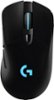
1-5 of 5 Answers
Lighting settings. Bottom right of screen on desktop click on the up arrow (win 10, maybe something different for a earlier windows) Click on it then click on Logitech icon. Logitech will open up and on the bottom of the Logitech window, click on third icon from the left which is lighting settings. Then Put logo and wheel to off.
Sorry, there was a problem. Please try again later.You have to install the logitech software, then you will find the lighting options configurable.
Sorry, there was a problem. Please try again later.on off switch on the bottom of the mouse duh!
Sorry, there was a problem. Please try again later.It goes off on its own after a few seconds, you should not have to do anything for that purpose
Sorry, there was a problem. Please try again later.Underneath the mouse is a small button that you slide to turn off mouse.
Sorry, there was a problem. Please try again later.
