“Connectivity and transfer speed issues Has anyone else experienced problems with this? Mine is extremely slow and loses connection occasionally. Typically with larger file transfers. I contacted WD and they are replacing it.”
Answer This Question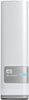
1-10 of 10 Answers
I experienced the same issue with the one that I bought. I returned it after 4 days and decided to create my own NAS with FREENAS. My suggestions would be make sure that your router is Gigabit capable and the device you are uploading files from is wired via Ethernet and has a Gigabit Ethernet port. This will produce the fastest transfer speeds. I would suggest staying off wireless for big file transfers to avoid the lost connections.
Sorry, there was a problem. Please try again later.No problems with speed or dropping the connection.
Sorry, there was a problem. Please try again later.If using windows, I found that opening any window and on the left column, click on network to expand then click on WD My Cloud. Use that window to drag and drop files. It's faster.
Sorry, there was a problem. Please try again later.I've been having LOTS of problems with mine, as have many other folks. Google "WD My Cloud problems" for more information.
Sorry, there was a problem. Please try again later.Yes, I experience very slow speed when transferring large files such as video. Small files work ok. Let us know if the new unit helps with faster speed.
Sorry, there was a problem. Please try again later.The drive is defective, This is not typical of these drives.
Sorry, there was a problem. Please try again later.The only issues I have is the network service provider, not the device. It all depends on the bandwidth available to you.
Sorry, there was a problem. Please try again later.I did at first but it was the first couple hours having it. Since then (knock on wood) it's been very reliable.
Sorry, there was a problem. Please try again later.Initially it worked fine. After about a month the thing quit working entirely. Now I'm taking it back to Best Buy. I won't get a replacement. I'm getting a refund!
Sorry, there was a problem. Please try again later.Strange. I had problems of getting my Windows 8.1 Pro to see it on the USB. After setting up the drive from scratch (it arrived blank, not formated at all). You might take a look at the ROMBIOS USB settings. Mine (gigabyte mother board, new) I did not use legacy settings, but have USB on from the start up. Also check your drivers that they are most current up to date. I use a purchase program, Driver Genius to do that for me. With hundreds of drivers, impossible to do by hand, so look into some driver management program. I am using WS SmartWare and have no issues at all. It backups continunously. Some of my files are over 8 gb, and no issues. I would look into Rom settings, driver updates, including your system updates. Nice that WD will replace it, not normal, but maybe they know something of it. Just to do that, I am surprised.
Sorry, there was a problem. Please try again later.