Customer Ratings & Reviews
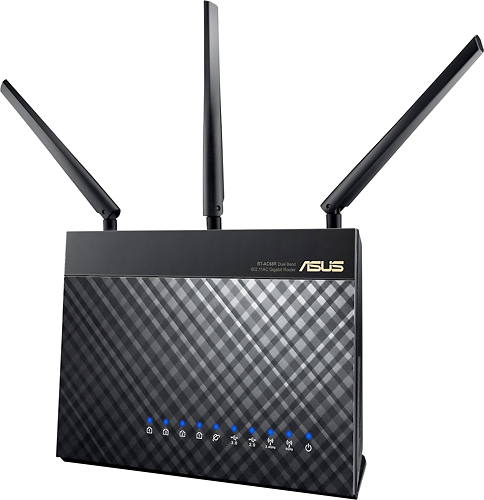
- Model:
- RT-AC68R
- |
- SKU:
- 1688401
Customer reviews
Rating 4.6 out of 5 stars with 300 reviews
(300 customer reviews)to a friend
Customers are saying
Customers express satisfaction with the router's impressive range, ease of use, and strong performance, particularly praising its ability to deliver a reliable signal and excellent streaming capabilities. Many appreciate the straightforward setup process and the router's extensive features. However, some customers note the relatively high price and point out occasional issues with the firmware. A few users mentioned experiencing lag, though this was not a widespread concern.
This summary was generated by AI based on customer reviews.
Rated 2 out of 5 stars
Frequent internet drops
||Posted .This reviewer received promo considerations or sweepstakes entry for writing a review.I ended up returning this because in the span of 3 days the WAN (internet) connection was non-functional on 4 separate occasions, requiring me to reboot the router to reconnect.
No, I would not recommend this to a friend- Pros mentioned:Performance, Signal strength, Speed
Rated 5 out of 5 stars
So Far, EXCELLENT
Posted .This reviewer received promo considerations or sweepstakes entry for writing a review.So far, this is the BEST router I have ever owned. I have ultimate internet through TWC and needed a router which can handle high speeds and LOTS of devices. I "upgraded" to a Western Digital N900 router last year - HUGE MISTAKE. I have only had this ASUS AC68R router a short time and normally wouldn't give it a review until I've tried it longer. However, I am so happy with the performance, I just couldn't wait. Speed and signal strength is strong on all devices. On my previous router, I would loose connection and/or have to reboot often. With this one, there have been no drops and signal strength is great in the farthest room (which was only 1 bar on my old router). I have 20+ devices which connect to the network and this router is doing a great job with all of them (computers, laptops, tv's, ipods, phones, game systems, and printers). I can stream video on several devices at once without worry that speed will suffer on one of them. So glad I spent the extra money for this router vs. settling for one cheaper!
I would recommend this to a friend Rated 1 out of 5 stars
Constantly Dropping Connection After 37 Days
||Posted .This reviewer received promo considerations or sweepstakes entry for writing a review.I got this to replaced a Netgear router Model: WNDR3400-100NAS that had last me 4 years. And this one the Asus - 802.11ac started dropping the connections after 37 days of using it. I had to go today and pick up another Netgear Router because I'll take 4 years over 37 days anytime! DO NOT BUY!
No, I would not recommend this to a friend- Pros mentioned:Performance, Speed
Rated 5 out of 5 stars
Outstanding!
Posted .This reviewer received promo considerations or sweepstakes entry for writing a review.Got this from Amazon because I wanted to pre-order it and they discounted it a few bucks and have had it for four days now. After connecting the Ethernet cables it took only five minutes to get setup and online, and half of that was it's initial negotiation with Comcast to get what it needed. My 1.5 year old Samsung laptop (Intel 802.11n integrated adapter) connects at 144Mbs at 2.4 GHz and 300Mbs at 5 GHz and my desktops are talking at 1Gbs Ethernet. Also good with a 3rd gen iPOD Touch and older .11b and g devices. Don't have any .11ac yet but so far it's matched the commercial reviews out there. It's got more features than I'll ever use and is probably overkill for my home use but I love the performance. There have been comments at Amazon and Newegg about connection problems with this router and I have seen one thing that may be an issue these people are having: I have a brand-new Toshiba laptop that is supposed to have an internal Realtek .11n adapter but it is only single-band and connects at 2.4GHz at .11g speeds. I'm thinking problems people are having are that some internal adapters may not be what they are speced to be, not the router. After four days of continuous operation I haven't seen the performance drop-off at 5GHz that some have reported. There have been complaints about not having labels for the MAC address filter, which was nice on my old Trendnet router, but how often is that updated? Before I disconnected my Trendnet, I just printed out the page with the MAC list and used that to pick MAC addresses from the drop-down list. Or, just pick everything in the list, then turn all your wireless devices off and remove anything from the MAC list still connected that shouldn't be. You can also open up the router's Network Map page in another browser or tab which lists the clients by name and match the MAC addresses there with the MAC table list.
I would recommend this to a friend Rated 1 out of 5 stars
Weak connection
||Posted .This reviewer received promo considerations or sweepstakes entry for writing a review.Sense hooking up this Asus route, our connection has been very slow, we keep losing connection and then have trouble getting connected again. It can't handle multiple devices running at one time. We hooked our old Cisco router back up and have had no more issues. I do not recommend this router to any one who has more then one devise they are using it for. Definitely not for any type of gamming.
No, I would not recommend this to a friend- Pros mentioned:Range
Rated 5 out of 5 stars
One of the best wifi routers on the market
Posted .This reviewer received promo considerations or sweepstakes entry for writing a review.I've owned and tried many different manufacturer's wifi router and by far this is the best for the money. It has great features and adjustable settings and a nice range of coverage. The FIrmware for this unit has stabilized and this unit won't disappoint.
I would recommend this to a friend - Pros mentioned:Ease of use, Speed
Rated 5 out of 5 stars
Excellent router so far in the market
Posted .This reviewer received promo considerations or sweepstakes entry for writing a review.I purchased this router (Asus RT AC68U) from Bestbuy,Lonetree, CO..Its an amazing product. Excellent speed and easy to setup. downloaded and completed mavericks setup in 15 mins. I download lots of stuff and I play games on PS3..there i got very positive results..say for example 10gb file it hardly took 12 mins where as net gear took 6 to 7 hours. I'm totally happy with asus though am a first time user of asus. Note:Due to good reviews (esp from (smallnetbuilder.net) and feature (Time machine for mac users), I tried Netgear R7000.. its a piece of junk..wasted my time for two days.restarting all the time.speed was not that good when you compare to Asus RT68U esp for 2.4GHZ N and 5 GHZ AC network.
I would recommend this to a friend - Pros mentioned:Range, Speed
Rated 5 out of 5 stars
WOW...... this thing is the Superman of routers
Posted .This reviewer received promo considerations or sweepstakes entry for writing a review.I have FIOS and their upgraded router but due to the construction of my older home, real plaster with wire screen underlayment ... have poor wireless in the far end of the house. I have tried extenders and at least 5 other routers and have not seen an improvement of wireless speeds. That is until now. I have 75 mbps/ 75 mbps and the best I get at the far ends of the house with the FIOs router and the others I tried for that matter is 14 mbps / 27 mbps. With this Asus router it is 73 mbps / 53 mbps. This thing is like superman . Tough walls do not slow it down. The best router out there that I have ever tried.It is a keeper. Has a long reach out there in the yard when using with Wi - Fi cell calling too. Works all the way to the next block. Just make sure you secure your network well because the reach is long.
I would recommend this to a friend - Pros mentioned:Speed
Rated 5 out of 5 stars
Best Router Yet
Posted .This reviewer received promo considerations or sweepstakes entry for writing a review.I purchased this today after having used several g and n routers in my home and it's noticeably faster even when connecting at those speeds. It connects reliably with n devices at 144 to 200 Mbps several rooms and floors away--even in the 2.4 GHz band. It can do everything I need today and will work well in the future with ac devices and NAS storage. Even the price is not bad if you consider all the features and the fact that you can now use wirelessly much more of the bandwidth that's coming into your home. It's worth the extra $100 over a bare bones router. Set up was fast and I was up and running in just a few minutes. Best purchase I've made in a long time.
I would recommend this to a friend - Pros mentioned:Ease of use, Performance
Rated 5 out of 5 stars
Amazing_Wireless_Router
Posted .This reviewer received promo considerations or sweepstakes entry for writing a review.High Quality product. Excellent GUI and amazing functionality and full feature set. Super easy for a non-IT person to configure, even without referring to a manual. Purchased this unit to replace multiple Linksys-Cisco routers that would CHOKE on my network, most likely because the number of connected devices. The Linksys would selectively drop different devices at will and was beyond annoying. I have (17) wireless devices connected with no issues on the Asus AC-68. - (2) Smart TVs, (2) Smart DVD Players, (4) Laptops, (2) Tablets, (1) Yamaha Receiver, (1) Desktop, (2) Smartphones, Playstation3, NordicTrack Treadmill, and a Linksys WS610 Media Bridge without any issues. Older devices that work with primarily Wireless-N need to use the 2.4G 'guest' connection instead of the quicker 5G main connection. It only impacts a few of my devices. I have been an ASUS customer since the days when I would build custom computers. They had the best, highest quality motherboards and video cards, and it's good to see that their quality is still very high. Would recommend this to everyone. Definitely the best wireless router that I have purchased yet.
I would recommend this to a friend Rated 1 out of 5 stars
Frequently dropped wired and wireless connections
||Posted .This reviewer received promo considerations or sweepstakes entry for writing a review.Returned it because it dropped both wired and wireless connections frequently.
No, I would not recommend this to a friend- Pros mentioned:PerformanceCons mentioned:Firmware
Rated 5 out of 5 stars
Asus does it again -- exceptional 802.11ac router!
Posted .This reviewer received promo considerations or sweepstakes entry for writing a review.Great router! Out of the box the installed firmware was outdated and some of my wifi clients were occasionally unstable. Upgrade to the latest firmware (3.0.0.4.374_583) and this resolved the wifi stability issues. The router has been performing well ever since. This is an exceptional router! Future proof with the latest 802.11ac support. This is the current top-of-the-line ASUS router on the market and is the router to have. The router works great with OpenDNS content/web site filtering and also supports DNS-O-Matic DDNS. With the purchase of this router I've switched from running DD-WRT on Buffalo 802.11g wifi routers to the Asus RT-AC68R and I'm very pleased. Even though DD-WRT is a great firmware package I haven't missed it a bit. The Asus firmware has everything required and is working great!
I would recommend this to a friend - Pros mentioned:Range, Speed
Rated 5 out of 5 stars
Blazing fast!
Posted .This reviewer received promo considerations or sweepstakes entry for writing a review.I bought this today to replace an older Linksys which had been dropping the connection. I unpacked it and followed the quick start guide. Super easy hook up and navigation of the quick internet set-up. Had my wired desktop up and checked download speed at 30 mbps in less than 10 minutes. Got my laptop out and was able to establish my connection quickly, but was only getting a .7mbps download speed. I had looked at other reviews which talked about firmware issues, so I went to the set-up page and checked the firmware. It said that the firmware was up to date. So I went to the Asus website and found the firmware versions in the support section. Lo and behold, the firmware was NOT up to date. So I manually downloaded the latest firmware, unzipped it, and installed it. After the firmware update completed and I rebooted the router, I was up and downloading at 29.7 mbps. This thing is almost as good as wired, no dropped links, and great range. Can't wait to plumb all the other features this thing brings. BUY IT!
I would recommend this to a friend - Pros mentioned:Range
Rated 5 out of 5 stars
Perfect for any situation
Posted .This reviewer received promo considerations or sweepstakes entry for writing a review.I have to start out by saying that this is by far the best investment I have ever made. I only wanted something that would give me enough reception throughout my home and out by my pool and hot tub. Well I noticed that this router had an adjustable range power 80-200mW. When I first pulled it out of the box it looked absolutely amazing. The sleek design, and stance it had was really something to showcase which is exactly what I did. Upon setting it up I had an issue. It would drop the connection every so often and wouldn't regain access. I browsed through some of the settings and noticed a few things that needed to be changed. As soon as they were switched I set it to 200mW and checked my signal. 2 bars out of five is what I was getting....from about half a block away! I am absolutely amazed by this product and I am sticking with ASUS from now on. Absolutely perfect product.
I would recommend this to a friend Rated 5 out of 5 stars
Great Easy Setup Wireless Router
Posted .This reviewer received promo considerations or sweepstakes entry for writing a review.I've been following routers for about a year and determined this model would help future proof some wireless stuff we purchase next year. It's also one of, if not the strongest available. I was a little intimidated buying this one because of all it's features and not one of the traditional router brand. I thought setup would be a hassle. Boy was I wrong on all counts. This thing is wonderfully thought out...in all areas. It blows away Cisco's new "cloud for dummies", tricking some into online router accounts, so they can track your data usage. Before setup I found 3 excellent HD Youtube videos #ASUS RT-N66U Setup...Wired...Wireless#. They're made by a down to earth Asus employee who does a great job covering the setup wizard and various features. Getting it up is a breeze, very simple, takes a couple minutes for both wired and wireless. Before install you might want to check into the following: 1# Download the latest firmware from the ASUS website. The routers FW version listed at top of GUI, nice! #Router access is 192.168.1.1# 2) Decide if you want a different #SSID# name for the 2.4GHz and the 5GHZ channel and figure out what the names will be. 3) I used an online "WPA Key Generator" so the keys were ready before setup. I created a different one for each channel. 4) Visit smallnetbuilder.com forum for the AC66U. Read the couple threads on how they're getting strongest signals, best channels, frequency's, etc. Many passionate owners will help with timely support and tips. 5) Test your internet speeds and pingtest.net before - and after you install this new router. The routers GUI is incredibly easy to understand and has tremendous amount of information and features. They use plenty of icons, images, grids, laymens terms, and "?" that provide simple explanations when hovering over. The ability to configure "port forwarding" was so simple I spent more time looking for complex steps, then the actual time to config. THE BOX - Folks this is an impressive looking piece of hardware. It uses very dark/deep blue LED's just below the top surface. This dark blue lighting matches that same blue on our high end components. The small ASUS name in the back right corner is gold plated, a nice touch. The criss-cross grid pattern is done extremely well. The unit itself is solid, a very heavy device for it's size, which is nice for a change. I'm a fan of external antenna's and these look good, fully adjustable. They screw on so you could add extension cables to relocate them. Surprisingly there is a small power button on the back - no more plug/unplug. There's also a WPS button on the back or AC66U. I discovered it's purpose on my Android phone, a WPS note next to router network name. This feature eliminates the need to enter long WAP keys. Hitting the WPS button in a timely fashion automates and finishes connection to router. I had no ideas this tech was in routers. The feature called "Download Master" performs downloads for your PC. With a storage device attached I no longer need to leave my PC running while waiting for a download to finish. There's many other features you can add or simply turn on. It's the shizznit of routers for sure. I'm in the GUI every couple hours checking features, usage, etc. It's a great application for sure. Since ASUS is making firmware changes frequently, listening to their customers, I was not worried about those minor glitches when first released this device. I was confident they would get it right and work things out. My unit is Hardware version A2, so they are updating hardware too. Stop your searching and reading - get this router - you will be happy.
I would recommend this to a friend- Pros mentioned:Performance, Speed
Rated 5 out of 5 stars
Another great router from Asus
Posted .This reviewer received promo considerations or sweepstakes entry for writing a review.This is the second Asus router I've owned (upgrading from the RT-N66), and the performance is everything I've come to expect from them. I recently upgraded my primary PC's motherboard (also Asus) to a model with AC wireless onboard. The bandwidth available with the new standard is phenominal. This particular model also features an upgraded chip (from Broadcom I think) for the 2.4GHz network which bumps it up to 600mbps over just that frequency, so even my single band devices have seen some improvement. Along with the pro features one should expect from this type of product (multiple guest networks, VPN support, attached storage, etc.), I can easily recommend this router for anyone with high-end networking needs.
I would recommend this to a friend - Pros mentioned:Signal strength, Speed
Rated 5 out of 5 stars
Awesome coverage
Posted .This reviewer received promo considerations or sweepstakes entry for writing a review.I was looking for a router that could act as an AP to replace the power lacki8ng AT&T uverse one. I lived in a small but long rectangular shape house where the location of the wireless router would be ~70 feet away from my main connection with kitchen and bathroom in between. This router did a great job on getting the signal throughout the entire house while maintaining incredible speed. The setup was easy, just plug and play. However, if you use this as an AP, it might be a bit hassle for locate the correct IP to access the configuration gateway (it will not use the 192.168.1.1 etc as your default). You will need to download another small software to get the right IP.
I would recommend this to a friend - Pros mentioned:Speed
Rated 5 out of 5 stars
Very Good Router That meets all my needs
Posted .This reviewer received promo considerations or sweepstakes entry for writing a review.Using this router as a suppliment to my Verizon Fios N router, The Verizon router gets poor wifi range in my house and the wireless speeds are very poor unless I am right next to the router. This router was pretty simple to set up and performs exatly as I hoped, wifi reaches just about everywhere in my house with the exception of my porch and balcony. Wifi speeds are easily three to four times faster than when i was connected with just the Fios router. Overall I am very happy with my purchase!
I would recommend this to a friend - Pros mentioned:Signal strength
Rated 5 out of 5 stars
A router that really does handle many users
Posted .This reviewer received promo considerations or sweepstakes entry for writing a review.I had been looking for a new router for a while having because my 2 year old Netgear N router constantly was dropping connections randomly to different units. I looked for a bargain but finally got tired of hearing the family complain about dropped connections and constantly rebooting the router. I had read some good things on the RT68 and decided to take the plunge for over $200. We have anywhere from 10 to 24 devices between Laptops, desktops, Phones, tablets, printer, TV, 4 gaming consoles all wanting connections. The RT68 has performed flawlessly, sharing the bandwidth amongst the users and not dropping a single connection. The radio is amazingly strong and the signal is full bars from basement to second floor anywhere in the house.
I would recommend this to a friend - Pros mentioned:Signal strength
Rated 5 out of 5 stars
Impressive performance
Posted .This reviewer received promo considerations or sweepstakes entry for writing a review.The performance of this product is outstanding - signal is always strong - no matter how many devices I connect. User interface could be improved though - It would be nice to be able to easier customize the performance of this product.
I would recommend this to a friend