Customer Ratings & Reviews
 See more images
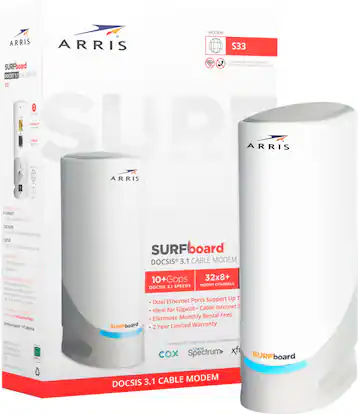
ARRIS - SURFboard S33 32 x 8 DOCSIS 3.1 Multi-Gig Cable Modem with 2.5 Gbps Ethernet Port - White
- Model:
- S33
- SKU:
- 6425831
Highly rated by customers for:
Customer reviews
Rating 4.6 out of 5 stars with 2130 reviews
Top Mentions
- Checking this box will move you to the filtered review section.
- Checking this box will move you to the filtered review section.
- Checking this box will move you to the filtered review section.
- Checking this box will move you to the filtered review section.
- Checking this box will move you to the filtered review section.
- Rated 5 out of 5 stars
Best standalone modem for Xfinity
BrownTrousers Posted
I bought this to replace a Motorola modem that would occasionally lose it's connection for a few seconds, which is terrible for video conferencing. I was surprised by how small this modem is - it's half the size of the Motorola (see the photo to compare). Setup was easy and the UI has similar functionality to the Motorola. Best of all, I've been using this modem for a month now and have not had any loss of connectivity. It has been rock solid. Speed test show that I'm getting 1.22Gbps downstream and 51.8Mbps upstream, which is slightly better than the 1.2/40 that Comcast promises.
I would recommend this to a friend - Rated 5 out of 5 stars
You will love it
TonyR Posted
The ARRIS SURFboard S33 32 x 8 DOCSIS 3.1 Multi-Gig Cable modem is an outstanding choice for anyone looking to upgrade their home network. With the latest DOCSIS 3.1 technology, it offers ultra-fast speeds, making it perfect for activities like 4K streaming, online gaming, and heavy file downloads. The 32 download and 8 upload channels ensure a stable and high-performance connection, even during peak usage times. The S33 is future-proof, supporting multi-gigabit speeds to handle the growing demands of modern internet services. Setup is simple, and its sleek design fits easily into any home environment. Whether you're a casual user or need top-tier performance for a smart home or office, the ARRIS SURFboard S33 provides excellent value and reliability. Highly recommended for anyone looking to enhance their internet experience!
I would recommend this to a friend - Rated 5 out of 5 stars
Best Multi-Gig Modem I’ve Tried
AMAI Posted
I’ve tried many different modems, and the ARRIS SURFboard S33 is by far the best. It supports multi-gig speeds, and the 2.5 Gbps Ethernet port ensures future-proof connectivity. Setup was straightforward, and it’s been incredibly reliable with no drops. The sleek white design is a nice bonus. If you need fast, stable internet for gaming, streaming, or working from home, this is the modem to get.
I would recommend this to a friend - Rated 5 out of 5 stars
ARRIS IS MUCH BETTER THAN MY OLD MOTOROLA MODEM!
PhillyKat Posted
I purchased this as a replacement for a MOTOROLA modem I have had for 23 months. When I purchased the Motorola, it was - at the time and on a LOT of websites - recommended as the *BEST* for Xfinity and it's even marked on the box! I have always (with the Motorola) found that even at the base and my main desktop computer plugged directly into Xfinity cable, that I never achieved near the speeds I was promised by Xfinity. I live in a 100 year + old house with thick walls so ever since "wireless" extended out of my home office, beyond the wireless printer, I always had to buy my own modem and router. I prefer buying them separate. GOOD THING TO DO. By 2020 I'd accumulated 13 Netgear wireless extenders and when we started working from home I realized how AWFUL my internet service really was with all the ZOOMS and such required. I'll NEVER buy another NETGEAR anything. I discovered TP LINK MESH systems back then and they had mesh modems designed very specifically for thick walls in old houses! WHAT A DIFFERENCE. I also upgraded the original mesh systems to tri-band with a couple that are both tri band and POWERLINE which also helps... But I would still have spotty service with the Motorola modem. And in the first half of April 2024 the Motorola modem JUST STOPPED WORKING for the last time. I had to walk down the street to access a wifi hotspot to communicate with Xfinity - a challenge because with all the online tweeks they did, I had to tell each tech support person to NOT DISCONNECT from me as I walked back down the street to my house - where I had no service - to see what they did to fix my home internet - and then walk back outside and down the street to explain to tech support what the result was. UGH... What a MESS. Although Xfinity offered to come right out the next day I set up the visit 5 days later because online I'd seen that - with the Motorola Modem - so many had tried that and whatever fix was done, didn't last for more than a few more days. That was when I discovered that XFINITY stopped supporting the Motorola Modem. And that now they supported THIS ARRIS modem for gig speed service instead. I was able to run to Best Buy and buy it. To my surprise and delight I brought the old Motorola Modem with me - I still had the original box - and my warranty on the Motorola was still in effect for another month. At the store, they only charged me $20 plus tax for the Arris! That EXTRA WARRANTY from Best Buy has helped me save on a FEW things this past year and I really recommend it! I'm thrilled with how the Arris modem is performing. I did have to call tech support a few times to get it set up right and XFINITY reps had to do something they called PROVISIONING - over the course of 2 days and from their office - to get everything working. One of the challenge too is that since my internet was broken I could only download the Arris User and SETUP GUIDE on my phone... TRYING TO READ an 8.5 x 11 inch BOOK of fine print on how to set up the dang ARRIS thing... GOOD LORD that makes NO SENSE at all. TOTALLY UNREADABLE on a phone and of course since I didn't have internet I couldn't do a download or print it at home either. THESE PEOPLE REALLY NEED TO CONSULT WITH USER EXPERIENCE SPECIALISTS regarding how to set up a MODEM when you don't have a modem and can't access the internet! YA THINK??? REPORTING THOUGH! The ARRIS is fast and my devices are running cleaner than ever (from using the Motorola modem. ALSO THIS: As of APRIL 10, 2024, the FCC has changed laws regarding how ISPs and cellular phone companies must by law put their prices on display in a clear and readable format!! They didn't find out on April 9th and have had MONTHS of advanced notice on how they must make PRICING and details of their plans clear, plain and understandable to consumers. I was shocked at how - even though this was occurring within the 2 weeks after April 10th, that a company as large as the ISP I use here in Philly was NOT in compliance to this new FCC law! In my process of getting help to reset this NEW modem, I was hit a few times with sales pitches - specifically one that would lower my monthly price for internet if I also signed up for their lowest priced phone plan... I asked if I could use it for my iPad that has wifi and cellular... it's only a 1GB plan a month and I could buy a 5GB plan cheaper, but my goal here was lowering the net monthly fee I pay for internet so I was going to do it. BUT the problem was the lack of transparency added to the fact that it was PRESENTED as a "BUNDLE" but even when I went in person to their office, they informed me that their internet offer was presented by completely different staff than the cellular plan. I reminded them that the law has changed regarding transparency but I still could not get confirmation when I signed up, that I actually HAD the deal they promised... and they also had a policy of billing each service separately. I got home 40 minutes after leaving their office and cancelled the mobile service for my ipad, because when I called them they could and would not verify that my cost of internet would go down as was told to me in the chat (which I saved). Back to the ARRIS it does work MUCH better. I gave 2 stars for SETUP instead of 5 because of the ham-handed startup guide for setting up a Modem (since you don't have internet) via a phone is just ridiculously silly and it's not readable. Overall though the Arris is MUCH better! AND BEST BUY's TOTAL warranty was a real and TERRIFIC benefit and surprise. LOVE BEST BUY! YOU GUYS ROCK!
I would recommend this to a friend - Rated 4 out of 5 stars
A couple of things to consider...
COUPLEPICS Posted
Purchased and setup on 11/14/2020. Installation was fairly straightforward except the last part where the manual tells you to log into the modem using a default username and password. I was unable to access it using the credentials in the documentation. I always change default passwords on home networking equipment so I contacted support. Support reached in a reasonable time but the support guy had never heard of this model. I explained to him that it was brand new and confirmed the model number I gave him directly from their documentation. He finally was able to track down documentation on the modem. He never could fix the issue with the password not working as documented. The second thing that threw me with this modem is the look. Based on the picture I thought it was tall and cylindrically shaped. It is actually short and oval shaped. Not a real issue but I felt the pictures were misleading. I did a few speed tests. My plan is 300mbps down and 10 up. I was consistently seeing 359 down and 12 up using a direct connection into the modem. Subsequent testing after I added mesh router still yielded great speeds over wifi. In summary, support is still coming up to speed but easy install process using my provider's website and my cellphone over LTE. It definitely gives me all the speed I pay for. I purchased because it was on the recommended device list from my provider and can handle speeds much faster than my current plan just in case I upgrade.
I would recommend this to a friend - Rated 5 out of 5 stars
Good solid modem, but runs very hot
vdawg Posted
Works great on Spectrum internet. It was hard to tell with the ISP-provided modem if a problem was signal related (inside or outside) because it didn't give us access to the modem's internal management page, so I bought my own modem. We currently have 500 mbps service and it works fine at those speeds. If we ever increase our plan to higher speeds, I expect this modem to work properly at gigabit speeds as well. The only downside to this modem is that it runs very hot. This is not a one-off issue with my modem; Reddit is full of discussions relating to heat with this modem. Ultimately, I placed an 80mm USB fan above it blowing down on it and it lowered the internal temperature by about 30 degrees (from about 120F to 90F). It seemed to run fine without the fan (no dropouts or speed degradation), but 120F is pretty hot for electronics, especially when sitting in open air on a shelf. At that temperature, I'd expect it's life to be shortened so I provided active cooling. I think if they could add a fan near the top of the device blowing up and out, it would make a huge difference. The case, as it is, has poor ventilation. Adding vent holes to the side of the cabinet would be also likely provide better ventilation and cooling.
I would recommend this to a friend - Rated 5 out of 5 stars
Great for what it does.
OKRobTX Posted
This is a great modem, I’m using it with my isp, Sparklight, I had an older surfboard that was constantly dropping connection. This one has been on for over a month straight. My download speeds are higher and I didn’t want a modem/router with wifi combo. Just a quick call to my isp to get it registered and I was up and running, and it looks so much better than the big black box it replaced.
I would recommend this to a friend - Rated 5 out of 5 stars
Good Modem - Only 1 Concern
JakeP Posted
This is a great modem. I just really hope that it withstands the test of time. So far, so good. But, I am really hoping that it pays for itself. I decided to buy a modem instead of renting from my internet company (midco). The only gripe I have with this, is that it runs really hot. This thing is is warm to the touch almost all the time it is running, so just keep it in the open and somewhere it can get air. That is the only thing that concerns me about it, but other than that it has been a satisfactory product and my internet has not given me any issues and has been smooth.
I would recommend this to a friend - Rated 5 out of 5 stars
Work like a cable modem.
DavidH Posted
Easy to setup. Works well. Just 2 ethernet connection. 2.5 and 1GB. I have my Erro 6 attached to the 2.5 ethernet. Other ethernet connection on Erro 6 attached to a Net gear switch. I am getting from Xfinity in the mid 900 internet speed. All devices are getting good wifi.
I would recommend this to a friend - Rated 5 out of 5 stars
Fast and easy!
CharlesH Posted
Fast to setup and fast period! If griping about having to download an app for setup is everyone’s issue then I’m not sure what to say. Very easy setup even down to activation through my provider, no issues. I have this paired with an Eero Pro 6 at the moment and it’s blistering fast! My only concern is that it does get unusually hot. Obviously the device does have ventilation so I’m not too concerned about it. Recommend!
I would recommend this to a friend - Rated 5 out of 5 stars
Small AND speedy
PeteR Posted
tl;dr - good choice if you have Xfinity gig-speed service Updated from 800 Mbps (thank goodness for competition from fiber) to 1.2 Gbps with unlimited data. Unfortunately, to take advantage of this, I had to upgrade both the modem and router to utilize the 2.5 Gbps ethernet port. While I prefer Netgear modems, they were $100 more for a 2.5 Gbps ethernet port, so went with Arris Despite its small size (about 3/4 the size of a Netgear) and that it runs warm (keep in a well-ventilated space), its run flawlessly. Highly recommended
I would recommend this to a friend - Rated 5 out of 5 stars
Works excellent
PeterG Posted
works as expected. getting speeds at 1200mbps per comcast plan. Honestly, this product is dead simple... screw in the coax and plug into router. most of the time the issue isn't with the product, but calling your ISP to activate it. Been running 24/7 since I bought it. no issues.
I would recommend this to a friend - Rated 4 out of 5 stars
Works Great but gets hot
Scout24 Posted
I've been using this modem since early last year because my other modem was taken out during a storm. Initially this modem worked great and was very fast, but it does get hot and recently started to drop offline and constantly reboot. The modem is sitting out in the open and not in a cabinet. This modem was expensive and I didn't want to spend another 200 bucks. After a lot of research and Googling I put a small desktop fan on the side of it and now it's cool and doesn't drop or reboot, though the fan was a little loud. There are vents on the top, side, and bottom, but there is no way for air to flow through the bottom since it sits flat. I put some rubber pads on the bottom and bought a USB fan (with speed control) and have that blowing through the side. The modem now runs cool. Arris may want to rethink the design.
I would recommend this to a friend - Rated 5 out of 5 stars
Get this Modem! And then get the EERO PRO.
MikeO Posted
My XFINITY modem was dropping at least once a day AND I was getting frustrated with the poor performance so I started researching the plans. I realized my plan was very old and I could save money with a new plan that included more than 4x the bandwidth. Once I started the sign up process that would take me from 150 to 700 megabits down, it said my modem was not capable of doing that. I then started to research compatible modems and Best Buy had this one available. I like the background on the company behind the modem as they seem to focus on high performance modems and routers. I couldn't believe how fast it provisioned while I was on the phone with XFINITY. On top of that it goes from completely powered off to connected in about 30 seconds, sometimes less. My old modem took 6+ minutes to get connected. I paired it with my EERO Pro setup and boom, fast connections on both wired and wireless. The EERO has a speed test app inside which is the absolute best place to do a speed test of your modem. Boom 700+ Mb/s all day long with no drops in over the 3 weeks I've owned it. As I sad, the old XFINITY/CISCO unit died at least once a day for periods of about 15 minutes. I bet this one stays solid until I have a power outage. My Playstation is on the Gigagbit Ethernet side of my router. Bone crushing speed all day long and leverages the full 700 megabits over gig-E.
I would recommend this to a friend - Rated 5 out of 5 stars
WELL worth the investment.
Joey Posted
Best modem to date. I'm paying for the Xfinity 200mbs plan, and I'm getting 244mbs with 5 devices connected. I'd avoid the 2 in one modem/router combos. Get yourself a SURFboard S33 and pair it with a high end router. You'll be very pleased. I'm using the AmpliFi - Alien, which can also be purchased at best buy. Xfinity plugs into the modem, modem plugs into router of your choice.
I would recommend this to a friend - Rated 5 out of 5 stars
Great Performance, Design, and Setup
Tron8888 Posted
Had to upgrade to a newer/faster modem and saw this one worked with my Xfinity Performance Internet Plan service. I did have to use my mobile phone to work with an Xfinity agent to get the modem activated and recognized, so you may need a way to get on the Internet while your service is temporarily down. Pretty typical of any modem you would be replacing. Been a few months now and working well. Getting well over 200 Mbps download speeds and no complications with the modem. Easy to set up. Modern and slim design make this easy to place just about anywhere.
I would recommend this to a friend - Rated 5 out of 5 stars
Great Modem for those needing the best speeds
Iskor12 Posted
2.5Gbps WAN port going to my Asus AX11000 router 2.5Gbps wan. Speed test results are over wifi using an Intel AX200 nic. Actual Speed Test Results 1,145Mbps Down 61.7Mbps Up Ping 12ms My package with Mediacom Cable is Up to 1,000Mbps down Up to 50Mbps up I would Recommend this Modem
I would recommend this to a friend - Rated 5 out of 5 stars
Easy set up and seamless process
Garrett Posted
It was easy to set up and after connecting it to a router, everything was seamless! Using my internet provider's app to sync took several minutes, but that allowed me to do other things.
I would recommend this to a friend - Rated 5 out of 5 stars
Great upgrade for upstream connections and BYO
TimG Posted
Tremendous speed boast! Replace the SB8200 (which only had gigabit ports) with this that supported 2.5 gigabits and a gigabit port that can be used together for 3.5 gigabits in total if your downstream device supports it! Very easy setup with Xfinity as the isp. Highly recommended
I would recommend this to a friend - Rated 5 out of 5 stars
Faster and better plug and play.
Louie Posted
My SB-8200 died after running 24/7 for a number of years. I needed a quick replacement and picked this one up just to get back up and running. It has a 2.5+ GB ethernet port (as well as a 1 GB port. I was blown away by the noticeable increase in speed over my 1 GB only SB-8200
I would recommend this to a friend