Customer Ratings & Reviews

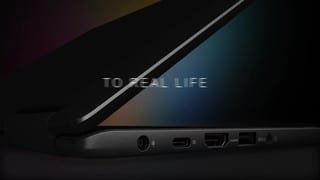


- Model:
- I7373-7227GRY-PUS
- SKU:
- 6083540
Rating by feature
- Value
Rating 3.9 out of 5 stars
- Quality
Rating 3.9 out of 5 stars
- Ease of Use
Rating 4.3 out of 5 stars
Customers are saying
Customers are pleased with the Inspiron 2-in-1 laptop's fast performance, lightweight design, and reasonable price. Many users appreciate its touch screen capabilities and light weight. However, some users have concerns about its battery life, overheating, and fan noise.
This summary was generated by AI based on customer reviews.
- Pros mentioned:Lightweight
Great laptop
||Posted .This reviewer received promo considerations or sweepstakes entry for writing a review.Bought for daughter for college. Lightweight and long battery life.
I would recommend this to a friend Easy change from Laptop to Tablet
||Posted .This reviewer received promo considerations or sweepstakes entry for writing a review.I wanted an easy to use laptop that also converts to a tablet. This one is very easy to use. And keyboard size is much better than something like the surface pro for example. Works well for the whole family.
I would recommend this to a friend- Pros mentioned:Fast
Great notebook
||Posted .This reviewer received promo considerations or sweepstakes entry for writing a review.This was a great laptop and very fast and slick look. Great price
I would recommend this to a friend - Cons mentioned:Overheating
Decent 2 in 1 Laptop for the price
||Posted .This reviewer received promo considerations or sweepstakes entry for writing a review.Relatively fast for multi tasking. The laptop runs hot even after a bios update. The charger brick gets even hotter. This is a known issue. I have contacted Dell.
I would recommend this to a friendBrand response from YourDellTeam
Posted .Techlover,
Thanks for your review and we're sorry to hear that your computer is running hotter than you'd like it to. Here are some tips to help your laptop run cooler for you:
Tips for Proper Usage:
1. Dell does not recommend placing portable systems directly on your lap. Due to reductions in the thickness of modern portable systems, heat transfer can be an issue.
2. Using a portable system (Laptop) on a hard, flat, non-cloth surface will increase airflow and reduce heat from underneath and inside the system.
Using the portable system on a blanket, pillow, or other types of cloth will cover up the fan cause the computer to overheat and can cause permanent damage.
3. It is recommended to use the portable system in a Room temperature of 0°C to 35°C (32°F to 95°F) with a Humidity level no greater than 90%.
4. Use compressed air to clean the vents on a regular basis.
5. Using a cooling pad can decrease heat and increase performance.
6. If you want to know the temperature limitations for your system, go to the Dell Support Website, look up your system model then open the user guide under the manuals link.
You can read the full article here - http://dell.to/2uJ8AdG.
Best,
Bryan
1-800-624-9896
- Pros mentioned:Lightweight
Great laptop
||Posted .This reviewer received promo considerations or sweepstakes entry for writing a review.Love this laptop very easy to use, good size . Easy to take with you
I would recommend this to a friend - Pros mentioned:Lightweight
great computer
||Posted .This reviewer received promo considerations or sweepstakes entry for writing a review.Very useful lap top for my son to carry to school every day.
I would recommend this to a friend great computer
||Posted .This reviewer received promo considerations or sweepstakes entry for writing a review.This also has a USB-C port for future devices, battery life is great, the screen is really high quality for just being FHD, not UHD. Only has the 256GB SSD, but I'll be looking to upgrade that on my own.
I would recommend this to a friendLove this computer but it tends to get hot.
||Posted .This reviewer received promo considerations or sweepstakes entry for writing a review.There are a lot of great things about this computer that allows me to run my business efficiently and I am happy that I made the purchase. My only complaint is that the computer does get hot. Keeping it on my lap while working does not work unless I have something underneath the computer. Overall though, love the computer and its functionality.
I would recommend this to a friendVery quick
||Posted .This reviewer received promo considerations or sweepstakes entry for writing a review.I love it! Very light. I would recommend this to a friend
I would recommend this to a friendWay better than a Net/Chrome Book!
||Posted .This reviewer received promo considerations or sweepstakes entry for writing a review.Will run my Windows Software. Fast enough for Terminal Server Access and web surfing. Will even play some OLDER and low demand Indi games. Hate the that the right shift key is to small for fast typing IMO.
I would recommend this to a friend- Pros mentioned:Light
Works well
||Posted .This reviewer received promo considerations or sweepstakes entry for writing a review.Light weight, battery life is long, easy to use. A+++++
I would recommend this to a friend - Pros mentioned:Fast
Fast...
||Posted .This reviewer received promo considerations or sweepstakes entry for writing a review.Very fast, easy to use, picture screen quality is great.
I would recommend this to a friend Great Laptop for Travel
||Posted .This reviewer received promo considerations or sweepstakes entry for writing a review.I needed a small, light laptop for travel. It had to be powerful enough for writing software and light gamming. The Dell Inspiron was the ideal choice. I needed a dedicated HDMI port, so a surface or similar choices were not an option. The two in one allows me to use it as a tablet and makes it nice to watch shows when travelling.
I would recommend this to a friend- Cons mentioned:Battery life
Battery not so well
||Posted .This reviewer received promo considerations or sweepstakes entry for writing a review.Overall the laptop is very nice. It's a thin design and pretty quick. The only negative is the battery life...it would die after 3-4 hours or constant use.
No, I would not recommend this to a friendBrand response from YourDellTeam
Posted .User1,
We're sorry that the battery life has not been lasting as long as you'd like it to. We'd recommend these tips to try to conserve your battery: Change the Power Plan:
1. On the notification area of the taskbar, right-click the Battery icon.
2. On the options list, click Power Options.
3. Select a power plan on the battery meter, such as Power Saver or Balanced. Windows 10 has a built in 'Battery Saver' mode that can be activated to extend your system's battery life. The Battery Saver mode will monitor and limit background activity and other features such as push notifications. You do have the option to enable or disable this mode within settings or within advanced Battery Saver settings, you can customize the mode to best suit your needs.
a) Click on the Action Center icon in the taskbar and select the tile for Battery Saver.
b) If running Cortana then type Battery Saver into the search box and select from the results.
Within the Battery Saver settings page, you will be able to turn on and off the feature and customize the feature to best meet your needs.
c) Turn Battery Saver On or Off.
d) Additional settings available via the Battery use and Battery saver settings links.
e) Battery use shows further info on apps and their power usage.
f) Battery Saver Settings screen allows you to customize further Battery Saver feature.
You can read the full article here - http://dell.to/2vfXWf4.
We hope this helps your battery last longer.
Best,
Bryan
1-800-624-9896
Very user friendly and convenient.
||Posted .This reviewer received promo considerations or sweepstakes entry for writing a review.This 2 in 1 lives up to the ease and flexibility of 2 in 1's. Size is just right if you want biggervrhan tablet but not huge laptop. Keyboard ia not my preferred touch but it is a minimal bother.
I would recommend this to a friend- Pros mentioned:Light
Great laptop for college
||Posted .This reviewer received promo considerations or sweepstakes entry for writing a review.This is a great laptop for college light and powerfull.
I would recommend this to a friend - Cons mentioned:Battery life
Bad Battery Life. Keyboard has issues.
||Posted . Owned for more than 2 years when reviewed.This reviewer received promo considerations or sweepstakes entry for writing a review.The battery life is pretty ordinary. The keyboard has issues - double types some alphabets and has issues with commas too.
No, I would not recommend this to a friend So nice!
||Posted .This reviewer received promo considerations or sweepstakes entry for writing a review.This worked out perfectly for presentation and meetings. The computer is capable of doing much more, but currently, I had taken it with me for a presentation and it was impressive in how it handled. Would totally recommend. My staff even said that it can handle some of the programs we need to use soon so it works out in multiple ways.
I would recommend this to a friend- Pros mentioned:Fast
Very fast
||Posted .This reviewer received promo considerations or sweepstakes entry for writing a review.Was very happy with this computer. Very fast and easy to use
I would recommend this to a friend - Cons mentioned:Overheating
Great speed
||Posted .This reviewer received promo considerations or sweepstakes entry for writing a review.Issue very hot when working but great computer....
I would recommend this to a friend