Customer Ratings & Reviews
.](https://pisces.bbystatic.com/image2/BestBuy_US/images/products/ae1649ec-8302-4f88-8b9b-d104978b3f04.jpg)
. 1 Most features require an Internet connection to the printer, as well as an Internet- and/or email-enabled device. For a list of Epson Connect enabled printers and compatible devices and apps, visit [www.epson.com/connect](http://www.epson.com/connect).](https://pisces.bbystatic.com/image2/BestBuy_US/images/products/9c542c50-85ee-4815-a2ca-cf245f57e253.jpg)

- Model:
- C11CJ62201
- SKU:
- 6470012
Rating by feature
- Value
Rating 4.6 out of 5 stars
- Quality
Rating 4.6 out of 5 stars
- Ease of Use
Rating 4.5 out of 5 stars
Customers are saying
Customers are impressed with the EcoTank ET-3830's print quality and ease of use. Many also appreciate its overall performance and simple setup. Some customers feel the printer is overpriced, and a few wish it had a better display and a document feeder.
This summary was generated by AI based on customer reviews.
- Pros mentioned:Ease of use, Print quality
Just as advertised!
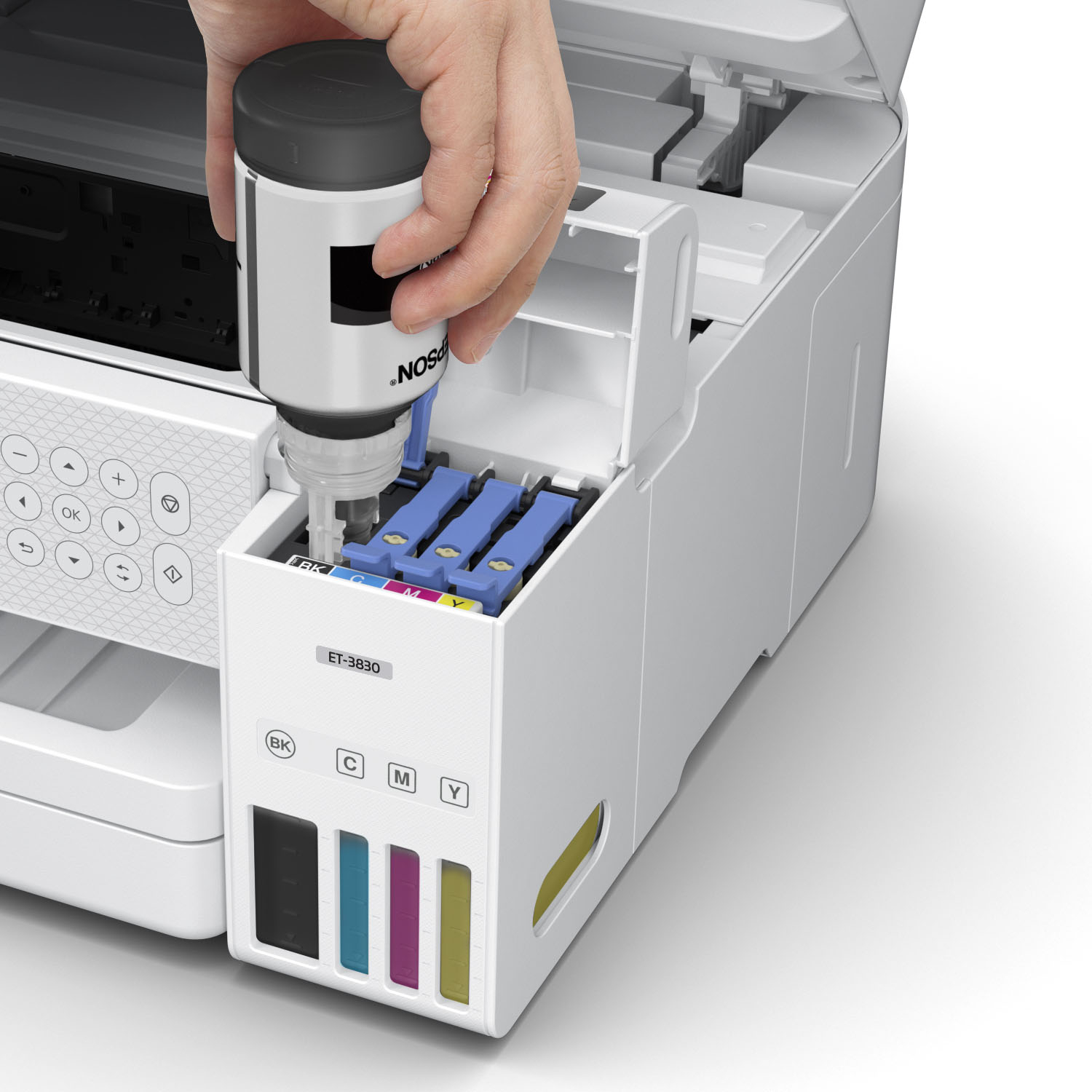
Posted .This reviewer received promo considerations or sweepstakes entry for writing a review.The printer was very easy to setup by just following the instructions, which were simple enough. Works very good on a wireless setup with easy access by my IPhone, MacBook, IPad, Dell computer! It prints excellent photos and ink usage is minimal. Installing the ink is very easy. Printer comes with four bottles of ink. The printer has been a very pleasant surprise. The printer is more expensive but you make up for it in ink cartridge savings! Excellent buy and I recommend!
I would recommend this to a friend - Pros mentioned:Print quality
Worth the money
Posted .This reviewer received promo considerations or sweepstakes entry for writing a review.Good price, good quality black & white & color copies, easy to fill ink tank and very helpful customer service.
I would recommend this to a friend - Pros mentioned:Print quality
Great little machine.
Posted .This reviewer received promo considerations or sweepstakes entry for writing a review.Great "All-in-One machine. Prints great copies quickly. Priced right.
I would recommend this to a friend - Pros mentioned:Overall performance
Best printer I every owned
Posted .This reviewer received promo considerations or sweepstakes entry for writing a review.Best printer I ever owned. If you looking. For a printer this is a no brained
I would recommend this to a friend - Pros mentioned:Ease of use
Old Guy
Posted .This reviewer received promo considerations or sweepstakes entry for writing a review.Like the results. Easy to set up. Would buy again.
I would recommend this to a friend - Pros mentioned:Overall performance
Printer
Posted .This reviewer received promo considerations or sweepstakes entry for writing a review.Pretty good printer! Really like it! I would definately recommend it!
I would recommend this to a friend - Pros mentioned:Ease of use
Epson eco tank 3038
Posted .This reviewer received promo considerations or sweepstakes entry for writing a review.Great product!!! A+++ love it. Connections are easy.
I would recommend this to a friend - Pros mentioned:Print quality
great small package. terrible wireless operation.
Posted .This reviewer received promo considerations or sweepstakes entry for writing a review.bought ET-3850 to replace WF-7620 (large format scanner and printer). was excited about Ecotank. was going to purchase ET-15000 but it's sold out. bought ET-3850 instead of ET-4850 because didn't want (a) tiny touchscreen, or (b) fax . The size is T-I-N-Y compared to my previous Workforce WF-7620. When printing works, it's great. quality is good. I really do need ADF but haven't really used that much. I scanned a couple docs and worked per expectations. I've read a couple reviews (after purchase) that claim ET-3850 intended only for HOME user (not home office). The ADF on my workforce WF-7620 was INCREDIBLE. I'm slowly having apprehension that ET-3850 was not the right product for me. Issue: The device won't stay connected to my wireless network. The previous WF-7620 was a ROCK and super reliable on network. in addition, I frequently hit the onboard web server on printer to check ink levels, etc. The onboard web service on ET-3850 is S-L-O-W ... surprisingly slow. My only Epson reference is my previous WF-7620. The overall slow behavior of web server is also reflected in print transfer times. ** I acknowledge this may be related to wireless operation as well **. Overall, Epson needs to fix wireless functionality with firmware update. It works, it doesn't work, it's just not reliable. Notes: I use Aruba InstantOn quasi commercial access point with full 2.4G / 5G support of all latest standards. printer is sitting within eight feet of AP with no obstructions. signal quality (as reported by AP for Epson - and on the Epson device itself) is excellent.
No, I would not recommend this to a friendBrand response from Epson
Posted .Hello CO4awhile, we're sorry to hear about the Wi-Fi connection issue with the ET-3850 printer. Epson considers all feedback to improve the performance and quality of our products. Epson also offers helpful information, including FAQs and self-help tools, on the product support web page at https://epson.com/Support/Printers/All-In-Ones/ET-Series/Epson-ET-3850/s/SPT_C11CJ61201#questions. Your EcoTank printer includes a 1-year Limited Warranty and free lifetime technical support. If you need any assistance, our Epson Support Team would be happy to help you and can be reached at (562) 276-4382; Hours: Monday - Friday, 7 am - 4 pm PT; Sincerely, Sam - The Epson Team.

- Pros mentioned:Print quality
Epson - EcoTank ET-3830 All-in-One supertank prin
Posted .This reviewer received promo considerations or sweepstakes entry for writing a review.We've had this epson printer for nearly 2 months. So far, it's been terrific. Meets all of our home needs.
I would recommend this to a friend - Pros mentioned:Overall performance
Hi
Posted .This reviewer received promo considerations or sweepstakes entry for writing a review.Good Good good good good good good good good good
I would recommend this to a friend - Pros mentioned:Ease of use
5 Stars
Posted .This reviewer received promo considerations or sweepstakes entry for writing a review.Amazing printer for the price. The setup was an easy process.
I would recommend this to a friend - Pros mentioned:Print quality
Super Printer
Posted .This reviewer received promo considerations or sweepstakes entry for writing a review.This printer is great. Does a beautiful job and the tanks of ink seem to last forever..
I would recommend this to a friend - Pros mentioned:Print quality
Awesome
Posted .This reviewer received promo considerations or sweepstakes entry for writing a review.Easy to set up. Prints digital papers beautifully. Uses very little ink. Love it!
I would recommend this to a friend - Pros mentioned:Print quality
Nice Ecotank Printer
Posted .This reviewer received promo considerations or sweepstakes entry for writing a review.Nice printer for the $ Print product labels and it’s great for that!
I would recommend this to a friend Epson 3830 printer
Posted .This reviewer received promo considerations or sweepstakes entry for writing a review.Overall, I’m very happy with this printer. I was using Canon printers and was sick of the error messages with them. I wouldn’t recommend this printer for printing photos, but for school and office, this fits the bill. It prints 2 sided and it definitely beats constantly replacing print cartridges. Set up was easy, but lengthy. Definitely a HUGE step up from Canon.
I would recommend this to a friend- Pros mentioned:Print quality
Epson printer
Posted .This reviewer received promo considerations or sweepstakes entry for writing a review.good buy. I have had to reset a few times but works great.
I would recommend this to a friend - Pros mentioned:Print quality
Fantastic printer
Posted .This reviewer received promo considerations or sweepstakes entry for writing a review.Fantastic printer…love it. Love the colors, love the ink system. Prints front/back when needed.
I would recommend this to a friend EPSON PRINTER FOR ELEMENTARY TEACHER
Posted .This reviewer received promo considerations or sweepstakes entry for writing a review.I love this printer soooo much! A teacher at my school wants to purchase one too. I hardly ever hav to fill the ink. The printer has lasted 3 years so far and still works great!
I would recommend this to a friend- Pros mentioned:Overall performance
Home Business Printer.
Posted .This reviewer received promo considerations or sweepstakes entry for writing a review.This printer is for our home business. We have many good reviews and want to see how good it works.
I would recommend this to a friend A returning customer!
Posted .This reviewer received promo considerations or sweepstakes entry for writing a review.I had no problem in dealing with Best Buy its self. The Downey store made the whole process from start to finish very easy convienient and friendly staff. However my particular product was faulty and I had to return it. It happens sometimes. But I will return to Best Buy.
I would recommend this to a friend