Customer Ratings & Reviews







- Model:
- GA03903-US
- SKU:
- 6520789
Rating by feature
- Setup
Rating 4.6 out of 5 stars
- Range
Rating 4.5 out of 5 stars
- Signal Strength
Rating 4.4 out of 5 stars
to a friend
Customers are saying
Customers enjoy the Nest Wi-fi Pro 6e AXE5400 Mesh Router for its speed, ease of use, coverage, simple setup, and overall performance. Many also appreciate its range and signal strength. However, some customers have experienced connectivity issues, while others feel the price is a bit high. A few customers have also reported compatibility problems with some devices.
This summary was generated by AI based on customer reviews.
Google Nest WiFi pro
||Posted . Owned for 2 weeks when reviewed.This reviewer received promo considerations or sweepstakes entry for writing a review.This Google router is the best choice for setting up with the T-mobile 5G gateway.
I would recommend this to a friendFats speed and easy to install
||Posted . Owned for 1 week when reviewed.This reviewer received promo considerations or sweepstakes entry for writing a review.The wifi 5Ghz ia giving me a full speed of Lan. It is amazingly fast and all my smart devices are connected to router.
I would recommend this to a friendGreat Google product
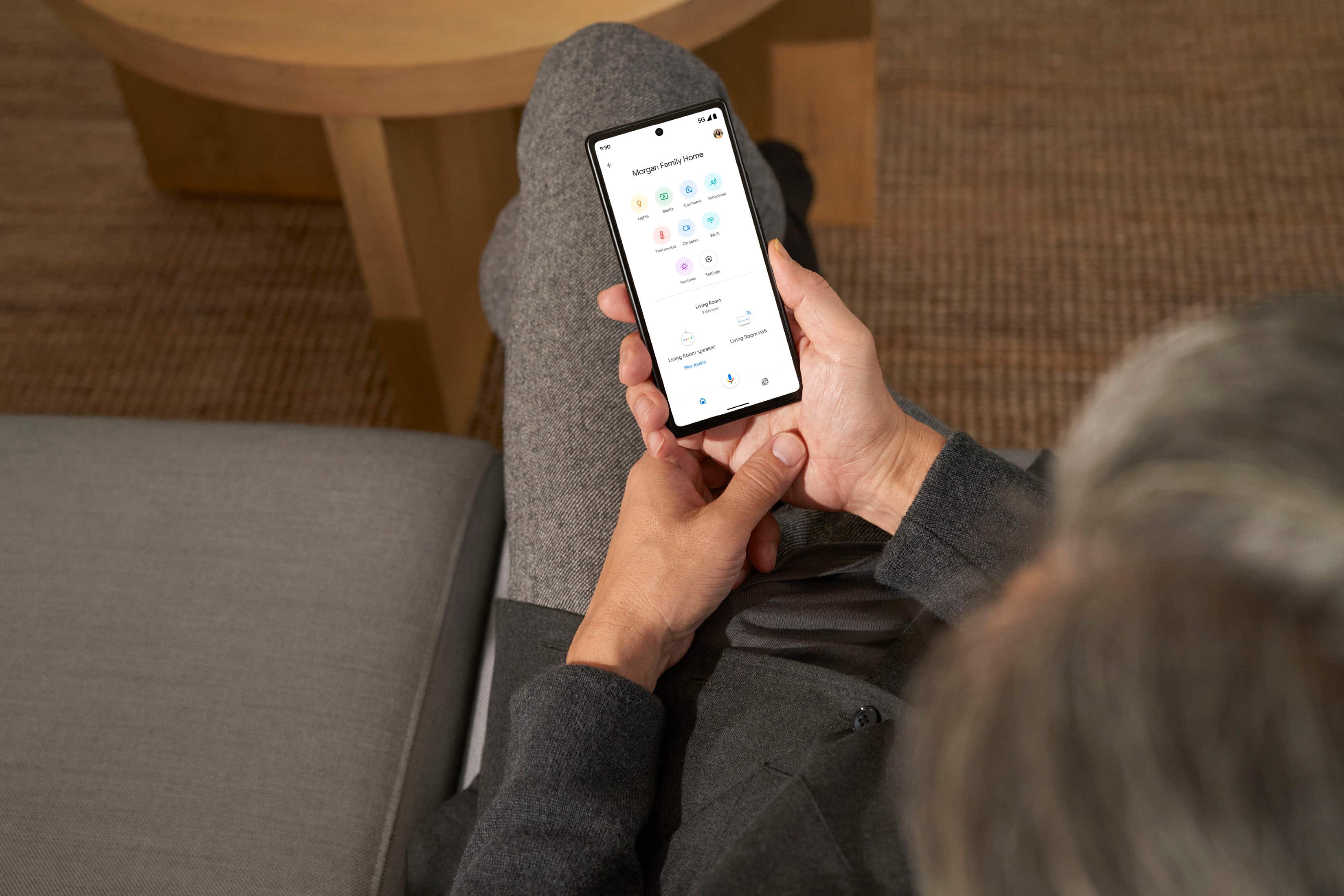
||Posted . Owned for 2 weeks when reviewed.This reviewer received promo considerations or sweepstakes entry for writing a review.This is a great product for the Google ecosystem. It's very easy to set up and works well with Google Home App.
I would recommend this to a friendNest wifi pro
||Posted . Owned for 1 month when reviewed.This reviewer received promo considerations or sweepstakes entry for writing a review.Only had for 3 months. Replaced my spectrum router for these. Seem to be working fine so far.
I would recommend this to a friendStay away if you have multi-gig fiber ISP speeds
||Posted . Owned for 2 weeks when reviewed.This reviewer received promo considerations or sweepstakes entry for writing a review.It's okay...if you have up to gigabit ISP speeds. Not ideal for multi-gigabit internet connections due to its lack of a 2.5 or 10gb WAN/LAN Ethernet port. Speeds are great if you only get up to a gig of connectivity though.
No, I would not recommend this to a friendBrand response from Nest Support
Posted .Hi there, DarylD. Thank you for sharing your review. We're sorry to hear that your Nest Wifi Pro didn't meet your expectations when it comes to providing you with an option for multi-gigabit connection. Please know that your feedback here is appreciated and rest assured that we'll relay this to the right team for potential improvements that we may provide in the future. We'd like to hear more feedback from our customers as these help us find ways we can enhance your experience with the device. Feel free to share more by visiting the link here: https://support.google.com/googlenest/answer/6273563

Google nest pro
||Posted . Owned for 3 weeks when reviewed.This reviewer received promo considerations or sweepstakes entry for writing a review.This the best Wi-Fi router because it has blazing speeds.
I would recommend this to a friendBest WiFi mesh network
||Posted . Owned for 2 weeks when reviewed.This reviewer received promo considerations or sweepstakes entry for writing a review.The nest was a great purchase for my home because I had problems with the Wi-Fi and I tried different router and never really worked properly until I got this mesh network
I would recommend this to a friendRouter works great
||Posted . Owned for 2 weeks when reviewed.This reviewer received promo considerations or sweepstakes entry for writing a review.This product works great,I recently bought it and no more issues
I would recommend this to a friendNest
||Posted . Owned for 3 weeks when reviewed.This reviewer received promo considerations or sweepstakes entry for writing a review.Love the range of this device. The nest wifi offers
I would recommend this to a friendSuper Fast Whole Home WiFi!
||Posted . Owned for 1 week when reviewed.This reviewer received promo considerations or sweepstakes entry for writing a review.Super Fast WiFi! The best mesh system so far for small home to big homes.
I would recommend this to a friend
6E Simply Done Well
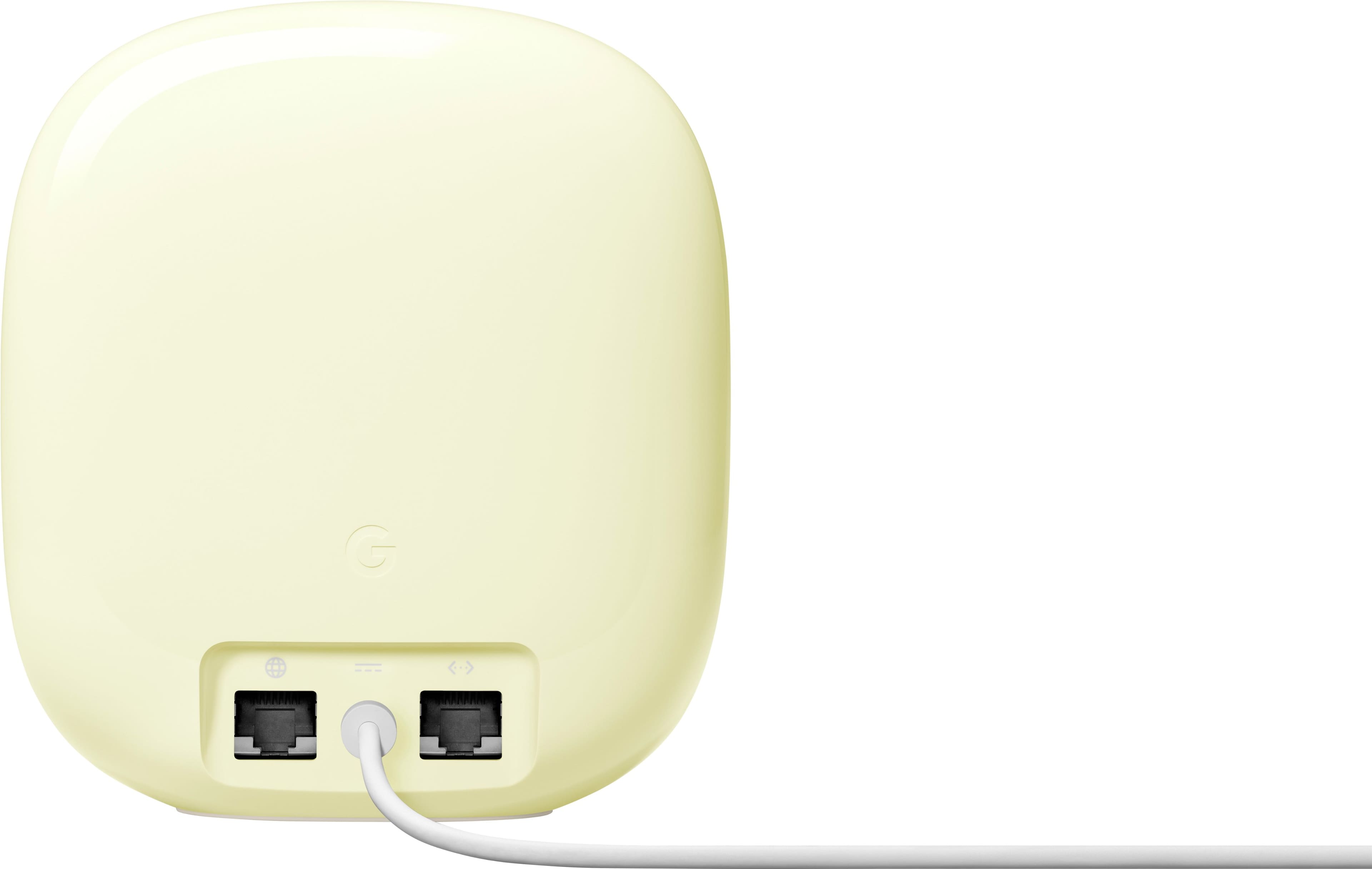
|Posted .This reviewer received promo considerations or sweepstakes entry for writing a review.The Eero Nest WiFi Pro is a lot smaller than I was expecting compared to the freakishly large routers that we have all seen on store shelves. Given its compact shape, on the back you will find two gigabit ethernet connectors alongside the power connector. As most households these days are entirely wireless, if you plan on connecting more than 1 wired device, you will need a network switch to do so. On the front of the glossy Nest WiFi Pro, you will find a single LED that indicates the status - its brightness can be adjusted via the app or disabled entirely. Setup was fairly simple using the Google Home app - simply scan the barcode on the bottom and your phone will connect to the router. Once it detects your Internet connection (designated by plugging in your modem to the properly labeled port on the back), it will ask a few questions regarding setting up your WiFi network. Once it is set up, the Google Home app will be how you access the network's settings and status by hitting the WiFi icon. From there, you can adjust the network name, password, as well as see connected devices. Other advanced features include : - Family WiFi : Allows you to specify specific devices that will only be able to use the network during certain times of the day, which is helpful as parents to make sure your kids aren't on their phones/tablets/devices late at night, so that they get the sleep they need. - Guest Network - Preferred activities - Prioritizes video conferencing and/or gaming - Privacy Settings for data collection to Google - Notification Settings for new devices, multiple attempts with wrong password to connect, and when it is offline - Advanced Settings: WPA3, 160MHz for 5GHz, uPnP, iPv6, DNS, DHCP reservations for IP, Network Mode, Port Management, etc. Connected to my Gigabit Internet, and using a Pixel 7 (which has 6E), I was able to easily get over 700Mbit speed test results consistently throughout my 800 sq ft apartment with the Nest WiFi Pro located centrally in the middle, through several walls. In my past few days of testing watching 4K HDR streaming content, online gaming, and with over 20 IoT devices, I have not had any issues in terms of connectivity or speed problems. All in all, I found that the Nest WiFi Pro worked well for my needs. The app is easy to navigate, has understandable controls, and the device itself has been rock solid in terms of range, speed, and performance.
I would recommend this to a friendNest wifi pro 2-pack
||Posted . Owned for 3 weeks when reviewed.This reviewer received promo considerations or sweepstakes entry for writing a review.Significantly improved my wifi range and speeds through my entire house compared to my previous netgear router. I have been using mostly google products in my home and the switch to the nest wifi pro routers was a very smooth transition.
I would recommend this to a friendGreat product.
||Posted . Owned for 3 weeks when reviewed.This reviewer received promo considerations or sweepstakes entry for writing a review.This are a real deal, my WiFi improved considerably right after i plug them, I have one on every house level and BOM! there are no more glitches on my WiFi connection!
I would recommend this to a friend
Solid mesh
|Posted . Owned for 1 month when reviewed.This reviewer received promo considerations or sweepstakes entry for writing a review.[Employee of bestbuy] No dead zones in 2400 sq ft and 3 floors. No complaints. I even have a perfect connection while filling out this review. Lol
I would recommend this to a friendSimple Mesh Wi-Fi - Misses the “Pro” Mark
|Posted .This reviewer received promo considerations or sweepstakes entry for writing a review.Google’s new Nest Wi-Fi Pro system arrived at just the right time, as I just purchased a new iPad and gaming laptop that are both Wi-Fi 6E compatible. I’ve tried a few different mesh systems over the past few years, but this is my first Google Wi-Fi system and my first one with Wi-Fi 6E compatibility. The Nest Wi-Fi Pro is simple to set up and easy to use, but performance is mediocre at best and it lacks certain feature and settings that would make it an actual “Pro” device. === SETUP === - Setup is about as simple as it gets, especially when setting up a single node like this particular configuration. Just take the unit out of the box, open the Google Home app, and scan the QR code on the bottom of the device. One issue I had is that the Google Home app does not work with the new cameras on my iPhone 14 Pro, so I was unable to scan the QR code and had to manually type in the code. - Once the router is recognized by the Home app, all you have to do is choose a Wi-Fi network name and password and then wait a few minutes for setup to complete. That’s pretty much it. - I wish more advanced options were offered during the setup flow, such as the ability to enable IPv6 and WPA3. These are disabled by default and never alluded to during setup. === PERFORMANCE === - Bottom line up front: performance is fine for the majority of average home users, but the router failed to saturate my 1 Gbps fiber connection in every test that I ran. - I tested the Nest Wi-Fi Pro in my 1,000 square-foot apartment. The router is centrally located in my apartment and it covers my entire space without issue. I see full bars of Wi-Fi everywhere in my apartment. Those with larger homes will likely need at least one more Nest Wi-Fi Pro node. Unfortunately, this new model is not backwards compatible with older Nest or Google Wi-Fi systems, so you existing users looking to upgrade can’t just purchase one node at a time. - The biggest issue is that there is almost zero customization offered for Wi-Fi configuration. Most importantly, you can’t separate the three bands (2.4, 5.0, and 6.0 GHz) into separate SSIDs, so the Nest Wi-Fi router will dictate which band your devices connect to. So even if you have a Wi-Fi 6E device, there’s no guarantee that it will reliably connect to the 6 GHz band. Too often, the router sends devices to the old, slow 2.4 GHz band. This was quite frustrating when trying to test speeds on my new iPad Pro with Wi-Fi 6E. It took about 5 restarts of the iPad before the Nest Wi-Fi router finally decided to let it connect to the 6 GHz band. - All of the speed tests I ran show perfectly acceptable Wi-Fi performance, especially on 6 GHz (Wi-Fi 6E). My iPad Pro reached peak speeds of nearly 800 Mbps upload and download while on the 6 GHz band. Over 5 GHz, most of my devices peak around 500-600 Mbps. These tests were done while sitting about 10 feet from the router. Once you lose a direct line of sight to the router, speeds fall off pretty quickly, especially on 6 GHz. - After a week of use, I can safely say that the Nest Wi-Fi Pro is very reliable. I have not seen any dropped connections, disconnects, or downtime. Speeds are perfectly fine, but the fact that most of my devices frequently connect to the slow 2.4 GHz band means that I can rarely saturate my 1 Gbps connection. === FEATURES AND MANAGEMENT === - The entire system is managed via the Google Home app. There is no web interface to control anything from a computer or web browser. The Google Home app is fine, but if you have multiple smart home devices that rely on this app, I feel it can get a bit overwhelming. - The app lets you see which devices are connected to your network and what bands they are on, see how much data they are using, run speed tests, set up a guest network, and set up parental controls via “Family Wi-Fi.” - There aren't too many advanced networking settings offered with the Nest Wi-Fi Pro, so I’m left wondering why Google is pushing the term “Pro” with this system. If you're a power user who needs to fine tune every last detail of your network, you might be left wanting more. As I mentioned, you can’t create separate SSIDs, nor can you choose the specific channels on which those bands operate. You get some port forwarding and IP reservation features, and that’s about it. === OTHER THOUGHTS === - The WAN port only supports speeds up to 1 Gbps, so if you have a multi-gig internet connection, you should probably look at other options. - There is only one ethernet port to connect a desktop computer, home security system, or other device that you would prefer to have hard-wired. If you want more ports, you'll have to connect an Ethernet switch. - No USB ports for those who would like to create a network storage solution. === OVERALL === The Nest Wi-Fi Pro system is simple, reliable, and easy to use. The problem is that’s it’s almost TOO simple, and it hardly earns the term “Pro” in its name. Don’t get me wrong - this is a great option for average home users. But don’t buy it expecting it to breathe new life into your shiny new Wi-Fi 6E devices — odds are that they will rarely connect via the 6 GHz band anyways. There are very few advanced options and I have yet to be able to fully utilize my 1 Gbps connection with this router. On the plus side, speeds are perfectly fine for the average user and the router is very reliable with good coverage. Real “Pro” users should probably keep their options open.
I would recommend this to a friendBrand response from Nest Support
Posted .Hi there ryanmcv, thanks for trying out the new Nest Wifi Pro. We're happy to hear that you had an easy time setting it up. We're sorry to hear that you were not able to get the ideal speeds from your 1 Gbps fiber connection. Nest Wifi Pro has a combined speed capability of up to 5.4 Gbps. Keep in mind that the combined speeds are total speeds across all bands, and are derived from IEEE Standard 802.11 specifications based on use of Wi-Fi 6 or later generation connected devices that support 160 MHz channels. Actual speeds will depend on your internet service provider, network conditions, connected devices, local regulations and environmental factors. Also, we considered providing a more simplified interface, including automating some of the features that can prove to be helpful for novice users who still want to experience the latest product offerings we offer. However, we'll certainly look into the details of your suggested feature, such as getting more customizations with the configuration, and we'll pass this along to the right team. In the meantime, for any other support needs that you may still be having, please consider contacting us here: https://support.google.com/googlenest/gethelp
Good not great
||Posted . Owned for 1 year when reviewed.This reviewer received promo considerations or sweepstakes entry for writing a review.Beautiful looking wifi device but im not sure if it is as fast as the eero. Spec wise it says it should be but ive had that product also and I feel that had better bandwidth.
No, I would not recommend this to a friendSuper fast
||Posted . Owned for 2 weeks when reviewed.This reviewer received promo considerations or sweepstakes entry for writing a review.My whole house now gets 250mps upload or more. 300+ in some areas.
I would recommend this to a friendSimple, Yet Powerful Google WiFi Solution!
|Posted .This reviewer received promo considerations or sweepstakes entry for writing a review.Reliable WiFi is a huge part of our home life and it’s important to have something you can easily work with and configure. The new Google Nest WiFi Pro delivers on so many areas and helps future proof your home! PROS: - I am a big fan of the design of these routers! They are smooth and seamless, looking like it’s just a decoration sitting out. I also like the size of it as it is not too large and bulky either. - Setup was very easy! You need the “Google Home” app to set it up, but the process is mostly easy and painless. I will add that at the time of this review, Google has not rolled out its newly designed “Google Home” app but I have hope that it will make everything even simpler. - Within the app you can easily change the name/password, see how many devices are connected, and check the speeds as well. Lots of nice options for customization but also provides a simplistic view. - Of course this only comes with 1 unit but you can add more to create a mesh network. The 1 is fine for my needs right now, but I like how I can easily upgrade if needed! - I noticed right away that I was receiving more speeds via WiFi right away! I was impressed with the WiFi 6E functionality as well, even though a majority of my devices are not up to that level yet, the ones that are 6E compatible worked well! The Router is Tri-Band as well meaning it can still support your older 2.4 GHz devices and up to your 6 GHz ones! - The Google Nest Pro also supports the new Matter smart home standard. I think that is going to be huge and once again provides a really good way to be future proofed as well. It also has a Thread Radio built in for even more support on that end as well. CONS: - The Google Nest Pro only has 1 Ethernet out port. I get you want these to be small and simple, but I would have liked more ports. I was able to buy an Ethernet network switch that fixed this, but still something I wish new routers were not moving away from. - On that note, the input Ethernet port is limited to 1 gigabit speed. Yes most people do not have over that, but more providers are offer larger speeds beyond 1 gigabit so I wish the input speed was larger for future proofing. BOTTOM LINE: - WiFi is becoming more and more critical as we work from home, stream at home, and connect more smart home devices to it. The Google Nest WiFi Pro is a great value for all that it offers! Provides WiFi 6E speeds, easy management via the Google Home App, and future proof support for smart home tech. This is a very easy buy to make and I think people will love the ease of use with great power behind it.
I would recommend this to a friendBrand response from Nest Support
Posted .Hi Njuice, thanks for taking the time to share a detailed review of the new Google Nest Wifi Pro. We're glad to hear it has been reliable and has played a huge part of your home life. The features you highlighted have been something we've worked on intently, and we hope you will keep enjoying these features. However, we are sorry to hear about your disappointment with the number of LAN ports and the supported speed available. We'll certainly look into your suggested feature and take this into consideration with future iterations for our Wifi line of products. We recommend keeping a close eye on the latest announcements for our new products here: https://blog.google/
We'd like to make sure that you always have a pleasant experience with our products and services, and if you will have any questions or support concerns you would like us to help you with, please do not hesitate to reach out to our support team here: https://support.google.com/googlenest/gethelp
Google Router
||Posted . Owned for 1 month when reviewed.This reviewer received promo considerations or sweepstakes entry for writing a review.These work well with T-Mobile cellular Wifi.......
I would recommend this to a friendTerrible upload speeds on ATT Fiber
||Posted . Owned for 1 month when reviewed.This reviewer received promo considerations or sweepstakes entry for writing a review.I strongly do not recommend using this router if you use an ATT Fiber. This Google router does not work properyl with ATT and as result it drops drastically upload speeds. This a very common unsolved issue of thia router. Do a quick search online and you will find lots of people with the same complaint.
No, I would not recommend this to a friendBrand response from Nest Support
Posted .Hi there, MarkCosta. Thank you for sharing your concerns about your Nest Wifi Pro. We're sorry to hear that your experience with the performance of the device has been less than ideal. Our goal is to provide an excellent user experience, and we are driven for advancement by your feedback. Please reach out to our team of specialists so we can help identify the cause of the connectivity issues you're having and help find a better resolution for you. You can contact us on our Google Nest Help page here for immediate support: https://support.google.com/googlenest/gethelp