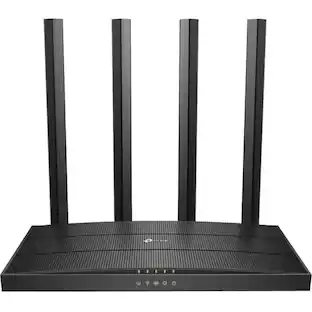
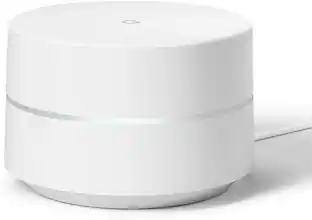
Google - Nest Wi-fi Pro 6e AXE5400 Mesh Router - Lemongrass
Customers are saying
Customers express satisfaction with the product's impressive speed, ease of use, and overall performance. Users frequently highlight the reliable connectivity, extensive coverage, and simple setup process as standout features. While the sleek design is also appreciated, a small number of customers noted concerns regarding the higher price point and potential compatibility issues with older hardware.
Color
LemongrassHighlights
Features
Made for the future of Wi-Fi.
Nest Wifi Pro uses the latest, most advanced Wi-Fi 6E technology. So it isn’t compatible with previous generations of Google Wifi or Nest Wifi.
Thoughtfully designed to perform.
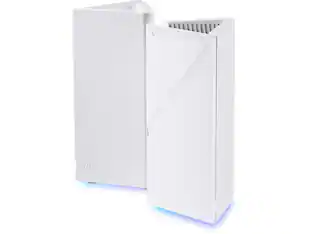
Wi-Fi routers perform best when they’re out in the open. So Nest Wifi Pro is designed to look good anywhere.₂
Parental controls for more peace of mind.
Use the Google Home app to block access to certain websites and explicit content. Set Wi-Fi schedules, internet time-outs, and more.
Coverage for your entire home.
One router provides up to 2200 square feet of fast, reliable Wi-Fi.₁ And you can customize your setup for the coverage you need.
Give guests their own network.
Create a special network just for guests that uses a different password, so you don’t have to give them yours.
Privacy and security come first.
Secure booting and software updates help protect Nest Wifi Pro from running unauthorized software and router hacks.
Faster than fast.
Nest Wifi Pro is built for Wi-Fi 6E. It’s up to 2x faster than Wi-Fi 6, so you get super fast speeds and a reliable connection for your entire home.₃
More bands. More speed.
Hop on the tri-band superhighway and get 2.4 GHz, 5 GHz, and the new 6 GHz band.₄ Which means you’ll get faster speeds and a more reliable connection.₅
Self-monitors and diagnoses.
Nest Wifi Pro monitors itself, diagnoses network issues, and can even fix some common issues on its own.
₁Actual speeds depend on your internet service provider, network conditions, connected device, local regulations and environmental factors. Wi-Fi 6E-compatible devices enable the full benefits of Wi-Fi 6E. Intended for indoor use only.
Router placement and home size, materials and layout can affect how Wi-Fi signal travels. Poor router placement and larger homes or homes with thicker walls or long, narrow layouts may require extra Wifi points for full coverage.
₂Nest Wifi Pro should only be used indoors.
₃1 Up to 2x faster as compared to a Wi-Fi 6 router that supports 80 MHz channels. Wi-Fi 6E specifications are based on use of a Wi-Fi 6 or later generation client device that supports 160 MHz channels.
Actual speeds depend on your internet service provider, network conditions, connected device, local regulations and environmental factors. Additional routers may be needed for full coverage.
₄A Wi-Fi 6E client device is needed to directly access the 6 GHz band, which is limited to indoor use only.
₅Actual speeds depend on your internet service provider, network conditions, connected device, local regulations and environmental factors.
Specifications
- Wi-Fi Range2200 square feetWi-Fi Mesh SystemYesNumber of Wi-Fi Satellites Included1Wi-Fi Speed5.4 gigabits per secondDownstream Data Speed5.4 megabits per second
Reviews
Rating 4.3 out of 5 stars with 1667 reviews
- Speed (295)
- Ease of use (266)
- Overall Performance (233)
- Coverage (162)
- Setup (153)
- Compatibility (15)
- Price (13)
Customer Images
The vast majority of our reviews come from verified purchases. Reviews from customers may include My Best Buy members, employees, and Tech Insider Network members (as tagged). Select reviewers may receive discounted products, promotional considerations or entries into drawings for honest, helpful reviews.
Compare similar products

Nest Wifi Pro gives you super fast, reliable Wi-Fi 6E coverage for your entire home.₁ It automatically adjusts your network’s performance to keep things running smoothly. It’s so smart it can monitor and diagnose common issues on its own. And it has privacy and security features to help keep you and your family safe.

Nest Wifi Pro gives you super fast, reliable Wi-Fi 6E coverage for your entire home.₁ It automatically adjusts your network’s performance to keep things running smoothly. It’s so smart it can monitor and diagnose common issues on its own. And it has privacy and security features to help keep you and your family safe.

Nest Wifi Pro gives you super fast, reliable Wi-Fi 6E coverage for your entire home.₁ It automatically adjusts your network’s performance to keep things running smoothly. It’s so smart it can monitor and diagnose common issues on its own. And it has privacy and security features to help keep you and your family safe.

Nest Wifi Pro gives you super fast, reliable Wi-Fi 6E coverage for your entire home.₁ It automatically adjusts your network’s performance to keep things running smoothly. It’s so smart it can monitor and diagnose common issues on its own. And it has privacy and security features to help keep you and your family safe.
| Pros for Google - Nest Wi-fi Pro 6e AXE5400 Mesh Router - Lemongrass | |||
|---|---|---|---|
| Speed, Ease of use, Overall Performance, Coverage, Setup | Speed, Ease of use, Overall Performance, Coverage, Setup | Ease of use, Overall Performance, Speed, Setup, Coverage | Speed, Ease of use, Overall Performance, Coverage, Setup |
| Cons for Google - Nest Wi-fi Pro 6e AXE5400 Mesh Router - Lemongrass | |||
| Compatibility, Price | Compatibility, Price | Price, Connectivity | Compatibility, Price |
Specs
Package deals that include this item



Customers often buy these together
Smart Speakers and Displays







Security Camera
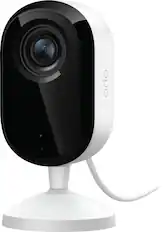
Arlo - Essential Indoor Security Camera 2K (3rd Gen, 2025 Release) - Wired Plug-In Powered, Automated Privacy Shield, 1-Cam - White
Our 365-day lowest price$29.99The price was $39.99









More recommended items
 Smart Doorbell
 Home Security System
 Smart Thermostat
More to consider
 $119.99The price was $149.99







Explore tech essentials Sponsored



Discover related products
 $249.00The price was $275.00
 $12.99The price was $13.99
 $149.99The price was $169.99












Keep exploring
 $659.99The price was $769.99
 $431.95The price was $539.95
 $97.49The price was $127.84