Customer Ratings & Reviews



- Model:
- V1N04A#B1H
- SKU:
- 5836100
Rating by feature
- Value
Rating 4.2 out of 5 stars
- Quality
Rating 4.1 out of 5 stars
- Ease of Use
Rating 4.0 out of 5 stars
Customers are saying
Customers are positive about the DeskJet 2655's ease of use, print quality, and affordable price. Many appreciate its compact size and wireless capabilities, finding it convenient for home use. While some experienced challenges with the initial setup process, the printer's reliability and scanning functionality also received positive feedback. Overall, the DeskJet 2655 is viewed favorably for its performance and value.
This summary was generated by AI based on customer reviews.
It's OK
||Posted .This reviewer received promo considerations or sweepstakes entry for writing a review.The printer is a little bigger than I anticipated but overall it is OK. Works well so far.
No, I would not recommend this to a friendGood
||Posted . Owned for 1.5 years when reviewed.This reviewer received promo considerations or sweepstakes entry for writing a review.Good for small needs just to use in small quantities
I would recommend this to a friendDifficult setup
||Posted . Owned for 2 weeks when reviewed.This reviewer received promo considerations or sweepstakes entry for writing a review.It took long to connect to wifi and even longer to synch up to laptop
I would recommend this to a friendDon't fall for the price
||Posted . Owned for 1 year when reviewed.This reviewer received promo considerations or sweepstakes entry for writing a review.I don't like this printer. The price is very less but the real cost is ink and black ink does not last more than 50-60 pages so you spend a lot on the ink. I would suggest buy some other printer for which ink is less expensive. It's like death by thousand cuts.
No, I would not recommend this to a friendVery Disappointed in HP
||Posted . Owned for 8 months when reviewed.This reviewer received promo considerations or sweepstakes entry for writing a review.Bought just before Covid lockdown to replace my old but trusty HP 4180 after doing a lot of research. Set up was impossible. Spent hours on phone with HP tech. HP had to replace faulty cartridge and it still didn't work properly especially the wi-fi printing. I left it unused at home for months while I waited out Covid in Chicago. Upon returning home a few weeks ago, I tried to get it to work. Still not happy and it's past the return date, so I'm stuck with a bum printer. Just pulled out my old one and set it up. It was a complete waste of my money. Also noticed that you have to share all your data with HP for it to work - Including your phone. SMH
No, I would not recommend this to a friendNot for us
||Posted .This reviewer received promo considerations or sweepstakes entry for writing a review.Had to return, it wouldn’t hook up to my daughter’s laptop.
No, I would not recommend this to a friendTo complicated to set up.
||Posted . Owned for 6 months when reviewed.This reviewer received promo considerations or sweepstakes entry for writing a review.It was to complicated when I bought it. I had to manually do things and I hated it and we have to connect a cord to the computer we were printing with. I was unhappy. I returned it and bought another printer and that one I love.
I would recommend this to a friendRequires you accept the collection an sharing data
||Posted .This reviewer received promo considerations or sweepstakes entry for writing a review.The set-up requires that you accept there terms of service that allows them to collect and share your data. Keep in mind, this printer has access to your computer and your phone. If you don't accept, you can't set-up. They say you can, but even the Best Buy's Geek Squad were not able to help me set it up. Returned and bought a Cannon from Amazon.
No, I would not recommend this to a friendBrand response from HP Team
Posted .Hey Mike,
I'm terribly sorry that your experience with the printer wasn't very ideal. Despite this experience, I assure you that it’s always our intention to provide much more reliable printing. With that said, I regret that we fell short this time. It is unfortunate to hear that you had to return the printer, but I hope that the process for doing so was seamless.
If there's anything we can help you with down the road, please don't hesitate to contact us for support. We want to make sure that any future printing experiences you have with us are much more consistent. Should you need to, you can get in touch anytime via your preferred method: hp.com/contactHP
Take care,
Chelsea
HP Care
hp.com/support
good for college
||Posted .This reviewer received promo considerations or sweepstakes entry for writing a review.good printer for college, its cheaply made though.
I would recommend this to a friendHP 2600 THIS IS THE WORST PRINTER I HAVE EVER HAD
||Posted . Owned for less than 1 week when reviewed.This reviewer received promo considerations or sweepstakes entry for writing a review.Just setting it up, the power cord will not stay plugged into the printer. The paper won't go in right. It will not connect to my network on wireless. It won't install, even plugged into a USB port. I am returning it as soon as I can get it over to the store. By the way, it was just delivered today, but when I checked on delivery status I was told it was delivered yesterday. I like Best Buy and will buy another printer from them, but not this one.
No, I would not recommend this to a friendBrand response from HP Team
Posted .Hi Steve,
I'm very sorry that the printer didn't deliver a more reliable and seamless experience in the time you had it. This is incredibly disappointing to hear, especially since we always hold ourselves to a much higher standard of quality. It's unfortunate to hear that you're in the process of returning the printer, but I do hope that the process is as smooth as can be.
For any future needs we can help with, please remember that you can always contact us for support. We're always more than happy to help, so you can get in touch anytime via your preferred method at this link: hp.com/contactHP
Chelsea
HP Care
hp.com/support
Do not buy
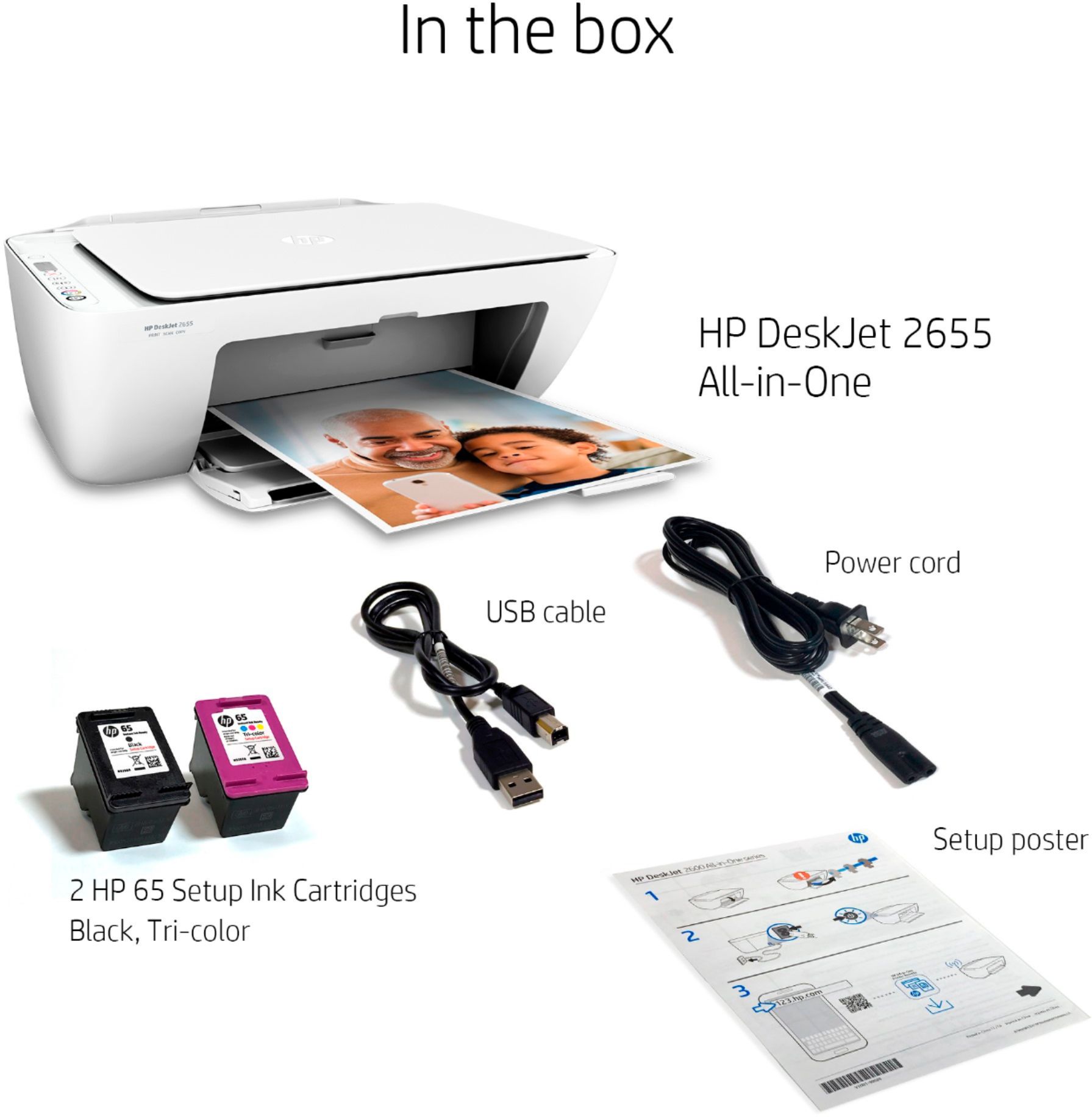
||Posted . Owned for 1 week when reviewed.This reviewer received promo considerations or sweepstakes entry for writing a review.Would only print test page. Did not come with USB cable as stated on ad. Could not do the online setup either. Went back to using my Canon MX922 . This printer is cheap and not worth the money. Bought it for $39.99 now it is $59.99. Drove 2 hours to take back to store. 15 day very short return policy. Hard pass on this cheap printer. HP dropped the ball on this printer.
No, I would not recommend this to a friendBrand response from HP Team
Posted .Hello there,
I am so sorry for the inconvenience this particular printer has been causing. We certainly build our printers with the intent of providing a reliable experience for our Customers, so I can imagine how upsetting problems with the printer were for you.
We are always there to help and assist with troubleshooting at: support.hp.com/us-en/contact-hp
I do hope that in the future you'll allow us an opportunity to make things right with the experience we intended on providing from the start.
Tom
HP Care
hp.com/support
Bad
||Posted . Owned for 3 weeks when reviewed.This reviewer received promo considerations or sweepstakes entry for writing a review.It didn't come with the cable like it stated that it did. The driver download didn't work. I'm left with a completely useless all in one printer. It's nice, but just won't work.
No, I would not recommend this to a friendBrand response from HP Team
Posted .Hi there,
I'm so sorry that you're having trouble downloading the driver and that you didn't receive a cable. I fully understand how inconvenient this must be and I regret that you're not able to get the printer set up.
Please contact us for support so we can assist you with downloading the driver and address the cable. As always, we're more than happy to help. You can give us a call at +1 800-474-6836 between the hours of 8 am - 9 pm ET. To expedite the process, you can gather these beforehand:
- Model number
- Serial number
- Your location
- Your case number (from prior contact with support)
We hope to speak with you soon and again, my sincerest apologies.
Chelsea
HP Care
hp.com/support
Only One Star - Cannot Install
||Posted .This reviewer received promo considerations or sweepstakes entry for writing a review.One Star - this printer is infuriating. I will not install to either of my laptops - Lenovo or ASUS. It is on and connected to my wireless, but NOTHING, NOTHING I do when following the step by step directions gets it to install, and online HP support is terrible - it goes from one page that offers no resolution to another and then back where I started. I gave it one star b/c of its sleep design and lightweight construction.
No, I would not recommend this to a friendthe hp 2655 doesn't scan from the internet
||Posted . Owned for 2 months when reviewed.This reviewer received promo considerations or sweepstakes entry for writing a review.The 2655 doesn't scan or print from the internet it is defective and can not be return . That real lee sucks . I only had for a month .
No, I would not recommend this to a friendBrand response from HP Team
Posted .Hi Duke,
I'm very sorry that the printer has stopped printing and scanning properly after only a month. This is very disappointing to hear, especially since we always strive to provide the most reliable printing experience possible. To that end, I want to assure you that we'll do everything we can to make this right.
As I don't have enough information to identify the underlying issue, what I’d recommend is contacting us for support. We’d be more than happy to help, so you can give us a call at +1 800-474-6836 between the hours of 8 am - 9 pm ET. To expedite the process, you can gather these beforehand:
- Model number
- Serial number
- Your location
- Your case number (from prior contact with support)
I hope you’ll allow us an opportunity to make amends and again, my sincerest apologies.
Chelsea
HP Care
hp.com/support
Disappointing
||Posted . Owned for 8 months when reviewed.This reviewer received promo considerations or sweepstakes entry for writing a review.Got this at Christmas to replace old HP. Wanted to print from my iPhone. Always gets disconnected from wifi - frustrating.
No, I would not recommend this to a friendBrand response from HP Team
Posted .Hi, Janie.
I’m sorry to hear that your printer has not performed like it should. It’s easy to understand why the inability to print from your mobile phone would be frustrating, especially if that’s why you bought the new printer, so I’ll offer some information and resources I hope will help.
First, I recommend you visit a page on our support site that has diagnostic tools for various problems, including printer-offline and connectivity issues. Visit that page here:
- support.hp.com/us-en/topic/diagnostics
Regarding mobile printing specifically, you also might find useful information in the FAQ troubleshooting portion of the applicable document:
- iPhone: support.hp.com/us-en/document/c02623193
- Android: support.hp.com/us-en/document/c04024231
If the problem persists, I hope you’ll contact us directly at +1 800-474-6836 so we can help you assess the situation and guide you through any applicable troubleshooting. (Please note that because of restrictions on personal movement and workplace attendance associated with the COVID-19 pandemic, wait times for agents are longer than normal. Thanks in advance for your understanding.) To expedite the process, I recommend gathering the following information before the call:
- Model number
- Serial number
- Your location
- Case number (from any previous contact with HP support)
Keith
HP Care
hp.com/support
Don't recommend
||Posted . Owned for 11 months when reviewed.This reviewer received promo considerations or sweepstakes entry for writing a review.It didn't come with all the parts. When I called geek squad to help they wouldn't just send me the kissing part they wanted my 96 year old grandmother to take it all apart and bring it back. I went out and bought the cord it was missing from another store and finished setting it up. Hp clearly can't even make sure their products are packaged correctly.
No, I would not recommend this to a friendGreatly disappointed.
||Posted .This reviewer received promo considerations or sweepstakes entry for writing a review.Having exclusively purchased HP products for several years, this unit and the one previous were a waste of money. Both were defective right out of the box. Does HP no longer have quality control on their manufacturing?
No, I would not recommend this to a friendBrand response from HP Team
Posted .Hi Monty,
It's so disappointing to hear that both printers were faulty out of the box. I fully understand how upsetting this must be, especially since you've been such a loyal customer for years now. We absolutely appreciate that and sincerely apologize for this inconvenience. It's always been our intention to build printers that last and we would love to stand by that.
Please contact us for support so we can discuss this further and arrange for a replacement. We're always more than happy to help so you can give us a call at +1 800-474-6836 between the hours of 8 am - 9 pm ET. To expedite the process, you can gather these beforehand:
- Model number
- Serial number
- Your location
I hope this helps and again, my sincerest apologies for this inconvenience.
Chelsea
HP Care
hp.com/support
No bells or whistles
||Posted .This reviewer received promo considerations or sweepstakes entry for writing a review.Low quality but works in a pinch for cheap. Noisy, hard to use for anything other than copying.
No, I would not recommend this to a friendFrom old DeskJet to new DeskJet
Posted .This reviewer received promo considerations or sweepstakes entry for writing a review.I just received this HP DeskJet 2655 Wireless printer to match up with my new HP Laptop. I have had a HP DeskJet USB connection printer for many years, so I wanted to compare the two printers in this review. First of all, the set-up was very easy. Watched the video here at the Best Buy site, then followed the directions that came with the printer, and it was as easy as 1, 2, 3. Wireless printing in less than 20 minutes! I have two observations that I noticed with this printer. It's rather noisy compared to my old DeskJet. Not sure why it makes so much noise while printing (maybe a thinner exterior case?), but it was noticeable to me. Also, the print quality was slightly less sharp than my old printer with the same print settings. Neither of these two issues is a deal breaker for me, but just thought I would point it out for possible buyers. Not sure if this wireless printer will last as long as my old printer, but for the price, its a "no-brainer" for me. I LOVE HP products and have been a repeat buyer here at Best Buy and HP online for a long time now. 4 stars for this printer due to the higher noise level and lower print quality, but I do recommend it just based on price for the non-picky budget buyer like me.
I would recommend this to a friendPoor Quality
||Posted . Owned for 1 year when reviewed.This reviewer received promo considerations or sweepstakes entry for writing a review.in the few months that it work i printed probably less than 50 pages total. very poor quality printer and HP support is downright awful
No, I would not recommend this to a friend