Customer Ratings & Reviews


- Model:
- K7G18A#B1H
- SKU:
- 5962003
Rating by feature
- Value
Rating 4.5 out of 5 stars
- Quality
Rating 4.4 out of 5 stars
- Ease of Use
Rating 4.5 out of 5 stars
Customers are saying
Customers are enthusiastic about the ENVY Photo 6255's print quality and ease of use, frequently praising its wireless capabilities and compact size. Many appreciate the printer's straightforward setup and quiet operation, along with its ability to scan documents effectively. While some users found the paper tray design less intuitive, the overall positive feedback highlights the printer's value and reliability.
This summary was generated by AI based on customer reviews.
Good printer but scan software trouble
||Posted .This reviewer received promo considerations or sweepstakes entry for writing a review.The printer works well as a printer. However, to scan something you have to download software, which I did just as the instructions said to do, but I can't get it to work as a scanner.
No, I would not recommend this to a friendEasy setup but not good at printing.
||Posted . Owned for 3 weeks when reviewed.This reviewer received promo considerations or sweepstakes entry for writing a review.Setup was easy but print quality was bad. Every time we used it everything had a green tint to it. Best Buy took care of it and returned it for a full refund.
No, I would not recommend this to a friendNothing special
||Posted .This reviewer received promo considerations or sweepstakes entry for writing a review.I bought this printer with the hope that it would produce better quality photos than my previous HP printer. Not so much, the blacks go gray even with brand new ink.
No, I would not recommend this to a friendSo so
||Posted .This reviewer received promo considerations or sweepstakes entry for writing a review.This is an average printer but meets my needs for home printing. Not as fast as I thought it would be and a bit noisy but still adequate for my needs considering the price
I would recommend this to a friendIt's just ok
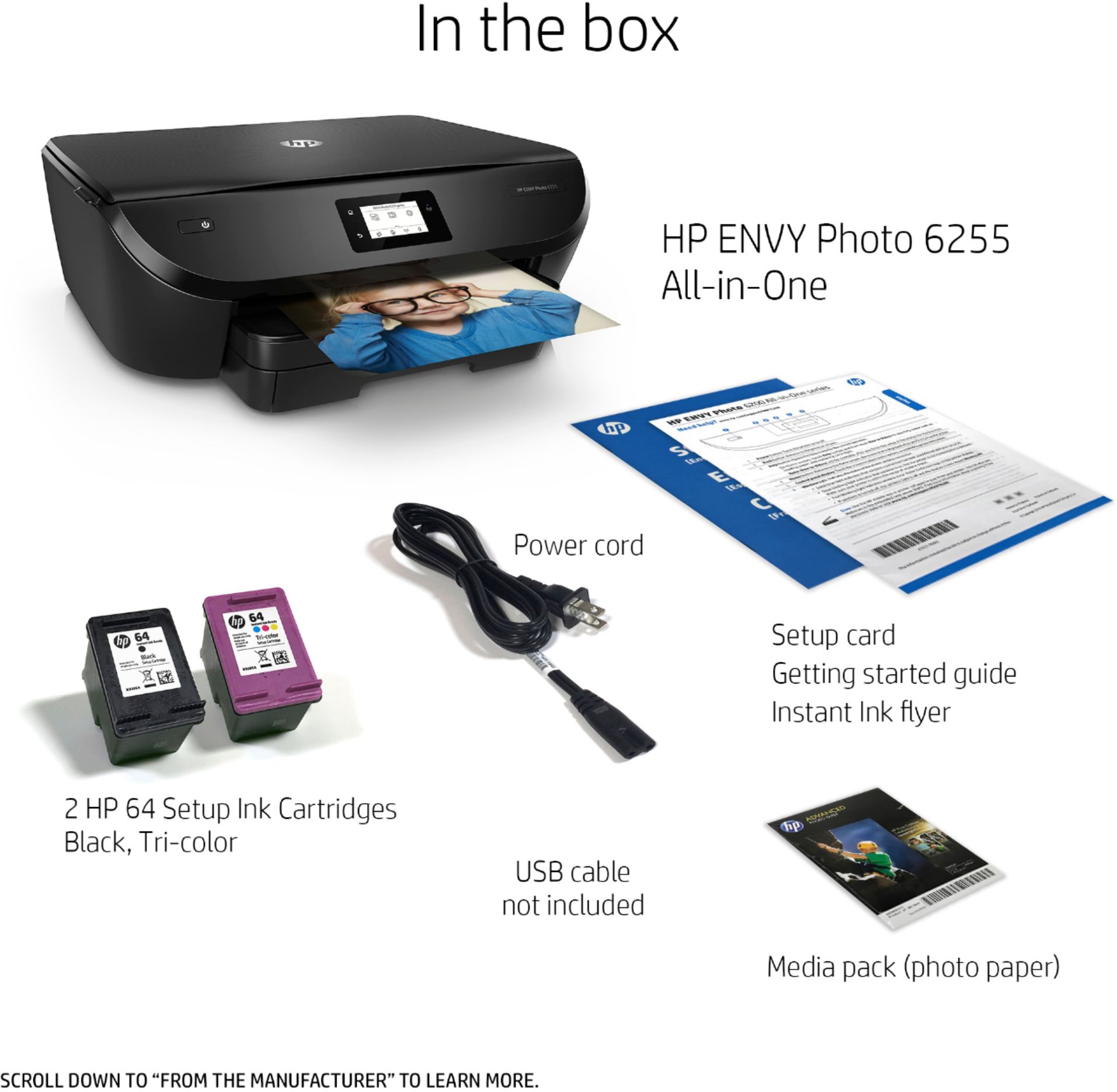
||Posted .This reviewer received promo considerations or sweepstakes entry for writing a review.Its ok very minimal operation had to go out and BUY ANOTHER CABLE so I could use it wired! This should have been in the box! So not very happy with additional $25 spent.
No, I would not recommend this to a friendDisappointment In Spades
||Posted . Owned for 3 weeks when reviewed.This reviewer received promo considerations or sweepstakes entry for writing a review.Impossible to connect to computer. Had to have HP connect. Thought it was okay, then problems began. My ip number was changed. Too much to describe my disappointment. Then they talked me into the instant ink plan. Guess what!!! Ink comes after ten pages printed, and still full cartridge. Then they charge for a bulk number of more pages. I am sorely disappointment.
No, I would not recommend this to a friendAn OK purchase
||Posted .This reviewer received promo considerations or sweepstakes entry for writing a review.The set up seemed easy enough, but kept losing connection in The middle of the process. 8x10 printed beautifully, 5x7 not so much. Came out very over saturated and dark.
I would recommend this to a friend- Pros mentioned:Ease of use, Print quality, Size

Nice Photo Printer
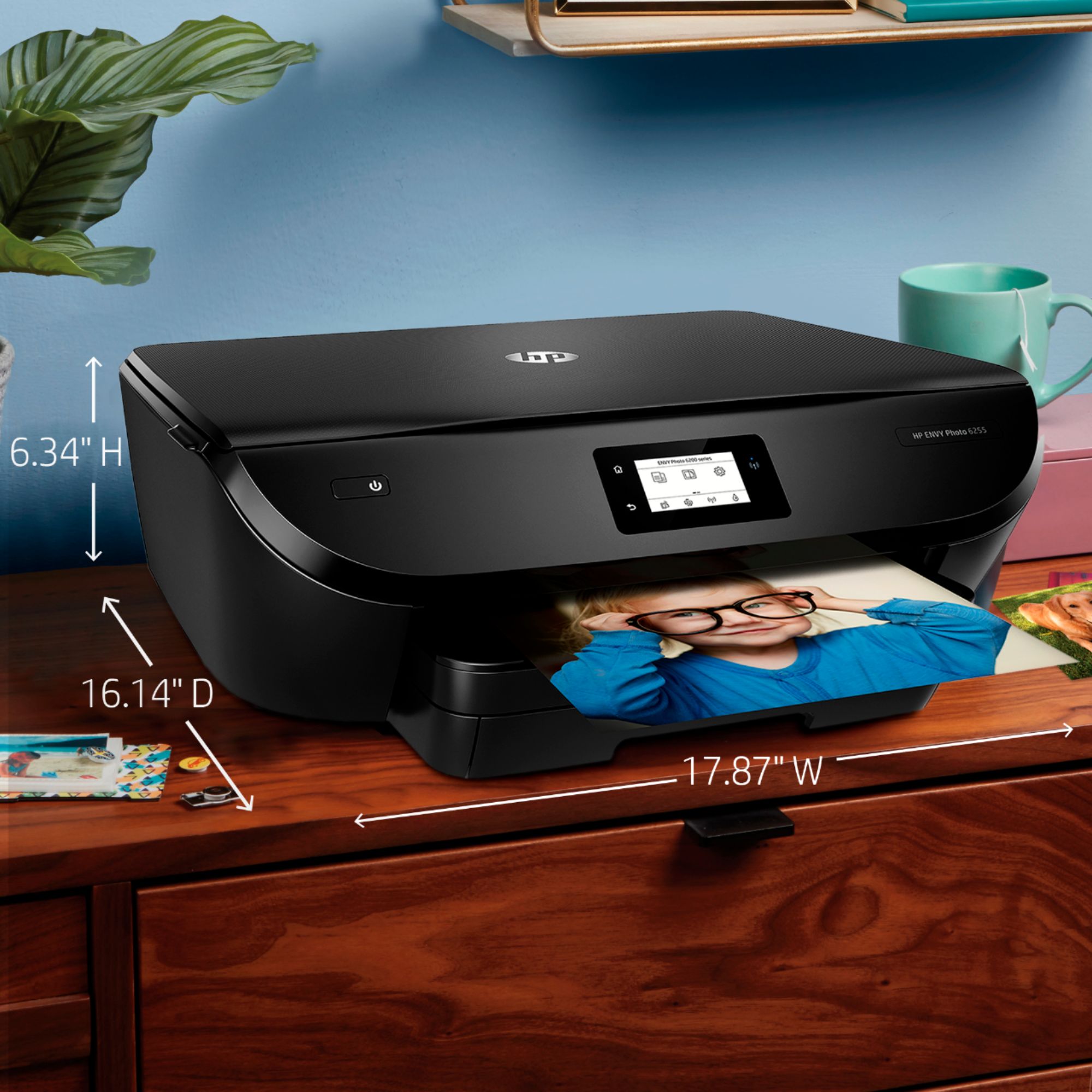
|Posted .This reviewer received promo considerations or sweepstakes entry for writing a review.The HP ENVY Photo 6255 All-in-One Printer is a moderately priced printer that provides consistently good printouts whether text on plain paper or photos on photographic paper. Setup was made super easy by following the included detailed graphic instructions. I first set it up to print from an iPhone and a Pixel XL – it worked flawlessly. I have since set it up to print from Mac OS X, Windows 10 and the internet. It is fast and easy to use while still delivering high resolution high quality images. If you need mostly photo printing it is very nice and also does a fine job of handling limited faxing, scanning and copying (read single sheet). It has a reasonably small footprint making it easy to find a place to put it. Ink cartridges promise to be simple by using HP’s HP Instant Ink.
I would recommend this to a friend Great while it lasted
||Posted . Owned for 1 year when reviewed.This reviewer received promo considerations or sweepstakes entry for writing a review.It worked great for the time it worked. After a while though it stopped printing correctly. Going to have to bring it in
I would recommend this to a friendPrints nicely, but takes a while to turn on
||Posted . Owned for 3 weeks when reviewed.This reviewer received promo considerations or sweepstakes entry for writing a review.This does whatever I ask for when making copies. The only problem I have is when it boots up. Takes longer than any Pinter I have had
I would recommend this to a friendDecent Printer but guzzles ink
||Posted .This reviewer received promo considerations or sweepstakes entry for writing a review.Decent Printer but guzzles ink. This printer does a decent job of turning out nice looking photographs but absolutely guzzles the ink. I was able to get only 10-8 x 10“ prints out of a set of the large ink cartridges. Best Buy is an absolutely fantastic company and was very accommodating about taking this printer back and giving me a store credit.
No, I would not recommend this to a friendCould be better
||Posted .This reviewer received promo considerations or sweepstakes entry for writing a review.When the printer is in sleep mode and you need to make copies the machine will not corporate so it has to be turned off and then back on.
No, I would not recommend this to a friendSo far so good
||Posted .This reviewer received promo considerations or sweepstakes entry for writing a review.I’ve rarely had the chance to use it. It’s performance so far has been good. Hopefully it lasts longer than the last one I purchased
I would recommend this to a friendDid Not Work
||Posted .This reviewer received promo considerations or sweepstakes entry for writing a review.Returned the printer, software glitch would not allow set up. HP we're no help and told us to return to Best Buy and just get a new one. No chance!
No, I would not recommend this to a friendUseful enough but wish it wer better
||Posted . Owned for more than 2 years when reviewed.This reviewer received promo considerations or sweepstakes entry for writing a review.Works well enough, but can be slow to process through jobs. Slower than printer owned previously made by HP and Epson.
No, I would not recommend this to a friendEhhhh...
||Posted .This reviewer received promo considerations or sweepstakes entry for writing a review.It’s okay but the printing speed on this is kinda slow. I printed my statement and it took me around 10-20min for 12 pages.
No, I would not recommend this to a friendworks sometimes
||Posted . Owned for 9 months when reviewed.This reviewer received promo considerations or sweepstakes entry for writing a review.This is a basic color printer. It only handles 8 1/2x11 paper and smaller. The inside 4x6 card/photo tray that sits inside the standard paper tray is nice - can have both loaded at once. Sometimes the printer/scanner works with devices. We have 2 pcs running Windows 10. One is a desktop right next the the printer. We found we had to reboot the printer every day to get it to work with this desktop computer. It no longer works with this desktop computer. We ran the HP scan/print doctor and it can not resolve or give instructions to resolve the problem. The HP virtual support goes through a series of steps and fails to resolve the problem. There is no way to get a real person at HP to fix the problem. Both computers are generic configuration - why this printer works with one and not the other baffles us and HP is of no help. So it might work with with your device and it might not. I do not recommend this product - it is not worth the headaches it has caused me.
No, I would not recommend this to a friendBrand response from HP Team
Posted .Hi there.
I’m sorry to hear that your printer has failed to maintain a reliable wireless connection with all your computers. I can understand why that would quickly become frustrating, especially considering you’ve used our Print and Scan Doctor with no change in performance. With that in mind, I’ll offer some resources and information I hope will help.
First, you might find useful information in this troubleshooting guide to frequent connection inconsistencies:
- Windows: support.hp.com/us-en/document/c04249080
- Mac OS: support.hp.com/us-en/document/c04249334
If the difficulty persists, I recommend that you contact us directly at +1 800-474-6836 so we can guide you through the proper troubleshooting. (Please note that because of restrictions on personal movement and workplace attendance associated with the COVID-19 pandemic, wait times for agents are longer than normal. Thanks in advance for your understanding.) To expedite the process, I recommend gathering the following information before the call:
- Model number
- Serial number
- Your location
- Case number (from any previous contact with HP support)
I'll also mention that HP printers have a one-year warranty from their purchase date that covers hardware as well as ink supplies, so if it comes to that, you might consider making use of it. You can verify the warranty using the following link: support.hp.com/us-en/checkwarranty
Keith
HP Care
hp.com/support
I thought I would be able to enlarge items
||Posted .This reviewer received promo considerations or sweepstakes entry for writing a review.It is a lot of work to enlarge items with the printer taking a picture then deciding how much to enlarge is not easy.
I would recommend this to a friendDO NOT BUY if using Apple products
||Posted .This reviewer received promo considerations or sweepstakes entry for writing a review.We had an HP Photosmart wireless printer that worked great for years so once it finally stopped working we decided to get another HP. The Envy was on sale so we got it. However the auto setup didn’t work so I had to do it manually. Then once I got it connected to our home wireless network (WiFi) I couldn’t get it to connect to our Apple desktop, nor laptop, nor even our iPhones! I downloaded the HP Smart app per the online support documentation, but even that didn’t work. I tried disconnecting and reconnecting multiple different ways but I still can’t connect to any of my Mac products. I tried using the online support chat bot but it couldn’t help me. Then I had to jump through hoops to create an account just to get to a support phone number, but after being on hold for a while I just gave up. If I can’t get through and get it to work, I may try to return it. Thank goodness I bought the protection plan. What’s also frustrating is that there’s no mention of Windows vs Mac on the box whatsoever, but all their support documents referenced Windows only.
No, I would not recommend this to a friendBrand response from HP Team
Posted .Hi there,
I'm so sorry that connecting the printer to your Apple products hasn't been very convenient. I can also imagine how disappointing it was not being able to reach support. I assure you we always strive to provide a much more reliable experience, so I regret that we fell short here.
I do want to clarify that while this printer is compatible with Mac OS, it doesn't offer any mobile printing solutions. More specifically, the printer supports the Mac OS versions listed in this product specification document: support.hp.com/document/c05646387
If your desktop or laptop is running one of the supported versions, I hope you'll allow us another opportunity to provide support. We'd be more than happy to help resolve this with you, so you can give us a call at +1 800-474-6836 between the hours of 8 am - 9 pm ET. To expedite the process a bit, you can gather this information beforehand:
- Model number
- Serial number
- Your location
- Your case number (from prior contact with support)
We look forward to making this right.
Chelsea
HP Care
hp.com/support
Cart ridge error message and jam paper
||Posted . Owned for 1.5 years when reviewed.This reviewer received promo considerations or sweepstakes entry for writing a review.Error message cartridge, jam paper, nothing’s inside it’s clean
No, I would not recommend this to a friend