Customer Ratings & Reviews


- Model:
- K7G18A#B1H
- SKU:
- 5962003
Rating by feature
- Value
Rating 4.5 out of 5 stars
- Quality
Rating 4.4 out of 5 stars
- Ease of Use
Rating 4.5 out of 5 stars
Customers are saying
Customers are enthusiastic about the ENVY Photo 6255's print quality and ease of use, frequently praising its wireless capabilities and compact size. Many appreciate the printer's straightforward setup and quiet operation, along with its ability to scan documents effectively. While some users found the paper tray design less intuitive, the overall positive feedback highlights the printer's value and reliability.
This summary was generated by AI based on customer reviews.
- Pros mentioned:Print quality

Solid AIO Wireless Photo Printer! Sleek Design.
|Posted .This reviewer received promo considerations or sweepstakes entry for writing a review.Built in dual band wireless functionality and Apple Air Print options allow for great printer placement flexibility and less wires. Color and B&W prints are about 22 PPM speed wise. Photos came out very nice and B&W prints are close to laser printer quality. Beautifully designed with a sleek look that will easily match almost any decor style. The touchscreen is great for quickly configuring printer options on the fly and a downloadable mobile app also does the same. Overall this printer is a pretty good value for the features and quality.
I would recommend this to a friend - Pros mentioned:Print quality
Photo Printer for the Masses?
|Posted .This reviewer received promo considerations or sweepstakes entry for writing a review.My last printer was a four-in-one, where the fourth option was faxing. I haven't received a fax on it in for who knows how long. It was time for an upgrade, especially with all the photos I've been printing lately. Not only does the ENVY Photo printer print better photos but the ease of going from phone to photo is amazingly easy. Loving it. Slightly smaller footprint than the last printer but that's because there is no auto-feeder which I hope I don't miss.
I would recommend this to a friend Great Photo Printing Capabilities
|Posted .This reviewer received promo considerations or sweepstakes entry for writing a review.Today there are so many printers to choose from when looking for just a general basic one for home or home-office use. This printer fits every box needed when looking for a home printer or even if you have a small office in your home that you work from. The one facet this printer does stand out with compared to other home printers is obviously the photo capabilities. My girlfriend recently has been going through the photography stage and this printer has been great for that purpose as opposed to waiting for Shutterfly or taking them to a local store to get printed out. The Bluetooth capabilities are obviously a major plus as well that are very useful. The only downside regarding this printer is the price of ink, which I suppose can be associated as a negative to nearly every printer on the market today. Overall though in the mid-tier price range that this printer occupies I can`t fault anyone for going with this option and if you are looking especially for a printer with great photo printing capabilities I definitely would suggest going with this printer.
I would recommend this to a friend- Pros mentioned:Print quality
So far so good
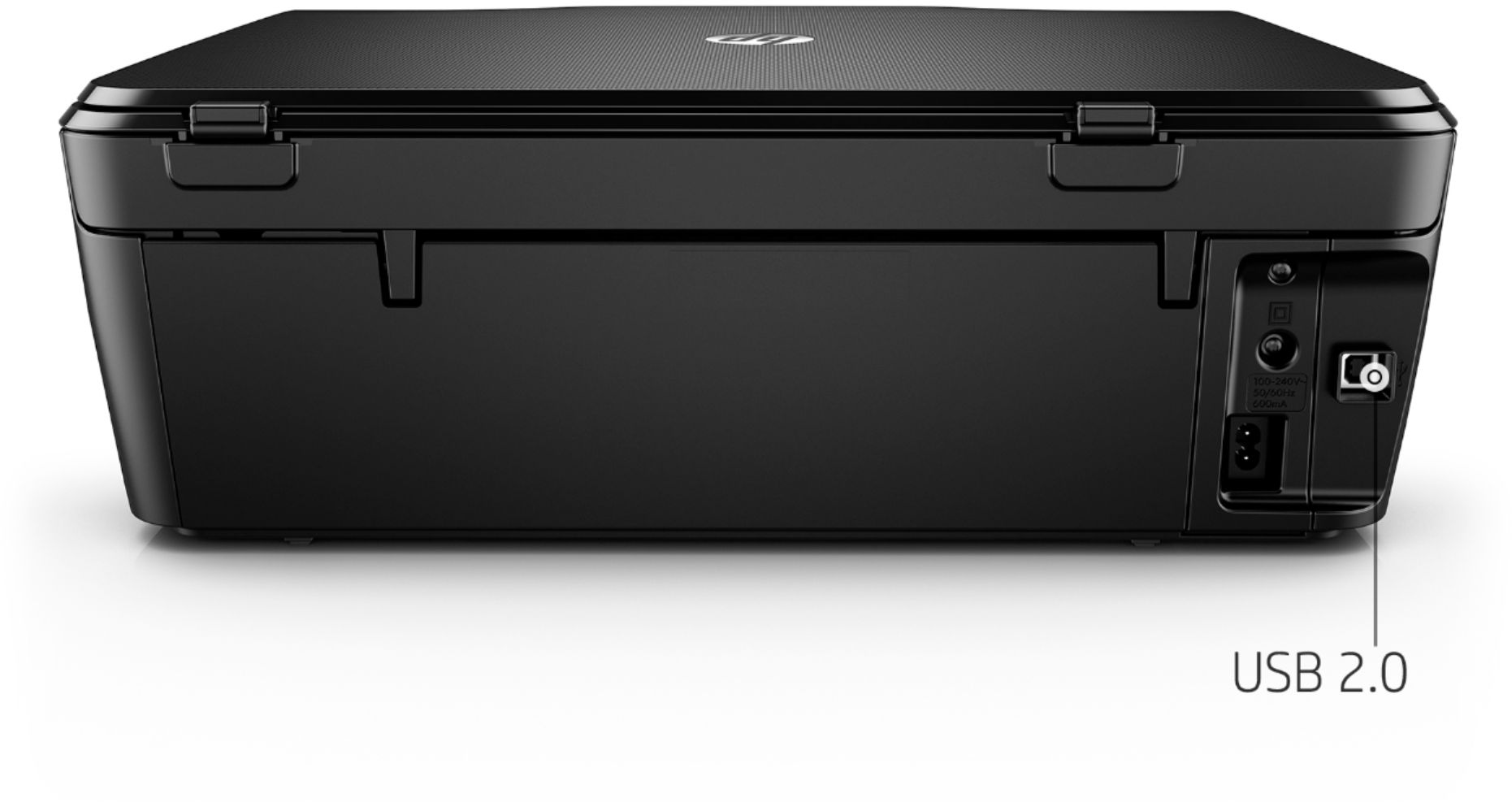
|Posted .This reviewer received promo considerations or sweepstakes entry for writing a review.It's hard to review this without much testing, but so far so good! The quality is really nice. No USB cable included, and 64 & 64XL ink is a bit on the high end but it's worth it.
I would recommend this to a friend - Pros mentioned:Print quality
Decent Quality Prints, Hard to Setup
|Posted .This reviewer received promo considerations or sweepstakes entry for writing a review.When i received this printer, trying to link it to my computer was a bit of a pain. After a little tech support and patience, i was able to get the systems linked. I was thrilled to be able to use the printer to print items directly from my phone. There was a bit of a delay in the process, but in the end, the pictures were pretty good quality when used with photo paper. I would not recommend using document paper for picture prints with this device. Overall, I was happy with this printer.
I would recommend this to a friend - Pros mentioned:Ease of use, Print quality
Best Printer.
Posted .This reviewer received promo considerations or sweepstakes entry for writing a review.This printer has automatic 2 side printing, the next higher model don't have this feature. I don't need a color display to operate a printer, instead you get the same print quality as the higher model with a lower price. set up was easy. I joined HP Instant Ink it was a great deal. Print speed is fast too.
I would recommend this to a friend Whats compatible to the HP envy 6255 all in one???
Posted .This reviewer received promo considerations or sweepstakes entry for writing a review.I might need another one. Where or how long till back in stock???
I would recommend this to a friend- Pros mentioned:Wireless
Good printer but having Web Service issues
Posted .This reviewer received promo considerations or sweepstakes entry for writing a review.this printer is good. Prints easily from laptop and android phones wirelessly. But one of the reasons I chose this model is because of its ePrint option. I spent a long time on the phone with tech support only fro her to tell me I need to call HP Cloud support. I spent an hour on the phone with cloud support and he still couldn't help me. I'm not sure what to do. Support thinks its fixable but its been a week and no one seems to know how to resolve the issue. If I didn't have this issue- this printer would get a 5 star rating
I would recommend this to a friend - Pros mentioned:Ease of use, Print quality
wonderful printer
Posted .This reviewer received promo considerations or sweepstakes entry for writing a review.easy wifi set up and easy to use..prints great photos and clean crisp text
I would recommend this to a friend - Pros mentioned:Print quality
Great printer for price
Posted .This reviewer received promo considerations or sweepstakes entry for writing a review.I ordered wireless printer HP6255 online at $50 off and it was delivered to my door in less than 48 hours. Was very easy to install and works great. Prints great pictures.
I would recommend this to a friend - Pros mentioned:Ease of use
Printer
Posted .This reviewer received promo considerations or sweepstakes entry for writing a review.Amazing product and upgrade. Easy to use but ink replacement is often.
I would recommend this to a friend - Pros mentioned:Wireless
it will work if you pay 99.00 for hp live support
Posted .This reviewer received promo considerations or sweepstakes entry for writing a review.bought this printer from best buy on 2/8/2018. went to hp123.com to get it set up. a live assistant named Thomas came on the site. asked me if i wanted him to install the printer and connect it to my wiireless network. he the proceeded to do a "remote access" of my computer to do the installation. after 45min or so everything was working. afterward he DEMANDED 99.00 FOR SETTING EVERYTHING UP AND PROCEEDED FUNDS TRANSFER THROUGH PAYPAL BILLED TO A "TECHIES POINT"? i was over a barrel as he still had remote access to my computer.. i was thoroughly outdone at this point. I THOUGHT THIS WAS UNFAIR AFTER PURCHASING THIS PRINTER AND A HP LAPTOP. WHAT CAN BE DONE TO RECTIFY THIS? I AM AN UNHAPPY CUSTOMER
No, I would not recommend this to a friendBrand response from HP Team
Posted .Hi,
I'm extremely sorry that this happened to you. Thank you for letting us know about this.
This is a terrible experience. Unfortunately, sometimes support feedback of this nature turns out to be fraudulent companies or individuals.
There is no charge for downloading the software via the correct HP link: 123.hp.com/envyphoto6255. Also there is no charge for standard support during your warranty period
You can reach us by email at psgsocialmedia@hp.com and we will be happy to look into the matter with you.
Mary
HP Care
hp.com/support
ok until it stopped working
Posted .This reviewer received promo considerations or sweepstakes entry for writing a review.was good until it stopped working a week ago. power outage, came back up with Kernel error. No one at HP or the internet seems to know what that is. Now it only displays the HP logo and I can't get it to work. HP has been no help what so ever and their smart app-doesn't work, help, or have the same info HP's tech support photos show. It says to select diagnose and fix from the menu on the smart app and the smart app doesn't even have a menu bar on it. So now I am looking for yet another printer. Probably won't get it from Best Buy though since I have had problems with the 2 that I have gotten there.
No, I would not recommend this to a friendWorst!
Posted .This reviewer received promo considerations or sweepstakes entry for writing a review.Worst printer I ever purchased. Uses lots of ink and will not printer correctly once ink gets to 25%.
No, I would not recommend this to a friend- Pros mentioned:Print quality
Fine Specimen of HP Mediocrity
Posted .This reviewer received promo considerations or sweepstakes entry for writing a review.It prints fine, even double-sided! What vexes me is that I keep finding the printer in an errored state: blinking from panel, and an 8 digit hex code that even Google cannot find. Also, it came config'd for IPv6 and kept interfering with -- i.e. blocking all access to -- my IPv4 home wifi until I disabled it. Yes, I've made sure it's taken HP's latest updates.
No, I would not recommend this to a friendBrand response from HP Team
Posted .Hi Nate,
I'm terribly sorry that the printer isn't working as expected. Reliability is something that we always pride ourselves on with our printers, so I regret that we missed the mark this time. That being said, I'd really like to resolve this for you, so let's see how I can help.
As I don't have enough information to identify this error, I recommend reaching out to us for support. We'd be more than happy to work through any necessary troubleshooting with you. You can get in touch via your preferred method at this link: hp.com/contactHP
I'd also like to mention the fact that HP printers do also have a 1-year warranty from their purchase date, so if you find you need to use it, I hope you will. To verify the warranty, you can use the following link: support.hp.com/us-en/checkwarranty
Chelsea
HP Care
hp.com/support
Will not print.
Posted .This reviewer received promo considerations or sweepstakes entry for writing a review.We talked to HP salesman in store and decided this would be best printer for our needs. Our computer is an older Dell running on windows 7. Plugged in printer, and loaded ink and paper. Set up seemed easy enough, but way too many steps, mostly concerning auto ink replacement. Anyway finally got everything set up, and went to print off internet, and it kept shutting down Yahoo, stating Yahoo no longer responding. Tried to print a picture stored on computer, and it kept asking me to save picture first. Picture already saved. Then tried to print bank statement. Again, it ask to save first. before it would print. Again I could not print anything. Researched this problem and apparently several people have had this problem. Spent 2 hours trying to correct, without success. Only thing accomplished was a migraine headache. Will return to Best Buy Never buy again.
No, I would not recommend this to a friendBrand response from HP Team
Posted .Hello,
I am sorry that you have been having this problem. It sounds quite annoying.
I'd never heard of this happening, so looked it up and it has been discussed and seemingly solved by people responding on the HP Forums: h30434.www3.hp.com/t5/Inkjet-Printing/My-printer-makes-me-save-the-document-first-instead-of-just/td-p/4846792
Hope this helps. Also, you can always contact us for help at: hp.com/contacthp
Mary
HP Care
hp.com/support
HP Envy 6255
Posted .This reviewer received promo considerations or sweepstakes entry for writing a review.Hate it! I had an HP 5520 PhotoSmart. Worked fantastic for 8 years, but died. Replaced it with this unit. The printer does not render colors correctly on photos. Contacted HP support. They gave a few suggestions. Nothing they recommended works. I really wish I could return this unit for a better model.
No, I would not recommend this to a friendPoor Quality
Posted .This reviewer received promo considerations or sweepstakes entry for writing a review.Roller cover very poor fit and quality. Paper jams take 30 seconds to clear and 45 minutes to get junk cover to fit back
No, I would not recommend this to a friendBrand response from HP Team
Posted .Hi Nathan,
I'm sorry to hear that you've not had the experience you expected to with the printer. This is quite disappointing, especially since we always aim to deliver a quality experience with our printers.
If you'd like any help with the paper jams, please remember that you can always reach out to us for support. We're always here and would be more than happy to help you make the most of your experience with the printer. You can get in touch with us via your preferred method at this link: hp.com/contactHP
Chelsea
HP Care
hp.com/support