Customer Ratings & Reviews
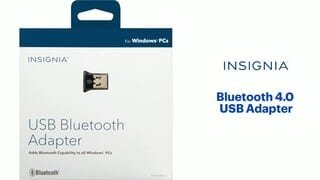
- Model:
- NS-PCY5BMA2
- SKU:
- 4884001
Rating by feature
- Value
Rating 4.1 out of 5 stars
- Quality
Rating 4.1 out of 5 stars
- Ease of Use
Rating 4.0 out of 5 stars
Customers are saying
Customers praise the Bluetooth functionality, ease of use, and compatibility of this USB adapter, frequently citing its affordability and compact size. Positive feedback also highlights the straightforward setup and reliable performance. However, some users experienced difficulties with driver installation and reported that the range and signal strength could be improved.
This summary was generated by AI based on customer reviews.
Best thing I have purchased in a long time.
||Posted .This reviewer received promo considerations or sweepstakes entry for writing a review.I have a older computer and could not connect via Bluetooth. This attachment was easy to install and I am now able to work wirelessly.
I would recommend this to a friendIt did not work right off but it was easy to start
||Posted . Owned for 2 months when reviewed.This reviewer received promo considerations or sweepstakes entry for writing a review.Cool lil thing to have for a pc that has no blue tooth
I would recommend this to a friendMost likely user error but…
||Posted . Owned for 1 month when reviewed.This reviewer received promo considerations or sweepstakes entry for writing a review.i don’t believe I’ve installed the proper drivers because I see the device on my desktop but there’s nothing left to do so I can’t connect my keyboard to it.
No, I would not recommend this to a friendCheap and efficent.
||Posted . Owned for 1 month when reviewed.This reviewer received promo considerations or sweepstakes entry for writing a review.Works as it should. Low profile. No dropped connections so far.
I would recommend this to a friendNecessary for older operating system.
||Posted . Owned for 3 weeks when reviewed.This reviewer received promo considerations or sweepstakes entry for writing a review.I had to order this because I'm using an older operating system, but Best Buy had it and sent it to me quickly.
I would recommend this to a friendWorks as Expected
||Posted . Owned for 1.5 years when reviewed.This reviewer received promo considerations or sweepstakes entry for writing a review.Bought this to run Blue Tooth headphones off of an old desktop computer. This does just what I wanted.
I would recommend this to a friendExactly what I wanted and needed.
||Posted .This reviewer received promo considerations or sweepstakes entry for writing a review.I wanted to use my bluetooth headphones with my desk top computer. This devise enabled me to use bluetooth and take advantage of wireless listening.
I would recommend this to a friendWorks great!
||Posted . Owned for 1 month when reviewed.This reviewer received promo considerations or sweepstakes entry for writing a review.Works great! Fixed the issues with sound on the computer. Sound comes out crisp and clear.
I would recommend this to a friendFailure at best under Linux OS.
||Posted . Owned for 1 month when reviewed.This reviewer received promo considerations or sweepstakes entry for writing a review.This product may well work in a Windows system, but was a complete failure for the Linux Mint v 20.2 with the latest updates.
I would recommend this to a friend- Cons mentioned:Driver installation
Would not install
||Posted .This reviewer received promo considerations or sweepstakes entry for writing a review.Will not install or find driver on Windows 10 desktop. Tried to download drivers from the Insignia Support site, but that site continually says it is down and has you call or email. Email just said call. Phone support was not able to assist. Kept transferring me around and keeping me on hold. Returning the item today.
No, I would not recommend this to a friendBrand response from InsigniaCustomerSupport
Posted .Hi smp81,
Thanks for taking the time and effort to leave a review our Insignia™ - Bluetooth 4.0 USB Adapter - Black. We do apologize for this disappointing experience that you had with our product due to failure of installation. I have indicated below the steps on how are you going to install this device. Hopefully, this would help.
1: Go to Device Manager (this can be done by left clicking on most start buttons. including 7/8.1/10)
2: Plug in USB Bluetooth Device
3: Check Device Manager and look for your Bluetooth device, which should come up as BCM20XXXXX (BCM20702A0) (the X's will be different depending on your exact model but it is not important, what is important, is that you find the proper device. The device should pop up as soon as you plug it in and you will see display manager flicker and it will repopulate its listing. you will probably see a yellow mark on the icon telling you something is wrong, which is correct. )
4: Right Click on the BCM20702A0 in device manager and click on "update driver software"
5: Select Browse my computer for updates,
6: Select "Let me pick from a list of Device Drivers"
7: Select Bluetooth Radius
8: Select "Broadcom" on the left list of manufactures.
9: Select "BCM2033 Single" Driver on the right.
10: Click Install
11: Reboot computer
We are continuously working on improving our products and their designs and if you have any more questions or concerns, please use the link below to reach us.
Insignia Products
Lisa
https://insigniaproducts.com
BT
||Posted .This reviewer received promo considerations or sweepstakes entry for writing a review.this is for my son's PC that he needs wifi access for schoolwork.
I would recommend this to a friend- Pros mentioned:Compatibility, Ease of use
Works perfectly.
||Posted .This reviewer received promo considerations or sweepstakes entry for writing a review.Just plug it in and install the drivers. It works perfectly with Windows 10.
I would recommend this to a friend Worked as advertised
||Posted .This reviewer received promo considerations or sweepstakes entry for writing a review.Very pleased. Plug and Play. I received a Bluetooth headset as a gift... but my older desktop was not equipped. This little dongle did the trick.
I would recommend this to a friendDidn't work on my work computer
||Posted .This reviewer received promo considerations or sweepstakes entry for writing a review.I got this for my work computer but it wouldn't work. This could be because of the security setting in place on that computer but oh well. I would still recommend it to, however, bewared it may not work.
No, I would not recommend this to a friendBlue tooth for computer
||Posted . Owned for 6 months when reviewed.This reviewer received promo considerations or sweepstakes entry for writing a review.I have an older computer that didn't have Bluetooth. I purchased this so I could connect my circut machine to my Computer.
I would recommend this to a friend- Cons mentioned:Driver installation
Don’t buy this
||Posted . Owned for 1 week when reviewed.This reviewer received promo considerations or sweepstakes entry for writing a review.No driver available for install on the insignia website. Found another driver that was recommended on another website and it caused my laptop to get the blue screen of death. I had to get IT to clean out the bugs. Why sell a device that has no driver for download?
No, I would not recommend this to a friendBrand response from InsigniaCustomerSupport
Posted .Hi there!
Thank you for taking the time to review our Insignia™ - Bluetooth 4.0 USB Adapter - Black, we're very sorry to read you are experiencing this issue with one of our products. We are continuously working to improve the quality of our products and anticipate market demands that drive customer satisfaction. Your feedback is especially important to us and your concerns will be shared with our product team.
Insignia Support
Angela
www.insigniaproducts.com/support
Not what I needed but good
||Posted .This reviewer received promo considerations or sweepstakes entry for writing a review.I purchased this to use with bluetooth head phones for my PS4. It was not compatible but it is a good product. I have used it in the past
I would recommend this to a friendSensitive to being bumped
||Posted .This reviewer received promo considerations or sweepstakes entry for writing a review.Works as expected but is sensitive to being bumped - causes my computer to completely restart if I accidentally touch it, which is a huge inconvenience.
No, I would not recommend this to a friendthis item works better than what its supposed to
||Posted . Owned for 3 weeks when reviewed.This reviewer received promo considerations or sweepstakes entry for writing a review.to sum this product up in a few words .. they would be in my eyes worth every penny enough said
I would recommend this to a friendDidn't work with PS4 controller
||Posted .This reviewer received promo considerations or sweepstakes entry for writing a review.I bought this to use a PS4 controller wireless with my PC, but it couldn't stay connected. I'm sure it works as intended for other purposes, but it didn't do what I needed it to do.
No, I would not recommend this to a friend