Customer Ratings & Reviews

- Model:
- 81B5000KUS
- SKU:
- 6061900
Rating by feature
- Value
Rating 3.6 out of 5 stars
- Quality
Rating 3.7 out of 5 stars
- Ease of Use
Rating 4.1 out of 5 stars
Customers are saying
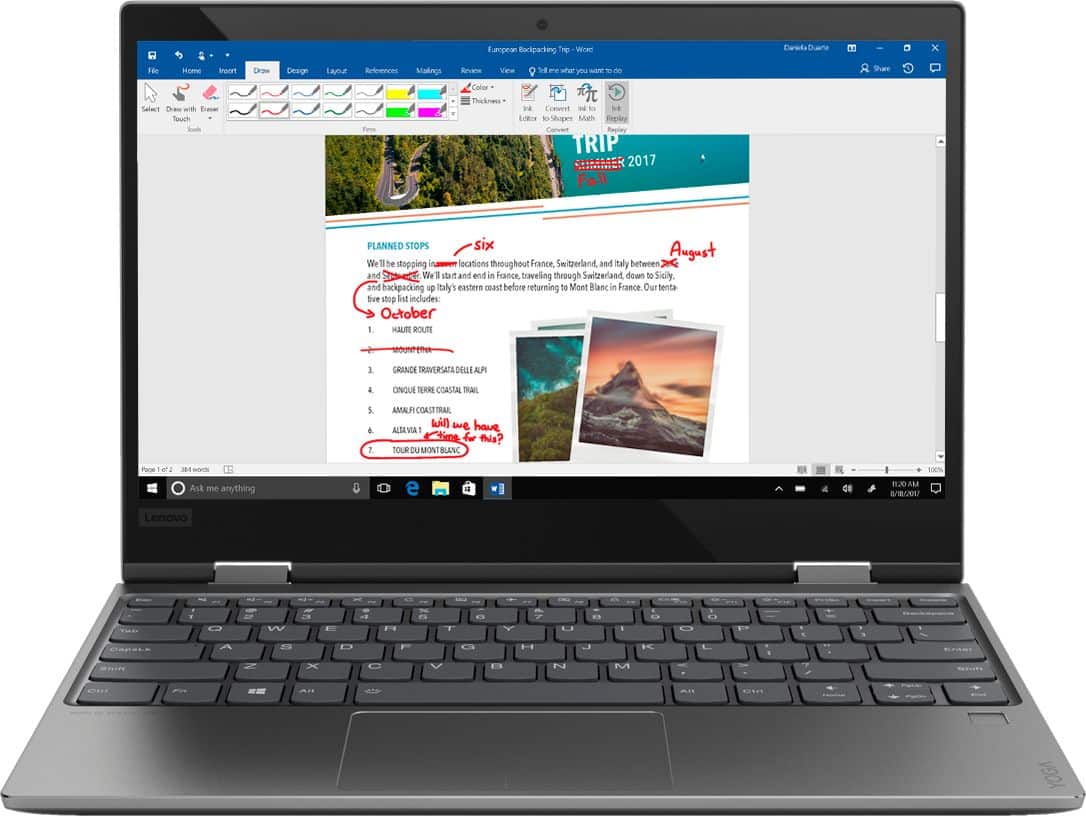
Customers love the Yoga 720 for its portability, light weight, and fast performance. They appreciate the touch screen and the affordable price point. However, some users have concerns about the fan noise, battery life, limited storage, and overheating issues.
This summary was generated by AI based on customer reviews.
- Pros mentioned:Portable
Great lightweight computer
||Posted .This reviewer received promo considerations or sweepstakes entry for writing a review.Very pleased with this purchase, perfect for traveling.
I would recommend this to a friendBrand response from Lenovo Product Expert
Posted .Thank you for choosing the Lenovo Yoga 720-12. We are pleased to hear that the Yoga 720-12 meets your computing needs so well.

- Cons mentioned:Battery life
lightweight but short battery life
||Posted .This reviewer received promo considerations or sweepstakes entry for writing a review.Depends what use you want it for. Keys are nicely spaced, but quirky touchpad. Short battery life, which was described, but usually shorter than the 4 hours
No, I would not recommend this to a friendBrand response from Lenovo Product Expert
Posted .The Yoga 720-12 ships with a 3CELL 36WH, Lithium Polymer battery, with a battery life of up to 6 hours, depending on the work that the device is performing. If you are getting substantially less battery life, be sure there are no unwanted programs running in the background, draining the battery. Here is a link to some tips for finding out what is draining your battery:
https://www.laptopmag.com/articles/battery-saver-windows-10. Additionally, to maximize battery life, try changing your power management setting to a more conservative one. You can do this in the control panel, in the power management category on your system. Select a more conservative power management setting to extend battery life. With regard to the touchpad, you can make adjustments to the touchpad in your system settings. You can get there by clicking on the magnifying glass at the bottom left of your Windows 10 screen. Type "touchpad" in the search window. Select "Mouse & touchpad settings" from the list of choices. You can make general adjustments to the touchpad there. You can also select "Additional mouse options" for more detailed adjustments to the touchpad sensitivity by increasing the delay of the touchpad.
Powerful versatile laptop
||Posted .This reviewer received promo considerations or sweepstakes entry for writing a review.This laptop works great so far. There is no lag and the touchscreen is super responsive. I was worried about using Windows 10 since I am switching from a MacBook Pro but it has actually been easy to transition to and so far I really like this laptop. I don't use the "tablet" feature much but when I do it works like it should.
I would recommend this to a friendBrand response from Lenovo Product Expert
Posted .Thank you for choosing novo Yoga 720-12. We are pleased to hear that the features and performance of the Yoga 720-12 meets your computing needs so well.

- Pros mentioned:Touch screen
My best computer purchase.
||Posted .This reviewer received promo considerations or sweepstakes entry for writing a review.Love the touch screen, excellent color, ease of use.
I would recommend this to a friendBrand response from Lenovo Product Expert
Posted .Thank you for choosing the Lenovo Yoga 720-12. We are pleased to hear that the ease of use, features and performance of the Yoga 720-12 meets your computing needs so well.
- Pros mentioned:Portable
Easy to use 2in 1
||Posted .This reviewer received promo considerations or sweepstakes entry for writing a review.This laptop is lightweight and easy to use. Love it!!!
I would recommend this to a friendBrand response from Lenovo Product Expert
Posted .Thank you for choosing the Lenovo Yoga 720-12. We are pleased to hear that the features and performance of the Yoga 720-12 meets your computing needs so well.
good price
||Posted .This reviewer received promo considerations or sweepstakes entry for writing a review.very useful,I Like it and ir is very small,good touch
I would recommend this to a friendBrand response from Lenovo Product Expert
Posted .Thank you for choosing The Lenovo Yoga 720-12. We are pleased to hear that the features and performance of the Yoga 720-12 meets your computing needs so well.
- Pros mentioned:Light weight
Very good for student
||Posted .This reviewer received promo considerations or sweepstakes entry for writing a review.The laptop is very light and is a good for a student.
I would recommend this to a friendBrand response from Lenovo Product Expert
Posted .Thank you for choosing the Lenovo Yoga 720-12. We are pleased to hear that the Yoga 720-12 meets your computing needs so well.
- Pros mentioned:Touch screen
Great laptop.
||Posted .This reviewer received promo considerations or sweepstakes entry for writing a review.This is going to be a great touch screen computer.
I would recommend this to a friendBrand response from Lenovo Product Expert
Posted .Thank you for choosing the Lenovo Yoga 720-12. We are pleased to hear that the features of the Yoga 720-12 met your requirements for a new computer so well.
- Cons mentioned:Fan noise
Good portable laptop
||Posted .This reviewer received promo considerations or sweepstakes entry for writing a review.Overall, it is a good laptop, I am satisfied with this. But, sometimes noise is big problem, I do not recommend using in library considering its noise.
No, I would not recommend this to a friendBrand response from Lenovo Product Expert
Posted .The Lenovo Yoga 720-12 is a high performance system with its Dual-Core/Four-Thread Intel Core i5-7200U processor and 8GB of RAM and a 128GB solid state hard drive. It will generate heat whenever it is turned on, even at idle, this is normal. The onboard fan will maintain the proper operating temperature for the device. You will hear the fan whenever it runs, this too is normal.
- Pros mentioned:Portable
LIght and productive
||Posted .This reviewer received promo considerations or sweepstakes entry for writing a review.Great laptop for traveling and performance no doubt
I would recommend this to a friendBrand response from Lenovo Product Expert
Posted .Thank you for choosing the Lenovo Yoga 720-12. We are pleased to hear that the Yoga 720-12 is working out so well for you.
- Pros mentioned:Touch screen
great camera
||Posted .This reviewer received promo considerations or sweepstakes entry for writing a review.It's a very good laptop!!!the screen can be written
I would recommend this to a friendBrand response from Lenovo Product Expert
Posted .Thank you for choosing the Lenovo Yoga 720-12. You are correct, this model is compatible with Windows Ink. The Active Pen is sold separately.
- Pros mentioned:Light weight
Great laptop
||Posted .This reviewer received promo considerations or sweepstakes entry for writing a review.Love the flexibility, light weight versatile laptop.
I would recommend this to a friendBrand response from Lenovo Product Expert
Posted .Thank you for choosing the Lenovo Yoga 720-12. We are pleased to hear that the Yoga 720-12 is working out so well for you.
Compact and light
||Posted .This reviewer received promo considerations or sweepstakes entry for writing a review.Bought this laptop open box and got a great deal. My only complaint is I use a lot of hot keys and must use the Fn key in combination. Something that I still have a hard time getting use to.
I would recommend this to a friendBrand response from Lenovo Product Expert
Posted .Thank you for choosing the Lenovo Yoga 720-12. You can reverse the HotKey/Function Keys within Windows 10. Here is a link to the instructions: https://support.lenovo.com/us/en/solutions/ht101437
- Pros mentioned:Portable
It work great
||Posted .This reviewer received promo considerations or sweepstakes entry for writing a review.I use for my school and easy to bring in my small bag
I would recommend this to a friendBrand response from Lenovo Product Expert
Posted .Thank you for choosing the Lenovo Yoga 720-12. We are pleased to hear that the Yoga 720-12 meets your computing needs so well.
Love the Lenovo yoga but
||Posted .This reviewer received promo considerations or sweepstakes entry for writing a review.This the second Lenovo yoga I bought. I love the product. But this screen is a little too small. My other yoga is slightly bigger but that extra inch really makes a huge difference.
I would recommend this to a friendBrand response from Lenovo Product Expert
Posted .The Lenovo Yoga 720-12 ships with a 12.5" (screen size measured diagonally). This is an ultra portable, 2 in 1 computing device. It is great for mobile computing. If you are looking for a powerful but ultra portable 2 in 1 computing device, the Yoga 720-12 is a great choice.
Great laptop loaded with options
||Posted .This reviewer received promo considerations or sweepstakes entry for writing a review.Love the options just not the smaller screen (should have gotten the 15”;(). But that’s my fault,And I do love that it fits in my center console!!! Fast with solid state and backup HD
I would recommend this to a friendBrand response from Lenovo Product Expert
Posted .Thank you for choosing the Lenovo Yoga 720-12. We are pleased to hear that the performance of the Yoga 720-12 meets your computing needs.
- Pros mentioned:Price
Connectivity issues
||Posted .This reviewer received promo considerations or sweepstakes entry for writing a review.Overall a good laptop for the price. BUT, it was a nightmare getting it to connect to Wi-Fi. I had to install software before it would connect.
No, I would not recommend this to a friendBrand response from Lenovo Product Expert
Posted .We are sorry to hear that you had issues with WiFi connectivity. This device uses the latest 802.11AC frequency WiFi. You can easily keep system drivers that control WiFi and other operational systems working by using Lenovo Utility software installed on the device. This system has Lenovo utilities installed to help maintain the health of the device and keep the operating system software up to date. Type "Lenovo Vantage" in the Cortana Search window (if Lenovo Vantage is not installed on your device, you can download the APP and install it now). Select Lenovo Vantage from the list. In the window that opens, click on "Health and Support". In the expanded menu, select "Hardware Scan" In the window that opens, select "Run Quick Tests". This will scan your entire system for errors. Follow any directions that may pop up. If the problem continues after this scan, now click on "System Update". First select Windows update from the menu. Scan your system to be sure you have the latest version of Windows 10. Once that scan is complete, select "Additional Updates". This will scan your device to be sure there are no new BIOS/Driver updates needed. Follow any instructions that may pop up. If the issue still continues after these updates, we recommend you call Lenovo Tech Support at: 877-453-6686 for additional help.
I love this laptop!
||Posted .This reviewer received promo considerations or sweepstakes entry for writing a review.I absolutely love this laptop! The only thing I'm not too fond of is that if the laptop falls asleep and I turn it back on, the mouse disappears and I have to use the touch screen even if I don't want to unless I restart the computer. Other than that, I would definitely recommend this laptop to friends and family.
I would recommend this to a friendBrand response from Lenovo Product Expert
Posted .Thank you for choosing the Lenovo Yoga 720-12. If your touchpad turns off after waking from sleep, just use the HotKey in the F6 position on your keyboard to turn the touchpad back on. This HotKey toggles the touchpad on/off. There was a Windows 10 update recently, that changed the default for this feature from "on" to "off". There is at BIOS/driver update that can fix this issue permanently. Follow the link below to look for new driver updates for your specific system. Use the "Update Your System" feature to be sure you get all of the BIOS and drive updates for your specific device. As always, be sure to create a restore point on your system before you make any changes. You can do this by just typing "restore point" in the search window within Cortana and follow the link to create a restore point. If the problem persists, we recommend you call Lenovo Tech Support at: 877-453-6686. Here is the link:
https://pcsupport.lenovo.com/us/en/products/laptops-and-netbooks/yoga-series/yoga-720-12ikb?linkTrack=Homepage%3ABody_Search+Products&searchType=3&keyWordSearch=Yoga%2520720-12IKB%2520Laptop%2520%2528ideapad%2529
Great for the price
||Posted . Owned for 3 weeks when reviewed.This reviewer received promo considerations or sweepstakes entry for writing a review.Got it for $200 open box. Great little machine for lighter work. Web surfing Netflix etc. basically the same workload as a chrome book but with the full windows experience.
I would recommend this to a friendGreat purchase
||Posted .This reviewer received promo considerations or sweepstakes entry for writing a review.I was very hesitant on purchasing since I had not really heard of the company Lenovo before. The sales rep was very knowledgeable & helpful. After purchasing & having for about a month I am very much in love with it! I was replacing a Dell & I can say it was well worth purchasing. Sleek & light weight!
I would recommend this to a friendBrand response from Lenovo Product Expert
Posted .Thank you for choosing the Lenovo Yoga 720-12. We are pleased to hear that the Yoga 720-12 meets your computing needs so well.