Customer Ratings & Reviews
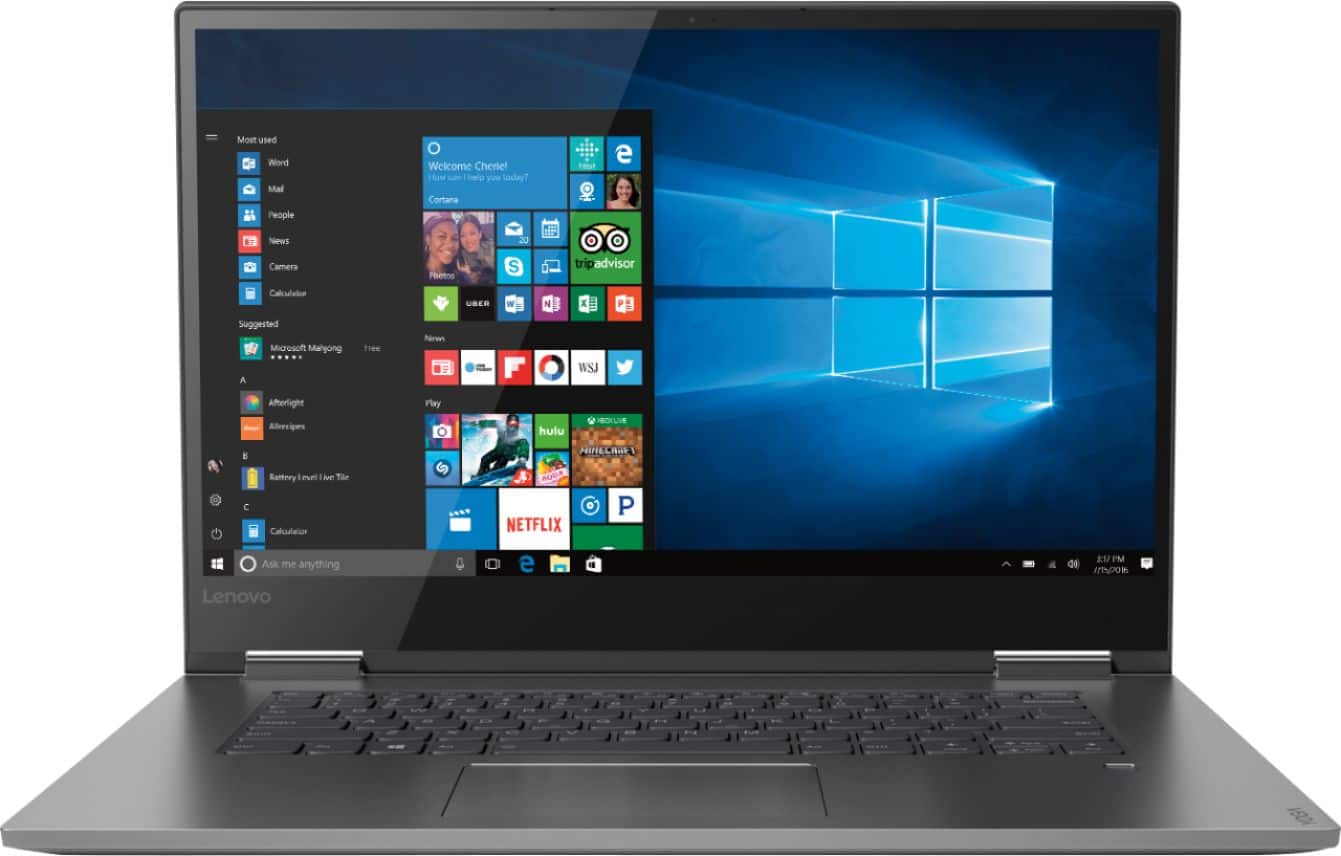
- Model:
- 81CU000BUS
- SKU:
- 6201040
Rating by feature
- Battery Life
Rating 4.7 out of 5 stars
- Speed
Rating 4.6 out of 5 stars
- Display
Rating 4.7 out of 5 stars
Customers are saying
Customers are enthusiastic about the Yoga 730's fast performance, lightweight design, and affordable price. Many users appreciate the convenience of the touch screen and the long battery life. However, some users have experienced issues with the Wi-Fi connectivity and the fingerprint reader, and a few find the laptop to be a bit heavy.
This summary was generated by AI based on customer reviews.
Sleek and fast machine
||Posted . Owned for 1 year when reviewed.This reviewer received promo considerations or sweepstakes entry for writing a review.I purchased this computer to do some front end development and it worked perfectly. Only gripe is that the battery life grew short after about 6 months and I’d almost always have to plug it in to turn it on.
I would recommend this to a friendBrand response from Lenovo Product Expert
Posted .The Lenovo Yoga 730-15 ships with a 3CELL 51.5WH, Lithium Polymer Battery, with a battery life of up to 9 hours, depending on the work that the device is performing. If your battery life is shorter, be sure any software you installed is compatible with Windows 10. There is no need to install Microsoft Office software. The software is already part of the operating system, you just need to activate the software with a purchased product key. If you have installed a copy of Microsoft Office, this is conflicting with the existing copy on the system and this will slow your system down. If you have installed a 3rd party anti-virus program, be sure that Windows Defender is turned off and that the trial version of McAfee Anti-Virus software is uninstalled. There can only be one anti-virus program on the system. You may need to restore your system to original factory default settings if any of the programing errors have occurred. You can do that by typing "restore" in the Cortana search window. Just click on the magnifying glass icon at the bottom left of your Windows 10 Desktop. Click on "Reset This PC" Then click on "Get Started" and follow the on screen directions to restore to factory defaults. If there is no incompatible software installed, to maximize battery life, first adjust your battery saver settings. Here is a link to instruction for doing this in Windows 10: https://www.digitalcitizen.life/how-use-configure-battery-saver-windows-10. Next, to maximize battery life, be sure there are no unwanted programs running in the background, draining the battery. Here is a link to some tips for finding out what is draining your battery:
https://www.laptopmag.com/articles/battery-saver-windows-10. Also, to maximize battery life, try changing your power management setting to a more conservative one. You can do this in the control panel, in the power management category on your system. Select a more conservative power management setting to extend battery life. Finally, if the battery life does not improve, a battery reset may help. Here is a link to instructions for reconditioning a non-removable battery, using the Battery Management Software installed on the computer. If you need further assistance, we recommend you call Lenovo Tech Support at: 877-453-6686. Here is the link: https://windowsreport.com/laptop-battery-not-charging-windows-10/
Great /FAST PC
||Posted .This reviewer received promo considerations or sweepstakes entry for writing a review.My only issues so far has been a few random glitches. I use this PC with an additional monitor at times and sometimes there is hesitation when dragging items or windows from one screen to other. Same issue with mouse.
I would recommend this to a friendBrand response from Lenovo Product Expert
Posted .Thank you for choosing the Lenovo Yoga 730-15. With regard to the lag you mention, this may be software-based. This model ships with Lenovo Utility software that can find errors on this computer and fix them. This system has Lenovo utilities installed to help maintain the health of the device and keep the operating system software up to date. Type "Lenovo Vantage" in the Cortana Search window (if Lenovo Vantage is not installed on your device, you can download the APP and install it now). Select Lenovo Vantage from the list. In the window that opens, click on "Health and Support". In the expanded menu, select "Hardware Scan" In the window that opens, select "Run Quick Tests". This will scan your entire system for errors. Follow any directions that may pop up. If the problem continues after this scan, now click on "System Update". First select Windows update from the menu. Scan your system to be sure you have the latest version of Windows 10. Once that scan is complete, select "Additional Updates". This will scan your device to be sure there are no new BIOS/Driver updates needed. Follow any instructions that may pop up. If the issue still continues after these updates, we recommend you call Lenovo Tech Support at: 877-453-6686 for additional help.
Great laptop with WiFi driver issues
||Posted .This reviewer received promo considerations or sweepstakes entry for writing a review.It would make more sense if the known problem with the WiFi drivers were updated when being set up. Bringing it back to Geek Squad took it out of action when needed. Luckily I have the Geek Squad service plan.
No, I would not recommend this to a friendBrand response from Lenovo Product Expert
Posted .There is currently a new driver update. Be sure you have the latest version of Windows 10 and that all of the BIOS files and drivers supporting Windows 10 are up to date as well. This system has Lenovo utilities installed to help maintain the health of the device and keep the operating system software up to date. Type "Lenovo Vantage" in the Cortana Search window (if Lenovo Vantage is not installed on your device, you can download the APP and install it now). Select Lenovo Vantage from the list. In the window that opens, click on "Health and Support". In the expanded menu, select "Hardware Scan" In the window that opens, select "Run Quick Tests". This will scan your entire system for errors. Follow any directions that may pop up. If the problem continues after this scan, now click on "System Update". First select Windows update from the menu. Scan your system to be sure you have the latest version of Windows 10. Once that scan is complete, select "Additional Updates". This will scan your device to be sure there are no new BIOS/Driver updates needed. Follow any instructions that may pop up. If the issue still continues after these updates, we recommend you call Lenovo Tech Support at: 877-453-6686 for additional help. For 2018, Lenovo retained its place for a second year as the best laptop vendor:
https://www.laptopmag.com/articles/laptop-brand-ratings
Super great laptop for college use. Fast & easy!
||Posted .This reviewer received promo considerations or sweepstakes entry for writing a review.I had a MacBook Pro and thought I had the right laptop for myself, but after purchasing this Lenovo Yoga, I have truly found the perfect laptop for research, writing papers, and schoolwork on the go. Truly a great a laptop for school/work purposes!
I would recommend this to a friendBrand response from Lenovo Product Expert
Posted .Thank you for choosing the Lenovo Yoga 730-15. We are pleased to hear that the features and performance of the Yoga 730-15 meets your computing needs so well.

light and well made great size screen
||Posted .This reviewer received promo considerations or sweepstakes entry for writing a review.This is my second Lenovo as I have purchased the same model with the 13 inch screen. It is well made and has a sharp screen. The 13 inch screen is better to carry to see clients. The 15 inch screen with the bigger screen is left at the office.
I would recommend this to a friendBrand response from Lenovo Product Expert
Posted .Thank you for choosing both the Lenovo Yoga 730-15 and the Yoga 730-13. We are pleased to hear that both Yoga models are meeting your computing needs so well. We appreciate your loyalty to Yoga and the Lenovo Brand.
good decision
||Posted .This reviewer received promo considerations or sweepstakes entry for writing a review.easy to get it started and easy keyboard. good screen. so much better than my previous dell laptop. wish I had purchased this one earlier. didn't even know about tenovo until it was recommended to me by a friend.
I would recommend this to a friendBrand response from Lenovo Product Expert
Posted .Thank you for choosing the Lenovo Yoga 730-15. We are pleased to hear that the Yoga 730-15 is working out so well for you. For 2018, Lenovo retained its place for a second year as the best laptop vendor:
https://www.laptopmag.com/articles/laptop-brand-ratings
Great machine for the price
||Posted . Owned for 1.5 years when reviewed.This reviewer received promo considerations or sweepstakes entry for writing a review.Excellent machine! Wanted a good machine for regular business tasks! Microsoft, Adobe, etc. runs everything perfectly fine. Rendering videos is a bit slow, but that’s expected for any machine around $700z
I would recommend this to a friendGreat computer at Great Price
||Posted .This reviewer received promo considerations or sweepstakes entry for writing a review.Provides all the computing power and options I need. Easy to get started and easy to use. This is my first laptop and couldn't be happier. Travels easily and appears to be very sturdy. Keyboard and touch pad are sensitive and comfortable.
I would recommend this to a friendBrand response from Lenovo Product Expert
Posted .Thank you for choosing the lenovo Yoga 730-15. With regard to the touchpad, you can make adjustments to the touchpad in your system settings. You can get there by clicking on the magnifying glass at the bottom left of your Windows 10 screen. Type "touchpad" in the search window. Select "Mouse & touchpad settings" from the list of choices. You can make general adjustments to the touchpad there. You can also select "Additional mouse options" for more detailed adjustments to the touchpad sensitivity by increasing the delay of the touchpad.
Great functional unit
||Posted . Owned for 1 month when reviewed.This reviewer received promo considerations or sweepstakes entry for writing a review.I had looked and looked. Everything was starting to jumble together. I finally broke down and went in to my local store. The salesman was great. Efficient, answered my questions and this is the unit I chose. So far it's been great.
I would recommend this to a friendBrand response from Lenovo Product Expert
Posted .Thank you for choosing the Lenovo Yoga 730-15. We are pleased to hear that the features and performance of the Yoga 730-15 meets your computing needs so well. For 2018, Lenovo retained its place for a second year as the best laptop vendor:
https://www.laptopmag.com/articles/laptop-brand-ratings
Great Computer
||Posted .This reviewer received promo considerations or sweepstakes entry for writing a review.No complaints so far, it has worked well. The packaging is amazing. The only thing is that it is really difficult to right click using the mousepad. Also would have liked to have a numbers pad on the keyboard.
I would recommend this to a friendBrand response from Lenovo Product Expert
Posted .Thank you for choosing the Lenovo Yoga 730-15. With regard to the touchpad, you can make adjustments to the touchpad in your system settings. You can get there by clicking on the magnifying glass at the bottom left of your Windows 10 screen. Type "touchpad" in the search window. Select "Mouse & touchpad settings" from the list of choices. You can make general adjustments to the touchpad there. You can also select "Additional mouse options" for more detailed adjustments to the touchpad sensitivity by increasing the delay of the touchpad. For 2018, Lenovo retained its place for a second year as the best laptop vendor:
https://www.laptopmag.com/articles/laptop-brand-ratings
Nice 2 in 1 laptop
||Posted . Owned for more than 2 years when reviewed.This reviewer received promo considerations or sweepstakes entry for writing a review.Great 2 in 1 laptop. Nice back-lit keyboard. Easy setup and use. Specs are good for browsing the internet and watching Netflix. Enough storage for documents and some pics. Use cloud for more storage.
I would recommend this to a friendGreat LapTop for the price
||Posted .This reviewer received promo considerations or sweepstakes entry for writing a review.This laptop has everything I need. My last laptop had Windows 7, which I like very much, so it has taken some change for me to get used to Windows 10, but I will get it soon. I would recommend thisYoga 730 Lenovo,computer very much.
I would recommend this to a friendBrand response from Lenovo Product Expert
Posted .Thank you for choosing the Lenovo Yoga 730-15. With regard to learning your way around Windows 10, you may want to try YouTube.com (just type that address in your browser address window). There are hundreds for free instructional videos there about Windows 10. Just type Windows 10 Introduction in to the YouTube search window. You can watch free videos there that will show you the basics all the way up to tips and tricks videos and they're all free.
Wife loves computer for school
||Posted . Owned for 1.5 years when reviewed.This reviewer received promo considerations or sweepstakes entry for writing a review.She is currently in a masters program and need a quality computer for the work. This computer does this and more. The SSD really allows for fast moving processing and have never really had an issue with lag.
I would recommend this to a friendLightweight, thin and plenty of power
||Posted .This reviewer received promo considerations or sweepstakes entry for writing a review.Nice Intel 5 chip inside. Flash drive is quick and nimble. Need to add upgradable graphics card at this price point. No internal DVD drive, but thats not a deal breaker these days. Nice overall laptop.
I would recommend this to a friendBrand response from Lenovo Product Expert
Posted .Thank you for choosing the Lenovo Yoga 730-15. We are pleased to hear that the Yoga 730-15 meets your computing needs so well.
Perfect Laptop for College
||Posted . Owned for 3 weeks when reviewed.This reviewer received promo considerations or sweepstakes entry for writing a review.My two daughters are getting set for another year of school. I purchased two of these laptops for either of them. They are on them constantly. We have not had a single issue. Would recommend this laptop to anyone
I would recommend this to a friendBrand response from Lenovo Product Expert
Posted .Thank you for choosing the Lenovo Yoga 730-15 for your daughters. We are pleased to hear that the features and performance of the Yoga 730-15 meets your daughter's computing needs so well. You can transition from tablet model to laptop mode and back with the new Yoga 730-15. Weighing in at 4.2 lbs and polished in premium aluminum, the Yoga 730-15 will complement your style no matter where the day takes you. The latest 8th generation Intel Core i5 processor gives the Yoga 730-15 up to a 40 percent performance boost with unprecedented touchscreen and pen responsiveness (active pen sold separately), faster bootups, and seamless multitasking. All of this speed and power to amplify your productivity and help you be ready at a moments notice. Experience truly immersive sound with Dolby Atmos, which creates a three-dimensional audio space. Sound comes alive with fullness and depth when you listen through headphones.
- Cons mentioned:Wifi connectivity
pretty good
||Posted . Owned for 1.5 years when reviewed.This reviewer received promo considerations or sweepstakes entry for writing a review.overall pretty good however wifi drops a LOT. After having this for a couple of years I am going to buy another due to this issue,
I would recommend this to a friend Takes care of all my school needs with ease!
||Posted .This reviewer received promo considerations or sweepstakes entry for writing a review.I love this laptop! It was the first laptop to catch my eye, and I ended up buying it, and I'm extremely happy with it! It takes care of all of my needs, and I can't imagine doing school work without it now! Thank you Lenovo!
I would recommend this to a friendBrand response from Lenovo Product Expert
Posted .Thank you for choosing the Lenovo Yoga 730-15. We are pleased to hear that the performance of the Yoga 730-15 meets your computing needs so well.
We are very pleased with this new laptop
||Posted .This reviewer received promo considerations or sweepstakes entry for writing a review.No problems what-so-ever! All of our programs were easy to install. The easiest part was that it recognized the Wifi and internet right off without any hassles. Now we have 2 Lenovos! Not going back to the other brand again!
I would recommend this to a friendBrand response from Lenovo Product Expert
Posted .Thank you for choosing the Lenovo Yoga 730-15. We are pleased to hear that the ease of setup and use as well as the performance of the Yoga 730-15 meets your computing needs so well. We appreciate your loyalty to the Lenovo Brand.
So far so good.
||Posted .This reviewer received promo considerations or sweepstakes entry for writing a review.Does everything my wife needs it to do for keeping our paperwork caught up. I'm hoping its better than my daughters Yoga 920, the geek squad worked on hers and it's till crashing during finals week.
I would recommend this to a friendBrand response from Lenovo Product Expert
Posted .Thank you for choosing the Lenovo Yoga 730-15 for your wife. With regard to the issues you are experiencing with your daughter's Lenovo 920-14, be sure any software you installed is compatible with Windows 10. There is no need to install Microsoft Office software. The software is already part of the operating system, you just need to activate the software with a purchased product key. If you have installed a copy of Microsoft Office, this is conflicting with the existing copy on the system and this will slow your system down. If you have installed a 3rd party anti-virus program, be sure that Windows Defender is turned off and that the trial version of McAfee Anti-Virus software is uninstalled. There can only be one anti-virus program on the system. You may need to restore your system to original factory default settings if any of the programing errors have occurred. You can do that by typing "restore" in the Cortana search window. Just click on the magnifying glass icon at the bottom left of your Windows 10 Desktop. Click on "Reset This PC" Then click on "Get Started" and follow the on screen directions to restore to factory defaults. If the problem persists, we recommend you contact Lenovo Tech Support at: 877-453-6686.
Fabulous Laptop!
||Posted . Owned for 6 months when reviewed.This reviewer received promo considerations or sweepstakes entry for writing a review.Bought as a gift for a relative. Risky to do since the relative would struggle to resolve any problems. Fortunately, this thing set up and ran like a champ! Plus, Best Buy had it in stock and on sale. Excellent!
I would recommend this to a friendBrand response from Lenovo Product Expert
Posted .Thank you for choosing the Lenovo Yoga 730-15 as a gift. We are pleased to hear that the easy setup, ease of use and performance of the Yoga 730-15 are working out so well for the user. For 2018, Lenovo retained its place for a second year as the best laptop vendor:
https://www.laptopmag.com/articles/laptop-brand-ratings