Customer Ratings & Reviews



- Model:
- 82BH00DQUS/82BH0006US
- SKU:
- 6426710
Rating by feature
- Battery Life
Rating 4.5 out of 5 stars
- Speed
Rating 4.6 out of 5 stars
- Display
Rating 4.5 out of 5 stars
Customers are saying
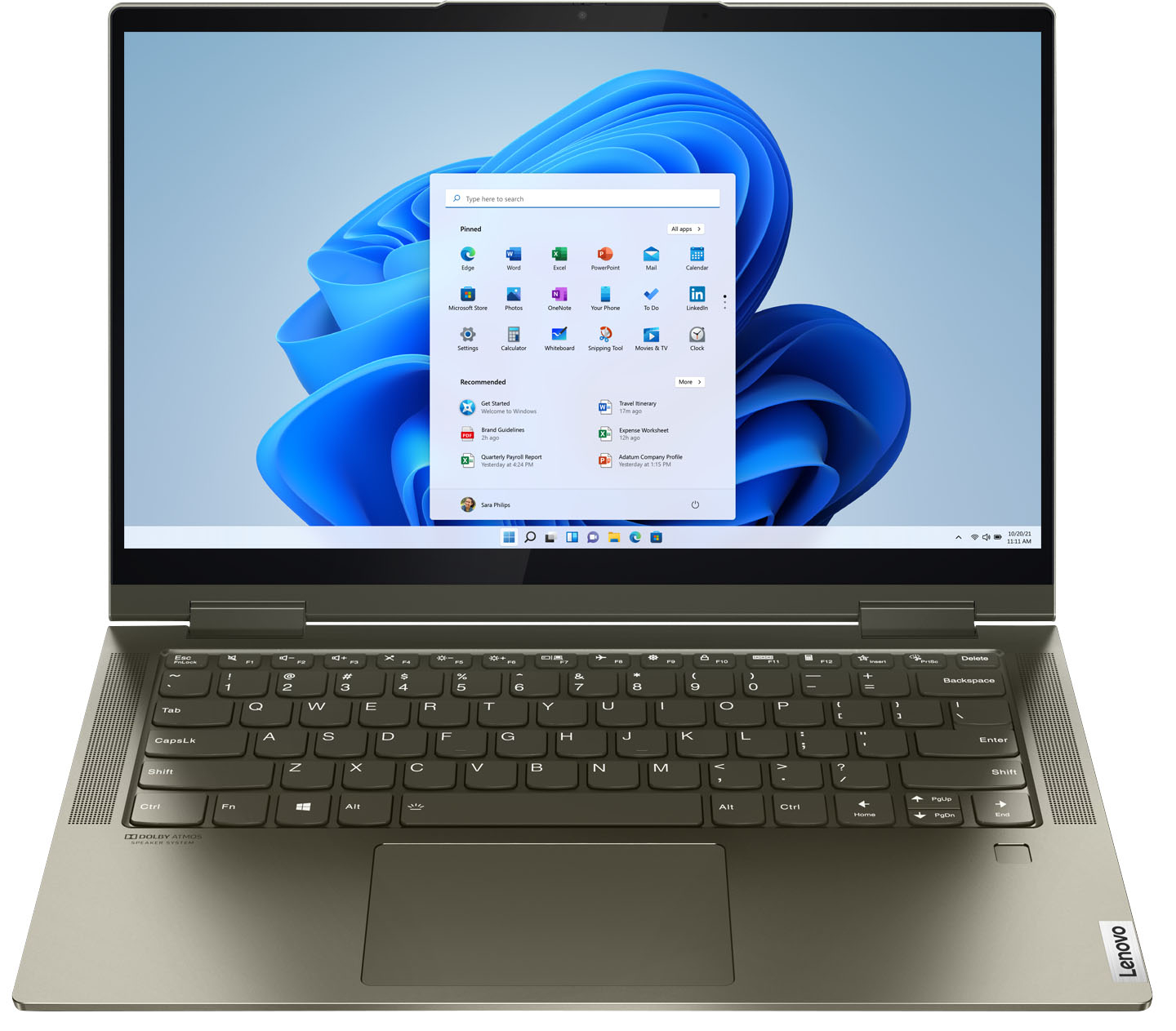
Customers are delighted by the Yoga 7i 2-in-1 laptop's fast performance, lightweight design, and long battery life. They appreciate the touch screen's sensitivity and the overall price of the laptop. However, some customers have concerns about the limited number of USB ports, the durability of the hinge, and the warranty coverage.
This summary was generated by AI based on customer reviews.
- Pros mentioned:Ease of use, Speed
Great computer
||Posted . Owned for 1 month when reviewed.This reviewer received promo considerations or sweepstakes entry for writing a review.BOught this computer as a graduation present for my granddaughter to use at college. She loves it! So fast! Easy to use.
I would recommend this to a friendBrand response from Intel team
Posted .Hello Johnson. Thank you for your great review. It is great to know that your daughter is happy with the performance of her new Lenovo - Yoga 7i 2-in-1 touch screen laptop. Continue to enjoy the remarkable responsiveness, battery life and fast connectivity our Intel® Evo™ Platform and the latest 11th Generation Intel® Core™ i5 Processors can offer you.
Thank you for choosing Intel!
Lenovo Review
||Posted . Owned for more than 2 years when reviewed.This reviewer received promo considerations or sweepstakes entry for writing a review.The only problem that I had is that the power cord went out after 3 weeks and I had to purchase another cord.
I would recommend this to a friend- Pros mentioned:Ease of use, Weight
Cute little laptop
||Posted . Owned for less than 1 week when reviewed.This reviewer received promo considerations or sweepstakes entry for writing a review.Cute laptop does what i need it to do. Very light and very easy to set up
I would recommend this to a friendBrand response from Lenovo Product Expert
Posted .Thank you for choosing the Intel Evo-Certified, Lenovo Yoga 7i 14. We are pleased to hear that the easy setup, features and performance of the Yoga 7i 14 meets your computing needs so well.

- Pros mentioned:Touch screen, Weight
I like it so far
||Posted . Owned for 1 month when reviewed.This reviewer received promo considerations or sweepstakes entry for writing a review.Nice and light, responsive, touch screen display is awesome too!
I would recommend this to a friendBrand response from Lenovo Product Expert
Posted .Thank you for choosing the Intel Evo-Certified, Lenovo Yoga 7i 14. We are pleased to hear that the features and performance of the Yoga 7i 14 meets your computing needs so well.
- Pros mentioned:Ease of use, Weight
Yoga7i...love it.
||Posted . Owned for 1 month when reviewed.This reviewer received promo considerations or sweepstakes entry for writing a review.So far, so good! Light weight, easy to use. For the price, couldn't ask for anything else.
I would recommend this to a friendBrand response from Lenovo Product Expert
Posted .Hello, thank you for choosing the Lenovo Yoga 7i. We are so happy to hear the performance, features, and sleek modern design of the Lenovo Yoga 7i is meeting your computing needs so well.
- Pros mentioned:Weight
Laptop
||Posted . Owned for 1 month when reviewed.This reviewer received promo considerations or sweepstakes entry for writing a review.This laptop has a small footprint and is not at all heavy. It is a good choice for my needs.
I would recommend this to a friendBrand response from Lenovo Product Expert
Posted .Thank you for choosing the Intel Evo-Certified, Lenovo Yoga 7i 14. We are pleased to hear that the features and performance of the Yoga 7i 14 meets your computing needs so well.
- Pros mentioned:Ease of use
Love my YOGA laptop
||Posted . Owned for 1 month when reviewed.This reviewer received promo considerations or sweepstakes entry for writing a review.I got a YOGA laptop computer. I am very happy with it. I like the way it operates and it came with everything I was looking for in a computer. I went in to buy a Surface pro but I read the reviews and decided that is NOT the computer for me. I would have given a five but customer service is important too and it seems to lack positive attention in the store I visited for some reason.
I would recommend this to a friendBrand response from Lenovo Product Expert
Posted .Thank you for choosing the Intel Evo-Certified, lenovo Yoga 7i 14. We are pleased to hear that the features and performance of the Yoga 7i 14 meets your computing needs so well.
- Pros mentioned:Battery life, Touch screen
rockin laptop
||Posted . Owned for 1 month when reviewed.This reviewer received promo considerations or sweepstakes entry for writing a review.love this computer battery lifr is great screen is good and it does everything I need....
I would recommend this to a friendBrand response from Lenovo Product Expert
Posted .Hello, thank you for choosing the Lenovo Yoga 7i. We are so happy to hear the performance, features, and sleek modern design of the Lenovo Yoga 7i is meeting your computing needs so well.
- Pros mentioned:Touch screen
So far so good
||Posted . Owned for 1 month when reviewed.This reviewer received promo considerations or sweepstakes entry for writing a review.About one month in, no problems. I also have a two-year old IdeaPad, this is thinner and lighter with similar screen size and the specs are better. The feel is solid. Battery life is ok, seems about 4-5 hrs but I haven't tried a full run down. I need to write on the screen and it is working fine. I was worried about a "green" tint but it's very subtle and actually the look is fine and even somewhat unique.
I would recommend this to a friendBrand response from Lenovo Product Expert
Posted .The Lenovo Intel Evo-Certified, Lenovo Yoga 7i-14, model number 82BH0006US, ships with All-Day battery life, from its 4CELL_71WH_INTERNAL, Lithium Polymer Battery, with a battery life of up to 13 hours, depending on the work the device is performing. This model ships with a Dark Moss Green aluminum case material. If you are getting substantially less battery life, first, set your screen brightness at less than 100-percent - try 80-percent to start with. Then, be sure Battery conservation Mode is turned off. This power management setting should only be used when the laptop is plugged in all the time. It will prolong overall battery life by only charging the battery to 60-percent of capacity. Here is a link to instructions for turning off Battery Conservation Mode: https://support.lenovo.com/us/en/solutions/ht103159. Also check what programs are running in the background on the computer. Be sure only the programs you want running in the background are. These programs will drain the battery. Here is a link to information about how to find out what programs are running in the background on your Windows 10 computer and how to manage them for better system performance: https://www.windowscentral.com/how-prevent-apps-running-background-windows-10. Then, finally, be sure any software you installed is compatible with Windows 10. Incompatible software will drain the battery at a faster rate. There is no need to install Microsoft Office software. The software is already part of the operating system, you just need to activate the software with a purchased product key. If you have installed a copy of Microsoft Office, this is conflicting with the existing copy on the system and this will slow your system down. If you have installed a 3rd party anti-virus program, be sure that Windows Defender is turned off and that the trial version of McAfee Anti-Virus software is uninstalled. There can only be one anti-virus program on the system. You may need to restore your system to original factory default settings if any of the programming errors have occurred. You can do that by typing "restore" in the Cortana search window. Just click on the magnifying glass icon at the bottom left of your Windows 10 Desktop. Click on "Reset This PC" Then click on "Get Started" and follow the on screen directions to restore to factory defaults. If the problem persists, we recommend you contact Lenovo Tech Support at: 877-453-6686.
- Pros mentioned:Weight
Nice
||Posted . Owned for 2 weeks when reviewed.This reviewer received promo considerations or sweepstakes entry for writing a review.It’s a good size, light weight, good picture and sound. I like that the keyboard lights up. Good buy. My son loves it.
I would recommend this to a friendBrand response from Lenovo Product Expert
Posted .Thank you for choosing the Intel Evo-Certified, Lenovo Yoga 7i-14 for your son. We are pleased to hear that the features and performance of the Yoga 7i-14 meets your son's computing needs so well.
- Pros mentioned:Touch screen
Lenovo Yoga 7i laptop
||Posted . Owned for 1 month when reviewed.This reviewer received promo considerations or sweepstakes entry for writing a review.quick startup, backlit keyboard, touch screen. Only 2 things I didn't like. Had to delete driver for mousepad in order to shut it off while typing (it should just have a button to shut it on and off). Also cannot sign on with facial recognition because the camera does not support it. But not a big deal. Ordering a stylus pen so I can draw on it.
I would recommend this to a friendBrand response from Lenovo Product Expert
Posted .Thank you for choosing the Intel Evo-Certified, Lenovo Yoga 7i 14. You can disable the touchpad of your Lenovo Yoga 7i 14 within Touchpad Settings. Here is a link to more information about disabling the touchpad: https://www.lifewire.com/disable-touchpad-windows-11-5195019. This Yoga 7i 14 uses a Touch style fingerprint reader on palm rest for Windows Hello Biometric Security. Here is a link to a YouTube Video that demonstrates the setup of your fingerprint reader: https://www.youtube.com/watch?v=E_ikyE5QMIg. Once you have setup your fingerprint reader on your Lenovo Yoga 7i 14, here's a tip for making your fingerprint reader work every time: Try lightly sliding your finger over the fingerprint reader. No need to press hard on the reader, in fact pressing hard on the fingerprint reader will distort your fingerprint and cause read errors.
- Pros mentioned:Speed
Very Nice Lenovo Yoga 7 Laptop
||Posted . Owned for 1 month when reviewed.This reviewer received promo considerations or sweepstakes entry for writing a review.I purchased the laptop on sale for $649.00. The Lenovo - Yoga 7i 2-in-1 Laptop with the Intel Evo has the latest intel chip for the i5. It is a very nice laptop, very responsive and quick webpage loading. The only issue is the one USB slot. I knew this before buying, but it has become problematic for me - so I added a portable USB-C docking station to add my external monitor, and a mouse and keyboard.
I would recommend this to a friendBrand response from Lenovo Product Expert
Posted .Hello, thank you for choosing the Lenovo Yoga 7i. We are so happy to hear the performance, features, and sleek modern design of the Lenovo Yoga 7i is meeting your computing needs so well. to expand usb ports and ports for multiple monitors we recommend a USB-C Docking station like the one in the following link. https://www.bestbuy.com/site/j5create-usb-type-c-triple-display-docking-station/6357396.p?skuId=6357396
- Pros mentioned:Weight
Well priced laptop
||Posted . Owned for 1 month when reviewed.This reviewer received promo considerations or sweepstakes entry for writing a review.Fast startup and processing. 12GB of memory is so worth it. Very light laptop and keys are responsive.
I would recommend this to a friendBrand response from Lenovo Product Expert
Posted .Thank you for choosing the Intel Evo-Certified, lenovo Yoga 7i 14. We are pleased to hear that the features and performance of the Yoga 7i 14 meets your computing needs so well.
- Pros mentioned:Touch screen
Lenovo
||Posted . Owned for 3 weeks when reviewed.This reviewer received promo considerations or sweepstakes entry for writing a review.The Lenovo Laptop I purchased has good graphics. The others I purchased were weak and I couldn't adjust the graphics to see the persons in YouTube clearly. It's a great small laptop to meet the needs of a senior like myself. I wanted a larger screen for my zoom meetings but I'm satisfied with this laptop. I had to exchange several because of the poor visibility of the video graphics.
I would recommend this to a friendBrand response from Lenovo Product Expert
Posted .Thank you for choosing the Intel Evo-Certified, Lenovo Yoga 7i-14. We are pleased to hear that the features and performance of the Yoga 7i-14 meets your computing needs so well.

- Pros mentioned:Speed, Touch screen
Great buy
||Posted . Owned for 3 weeks when reviewed.This reviewer received promo considerations or sweepstakes entry for writing a review.Great laptop, fast and amazing screen, looked at many others but came back to this as options were very impressive
I would recommend this to a friendBrand response from Lenovo Product Expert
Posted .Thank you for choosing the Intel Evo-Certified, Lenovo Yoga 7i 14. We are pleased to hear that the value, features and performance of the Yoga 7 i 14 meets your computing needs so well.
- Pros mentioned:Speed, Touch screen
Excellent Purchase
||Posted . Owned for 3 weeks when reviewed.This reviewer received promo considerations or sweepstakes entry for writing a review.Excellent purchase. Fast, Efficient and good size screen. Bought two! Definite recommendation Thank you kindly
I would recommend this to a friendBrand response from Intel team
Posted .Hello DebinRedding. Thank you for your great review on this Lenovo - Yoga 7i 14 2-in-1 touch-screen laptop! All Intel® Evo™ platform-based laptops such this one, are designed to deliver the remarkable responsiveness, battery life, connectivity, audio, displays, and thin and light designs you need
to move freely and stay productive wherever you are.
Thank you for choosing Intel!
- Pros mentioned:Touch screen
I like my Lenovo
||Posted . Owned for 1 month when reviewed.This reviewer received promo considerations or sweepstakes entry for writing a review.Bought my Lenovo laptop 1 month ago because my new 5 month old Surface Pro stopped working! The Pro was not fixable so I switched brands & replaced it with the Lenovo. So far the Lenovo is working like a charm! Easy touch screen, easily flipped to tablet mode & I like the ever so slightly larger screen size than the Surface Pro. Only small concern, when left in sleep mode (rather than turning off) the battery dwindled more rapidly than I expected.
I would recommend this to a friendBrand response from Lenovo Product Expert
Posted .Thank you for choosing the Intel Evo-Certified, Lenovo Yoga 7i 14. Regarding battery drain while the laptop is in Sleep Mode, check to be sure what your current settings are for what the laptop should do when you close the lid. Be sure it is set for Sleep Mode. You can check this by following these instructions: https://www.howtogeek.com/howto/25230/beginner-geek-change-what-windows-does-when-you-shut-your-laptops-lid/#:~:text=Windows%2010%3A%20Choose%20Your%20Laptop's%20Lid%2DClose%20Action&text=You%20can%20access%20it%20in,%26%20sleep%20%3E%20Additional%20power%20settings. If you have the correct settings for your laptop to go into Sleep Mode when you close the lid, but the battery is still draining quicker than expected, check what background processes are continuing to run. Be sure only the processes you want running are. Here is a link to instructions for checking what processes are running on your Windows 10 laptop: https://www.toolbox.com/it-security/vulnerability-management/blogs/how-to-find-hidden-programs-running-in-the-background-020615/#:~:text=%231%3A%20Press%20%E2%80%9CCtrl%20%2B,of%20hidden%20and%20visible%20programs. If the issue continues and there are no unwanted processes running, we recommend you contact Lenovo Tech Support for additional help at: 877-453-6686.
- Pros mentioned:Touch screen
Great buy
||Posted . Owned for 3 weeks when reviewed.This reviewer received promo considerations or sweepstakes entry for writing a review.I Bought to use for college. Great buy! Love the size, flexibility and touch screen.
I would recommend this to a friendBrand response from Lenovo Product Expert
Posted .Hello, thank you for choosing the Lenovo Yoga 7i. We are so happy to hear the performance, features, and sleek modern design of the Lenovo Yoga 7i is meeting your computing needs so well.
- Pros mentioned:Speed, Weight
We love Lenovo yoga
||Posted . Owned for 1 month when reviewed.This reviewer received promo considerations or sweepstakes entry for writing a review.I bought this for my daughter and she loves it and especially for it's light weight and lightning speed
I would recommend this to a friendBrand response from Lenovo Product Expert
Posted .Thank you for choosing the Intel Evo-Certified, Lenovo Yoga 7i 14 for your daughter. We are pleased to hear that the features and performance of the Yoga 7i 14 meets your daughter's computing needs so well.
Just what I needed for a fantastic price
||Posted . Owned for 3 weeks when reviewed.This reviewer received promo considerations or sweepstakes entry for writing a review.I bought this laptop to replace a very old and a very large and heavy tower. I was able to buy this at a big savings because this was an open box, originally selling for $900. After the Geek Squad finished copying everything over I just plugged in my monitor and new wireless keyboard and mouse and everything was there, except Facebook.
I would recommend this to a friendBrand response from Lenovo Product Expert
Posted .Thank you for choosing the Lenovo Yoga 7i 2-in-1 14in. Touch Screen Laptop with Intel Evo Core i5. We are pleased to hear that the specifications and features of the Lenovo Yoga 7i 2-in-1 14in. Laptop with Intel Evo Core i5 meet your computing needs so well.