Customer Ratings & Reviews


- Model:
- MR8300
- SKU:
- 6309260
Rating by feature
- Setup
Rating 4.6 out of 5 stars
- Range
Rating 4.6 out of 5 stars
- Signal Strength
Rating 4.6 out of 5 stars
Customers are saying
Customers highly value the AC2200 Tri-Band Mesh WiFi 5 Router's ease of use, range, and performance, with many praising its simple setup and strong signal. Positive feedback also highlights the router's extensive coverage and ability to support multiple devices without significant issues. While some users reported occasional connection drops, the majority experienced improved streaming and gaming performance after installation. The positive aspects significantly outweigh the reported drawbacks.
This summary was generated by AI based on customer reviews.
Router
||Posted . Owned for 3 months when reviewed.This reviewer received promo considerations or sweepstakes entry for writing a review.Bought this to replace an asus brand. Seems ok but we have internet issues all the time. Not sure if it is the product or our internet service.
No, I would not recommend this to a friendBrand response from Linksys Staff
Posted .Hi, Mfight,
You can connect your device directly to the modem and observe if the connection is stable. That way, we can isolate if the one causing the issue is the modem or the router. If it is really the router, then we’ll have our Escalation Engineers check your network setup as it’ll help them investigate the root cause of the challenge. Just email us at LinksysCares@linksys.com with your contact information and a link to this review as our reference.
Regards,
Rosalyn
Linksys Support
- Pros mentioned:Range, Speed

Super Fast, but slow setup
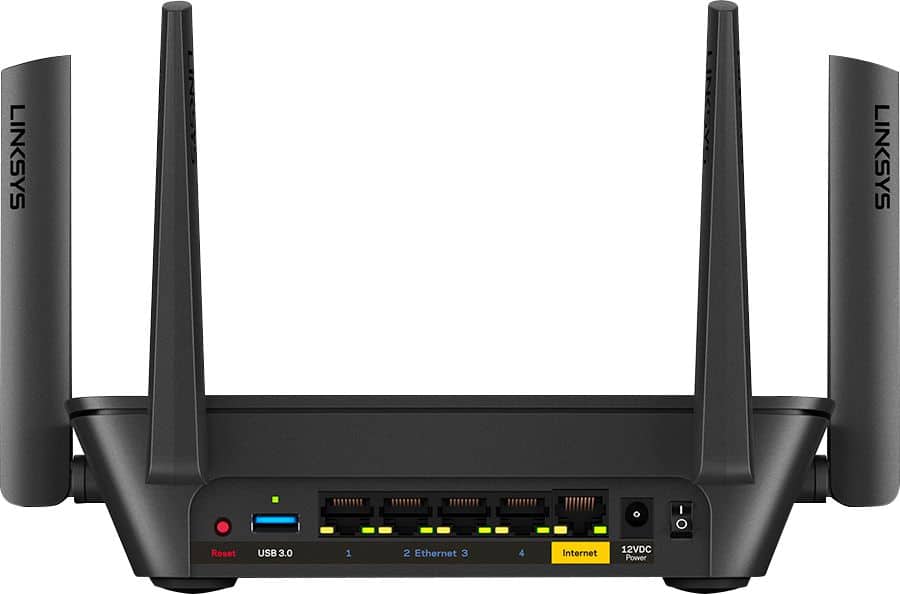
|Posted .This reviewer received promo considerations or sweepstakes entry for writing a review.Let start off this review by saying this device does exactly what it's designed to do! It's fast ethernet ports allow for quick in network transfers from device to device, assuming you have gigabit ports on the device 9 (or AC wifi on both) and the WiFi is blazing fast, using the newest WiFi standard! What I dislike about this, is the lengthy setup process. It takes a bit longer than other network routers I've used, and you should fully expect to walk away from your phone, while the setup process takes place. First, the router wasn't able to find an "internet" connection. I tried twice to restart my modem, and finally ended up just plugging it into an existing router. Not sure why, but the router surrogate allowed for the setup to continue. Then, it failed twice to setup properly, necessitating a "reset" using the easy to find reset button on the back. Once I completed that reset, it was able to find an internet connect direct from the modem, but I had to restart the setup process. I don't think you'll run into this, I believe it's just due to the modem more than anything, as I've had issues with the ISP provided modem in the past. If you've had a previous Velop or other Linksys system that uses the cloud features of the app, don't worry about logging in. The setup process makes you log in anyway, and logging in before hand won't matter. The finding internet step really does take a minute, by itself. I'm on a grandfathered TWC internet speed of 300 down, and 20 up, so it's not just you! The actual setup process then takes about 8 to 10 minutes. You'll name the network, then name the router, and then wait for all the settings to finish. The node setup actually seemed to take a bit longer (roughly 13 minutes for me) just to add to the network. Then it ran a quick update (super quick), and I was fully up and running in about 20 minutes. I literally just walked away, and just waited for the light to turn blue; indicating that the setup was complete. Don't worry if your phone screen falls asleep, it should still be running. On my iPhone X, in a totally different room (approx 30 feet away), I was still able to achieve 342 Mbps download speeds, and hit 20 to 25 uploads using Speedtest.net. Changing servers for testing still yielded better than advertised speeds, until I was further away, but it still hit 242 at the furthest point of my home. Given this was likely on the 5ghz band, and using AC standards in an un-congested network environment, this was super impressive. It easily outperformed the previous mesh network setup I had, and the range was even further with just two nodes, compared to 3 on the other mesh network. Coverage is GREAT on 5ghz, and even better on 2.4 Ghz frequencies! Aside from the longer than usual network setup, this one easily exceeded my expectations, and is highly recommended. Price point might be a bit high, but given the speeds and reliability of connection, it's an easy one to recommend. The most you'll need to do is invest in more nodes if you have a larger home. The good news is that this also paired with a previous Velop system I had used before, and was still performing optimally on another floor of the house. I was able to get around 240 Mbps download speeds upstairs, using two other Velop nodes (the plug in type). Overall, this is a great step forward for the Velop platform, and I hope to see Linksys shave down the setup time with future releases!
I would recommend this to a friend - Pros mentioned:RangeCons mentioned:Lag
A Focus on WI-Range and Coverage Area
|Posted .This reviewer received promo considerations or sweepstakes entry for writing a review.Though even Linksys makes some routers that are technically “faster” than the MR8300 because of more cores or cycles in their CPUs etc., the MR8300 is still by today’s standards “fast” (716 MHz, quad-core) but that’s not the reason I have one. Where the MR8300 really shines is its easy hook-up to available Mesh Extenders to make full Wi-Fi coverage of large homes, out-buildings and even outside the house simple. No more walking from one room to another dropping Wi-Fi signals and having to return to the room with the router in it to reestablish a connection. The Linksys MR8300 Tri-Band Mesh Router with active MU-MIMO switching and optional Mesh extenders really has me and everyone in my family Wi-Fi covered and happy. Features: - Easy plug and play setup (no CD required) out of the box with easy to follow instructions on your device’s screen or on the paper quick-start guide. - 4 adjustable antennas allow vertical orientation whether the router body is sitting horizontally on a table or is mounted vertically on a wall. - The Tri-band (up to 2.2Gbps) output delivers both 5 GHz and 2.4 GHz signals operating independently. - MU-MIMO technology means that Wi-Fi devices designed since 2017 to receive MU-MIMO will switch seamlessly between bands and the main router or Mesh units for the maximum signal available as you move through your house. - Beamforming Technology is used to focus the Wi-Fi signal between the router and your device in a narrow beam (like a lighthouse’s focused light), rather than wasting signal strength sending the signal in all directions at once. - Facilitates LAN and Wireless Network connections - Intelligent Mesh Technology adapts to the particular devices trying to use the network by “talking” directly through the ports connected via Wi-Fi at the moment and not wasting precious milli-seconds switching through ports unused at the moment with every CPU Clock cycle. This reduces Lag and Latency during gameplay. Intelligent Mesh Technology is also “Self-Healing”. This term means that if one Mesh node fails or is unplugged, the rest of the nodes will take over for the missing node. Also, if a new Mesh Node is plugged in, the rest of the Nodes will automatically incorporate it into the total Mesh in the most effective way possible. This intelligent switching can handle between 1 and 15 devices simultaneously in the most effective way possible. - Works with all of the latest security protocols in WPA/WPA2 and SPI Firewall. - The Quad-core CPU operates at 716 MHz for fast data transfer speeds. - 1 Year Limited Warranty on Parts PROS: - A Top Spec, High Performance Modem - Easy set-up with Linksys App - Attractive design - Very compact for its power - Well cooled with efficient quiet convection vents - Handles all of the latest Wi-Fi and Internet connection protocols - VERY easy to increase the range of the main MR8300 Router’s Wi-Fi network at any time by plugging optional (not included) Mess extenders like the Linksys AC1300 unit into any 120v wall outlet. Linksys App helps you locate the extender for maximum effect in the total network. CONS: - After a couple of weeks of use I honestly could not think of a single negative in the great increase in speed and range for my home Wi-Fi network that the MR8300 gave me. If I do find anything negative in the next few months, I will edit my review accordingly.
I would recommend this to a friend Speed issues
||Posted . Owned for less than 1 week when reviewed.This reviewer received promo considerations or sweepstakes entry for writing a review.Have some trouble initially getting the desired Ethernet speed. Had to reboot and reset cables at least twice before getting the Internet speed I expected.
I would recommend this to a friendBrand response from Linksys Staff
Posted .Hi, Catscratchfever,
Have you tried using a different Ethernet cable for isolation purposes? If the router is already running on the latest firmware and you still experience the same challenge every now and then, please get in touch with us at [email protected] along with your contact information and a link to this review so we can have our Escalation Engineers check the potential cause of the setback and provide you recommendations.
Regards,
Rosalyn
Linksys Support
Better routers for the price
||Posted . Owned for 4 months when reviewed.This reviewer received promo considerations or sweepstakes entry for writing a review.Router isn't the best at auto switching bands. The device prioritization doesn't seem to work at all. Easy to set up at least.
No, I would not recommend this to a friendBrand response from Linksys Staff
Posted .Hi, Daniel,
Optimizing the router might help to improve its overall performance. Let’s have our Escalation Engineers assist you with that. Just email us at LinksysCares@linksys.com with the relevant details, your contact information, and a link to this review as our reference.
Regards,
Rosalyn
Linksys Support
Disappointed
||Posted . Owned for 3 weeks when reviewed.This reviewer received promo considerations or sweepstakes entry for writing a review.Where to start? An internet router with gigabit ethernet ports. So I connected it to my computer to configure the network ... only to receive a message redirecting me to download an app onto my phone to do it wirelessly. This was already irritating, but the smartphone app is complete junk and did not work. 1 star for Best Buy's excellent return policy and customer service. 0 stars for the trash configuration app. I never got to review the router because the configuration app did not work. All the other Linksys stuff I used over the years was great. This should have taken 10 minutes with an ethernet cord and a browser, instead I wasted 2 hours and returned it.
No, I would not recommend this to a friendNo usb NAS support
||Posted . Owned for 5 months when reviewed.This reviewer received promo considerations or sweepstakes entry for writing a review.Bought it looking to plug a usb Hdd into the back. There is a port but it is “reserved for future use” Other than that is is an awesome router!
I would recommend this to a friend- Cons mentioned:Connection
Sucks for important zoom and gaming needs.
||Posted . Owned for 1.5 years when reviewed.This reviewer received promo considerations or sweepstakes entry for writing a review.I’ve had this for 2 years and it is always dropping the connection. I’ve already contacted the company and their response is always the same: turn off modem, turn on modem after 30 seconds, blah blah blah. It works for about a day and then it drops. It’s not my modem. It is definitely this router. I plan on purchasing a different brand.
No, I would not recommend this to a friendBrand response from Linksys Staff
Posted .Hi, GamingGilly,
We’d like to have our Escalation Engineers take a look at the challenge instead. Just email us your case number at LinksysCares@linksys.com so our team can pull up and review your records in our system and provide you with better recommendations. Don’t forget to include a link to this review as our reference.
Regards,
Rosalyn
Linksys Support
Throttled Internet Soeeds
||Posted . Owned for 1 month when reviewed.This reviewer received promo considerations or sweepstakes entry for writing a review.I bought this router to replace my netgear router that crapped out on me after a firmware update. Got the router installed and noticed that I was not getting the speeds that I was paying for through my ISP. After doing some troubleshooting, I discovered that the router was throttling my speeds, to the point that I was only getting about ⅓ the speed that I should be getting. Called support and they told me that it was my ISP, which I knew it was not. ISP confirmed that my speed was correct at the jack but was not correct through the router. Returned the router and went with a different brand altogether. I use to always use Linksys, but not any more.
No, I would not recommend this to a friendOk product
||Posted .This reviewer received promo considerations or sweepstakes entry for writing a review.I expected more for how it had been described to me. Might work better for someone else, but did not make much difference in my home.
No, I would not recommend this to a friend- Pros mentioned:Ease of use, Range, Speed
Monster Router
|Posted .This reviewer received promo considerations or sweepstakes entry for writing a review.This is a great router for a multi-device network like ours. Computers, TVs, cell phones, game consoles; we’ve got them all connected. I can play my online games without the wife having any lag or buffering on her computer. It used to be a problem with our old router. The thing gives off a ton of EM though so have some foil handy if you have speakers nearby, unless you like the wubwub sound. It was easy to set up using the Linksys app, though I messed something up and had to do a factory reset when nothing would connect. It works well with the extender too and fully covers our 1200 square foot apartment.
I would recommend this to a friend Difficult setup.
||Posted .This reviewer received promo considerations or sweepstakes entry for writing a review.I will be contacting the geek squad for assistance after the holidays . Not everyone is computer savy
No, I would not recommend this to a friendBrand response from Linksys Staff
Posted .Hi, Sarge,
Allow us to help you out on setting up the unit. Email us at [email protected] with your contact details and link to this post for our reference. We'll have an Escalation Engineer contact you to further assist on this matter.
We're open to help 24/7.
Regards,
Carl
Linksys Support
- Cons mentioned:Connection
There has to be better
||Posted . Owned for 5 months when reviewed.This reviewer received promo considerations or sweepstakes entry for writing a review.I have had several routers in the past this is absolutely the worst of any. It constantly drops connection and the speed is horrid. Its past the return and exchange so I'll just fume here. Using a TP router that's 6 years that runs circles around this thing
No, I would not recommend this to a friendBrand response from Linksys Staff
Posted .Hi, Homeuser,
We appreciate your writing us a review, and this is not the experience we want to hear from our customers. Please make sure to have the Linksys AC2200 Tri-Band Mesh WiFi 5 Router runs on its latest firmware to optimize its performance. Please email us at LinksysCares@linksys.com with your contact details and the link to this post. We'd like to have Escalation Engineers to further assist you.
Regards,
Gregory
Linksys Support
Requires mobile app and making an online account
||Posted .This reviewer received promo considerations or sweepstakes entry for writing a review.I’d love this router if I could just set it up through a web browser and didn’t have to make an online account with Linksys. That account (which is held by the manufacturer) has admin control over the device.. which makes me feel uncomfortable. The requiring of a mobile app to initially setup the device is another major privacy concern for me as well, especially since you can configure the router after the setup through a web browser. Super scetchy!
No, I would not recommend this to a friendBrand response from Linksys Staff
Posted .Hi,
We understand where the hesitations are coming from. One thing is for sure, the main purpose of the Linksys App and creating an account is for users to have access and control of the router anytime and anywhere. Linksys doesn't have visibility and control over users' accounts. By design, the Linksys MR8300 must be set up using the app because the router will not display data properly when configured manually.
Should you have other concerns or wants to share your comments about the router and the app, feel free to email us at LinksysCares@linksys.com. Our 2nd Level Team is more than happy to discuss this with you.
Regards,
Mara
Linksys Support
- Pros mentioned:Speed
Excellent primary node for Velop Mesh Owners
|Posted .This reviewer received promo considerations or sweepstakes entry for writing a review.I already have multiple LinkSys VELOP nodes installed with the tri-band mesh nodes and a wall-jack node as well. LinkSys finally made a "traditional" Wi-Fi router with all the antennae and 4 outbound ports that is also compatible with existing mesh networks. I placed this Max Stream router closest to my Verizon router and switch and moved the Velop mesh node to another part of the house. The additional range and signal strength of the Max Stream unit should increase the signal strength and speed of each node. So far so good. Adding the Max Stream wasn't quite as easy as I had expected through the LinkSys app on my phone. I still had to connect to the Max Stream unit and login with the credentials in a separate portion of the app, instead of just having it smart-added like the rest of the mesh nodes that I added in the past. I plan to break down the entire network at some point and just have each Wireless node have a homerun feed off of this LinkSys Max Stream, which then connects up to the Verizon router. The one negative I will say about this unit is that it doesn't look as industrially charming as the other LinkSys Velop products, particularly the Tri-Band Mesh rectangle nodes. They look really good in any setting, while this Max Stream looks like every router from the last 6 years but doesn't look as nice. At least it will be hidden in my office while the Tri-Mesh nodes are out in my living spaces.
I would recommend this to a friend PoOr directions
||Posted . Owned for 1 month when reviewed.This reviewer received promo considerations or sweepstakes entry for writing a review.Although it is now installed and doing what I need it was not easy. And I am still not totally sure it's fully functional.
No, I would not recommend this to a friend- Pros mentioned:Performance, Range
Easy setup, expanded range
|Posted .This reviewer received promo considerations or sweepstakes entry for writing a review.I live in a rural area in a metal house (heavily insulated). So, our internet service had been a hot spot for a few years--- and we finally got stationary broadband service! This Linksys router seemed to be the perfect tool for us since we have several computers, phones, TVs, heck, even the vacuum bot is connected. Installation was a breeze once I realized the Linksys app would be on my phone, not my laptop (been a while since I installed a router). Once I had the program on my phone, it took about 15 minutes total to install both the router and a Velop mesh module. The app on my phone allowed me to rename the system, set the password and enable the Velop. Most of the time was allowing the router to do whatever it did to automatically set itself up. Once done, I requested a firmware update which took about 15 minutes. Now, this will be done automatically late at night. I put the router through a stringent test by trying it outside the house (worked through the metal walls!) and across the barn end of the house with no problems. The router is on the second floor near the stairway and it worked fine alone. Once I added the Velop module to the first floor, it was super. I can run streaming TV and several other things at once without a hiccup. The nice thing is that if I feel I need to extend further, I can add another Velop module...which I think would extend the wifi to the guest quarters at the other end of the 100 foot building. Another little thing I preferred is that I do not have separate wifi names for the different speeds, just one. No worries on deciding which band to use, this clever router does it for me! The app also lets you prioritize which things get first dibs on the bandwidth. Clever!
I would recommend this to a friend - Pros mentioned:Coverage, Performance
Great consumer router
|Posted .This reviewer received promo considerations or sweepstakes entry for writing a review.I've been using a Linksys WRT3200ACM router for about 3 years. That router wasn't having any issues, but I thought I'd get this one to keep up with the latest technology Inside the box you'll find the router, a short ethernet cable, the power adapter, and some simple instructions. Setup: At first I tried setting this up using the Linksys app on my Chromebook. After about 30 minutes of being unsuccessful, I decided to just use my android phone. With that, it was relatively painless, although it took a couple of tries for it to figure out that my connection was PPPoE and required a username and password. Once I got past those hurdles, set up was relatively fast and easy. I'm sort of old school so I wanted the traditional browser set up, but that didn't seem to be an option, although I can access it from my PC now via a web browser and maintain the various settings and devices. The app will work well for most users. I also setup a Velop node, which was also pretty easy. Just follow the instructions in the app. It didn't find it at first, but tapping retry did the trick. It took longer than I imagined to complete the setup, but it was hands off and did it by itself. Performance: Compared to my previous router, the performance is nearly identical with a little bit better throughput using the speedtest app built into the Linksys app, but that was a relatively high-end router. For reference, I would average 27Mbps download speeds with the previous router, but with this one it's consistently 28Mbps. Coverage inside my house is much better with the added Velop node. My previous router had the 2.4ghz and 5ghz bands separated to their own SSIDs. By default this one has only one SSID, but it seems to manage the devices and connections very well, assigning the 5ghz band to those devices that support it. On the browser interface, I can separate those into their own SSIDs if I choose. Even with lots of devices connected, there was no degradation in performance. We have over 20 devices that can be connected at any one time and with the ever expanding universe of the "Internet of Things", you definitely need that ability. Summary: This is a great stand-alone router, and if you have a larger home or need better coverage, it makes it simple to add additional nodes. It's a great option that allows more flexibility than the traditional node setup. I would highly recommend.
I would recommend this to a friend Heard great things about product..
||Posted . Owned for 1 month when reviewed.This reviewer received promo considerations or sweepstakes entry for writing a review.I can't give you a legitimate rating because, I didn't get the opportunity utilized the device.Due to my lack of experience with connecting said device I never made the attempt to use it. My technician (son)was unable to assist me with the connection at the time of purchase..Plus the fact that,I went into the Best Buys with a different product in mind..
No, I would not recommend this to a friendBrand response from Linksys Staff
Posted .Hi, TurboTy,
It’s unfortunate that you’re unable to try the AC2200 Tri-Band Mesh WiFi 5 Router. Know that we’re just here at LinksysCares@linksys.com should you want to try another Linksys product. Our Escalation Engineers are always ready to lend you a hand.
Regards,
Rosalyn
Linksys Support
- Pros mentioned:Range, Speed
Good Velop addition, if needed
|Posted .This reviewer received promo considerations or sweepstakes entry for writing a review.I added this router to an existing dual-band Velop system with six nodes. I wasn't happy with the frequent disconnects, conflicts and mediocre WiFi performance we experienced with the nodes connected directly to my ISP gateway. I decided to try this router with the hopes that it would resolve some of those issues. Adding the router to the existing Velop system proved challenging, especially with the very basic instructions provided. I eventually threw in the towel and just created a new Velop system with the router as the main node. I had to manually reset all the nodes to do so but it was better than being forced to call Linksys for assistance. I am no fan of support calls these days. Once I got past the initial setup difficulties, the router functioned pretty much the same as my original Velop nodes. I can pause connections, prioritize devices, use the parental controls, add additional nodes and administer the system via a browser or the app. The app is convenient but doesn’t have quite as many features and controls as the browser admin option. After spending a couple weeks with this router I did notice improvement with the random disconnects. Over that period, I’ve only had one disconnect with my computer. That’s pretty good compared to the nearly daily disconnects we were experiencing with the nodes alone before adding the router. One thing I noticed is that the nodes tend to conflict with each other if you have too many. Prior to installing this router, I had six dual-band Velop nodes throughout the house. I cut that number down to three after installing the router. I believe that helped contributed to fewer disconnects. Coverage throughout the house is very good and WiFi speeds and performance are decent. I subscribe to gigabit internet and basically get just over 300Mbps down/up over wifi. Typical speeds are between 100-200Mbps down/up around the house. I have gotten better speeds with other high-performance routers but less range. I feel the Velop system is better suited for extending range rather than increasing WiFi performance or speeds. There aren't a lot of tweaking options available on this router. When I run speed tests from a port on the ISP gateway using other devices, I get down/up speeds above 900Mbps. When I test directly from this router, which is also connected to a port on the ISP gateway, I get 500-600Mbps down and 700-800Mbps up. I searched for ways to tweak the router to improve speeds but the only option pretty much available is disabling the router's firewall. I tried it but it didn't help at all. I also tried enabling bridge mode, which worked great when we were using the nodes alone but failed to improve the router's throughput speed. There really aren't any useful settings to tweak inside the router beyond that. The management interface is pretty basic. In a nutshell, the Velop system works for us but barely. Although half the household primarily browses the web and does light streaming, we also have a couple gamers and heavy streamers. When things go south, they're the first to notice. I actually had to set up a separate dedicated high-performance gaming router just for them because the dual-band Velop system just couldn't cut it, even after this newly added router.
I would recommend this to a friendBrand response from Linksys Staff
Posted .Hi, JMan,
The MR8300 mesh router is intended to be set up as a primary node and since you have an existing Velop system, you need to reset the devices and add them as secondary nodes. Allow us to have our Escalation Engineers look into the challenges that you're currently experiencing with the device. Just send us an email at [email protected] along with your contact information and a link to this review so we can have this sorted out.
We look forward to hear from you.
Regards,
Rosalyn
Linksys Support