Customer Ratings & Reviews


- Model:
- MR8300
- SKU:
- 6309260
Rating by feature
- Setup
Rating 4.6 out of 5 stars
- Range
Rating 4.6 out of 5 stars
- Signal Strength
Rating 4.6 out of 5 stars
Customers are saying
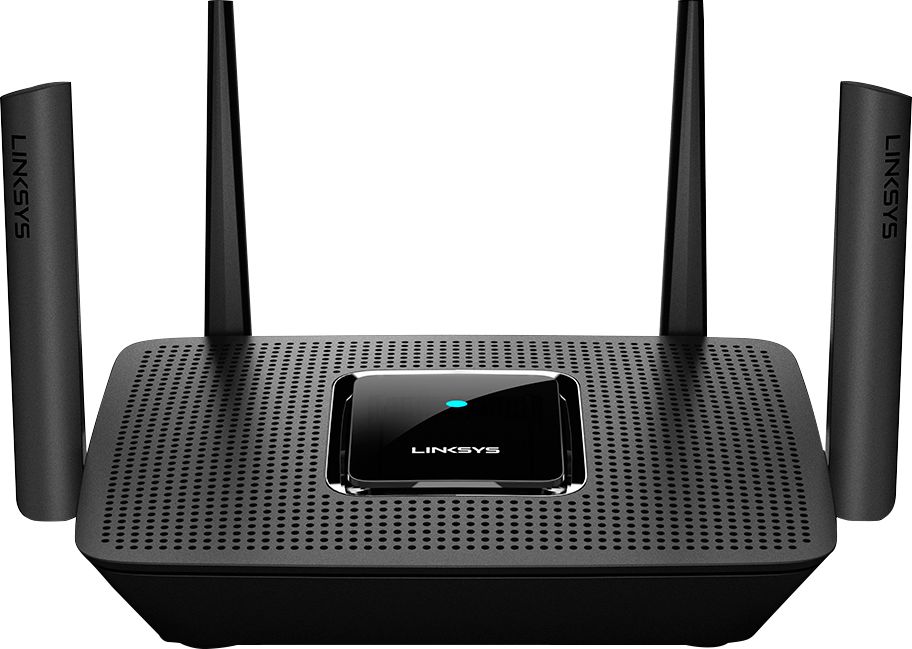
Customers highly value the AC2200 Tri-Band Mesh WiFi 5 Router's ease of use, range, and performance, with many praising its simple setup and strong signal. Positive feedback also highlights the router's extensive coverage and ability to support multiple devices without significant issues. While some users reported occasional connection drops, the majority experienced improved streaming and gaming performance after installation. The positive aspects significantly outweigh the reported drawbacks.
This summary was generated by AI based on customer reviews.
If you want to buy for Mesh Network, look elsewher
||Posted . Owned for 11 months when reviewed.This reviewer received promo considerations or sweepstakes entry for writing a review.I was excited to set up this network. I replaced a first generation Eero. Set up was not bad. I have a 2500 square foot ranch house with a finished basement. I purchased a Linksys AC 220 MRrouter and Velop 4 nodes. What a mistake. You would think from the box recommendation that 2 nodes would be enough, however they would constantly disconnect. I would go through the reset procedure and it would ask me to move the node. I have moved them all over the house. Same problem. So I added 2 nodes, big mistake. What a waste of money. Now I have 4 nodes disconnecting instead of 2. I reset the router and nodes last night and as I write this two of the nodes are offline, different then the ones I reset last night. It is incredibly frustrating, especially since I have my security system and cameras in the network. Node goes out, so does the camera. Please save your money, the network is completely unreliable.
No, I would not recommend this to a friendBrand response from Linksys Staff
Posted .Hi, RJTECW,
By making sure that the firmware of the Velop devices is up to date helps optimize their performance. The swapping of nodes also does the trick. Please send us an email at [email protected] with your contact details along with the link to this post for our reference.
We’ll wait for you there.
Regards,
Gregory
Linksys Support
router
||Posted .This reviewer received promo considerations or sweepstakes entry for writing a review.works better then what we had but still do not every room of our house
I would recommend this to a friendBrand response from Linksys Staff
Posted .Hi, papa,
The MR8300 router is designed to cover a medium household. If your home is too big, you might need to add nodes in order to extend the coverage. However, we’ll have our Escalation Engineers check the router first to see if it is already running on its full potential. Just send us an email at LinksysCares@linksys.com along with the relevant details, your contact information, and a link to this review as our reference.
Regards,
Rosalyn
Linksys Support
- Pros mentioned:Range

Great signal, Easy Setup
|Posted .This reviewer received promo considerations or sweepstakes entry for writing a review.This is definitely a different approach to the traditional mesh setup, in that the system begins with a full-power traditional router and adds the convenience of adding "mesh nodes" easily via the app. Setup and Install was very straightforward. I don't have a dead zone anymore in the living room. The router connection is in the bedroom on the opposite side of the house and in between were walls, bathrooms, kitchen appliances, and a brick wall. If I put the old router in the hall on a chair I would get a great signal, but that wasn't very convenient. I cannot say if this Linksys MR8300 alone would have solved my problem from my last modem (it is brand new, just lower spec'ed), but combined with the mesh node my issue is solved. I don't have a lot of square footage needing to be covered, just had obstacles in the way. Most other mesh systems come as single or 3-pack and I knew I wouldn't need a 3-pack, so it would just be something I paid for that went unused. And, yes I could have crawled around in the attic or fished the extension into the basement and tried centralizing the original setup, but there wasn't a good central location and I didn't want that hassle. Setup in less than 20 minutes and problems solved with better equipment, just seemed like a no brainer for my application. Mesh Wifi changes everything from the old method of setting up repeaters/bridges. I think your layout and situation will determine how much coverage you will need and which solution may serve you better. I like the fact that this setup has the ability to bath my property in WiFi and just adding a node to get around an obstacle is great.
I would recommend this to a friend Did not help!
||Posted .This reviewer received promo considerations or sweepstakes entry for writing a review.Don’t know if it’s because the router is upstairs and my tv is downstairs, because I can detect no difference in the in the quality of the signal, even with an extender, as there are still pauses during tv programming. The equipment was in good shape, however, when it was taken out of the box, so no problem there!
I would recommend this to a friendBrand response from Linksys Staff
Posted .Hi, Wishful1,
Try running the channel finder and updating the firmware. If that won’t help, get in touch with us at [email protected] so our Escalation Engineers can check what could be the culprit of the challenge and provide you with relevant recommendations to improve the overall performance of the device. Do include your contact details and a link to this post as our reference.
Regards,
Rosalyn
Linksys Support
The app is horrible
||Posted . Owned for 1 week when reviewed.This reviewer received promo considerations or sweepstakes entry for writing a review.You can only interface with the router via their app. And the app is garbage
No, I would not recommend this to a friendBrand response from Linksys Staff
Posted .Hi, Sweatygeek,
Aside from utilizing the Linksys App, you also have an option to access the interface of the router via browser. You just need to connect to its network and access the router using its IP address. Please get in touch with us at [email protected] so we can walk you through the process instead. Don’t forget to include your contact information and a link to this post as our reference.
Regards,
Rosalyn
Linksys Support
IF bought, forget about usb backup
||Posted . Owned for less than 1 week when reviewed.This reviewer received promo considerations or sweepstakes entry for writing a review.Bought to replace a Netgear that we had for two months but had a small problem but was under Best Buy protection plan. Got credit on new Router for amount paid for old one but not for 24 month plan.. Had to buy new one with replacement router for $29. No usable USB so am going to return and purchase a router elsewhere.
No, I would not recommend this to a friendBrand response from Linksys Staff
Posted .Hi PumpDr,
Your feedback is important to us and we'd like to know more about the setback. Please share us more details by sending an email at [email protected] so we can have our Escalation Engineers check it out for you. Indicate the link to this review as a reference.
Regards,
Carl
Linksys Support
Not what i expected
||Posted . Owned for 8 months when reviewed.This reviewer received promo considerations or sweepstakes entry for writing a review.I was not impressed with this product. I read the reviews and was hopeful that it would resolve my issues with internet connectivity, however, it was complicated to set up and once I did it did not improve the speed of my internet. I ended up returning it
No, I would not recommend this to a friendBrand response from Linksys Staff
Posted .Hi, MelanoeD,
We hear you and we're sorry we failed to meet your expectations. Rest assured that this is not the expected of the router especially when running on the latest firmware and is getting a stable connection from the source. If there's something that you want to share with us about your product experience, feel free to email LinksysCares@linksys.com. Your feedback helps us do better.
Regards,
Mara
Linksys Support
it's ok
||Posted . Owned for 1 month when reviewed.This reviewer received promo considerations or sweepstakes entry for writing a review.i was told it would solve the problems an it was easy to use. it is neither
No, I would not recommend this to a friendBrand response from Linksys Staff
Posted .Hi, coco,
What network challenges do you encounter? We might just need to optimize the router’s settings in order to maximize its full potential and get rid of the problems you have in your network. Please send us more details at [email protected] so our Escalation Engineers can help you investigate the potential causes of your network problems and provide you with recommendations to improve your WiFi experience. Don’t forget to include a link to this post along with your contact information for documentation.
Regards,
Rosalyn
Linksys Support
Probably not my best choice
||Posted .This reviewer received promo considerations or sweepstakes entry for writing a review.Netgear warranty expires QUICKLY and if you want any support afterwards they will charge almost the price of a new router. I bought two for two different households and recently it just disconnects from the internet on its own and you have to constantly reboot it.
No, I would not recommend this to a friendBrand response from Linksys Staff
Posted .Hi, Lau4,
The Linksys MR8300 Mesh Router upgrades your home WiFi and delivers a dedicated signal to each connected device using MU-MIMO technology. But, you can try to check your ISP's modem to see if the connection is stable and make sure that the firmware is up to date. For further assistance, you can reach out to us at LinksysCares@linksys.com with the link to this review for our reference.
Regards,
Jan
Linksys Support
Make sure
||Posted . Owned for 1 week when reviewed.This reviewer received promo considerations or sweepstakes entry for writing a review.Tried with customer support with Spectrum but could not get it to work
I would recommend this to a friendBrand response from Linksys Staff
Posted .Hi,
We can have our Second Level Technicians contact you for further assistance with the Linksys MR8300 to get it working as expected.
Just send us your contact details at [email protected] so that we can escalate your case. Don't forget to include the link to this post as a reference.
We hope to hear from you soon.
Regards,
Thaddeus
Linksys Support
- Pros mentioned:Range, Speed
Solution for Wifi Coverage
|Posted .This reviewer received promo considerations or sweepstakes entry for writing a review.This Linksys MR8300 Max stream provides the best solution for any WiFi spotty and patchy coverage thanks to the the "mesh" technology. The best installation is to use the router at one side of the house and the mesh repeater on the farther side where connection is needed the most or to use one in the first floor and the second in the second floor of the house covering up - down and side to side. The coverage improved by more than 80% compared to the old WiFi router I had. Better than that, the speed also will increase with the streaming thanks to the beam technology. The router will detect the location of the WiFi using device (Thanks to multiple antennas system) and direct a beam where it is located to boost the streaming speed. Checking internet speed will show how the curve changes with the streaming request by giving remarkable increase in WiFi signal and speed. My advice, the best way to get the maximum coverage and the best internet speed is to get more mesh modules. It arrived with one included. You can buy and add more as needed. Best use of the router to make best wifi coverage in concrete buildings (internal walls are concrete) or in large homes.
I would recommend this to a friend - Cons mentioned:Connection
Linksys AC2200 router lasted 9 months
||Posted . Owned for 10 months when reviewed.This reviewer received promo considerations or sweepstakes entry for writing a review.Worked fine for the most part for the 1st 8 months, then over the last month it keeps losing connection. Return period was like 5 or 6 weeks.
No, I would not recommend this to a friendBrand response from Linksys Staff
Posted .Hi, Tammy,
The MR8300 should work fine regardless how old it is. If it’s already running on the latest firmware, get in touch with us at [email protected] so our Escalation Engineers can look into the root cause of the disconnection and provide you with recommendations to stabilize its performance. Don’t forget to include your contact information and a link to this post as our reference.
Regards,
Rosalyn
Linksys Support
Finally! A mesh router with LAN ports
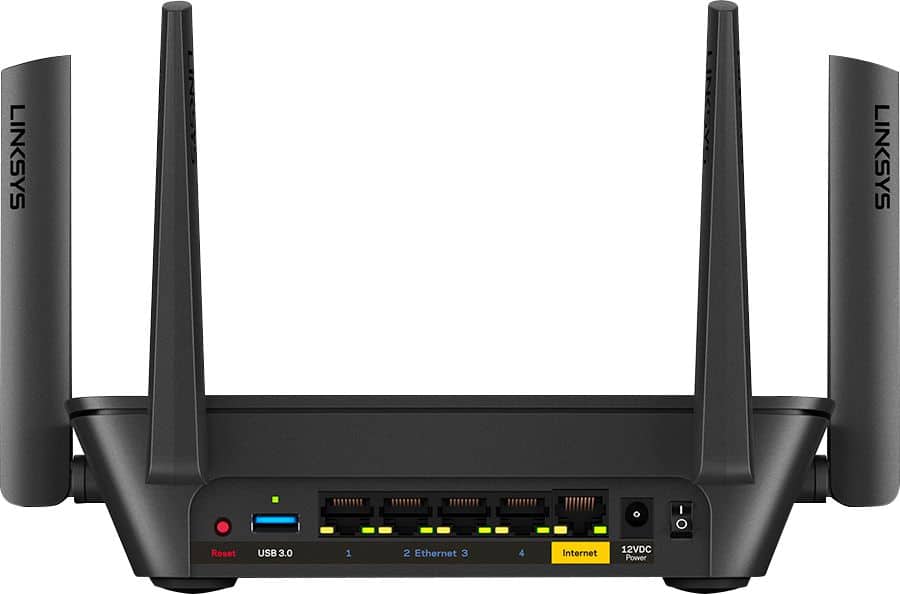
|Posted .This reviewer received promo considerations or sweepstakes entry for writing a review.The Linksys MR8300 is the first time I have found a Mesh capable router that is more like a traditional router. That is, it has 4 LAN ports + 1 for internet so you can use this to replace your existing router, still have enough hardwired connections and then use and extend WiFi where it's needed. The MR8300 is compatible with Linksys Velop standard and supports 802.11ac and has 3 antennas, tri-band Wi-Fi radios (one 2.4GHz and two 5GHz),This is worth calling out as some of my (older) home automation gear only works with 2.4GHz, so this support is important to me and may be for you. Setup is was straight forward with the free Linksys app but you can 192.168 direct to the router if you're a bit more hard core technical. Bonus feature. The MR8300 has a USB 3 port and you can use the router for with a USB drive, file share/media server, or for FTP. There are also relatively sophisticated parental control and media prioritization controls. Tip. If you're using this with FiOS. Just run an ethernet cable from your FiOS router into the internet port on the MR8300 and then disable WiFi on your FiOS. Final thoughts. I use the MR8300 with a Velop AC1300 Basic Extender and the result is flawless whole home internet. No more dead zones! If you want fast flawless whole home WiFi but still need a more proper 4 port router for your central Mesh node, the you can't go past the Linksys MR8300.
I would recommend this to a friendI don't care for your surveys
||Posted . Owned for 1 month when reviewed.This reviewer received promo considerations or sweepstakes entry for writing a review.It is ok....not what I expected I don't care for your surveys
No, I would not recommend this to a friendWorks great, until it doesn’t.
||Posted . Owned for 1 month when reviewed.This reviewer received promo considerations or sweepstakes entry for writing a review.This router works great, until it doesn’t. It’s constantly dropping signal. We thought it was our internet at first but we moved and have a new internet carrier and it’s still happening consistently. I do not recommend this unless you enjoy having your shows and games constantly interrupted.
No, I would not recommend this to a friendBrand response from Linksys Staff
Posted .Hi, Erica,
Making sure that the device is running on the latest firmware will surely help to stabilize its performance. Running the channel finder might also help. If not, please get in touch with us at [email protected] so our Escalation Engineers can check what’s causing the challenge. Don’t forget to include your contact information and a link to this review as our reference.
Regards,
Rosalyn
Linksys Support
Unable to set up the Linksys AC2200 Trim-Band Mesh
||Posted .This reviewer received promo considerations or sweepstakes entry for writing a review.I gave the Linksys AC2200 Trim-Band Mesh WiFi 5 Router only one star because it requires an alternate access to the internet to download the set up ... generally a smartphone. I do not have a smartphone and no alternate internet access, therefore I could not set up this router. This forces me to go back to my ISP and purchase from them, which means a lower quality, lower speed router for much the same price. PLEASE, Linksys, offer a simpler method for your customers to set up your routers.
No, I would not recommend this to a friendPowerful Addition to any home network!
|Posted .This reviewer received promo considerations or sweepstakes entry for writing a review.The Linksys - MR8300 Max Stream™ AC2200 Tri-Band Mesh Wi-Fi Router - Black brings power and adaptability to any home wireless network by implementing Linksys' proven MESH Network with strong signals and great bandwidth throughput. This tri-band router was a quick and easy setup with my existing Linksys MESH network. It also worked great independently from the network as well providing solid whole-home coverage, even though I place it in a downstairs/understairs closet. Zero gaps in coverage, powerful and responsive for our family's high usage needs! PROS - Linksys quality and performance - Strong signal - Large coverage area - Able to work even through many walls and floors - Easy setup and integrations both independently or with existing network - 4 blade antennas to aid is strong transmission and reception - 1 input, 4 output for ethernet cable make this a great base for multiple addons and functionality - AC2200 include legacy bands for all your electronic and wifi compatability needs. CONS - None at this time. Excellent product!
I would recommend this to a friendINstalled but have to take it off
||Posted .This reviewer received promo considerations or sweepstakes entry for writing a review.Was not able to linked to my actual router have to contact tech support
I would recommend this to a friendBrand response from Linksys Staff
Posted .Hello Andy,
We'd like to check on this matter further. Please share with us more details at [email protected] along with the reference number provided by our Technical Support team so we can review it and have our Escalation Engineers lend you a hand. Include your phone number and the link to this review for easy reference.
Regards,
Princes
Linksys Support
Good for basic internet
||Posted . Owned for 3 weeks when reviewed.This reviewer received promo considerations or sweepstakes entry for writing a review.Very easy to set up. A little bigger than I expected but not bad.
I would recommend this to a friendGreat product but
||Posted .This reviewer received promo considerations or sweepstakes entry for writing a review.The replacement works great, the first one failed after 3 weeks
I would recommend this to a friendBrand response from Linksys Staff
Posted .Hi, Snowy,
We're delighted to know that the replacement is serving you well now. Please don't hesitate to tap us anytime at [email protected] should the need arise. Our Escalation Engineers are always ready to lend you a hand.
Regards,
Rosalyn
Linksys Support