Customer Ratings & Reviews

- Model:
- RE9000
- SKU:
- 6178208
Rating by feature
- Value
Rating 4.1 out of 5 stars
- Quality
Rating 4.3 out of 5 stars
- Ease of Use
Rating 4.3 out of 5 stars
Customers are saying
Customers are delighted by the RE9000 AC3000 MU-MIMO Wi-Fi Range Extender's impressive range, ease of setup, and strong signal strength, frequently citing its improved coverage and performance. Many appreciate the convenient Ethernet ports, although some experienced connection issues. A few users noted the price point as a potential drawback.
This summary was generated by AI based on customer reviews.
- Cons mentioned:Connection
Bad conection
||Posted .This reviewer received promo considerations or sweepstakes entry for writing a review.Best Buy return was great but the linksys kept loosing connection.
No, I would not recommend this to a friendBrand response from Linksys Staff
Posted .Hello pdalerverat,
There might be interference and physical obstructions from where the Linksys extender was placed. We recommend that you relocate it. For further assistance, you can reach us at [email protected] along with your phone number and the link to this review for our reference; let's take it from there.
Regards,
Princes
Linksys Support
Linksys
||Posted . Owned for 2 weeks when reviewed.This reviewer received promo considerations or sweepstakes entry for writing a review.It was difficult to set up. It was not consistent with increasing speeds. One minute the speed was 100 and the other minute speed was 10.
No, I would not recommend this to a friendBrand response from Linksys Staff
Posted .Hi,
The Linksys RE9000 Range Extender delivers a reliable connection once set up and connected to the router. For easier installation, you can utilize the WPS feature of the range extender. Also, you can try to relocate the extender and make sure that the firmware is up to date for consistent speed connection. For further assistance, you can reach out to us at LinksysCares@linksys.com with the link to this review for our reference.
Regards,
Jan
Linksys Support
- Cons mentioned:Price

Does it job
|Posted .This reviewer received promo considerations or sweepstakes entry for writing a review.The Linksys - RE9000 AC3000 MU-MIMO Wi-Fi Range Extender is a simple platform that provides better than average extended coverage on an existing WiFi network throughout the home. With it's integrated 4 port switch, it solves the problem of limited connectivity for a setup backbone comprised of a Velop tower solution - that is limited to only 2 Ethernet ports at any given location. Both 2.4 and 5 GHz channel reach & strength are solid and I attribute this excellent performance to the antennas. My only real issue with this product is the inability to perform its initial setup via the Linksys WiFi app. Setting this thing up was a bit of a struggle via an Android device but not impossible. The WPS button option is a good fall back for the 'plug-and-play' crowd. A bit overpriced for what you get.
I would recommend this to a friend - Pros mentioned:Range, Setup
Easy to setup and use for added coverage
|Posted .This reviewer received promo considerations or sweepstakes entry for writing a review.I live in a 2-story house with finished basement and we have always had been worried about our coverage throughout the whole house. We also have about a good size suburban lot of land and I noticed that certain areas give me issues when I am mowing the lawn. With all of that being the case, I was happy to pick up the RE9000 to extend our network. This paired easily with our Linksys router. The whole house is covered and I can’t wait for it to warm up so I can test the coverage while mowing. To provide a little more detail, the setup as a wireless range extender using the browser-based method and a cell phone took about 5-7 minutes. It was very easy to follow and enjoy right away. There are a few cool things that make me recommend the Linksys RE9000 for extending your network. The Spot Finder screen, for the setup, shows the ideal distance the RE9000 should be placed from the router. That is a very useful tool. I also enjoy the fact that my same SSID can be carried through and I don’t to worry about that disgusting _EXT being found at the end of it. This allows for that carefree roaming from place to place around the house. All in all, this is an easy device to set up with little maintenance needed once you have it in place.
I would recommend this to a friend - Pros mentioned:Ease of use
Great Range Extender for non-Power Users
|Posted .This reviewer received promo considerations or sweepstakes entry for writing a review.Let me preface this by saying I'm generally a fan of Linksys' networking products. So, what better way to complement my current router's difficulty getting signal into the upstairs bedroom and outer reaches of the basement than with a Linksys range extender? The range extender is interesting. It's practically router sized itself and so need a router amount of space to be mounted. I suppose if going in permanently, one could mount it on a wall, though such mounting while normal in work and academic environments seems out of place in a home. Setup is pretty simple and the extender itself helps you with placement to optimize the signal, but your first hurdle is finding some place to put it so that it's not just sitting on a floor. An available bookshelf, table, or something that is also coincidentally located somewhere away from your primary router, but will actually give some range extending benefit. Once you've climbed that summit, if you're a lite user, you're done. If you're a power user, or someone who has configured your fancy router to have multiple SSIDs on each radio (the 2.4Ghz and 5Ghz). . . you may be out of luck. Some might tell you it doesn't mater, just use the same SSID across both interfaces. But I can tell you, that creates problems for the exact devices where I need to use different SSIDs. I have a couple things, noteably a TV with built-in media device, that can connect to my 2.4Ghz network, but not the 5Ghz (don't get me started on the further need to tailor between 802.11n and g). When they both have the same SSID, it fails. Now, that's likely a buggy implementation on the TV, but guess who get's the boot when things don't work - hint, it's not the device with nearly 50 inches of screenestate. So, that issue aside, I was actually pleased with the whole point of this device - namely to extend the range of my wireless network. It's pretty cool that it has local ethernet ports, so you could extend wireless with the 5Ghz backhaul, then run ethernet. Pretty convenient in older homes where you may not want to completely dig into walls to rewire the entire house, but may tackle the project on a floor by floor basis. So, good product, great for lite users, but it doesn't play nice with the other fancy features of my primary router.
I would recommend this to a friend - Pros mentioned:Ease of use, Signal strength
strongest wifi signal ever
|Posted .This reviewer received promo considerations or sweepstakes entry for writing a review.The Linksys - RE9000 AC3000 has made it possible for every room in my house now get a strong wifi signal, even the garage. I have a 2 story 2500 sq foot house that had many dead spots including our master bedroom (furthest away from router) and our garage (several closed doors between). First off it was hard to use our cell phones or watch netflix in the master bedroom due to the distance away from the router. But after attaching this Linksys - RE9000 AC3000 Wi-Fi Range Extender to the wall just outside our bedroom and just above the garage we now get a full strength signal in both places where we were lucky to maybe get 1 bar previously. The initial setup was very easy. the first time the instructions tell you to connect the range extender in close proximity to the modem. That was easy. Then it says you can move it to an area where reception is poor. When i did that it took several times for it to connect in the new. location. I had actually given up and was looking for a new spot but when I went back to get it the light had gone from a flashing orange to a solid green meaning it was connected and extending my wifi to my hard reach areas. Now everywhere in my house gets a strong signal.
I would recommend this to a friend Constantly Disconnects
||Posted . Owned for 1 year when reviewed.This reviewer received promo considerations or sweepstakes entry for writing a review.I've had to work with this thing much more than I wanted to. Keeps disconnecting and, YES, I've done all the troubleshooting, etc. It's a piece of crap. I'm getting something else and then I'm going to take a ball bat and smash this thing to pieces. (I should have purchase the protection plan.) The only upside is that I got it for $100 instead of $150, so I guess I didn't get taken for as much as others. Linksys should be ashamed.
No, I would not recommend this to a friendnot worth it
||Posted . Owned for 11 months when reviewed.This reviewer received promo considerations or sweepstakes entry for writing a review.it would not stay connected to my internet. I had to keep reconnecting it. Not worth the hassle or money.
No, I would not recommend this to a friendBrand response from Linksys Staff
Posted .Hi KristiB,
We would like to look into this. Please email us at LinksysCares@linksys.com with the relevant information, and the link to this review for our reference. If you’ve spoken with any of our Support teams, send us your case number so that we can pull up your record.
Regards,
Marie
Linksys Support
- Cons mentioned:Connection
Not working as advertised
||Posted . Owned for 3 weeks when reviewed.This reviewer received promo considerations or sweepstakes entry for writing a review.Did not work returned does not connect to router go with ne netgear
No, I would not recommend this to a friendBrand response from Linksys Staff
Posted .Hi jazzy,
We totally hear you. If there's something that you want to share with us about your product experience, feel free to email LinksysCares@linksys.com. We want to address this once and for all so it won't happen in the future.
Regards,
Mara
Linksys Support
- Pros mentioned:Speed
This works very well and extends coverage well
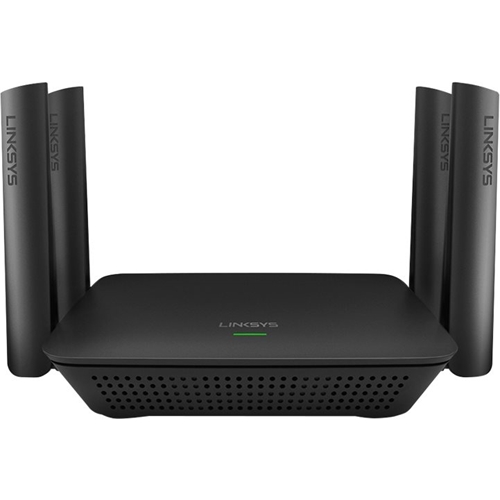
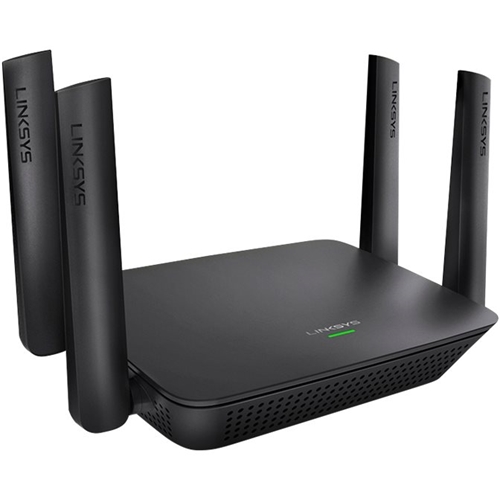
|Posted .This reviewer received promo considerations or sweepstakes entry for writing a review.I was impressed upon opening the box. This has four beefy antennas and the build has the appearance of high quality. I was expecting a complicated set up, but it was very simple. It worked the first time right out of the box. I have a very high end router from the same manufacturer and it was a matter of pressing two buttons and I was connected. The speed is outstanding and it made a huge difference in the coverage on my main floor. My cable modem and router are in the basement in a closet and it worked OK without this exentder. I immediately noticed a difference in speed tests when I connected this device. This isn’t my first extender, but so far, it is clearly the best I have used. I was seeing wireless speeds equal to my wired speeds. I have been using multiple routers in my home, but I think that I will try just using this extender now. I placed it on my main floor and the coverage was equally as good on my top floor. This is another quality product from Linksys and I like it better than my multiple node (MESH) system.
I would recommend this to a friend Not good for me
||Posted .This reviewer received promo considerations or sweepstakes entry for writing a review.I hooked everything up according to instructions, did not work well. Returned to store for different router. This time I’m going to try Netgear.
No, I would not recommend this to a friendBrand response from Linksys Staff
Posted .Hi, bosslady922,
There are factors that possibly caused the challenge as the RE9000 is designed to be a user-friendly extender that will give your WiFi a boost and eliminate dead zones in hard to reach areas. Should you decide to try another Linksys product next time, please don't hesitate to tap us at [email protected] so we can have our Escalation Engineers assist you.
Regards,
Rosalyn
Linksys Support
- Pros mentioned:Signal strength
Great signal coverage. Easy to use.
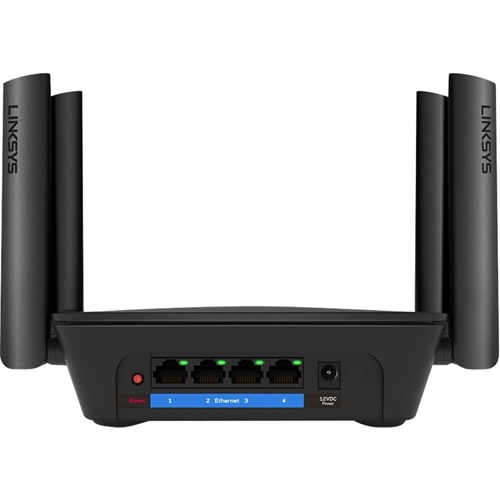
|Posted .This reviewer received promo considerations or sweepstakes entry for writing a review.Upon opening the box you will find a quick setup guide that makes the installation process very smooth. I live in a 2 story 2200 square ft property and there are some weak signal spots on rear side of the 2nd floor. With the RE9000 from Linksys the entire house has strong signal strength throughout. I tested the Linksys even further by placing my AC5400 router in the basement to see how well the wireless signal would be amplified by the RE9000 and it performed surprisingly well. Bathrooms and pantry room in the rear of the house had strong signal strength (~90% speed). Backyard had about ~70% speed so the RE9000 signal attenuation is also very solid. Thus far I have yet to have any dropped or laggy connections. It is a good price for a AC3000 class range extender and the Linksys brand always performed very well in my house; this is no different! Has 4 built-in Gigabit ethernet ports so that wired devices may connect to the wired/wireless network. Definitely recommend this to everyone who lives in a larger residence!
I would recommend this to a friend - Pros mentioned:Signal strengthCons mentioned:Connection
Creates a stronger Wi-Fi access point.
|Posted .This reviewer received promo considerations or sweepstakes entry for writing a review.The Linksys AC3000 Max-Stream Tri band Wi-Fi Range Extender biggest problem for me was just trying to get it to connect to my router. I could not get my Spectrum router’s WPS connection to work from merely pressing the WPS buttons on both devices. When I tried connecting by using the browser based setup, the pictures of available routers shown to click on did not include my RE9000 Model. I had to call Linksys for technical support. I was told to simply use the numerical web address, which worked perfectly and connected the Linksys AC3000 Max-Stream Tri band Wi-Fi Range Extender, without any problems. Once, the Linksys AC3000 Max-Stream Tri band Wi-Fi Range Extender was up and running, it maintained five bars in the area farthest away from the router. The spectrum router’s Wi-Fi bars diminish as the devices get further away from it, but the Linksys AC3000 Max-Stream Tri band Wi-Fi Range Extender maintains five Wi-Fi bars throughout the apartment. It has increased the connectivity amongst all of my Wi-Fi devices.
I would recommend this to a friend - Pros mentioned:Range, Signal strength
Great product to extend the range of your WiFi
|Posted .This reviewer received promo considerations or sweepstakes entry for writing a review.I have a large ranch-style home. The main Internet router is on one side of the home so the signal strength in the far end of the home is not good. I wanted to see if this would extend the range of my high-speed cable network without having to hard wire the Linksys to an ethernet connection. The RE9000 Extender enables the user to extend the 2.4 GHz and 5 GHz signals simultaneously. I was pleasantly surprised at the dramatic increase in signal strength at the far end of the home. I was able to set up the device in about 7 minutes. I connected it to my main network and tried several different devices and computers on the far end of the home. A Speedtest.net test showed only a minor degradation of speed at the far end of the home (only about 2%) . I recommend this product for anyone looking to extend the range of your network.
I would recommend this to a friend Nice Range Extender
|Posted .This reviewer received promo considerations or sweepstakes entry for writing a review.My review is from the point of running a Max-Stream Linksys Router. I can't say how this will perform using something that isn't from Linksys's Max Stream family. I'm sure it will perform well I just didn't test that configuration. This is a nice extender with a dedicated backhaul channel to ensure it can extend your network and it has 4 dedicated NIC ports. Additionally if you don't need a wireless extender but want a wired extender this can be used as that as well and all three Channels 2.4Ghz and the two 5Ghz channels will serve the devices in that mode. It has a nice set of antennae that allow it serve strong signals. This is a nice solid unit all around that is fairly simple. ********** Setup: This is the only place I had trouble. Either I was impatient and connected to the router too soon from plugging in or the Firmware that shipped on device needed to auto update. Anyway when I first set it up I connected my phone via WPS. No issues there. Worked nicely to get on the extender, but the automatic setup wizard for whatever reason didn't run. It seemed to work fine, but I wasn't happy with that. So I reset the device and started over. This time it worked much better. WPS attached me to extender and the wizard ran without an issue. It detected that I was running a Max Stream router walked me through the seamless wireless network setup with no issues. It does have a spot finder to help you make sure you are not too far or two close, however I was replacing a RE7000 so I already knew the spot it was going in was fine, though when I setup the extender it said I was too close. Later when I checked via the web interface it said I was just right. I think its a decent guide but testing yourself to ensure you are covering what you want to cover is just as important. I will say the interface is nice that they went with a simple Web interface and not some silly app setup. Its nice to be able to check performance etc. via a web and not have to look around for my phone. ************ Useage: Once connected this is a setup and forget kind of device. As you wander the house it should switch (assuming you are using a Max Stream router like me) between which ever Access Point has the strongest signal. I do notice at least on my Pixel XL as I was testing it will drop wireless for a second while it switches. I only happened to notice because I was watching my phone like a hawk. But it quickly got back on wireless and if I wasn't watching the phone I doubt I would have noticed or seen any impact because of it. Coverage isn't an issue. I was using a Linksys RE7000 before to cover the dead spots in my home. This provides the same coverage. I don't have a qualitative way of measuring, so I can't say this is x% better. I do think it is better overall, at least when I am running a few devices over the extender and the addition of the extra NIC ports are handy as I could repurpose a network switch I was running for something else. So that is a win for me. ************** Summary: This is a nice upgrade to the RE7000 which I was using before. It is bigger but I'll take the larger footprint for the improved antennae and extra Nic ports. It does the job and has the flexability to extend your wired network without the need for Router or extend your wireless network to improve your coverage. If you need to extend your network and you have a Max Stream router then I would seriously look at this device.
I would recommend this to a friend- Pros mentioned:Ease of use
Easy Setup
|Posted .This reviewer received promo considerations or sweepstakes entry for writing a review.The last range extender I owned worked fairly well, but it was a pain to setup. I assumed this one would be about the same. I was impressed as to how easy it was to set it up. The instructions had me to plug the unit near my main Linksys router, then press the wps button the main router, and then on the extender. After about a minute, it was paired. I was then able to move it to the part of the house where the signal wasn't as strong. I was able to achieve a full WiFi signal with increased speed. Be sure to change the extender's admin password and time zone settings. I was able to do it from my Android phone's browser, rather than using an ethernet cable. I also like how the extender provides 4 ethernet outlets. This will allow me to plug in my wireless security base station, printer, and other devices. Great extender!
I would recommend this to a friend Not Plug and Play
||Posted . Owned for less than 1 week when reviewed.This reviewer received promo considerations or sweepstakes entry for writing a review.Nothing I did for three days would get it to work per the instructions. Contacted Lynksis and they could get it to work after being on the phone for 30 mins. There only response was must be my IP address--so Plug and Play it was not. Returned to BB, looking for different model.
No, I would not recommend this to a friendBrand response from Linksys Staff
Posted .Hi RJP157,
This is definitely not the experience we want for our customers. We could have had our Second Level Technicians assist you for further troubleshooting to get the device working. We respect your decision in returning the device.
If you have questions for any Linksys device, feel free to email us at [email protected].
Have a good day!
Regards,
Thaddeus
Linksys Support
- Pros mentioned:Range, Setup
Extend your Wi-Fi coverage
|Posted .This reviewer received promo considerations or sweepstakes entry for writing a review.The Linksys Max-Stream RE9000 Range Extender was very easy to set up with our Linksys EA9500 router. The range extender comes out of the box ready to go with only a power cord to attach and antennae to adjust. After plugging it in near the router and waiting for it power up, you can use the Wi-Fi Protected Setup (WPS) buttons to connect the two devices. It only takes a couple of minutes to set up and then you can unplug the Range Extender and move it to a new location that will help extend the range of your wi-fi. If you already have a Linksys Max- Stream Router, it will work together with Range Extender to support seamless roaming without having to do any additional setup.
I would recommend this to a friend - Pros mentioned:Range
Great extender, Max-Stream feature is awesome
|Posted .This reviewer received promo considerations or sweepstakes entry for writing a review.The Linksys - RE9000 AC3000 MU-MIMO Wi-Fi Range Extender is the best range extender I have used so far and it is especially useful if you pair it with a Linksys Max-Stream wireless router. Doing this allows “Seamless Roaming” which means your devices will auto connect to the strongest Wi-Fi signal without the need to manually switch between the signal from your router and the signal from this extender, however, it should be noted that this setup is only possible when you set this product up as an actual extender rather than a wired access point. Normally, it is suggested that if you have the capability of using this type of product as a wired access point, you should set it up that way instead of using it to extend the range of your existing network (for example, if your home is pre-wired with ethernet cables as mine is) but the fact that this extender is tri-band and has a dedicated 5 GHz band that is used to communicate with your router means there is not a significant dropoff in quality when using this product as a range extender instead of a wired access point. As a result, I use mine as a range extender so I can take advantage of the Max-Stream feature despite the fact that I could easily set it up as a wired access point. My home is a tri-level townhome and the connection for my modem and all of the ethernet wiring for the whole home is located in the closet of the master bedroom on the third floor. As a result, I am forced to place my router in this location which is obviously not ideal. The Wi-Fi from the router is useable on the second floor but not the first floor. After setting up this extender on the second floor, I now have a decent signal on the first floor and full signal everywhere on the second and third floors but the best part is I never have to switch networks and can go from the first floor to the third floor without any interruptions. Overall, this is a great range extender that works especially well if you pair it with a Linksys Max-Stream router and I highly recommend it!
I would recommend this to a friend Not good extender
||Posted .This reviewer received promo considerations or sweepstakes entry for writing a review.It's doesn't have the range that it is rated for kept losing the signal!
No, I would not recommend this to a friendBrand response from Linksys Staff
Posted .Hello Stump,
There might be interference and physical obstructions from where the Linksys extender is placed. Allow us to have our Escalation Engineers check on this matter. Shoot us an email at [email protected] along with your phone number and the link to this review for our reference; let's take it from there.
Regards,
Princes
Linksys Support