Customer Ratings & Reviews

- Model:
- RE9000
- SKU:
- 6178208
Rating by feature
- Value
Rating 4.1 out of 5 stars
- Quality
Rating 4.3 out of 5 stars
- Ease of Use
Rating 4.3 out of 5 stars
Customers are saying
Customers are delighted by the RE9000 AC3000 MU-MIMO Wi-Fi Range Extender's impressive range, ease of setup, and strong signal strength, frequently citing its improved coverage and performance. Many appreciate the convenient Ethernet ports, although some experienced connection issues. A few users noted the price point as a potential drawback.
This summary was generated by AI based on customer reviews.
- Pros mentioned:Setup, Signal strength

Works like it should, but is pricey.
|Posted .This reviewer received promo considerations or sweepstakes entry for writing a review.Setup was easy. My existing router is a Linksys Velop, but it works with any router. The LED light tells you if you are in a good position or too far away, I found that helpful during setup. The performance of the WiFi has been great so far. No issues connecting, and I haven't noticed my phone/tablets "switching" to the extender, it just recognizes it as the same WiFi signal as my router. It also works with both 2.4GHz and 5GHz, that is a plus. Overall i would recommend this, although it is an expensive option, it does what it is supposed to do.
I would recommend this to a friend - Pros mentioned:Speed
Setup was slightly frustrating, this is AMAZING!
|Posted .This reviewer received promo considerations or sweepstakes entry for writing a review.I decided to try using this with my already extended Apple network. So, I used this in conjunction with Apple Extreme and two Apple Express units. Setup was a bit frustrating because it could not see the 5GHZ side of the Apple router. So, I went to the 2.4GHz side and it worked fine. But then it makes you place it really close to the router, only to unplug and move it away to a different location, Why not allow you to just set it up as long as you get a good signal from the base? For security? If you have the password, I can only imagine it would be safe to do. So, that issue in the rear view mirror, the performance is good. On the 2.4GHz side of things, I'm getting 30 mbps up and down, which I'm also routing through a Cujo device and have 50 mbps speeds. Direct off the router base station I'm getting slightly faster speeds, but it isn't a deal breaker. Where this shines is in two areas. (1) distance and (2) the many ports on the back of the unit. The ports are gigabit speed. But since there are things that only connect with a wire (cough, cough, Arlo camera receiver), this is handy to have this opportunity to connect this way, from a further area away. I can tell because this unit gives it a _ext name on the end of your network, and you can connect to it, or to your regular network, or set to do both and have your device pick the strongest. It has 4 very meaty antennas, is a solid feeling unit, and 4 ports on the back. The ports are gigabit speed, so gaming computers, video cameras, etc. can all be wired into this unit and save yourself having to run new network cables in your home/office. When you realize the flexibility of having such a device, and what it can do for you, it starts to become crystal clear that this is something you really need and can use. Having multiple units can enable you to put wired security cameras far away from your main DVR/router/switch, and wirelessly send the signal back. Or same with computers/devices that need to be wired. You can get tremendous distance with this unit and I expect multiples would create a daily chain effect over a long distance. Had you told me years ago that something like this would be available today, I would have laughed and said you were dreaming. Not only is it available, it is a very decent price for such great technology. I am floored by the thoughts of what this can do and how well it works. It has not dropped once and continues to filter through a lot of data from multiple devices. Linksys has amazing devices/solutions, and this is no exception! Thank you Linksys and thank you Best Buy for offering solutions that help out people with difficult situations/conditions.
I would recommend this to a friend Outstanding AC Extender. Excellent Performance!
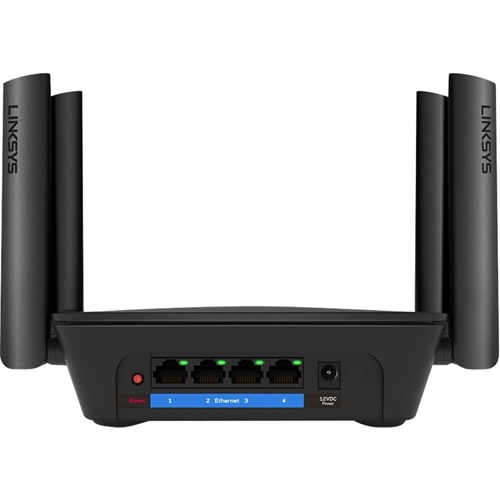
|Posted .This reviewer received promo considerations or sweepstakes entry for writing a review.Linksys RE9000 extender setup is quick and easy. I have configured with my Netgear CM7800 Modem / Router combo. This extender will work with any router. It is easy to configure using WPS button from your router or you can configure using browser setup. It is recommended to put the extender within best Wi-Fi coverage to extend further inside the house. I have used the same SSID instead of different SSID. I wanted to connect certain devices like Home monitoring system in second floor. This extender helped to achieve the same without any issues. The performance of this extender is outstanding. I have two story house and router is sitting in first floor living room. I had weak signals in second floor rooms. I have placed this extender in second floor and now i am getting full speed of 300+ Mbps in speedtest.net in second floor. This extender is compatible with most 802.11a/b/g/n/ac Wi-Fi routers / gateways to extend your existing network's range and create a stronger signal in hard-to-reach areas. With MU-MIMO technology, we are able to connect more than 25+ devices and no more slow down on internet. I like the idea of spot finder technology with one push button and it will expand the coverage to everywhere in house. There are 4 Gigabit Ethernet ports will allow to connect wired devices. This extender exceeded the expectations and Wi-Fi signal is very solid throughout the house. It is worth to buy this extender to extend the Wi-Fi signal to get outstanding results.
I would recommend this to a friend- Pros mentioned:Range
FINALLY Extender with WIRED & WIRELESS networking
|Posted .This reviewer received promo considerations or sweepstakes entry for writing a review.I've been shopping wireless extenders for quite some time as my home needs more than one AP to cover it. At one point I took the time to pull a CAT6, which many of you may have done, or have found that your builders did, but all of the latest mesh routers and extenders have utilized ONLY their backchannel radios... until this device. And frankly, it's about time. As usual, the Linksys Spot finder app is paired with this extender and it tells you where the best signal strength is to be repeated. It's almost always closer to your router than you're comfortable with, which was why I was glad I could switch modes and take advantage of the wireless access point extender mode. This extender is reported to work with any brand of router, and I see that there are some complaints from those out there with and without Linksys routers. I had no trouble getting it to connect to mine and stay connected. Once I switched to wired access point mode this became a non-issue. I found range extended a fair amount using just the radios, but not enough to justify the cost, nor to cover my whole home. In wired access point mode, the range was much greater and covered the area that I need. The two coverages combine to eliminate any wifi dead spots inside my home. I do like the Linksys setup app that came with my router and this device only uses the spot finder for placement, all other setup is browser based. This extender is a decent value for an AC extender with MU-MIMO tech and multiple bands. Especially if you're someone who needs all of those acronyms you're already probably bordering on power user and are pushing your existing network to its limits, or would like to be if you could. I would recommend this extender to anyone experiencing deadspots/weak spots in reliable coverage.
I would recommend this to a friend - Pros mentioned:Signal strength
So far so good!
|Posted .This reviewer received promo considerations or sweepstakes entry for writing a review.I have always been a fan of Linksys. At one point owned by Cisco and now by Belkin, they make a solid networking product. Whether a router or extender, I have had good luck through the years. This one is no exception. The setup was easy once I was able to boot it up and wait for the light to tell me it was ready. I was impatient to begin with as it took a bit to get the status I wanted but once it came up, I was able to select it right away and tell it which network I wanted to extend. The option to do it wired or wirelessly is a plus. If you have a house with network cabling run through it, you may be able to take advantage of the more reliable connectivity but even if you don’t, like me, you will still be happy with the signal boost. My router is made by a competitor and resides on my second floor; I am extending the network into my basement where I have always had challenges due to the floor separation along with the wood, doors, etc that are in the way of the signal coming straight through. What was most helpful for me was the signal meter that told me if I was too far (or too close) to my router. Once positioned properly, I have gotten good reports from the family saying that the connectivity is much better down there. Once you setup all of your devices with your network name.ext you should have no issues as most devices will default to the strongest signal. Good luck with it!
I would recommend this to a friend - Pros mentioned:Range, Signal strength
Perfect for my 2 floor house
|Posted .This reviewer received promo considerations or sweepstakes entry for writing a review.i used to get no signal in the front or back of my house, but once i hooked this guy up i get all bars all around my house. Inside and outside i get strong signal and am able to watch 1440p videos with no buffering! this is great for ppl who need a boost in there signal, i thought it was just gonna give me a lil boost but no, it like buying a 2nd router! the range is great! it does feel a bit cheep but u shouldn't be caring it around either ways.
I would recommend this to a friend I cannot get it to engage my system
||Posted . Owned for 1 month when reviewed.This reviewer received promo considerations or sweepstakes entry for writing a review.It's pretty, but I cannot get it to work. Will have to take it back and try to return it. It is supposed to have an easy engage button and we tried to use it, but no go.
No, I would not recommend this to a friendBrand response from Linksys Staff
Posted .Hi Dunadan0000,
Setting up the range extender should be easy using the setup guide. Make sure that the device's light indicator is blinking orange and, your Wi-Fi-capable device is connected to the Linksys Extender Setup. For further assistance, please send us an email at [email protected] with your contact details and the link to this review and, we'll have our Escalation Engineers assist you further with the setup.
Regards,
Jan
Linksys Support
don't waste your money
||Posted . Owned for 4 months when reviewed.This reviewer received promo considerations or sweepstakes entry for writing a review.This Extender worked fine for a little while. It would reboot every once in a while. Now it reboots every few hours.
No, I would not recommend this to a friendBrand response from Linksys Staff
Posted .Hi,
The Linksys RE9000 MU-MIMO WiFi Extender should work longer than described. Make sure that the firmware of the extender is updated, and you can try to plug the extender into a different power outlet to see if that will make any difference.
For further assistance, please share more details at [email protected] with the link to this review for our reference.
Regards,
Jan
Linksys Support
- Pros mentioned:Ease of use
Great extender. Very recommended in my 2,500 sq ft
|Posted .This reviewer received promo considerations or sweepstakes entry for writing a review.Setting this range extender up was suprisingly very easy, thanks to the WPS tech on it. I now am able to have a much more reliable signal on the third floor of my home, which would constantly loose wi-fi connection to my iPad and other devices. It also gives you a status bar on it so you can see how far you can go from your source wi-fi router before the signal degrades the repeated signal. Once I got it located in a decent area I was able to not only keep the connection going, but also it was a much faster connection to my iPad and other devices. The other great thing is that the extender also has ethernet jacks to plug in other things to it should that need ever arise. Like if you want to plug in a laptop maybe. The only thing, and I think this is common to alot of range extenders, is that it will not just be you connecting to your original router device, it shows up in the list of wi-fi devices as (routername_EXT). Not a problem, as you just use your same password as your original router, but for those less tech savy setting it up just a bit of a gotcha. Great extender. Very recommended in my 2,500 sq ft, 3 level home (router source being in basement).
I would recommend this to a friend - Pros mentioned:Setup, Signal strength, Speed
The Great Extender
Posted .This reviewer received promo considerations or sweepstakes entry for writing a review.I initially purchased a Netgear Nighthawk x6s Extender and had nothing but issues with it when trying to connect Apple devices. I ended up returning that and getting this extender. I live in a two story house and needed a signal to be stronger upstairs. This was very easy to setup. I could have used the WPS, but I'm a geek and opted to manually set it up. Once it was up and running I am getting 110 Mbps upstairs and my router (which is a Netgear Nighthawk router BTW) is getting 170 Mbps. So I'm not seeing that much of a drop off. I could have 8 devices all connected upstairs on any given night. We'll see how it does with that. So far I am liking it.
I would recommend this to a friend - Pros mentioned:Signal strength
Excellent range extender paired with EA9500
|Posted .This reviewer received promo considerations or sweepstakes entry for writing a review.Just moved into a newer bigger house from a smaller townhouse. I have a Linksys EA9500 upstairs in the spare bedroom but I was noticing a weaker signal downstairs on the opposite side of the house and out on the patio. There is a spot finder tool on this device that gives you a good idea where to place your range extender, really helpful! The RE9000 was really easy to set up and gave me the extended signal I needed in the downstairs area and on the patio and even further into the yard than I expected. I'm really impressed with the strength of the device. It's just small enough where you can tuck it away somewhere where it's out of site. This bad boy will be helpful when summer arrives and we have people over and everyone wants to use the wifi outside. Keep in mind, I am using this with another Linsys product your router may differ. I recommend this to anyone looking to get a little more spread out of their wifi.
I would recommend this to a friend - Pros mentioned:Signal strength
Great range extender or access point
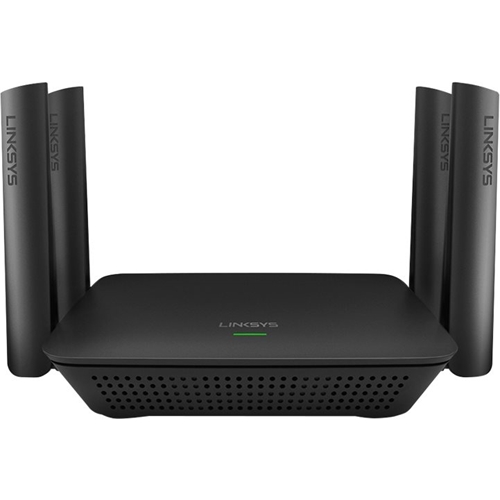
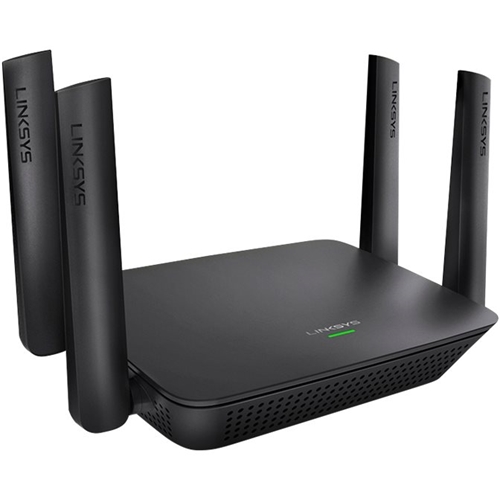
|Posted .This reviewer received promo considerations or sweepstakes entry for writing a review.Very compact and small footprint. It has 4 antennas. You can either use it as a wifi range extender, which will use a 5 ghz channel as back-haul. You can use its wizard to seat it on a place were it gets good reception from your router and then it will extend it. You can also use it as an access point, if you have a long enough Ethernet cable from your router to this. I used this method. I had a long ethernet cat 7 cable and then plugged it in the extender. The setup asks if you want to use it as a wifi rang extender or acess point, I chose the 2nd option and it automatically detected my internet and asked me to create my new networks name and passwords. Signal is strong and now I can have internet on places I couldn't before, like my porch and garage! I would highly recommend it since it offers those two options. Other range extenders I had only offered the option to extend wifi.
I would recommend this to a friend - Pros mentioned:Setup
Gave me great coverage
|Posted .This reviewer received promo considerations or sweepstakes entry for writing a review.My house is not huge by any means but my wi-fi coverage does lack in my basement. Maybe its the lead paint, maybe its the lead walls, but I do think there are some trace amounts of lead in my house. That's besides the point. So when I had the opportunity to extend my wi-fi coverage to my basement I jumped on it. In my basement is TV, Firestick, Wii, Xbox and Amazon Echo Dot all connected to wi-fi. Setup was very easy, I was able to do it online. I was up and running in a matter of minutes. I then ran a speed test in my basement and clocked the same speeds I get upstairs near the router. Success!! I was very happy to be getting some nice speeds in the area of my house that seemed to be a little off in terms of wireless performance. I highly recommend this product as it is one of the highest quality wireless extenders on the market, you get what you pay for!
I would recommend this to a friend ech
||Posted .This reviewer received promo considerations or sweepstakes entry for writing a review.we had high hopes for this, but, it turned out to not be able to help us.
No, I would not recommend this to a friendBrand response from Linksys Staff
Posted .Hello dewey,
Although we regret to hear your feedback, please know we would like to learn more about it and provide the necessary assistance. With the link to this post and your contact information, take time to drop us a message at [email protected]. Our Escalation Engineers will look into your extender from there.
Regards,
Klaudette
Linksys Support
- Pros mentioned:Ease of use, Range
Easy Set Up great range
|Posted .This reviewer received promo considerations or sweepstakes entry for writing a review.Very easy to set up with my current router. After the setup I moves it to where I wanted to get more range and it proved to work wonders. I now get Wi-Fi out in my detached garage through 2 brick walls. It makes my life very convenient now.
I would recommend this to a friend - Pros mentioned:Speed
After reading instructions, rest went easy...
|Posted .This reviewer received promo considerations or sweepstakes entry for writing a review.Works as you would expect an extender to work and seems as fast as promised (it's faster than my home internet, so it's difficult to thoroughly measure this), though I chose to use it as a WIRED range extender as I had a convenient place with an Ethernet cable that was available. I went through the web-based "Wizard" to set it up (once i found it, it was a few prompts, and waiting for it to reboot). Once I did the initial set-up by connecting to its setup wifi network, to find the extender on my network i used the network browser in Windows file manager to get to the configuration web page where i found that wizard. There was a little difficulty figuring out how to set it up, but i won't knock it down a star because when i say little I believe it took me less time to set it up than it did to write this review.
I would recommend this to a friend - Pros mentioned:Setup
Extended Wi-FI Excellence
|Posted .This reviewer received promo considerations or sweepstakes entry for writing a review.The Linksys - RE9000 AC3000 MU-MIMO Wi-Fi Range Extender is an amazing compliment to my home wireless network. The extender is easy to setup. Takes just a few minutes to peer with the existing wi-fi network. I notice an incredible improvement is wireless range and throughput in areas that were weak prior to using the Linksys range extender. It works extremely well with streaming of HD content. I have a television in a bedroom that is far away from the centralized wi-fi router. After deploying the extender, I can stream 4K quality media on the TV with no clips, buffering, or disruption. I would definitely recommend this Linksys - RE9000 AC3000 MU-MIMO Wi-Fi Range Extender to increase throughput on your wireless network at areas of the home that are impacted by weak signals.
I would recommend this to a friend Not for Apple?
||Posted .This reviewer received promo considerations or sweepstakes entry for writing a review.Not sure why, but couldn’t get it to work with my Apple AirPort
I would recommend this to a friendBrand response from Linksys Staff
Posted .Hello EsbMlb,
For as long as your existing router meets the system requirements of the Linksys extender, then it should work. To further assist you with this matter, email us at [email protected] along with your phone number and the link to this review for our reference; we'll get you over to our Escalation Engineers.
Regards,
Princes
Linksys Support
Simple Setup, Awesome Coverage
|Posted .This reviewer received promo considerations or sweepstakes entry for writing a review.This little guy fits well into my home network and extends the wifi well into my front yard. I initially wanted this to get a stronger signal to some outdoor smart home devices, but found it has been so much more useful. I now have no issue streaming music while riding the tractor, the video quality of my smart doorbell is much better, and the addition of some Ethernet ports was a nice bonus. The setup process was so simplified, that you just need to follow the steps and wait a few minutes. It integrated so well with my current network, that it was basically plug and play. Good build quality and it looks pretty cool too!! If you are looking for a boost to your network range, this is a better option than just a simple outlet plug in extender.
I would recommend this to a friendWorks Great for Intended Purpose
|Posted .This reviewer received promo considerations or sweepstakes entry for writing a review.The Linksys RE9000 is a pretty solid range extender. I've seen plug in units that may or may not have up to 2 antennae and one Ethernet port. The RE9000 looks more like a WiFi router. It has 4 antennae and 4 Ethernet ports. Setup involved powering on the device, connecting my WiFi enabled device (Android phone) to the Range Extender's WiFi network and then opening a browser to extender.linksys.com, entering a default password and working through the Setup Wizard. There are two ways this Range Extender can be setup. As a wireless extender or as a Wired Access Point. As a wireless extender, one great feature is that anything that is plugged into the RE9000's Ethernet ports are now connected to your network via WiFi. As a wired Access Point, it can assume one of your your existing WiFi Network's SSID and lets your wireless devices get passed between the range extender or your wifi router seamlessly, especially if you have the RE9000 paired with a Linksys Max-Stream WiFi Router. I have this Linksys RE9000 paired up with a Linksys EA9500 Router, which is a beast of a thing. The Linksys EA9500 covers my house pretty well by itself. So I didn't necessarily need the Linksys RE9000 to extend my wifi signal. My particular use of the RE9000 is for my wireless Arlo Pro cameras. Unfortunately, I cannot just extend the wireless signal just for the Arlo Pro wireless network. I have to move the Arlo Pro base station to balance the signal between my cameras. I have one Arlo Pro camera that sits next to the garage door watching the driveway on the far end of the house. That one camera has weak WiFi connectivity which tends to wipe out the battery quicker than the other cameras. The RE9000 in wireless range extender mode allowed me to move the Arlo Base Station to a location that all Arlo Pro cameras have decent signal. I can then fine tune the location with the Range Extender's "Spot Finder" to make sure the Range Extender is not too close/far from my Wifi Router. Diving deeper into the configuration of this Range Extender, I became a little more disappointed. By default, only one SSID is handled by the Range Extender. More SSIDs can be created by turning off Band Steering, but it isn't truly extending your existing SSIDs. My Linksys EA9500 allows me to work with 4 SSIDs. I would have really liked to extend all 4 SSIDs, but the real way to do this is to set up something like Ubiquiti Access Points that support multiple SSIDs. In Wireless Range Extender Mode, it creates a unique SSID by adding "_Ext" to your supplied SSID. The RE9000 Range Extender works great if your WiFi router just isn't covering your house. It also worked to solve my wireless camera situation. Beyond that, I think you're better served by enterprise grade wireless access points.
I would recommend this to a friend