Customer Ratings & Reviews


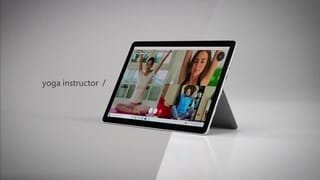


- Model:
- STQ-00001
- SKU:
- 6408475
Rating by feature
- Battery Life
Rating 4.4 out of 5 stars
- Durability
Rating 4.5 out of 5 stars
- Display
Rating 4.7 out of 5 stars
Customers are saying
Customers praise the Surface Go 2's portability, size, and weight, making it ideal for travel. Many appreciate its performance improvements over the previous model and the responsive touchscreen. Positive feedback also highlights the battery life and the value for the price. However, some users express concerns about the operating system's limitations and the relatively small storage capacity.
This summary was generated by AI based on customer reviews.
- Pros mentioned:Portability, Weight
Take it everywhere.
||Posted . Owned for 1 month when reviewed.This reviewer received promo considerations or sweepstakes entry for writing a review.Very convenient, easy to pack, and lightweight. Goes anywhere.
I would recommend this to a friend - Pros mentioned:Performance, Size
Microsoft Go
||Posted .This reviewer received promo considerations or sweepstakes entry for writing a review.This is a great computer it works great for school work! The size is perfect for taking on the go
I would recommend this to a friend - Pros mentioned:Size
Good but has limitations.
||Posted . Owned for 2 weeks when reviewed.This reviewer received promo considerations or sweepstakes entry for writing a review.Got this for my mother who was coming from a samsung tablet. Since its android based she was unable to do certain items that require windows based items The was the perfect size for her and comparable to the samsung tablet. If you are in need of a basic compact windows device to do basic functions of windows items this is for you. It will be a little slow but works great. Biggest complaint is that the Go is a lite version of windows which limits the applications that can be downloaded. Can only be downloaded from windows store.
I would recommend this to a friend - Pros mentioned:Size
Great compact device for on the go student
||Posted . Owned for 3 months when reviewed.This reviewer received promo considerations or sweepstakes entry for writing a review.I needed a small device for college while on medical rotations to limit how much I was lugging around and this does the trick. I started with downgrading from a larger laptop to an iPad with an apple pencil and that was a poor experience. After iCloud lost/corrupt an entire presentation I canned Apple and went for this Surface with a Microsoft Pen. This was a far better experience and I regret not buying it earlier when I debated between this and the iPad to begin with.
I would recommend this to a friend Love this computer it’s perfect
||Posted . Owned for 1.5 years when reviewed.This reviewer received promo considerations or sweepstakes entry for writing a review.Love this computer. I use this for my sermons and many other things . Great quality and would buy again
I would recommend this to a friend- Pros mentioned:Portability, Weight
Surface Pro
||Posted . Owned for 1 month when reviewed.This reviewer received promo considerations or sweepstakes entry for writing a review.Light weight, easy to use, just not crazy about the constant MS Updates you have to do.
I would recommend this to a friend - Pros mentioned:Size, Weight
Less weight with more options
||Posted . Owned for 7 months when reviewed.This reviewer received promo considerations or sweepstakes entry for writing a review.This is one of the most lightweighted and smallest laptop out, you can put it in your backpack and wont even feel the weight.
I would recommend this to a friend - Pros mentioned:Portability, Processor speed
Sweet
||Posted . Owned for 2 months when reviewed.This reviewer received promo considerations or sweepstakes entry for writing a review.We use these at our dealership everyday, portable, fast and allows us to share work stations.
I would recommend this to a friend - Pros mentioned:Size, Weight
satisfied
||Posted . Owned for 1 month when reviewed.This reviewer received promo considerations or sweepstakes entry for writing a review.It seems like a quality product the size and weight of a tablet with the power of a pc
I would recommend this to a friend - Pros mentioned:Portability, Weight
Good for simple things
||Posted . Owned for 3 weeks when reviewed.This reviewer received promo considerations or sweepstakes entry for writing a review.Very light and good to use for simple things while on the go. Little too expensive especially if you want the keyboard and pen for art design.
I would recommend this to a friend - Pros mentioned:Portability, Weight
Pro
||Posted . Owned for 3 months when reviewed.This reviewer received promo considerations or sweepstakes entry for writing a review.Love my new little pro. Easy to use. And to store away when finished. Light weight. Great!
I would recommend this to a friend - Pros mentioned:Portability
Very portable
||Posted .This reviewer received promo considerations or sweepstakes entry for writing a review.This is I small lightweight portable 2 in 1. Very nice to have if walking around campus for a college student, and also very nice touch screen.
I would recommend this to a friendBrand response from MicrosoftOutreachTeam
Posted .Hey there,
Thanks for sharing! We're glad to hear you've been liking the easy portability and 2-in-1 features of your Surface Go 2.
Cheers,
Heather
Surface Customer Care
- Pros mentioned:Performance, Size

The little computer that is REALLY a computer!
|Posted .This reviewer received promo considerations or sweepstakes entry for writing a review.Hey >> The “Go” in “Surface Go 2” means you GO PLACES with it... DISCLOSURE: “Reviewers in this invitation-only program are provided products for the purpose of writing honest, unbiased reviews.” The name “Go” sums it up >> this device is something you take with you when you “Go” places. When I am headed out the door for a meeting or "out and about" in the world, the “Go2” comes along to flip open and take notes, zip off a quick email, share photos or drafts of presentations >> anything that benefits from having a full operating system that is COMPATIBLE with, and SYNCHRONIZED with, my systems back at the office and at home. If the Surface Go 2 looks like a “real” little computer that is pretty cool, cute, handy, or would make your life easier or more productive >> then it’s worth a look. Please I am not a “Microsoft Fan Boy” as I use (or have used) Windows, Linux, Android, Chromebook, iPad, and MacOS at different times for different purposes. Each has its strengths, and none of them are all things at all time to all people. Figure out what you want, and if the Go2 looks like what you want and meets your needs, you will not be disappointed. WHAT IT IS: 1 – Microsoft Windows 10 Operating System – the whole thing >> NOTE: the default OS on unboxing is the W10 “S” which takes about 5 minutes to switch over (free of charge) to the full “W10 Home” system. The W10 “S” mode is there to keep the installed programs from collecting a lot of “digital sludge” that slows down ANY computer over time, and if you can go with the apps and programs in the Microsoft Store, that is the best way to keep the Go2 as snappy and clean as possible. If you must switch out of “S” mode to install needed software, please don’t go crazy and install a bunch of junk that will slow you down. The Go2 runs fine, but if it starts getting overloaded with background services it will cut down on both your speed and your battery life. 2 – Small and Light – did I say it was small and light? If you walk around at work, you carry a portfolio or a clipboard or something in your hands – if you don’t have something in your hands it looks like you are slacking off – you know that don’t you? Carry a Surface Go 2 instead – it replaces your clipboard, keeps you from having to keep pulling your phone out in the middle of everything (MS update is coming to allow phone interaction on the Windows system if you don’t already have that <or> tether the Go2 to your phone before you go in the meeting), and I GUARANTEE people will come over and ask through their facemask “What the heck have you got in your hand?” 3 – VERY nice build quality – not the “cheapo plastic” shell and paperclip hinges you get with a budget laptop – no siree.... this is a magnesium metal shell and is a SOLID piece of equipment. The hinge for the prop-stand should win the Nobel Prize for engineering – it will adjust to any angle you want and STAY THERE right where you set it. Go to BestBuy and pick up and handle a few machines in this price range.... you will very quickly see and feel what I mean – the Go2 has a premium feel and you can “just tell” when you pick it up that it is well built. WHAT IT IS NOT: 1 – This is (probably) not a PRIMARY use laptop computer all by itself – nope, it is (probably) too small to use all day long to give you the “full laptop experience” BUT the Go2 stays SYNCHRONIZED with your main rig(s) and when you come back to your main machine(s) everything is in step in with what you just did on your Go2 and you just sit down and pick up where you left off. If you have modest computing needs and want to stick with the Go2 as your primary rig, then there is a docking station and/or USB3 port if you need to connect larger monitors, keyboard, mouse - and Bluetooth is built in if you want to use that for your peripherals. 2 – This is not a GAMING rig – nope nope nope do NOT think you will play ANY modern games on this little machine – older games or the simpler web-based games work just fine. However, if you want to comfortably hold something small in your hands to work on adult business and/or educational stuff – get a Go2. It should be said that there are PLENTY of entertaining games that can run very well on the Go2 if you need a little break or for winding down after a hard day’s work, so that’s a plus for the Go2 but there is a limit to the level of complexity that it can handle with gaming software. Be advised. 3 – Please! This is NOT a “Toy” for the kids – the Go2 is small, but it’s NOT a “toy computer.” It is an amazingly small, fully functional, well-engineered Windows 10 machine. If you want the kids to have a laptop to “play” with then get them an inexpensive or refurbished device so when they take it in the shower to watch a video while they lather up or use it as a digital Frisbee you won’t have a melt-down. If you want the kids to have a small computer of their very own that they can LEARN with, or STUDY with, or SCHOOL with, then here you Go2. 4 – This is not a PURE tablet experience – this is Windows 10 and thus is not designed for “pure” use as a tablet device. You are purchasing a small W10 computer, so a keyboard is called for – look for the ‘package deals’ that knock off a few bucks with the added keyboard. The tablet mode (remove the keyboard) works very nicely for note-taking and videos and small-group presentation and sharing pictures and even catching a video or two when you are settling down for the evening or taking a break – all these are good functions and tablet mode is GREAT in these situations. The Go2 as a tablet fits VERY nicely in your hands, has smooth and comfortable edges, and a big enough screen to work well in tablet mode... BUT you will WANT to be able to pop on a keyboard so you can get some work done on documents, emails, presentations – all the things you would like to be able to do on a small portable computer when you are out and about and on the go – which is EXACTLY what the Go2 is for! What you will LOVE about the Go2: “Hello Windows” Facial Recognition – turn it on, look at it, there you go. If you haven’t seen or used the facial recognition unlock feature for Windows – it is a warm and fuzzy experience. Noice! “Instant On” – close the lid, go to the next place, open the lid – it really is “instantly” ON right where you left off. I gotta admit that’s one thing I always did LOVE about some other devices that were out there, and now it really really really works with a Windows portable. Noice! Windows Sync and OneDrive/SharePoint Sync – all your settings, documents, browser history, sticky notes, OneNote, TEAMs, etc etc etc – EVERYTHING is synched with your desktop and/or laptop whether they are at home, at work, or both. I promise – I have several laptops and desktops spread out at home and work, and I can sit down at ANY of them and they are all working together to keep me going smoothly. Adding a Go2 to the mix was quick and seamless. IT’S ONLINE MEETING TIME! >> Front/Back cameras, stereo speakers, dual studio microphones >> all of which are pretty darn good: With online meetings becoming the “new normal” – having a sweet little computer that will hold it’s own in a TEAMs, Skype, or ZOOM meeting is very handy. You could very easily use this little critter for your meetings while you keep your work tasks going on another rig without having to stop everything to join in another “yawn” online collaboration or try to use the TEAMs app on your little bitty phone. If you are “out and about” when the meeting is scheduled to start, the Go2 gives you a high-quality video and sound feed. What you want to get along with your Go2 chassis (HINT: look for the “package deals” to save on the accessories): 1 – Get the keyboard – unsurpassed design with tactile keypress and BACKLIGHTING! The Go2 is not intended to be a tablet at all times for all purposes. It is a Windows 10 machine and for that you will want to have the option of using a keyboard with a (very nice) built-in trackpad. Go fancy with the nice Alcantara Signature cover – you deserve it and for a few bucks more it really looks nice and complements the appearance of the Go2 case. Save a few bucks and get the black plastic cover if you like, but really the Alcantara is a nice touch, looks great. 2 – Get a tempered glass screen protector. Enough said. Gorilla Glass is a fantastic material, but Stuff Happens - don't let it happen to your Go2. 3 – Get a protective case if you are going to be out and about in an environment where drops and rubs and scratches are par for the course. Indoor only or “soft” use outside, the Go2 is metal case and very durable, but if you are banging around at work (or play) a case may come in handy and keep your Go2 looking at its best when you are back inside and want to show it off. 4 – Get a Surface Pen? Well, maybe and it really comes in handy for taking notes and highlighting text when you are in the tablet mode. If you are looking at the Go2 for note-taking like OneNote or similar software, you will be deee-lighted at how nicely a pen helps you be more productive and creative with your note taking and doodles during meetings. SPENDING YOUR ACTUAL MONEY: OK that’s about it and if you are like me you don’t want to waste your money and you have spent a week staying up late going around on YouTube looking at unboxings and Googling “Microsoft Surface Go 2” to read the reviews. Do your research and go to BestBuy and put your hands on one and then make up your mind. You can tell I am really pleased with my Go2. Honestly, I am not the fan-boy type and have been going through little portable devices starting with the Casio SF-8000 in 1990 and I think the Go2 is what I have been looking for all these years. Stay Safe!
I would recommend this to a friend - Pros mentioned:Portability
Portability
||Posted . Owned for 3 weeks when reviewed.This reviewer received promo considerations or sweepstakes entry for writing a review.Very compact and portable device. Purchased this for a specific purpose, Amateur Radio emergency communications. Majority of programs I use runs primarily on Windows. However, this device serves perfectly for anyone who basically checks email or navigates the web. Very good everyday device companion.
I would recommend this to a friend - Pros mentioned:Processor speed, Size
Just right
||Posted .This reviewer received promo considerations or sweepstakes entry for writing a review.Light, small and works fast. It’s a great smaller scale version of the pro.
I would recommend this to a friend - Pros mentioned:Weight
Super fast, light and does its job well
||Posted . Owned for 3 weeks when reviewed.This reviewer received promo considerations or sweepstakes entry for writing a review.Its very lightweight, which is what I wanted to be able to carry it around. Charges up quickly, and the startup time is fast. I am enjoying my device so far, but have also not put it thru its paces, only done basic browsing and editing. The only I did not get a chance to purchase is the official cover type keyboard in my desired color, so had to get something off of Amazon.
I would recommend this to a friend - Pros mentioned:Portability, Weight
I love it!
||Posted . Owned for 1 week when reviewed.This reviewer received promo considerations or sweepstakes entry for writing a review.I love my Surface Go 2. It’s perfect to take everywhere and so light compared to my last laptop!
I would recommend this to a friend - Pros mentioned:Performance, Portability
Great Price
||Posted .This reviewer received promo considerations or sweepstakes entry for writing a review.Small and powerful.. covers all my needs and the price is great also..
I would recommend this to a friend - Pros mentioned:Portability, Size
ITMASTER
||Posted .This reviewer received promo considerations or sweepstakes entry for writing a review.It is a very good user friendly product. This is a very slim product.
I would recommend this to a friend - Pros mentioned:Portability, Size
Compact pc
||Posted . Owned for 2 weeks when reviewed.This reviewer received promo considerations or sweepstakes entry for writing a review.Got a good deal with open box, easy to set up and use, perfect size for daily study.
I would recommend this to a friend