Winter SaleEnds 1/19. Limited quantities. No rainchecks.Shop now

Main Content
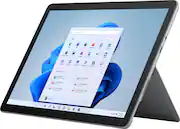
product image

Microsoft - Surface Go 2 - 10.5" Touch-Screen - Intel Pentium Gold - 8GB - 128GB SSD - Device Only - Platinum

Model: STQ-00001
SKU: 6408475
This item is no longer available in new condition. See similar items below
  • Key Specs
    • Screen Size: 10.5 inches (Size of the screen, measured diagonally from corner to corner.)
    • Screen Resolution: 1920 x 1280 (Screens come in a range of resolutions (measured in pixels, horizontal x vertical). The higher the resolution, the greater the picture quality.)
    • Processor Model: Intel Pentium Gold 4425Y (Your computer's processor is like its brain. Working in combination with system memory, the power of the processor determines the complexity of software you can run, how many programs you can have open at the same time, and how fast those programs will run. Most computers feature an AMD, Intel or Snapdragon processor.)
    • Total Storage Capacity: 128 gigabytes
    • Operating System: Windows 10 Home in S mode (The operating system manages all software and hardware, including files, memory and connected devices. Most importantly, it lets you interact with your device and your programs in a visual way; otherwise, you'd be typing computer code to get anything done.)
    • Voice Assistant Built-in: No (A digital assistant built into the device that uses voice commands to answer questions and control smart devices.)
    • Wireless Connectivity: Bluetooth, Wi-Fi (The manner in which a device sends data to another device over a short distance without the use of wires or cables.)
    • Battery Chemistry: Lithium-ion
    • 2-in-1 Design: true (A laptop and a tablet combined in one lightweight, portable device. Sometimes referred to as "convertible" or "hybrid" laptops, these devices deliver the processing power and keyboard of a laptop. When you're ready to play, either detach the screen or fold your 2-in-1 into tablet mode to comfortably watch movies, play games, read an e-book and more.)
    • Security Features: Facial recognition
  • General
    • Brand: Microsoft
    • Model Number: STQ-00001
    • Product Name: Surface Go 2 - 10.5" Touch-Screen - Intel Pentium Gold - 8GB - 128GB SSD - Device Only
    • Color: Platinum
    • Model Family: Microsoft Surface Go
    • Year of Release: 2020
  • Display
    • Screen Type: PixelSense
    • Screen Size: 10.5 inches (Size of the screen, measured diagonally from corner to corner.)
    • Screen Resolution: 1920 x 1280 (Screens come in a range of resolutions (measured in pixels, horizontal x vertical). The higher the resolution, the greater the picture quality.)
    • Stylus Input: Built for Windows Ink (Active) (An active stylus/pen is able to communicate directly with a compatible device; active electromagnetic resonance (EMR) pens are powered via a device's screen and active electrostatic (AES) pens require an additional power source. A passive stylus does not have electronic features and is compatible with most capacitative touch screens.)
    • High Dynamic Range (HDR): false (An HDR-compatible 4K TV or other HDR-compatible product displays HDR video content when it's available from sources like 4K Ultra HD Blu-ray Discs and 4K streaming services.)
  • Processor
    • Processor Brand: Intel
    • Processor Model: Intel Pentium Gold 4425Y (Your computer's processor is like its brain. Working in combination with system memory, the power of the processor determines the complexity of software you can run, how many programs you can have open at the same time, and how fast those programs will run. Most computers feature an AMD, Intel or Snapdragon processor.)
  • Storage
    • Total Storage Capacity: 128 gigabytes
  • Memory
    • System Memory (RAM): 8 gigabytes (Random-access memory (RAM) is a computing device's short-term data storage, which allows active information to be accessed quickly. The size and type of RAM determines how efficiently the device can handle large amounts of information at one time. For example, gaming or video editing requires more RAM for optimal performance.)
    • Expandable Memory Compatibility: microSD, microSDXC
  • Compatibility
    • Operating System: Windows 10 Home in S mode (The operating system manages all software and hardware, including files, memory and connected devices. Most importantly, it lets you interact with your device and your programs in a visual way; otherwise, you'd be typing computer code to get anything done.)
    • Operating System Compatibility: Windows
    • Voice Assistant Built-in: No (A digital assistant built into the device that uses voice commands to answer questions and control smart devices.)
  • Connectivity
    • Wireless Connectivity: Bluetooth, Wi-Fi (The manner in which a device sends data to another device over a short distance without the use of wires or cables.)
    • Network Connectivity: None (The manner in which a device sends data to another device over a long distance using a cellular network.)
    • Compatible Wireless Standard(s): Wireless-A, Wireless-AC, Wireless-AX, Wireless-B, Wireless-G, Wireless-N (The wireless networking standard(s) the device is backwards compatible with. This includes networking protocols based on the IEEE 802.11 standard (alphabetically ascending) and the Wi-Fi Alliance standard (numerically ascending), both of which provide high-throughput wireless local area networks (WLANs). Devices designed to work with specific standard(s) will be backwards compatible with previous versions but may not run at optimal performance when using earlier iterations.)
    • Headphone Jack: true (The device features an interface that allows for the connection of headphones.)
    • Bluetooth Version: 5.0 (The Bluetooth specification formalized by the Bluetooth Special Interest Group. All versions of the Bluetooth standard are backwards compatible with previous versions.)
    • GPS Enabled: false
    • Interface(s): 3.5mm audio, Proprietary, USB-C (Refers to the types of connections that devices use to interact and communicate with each other.)
    • Data Plan Required: false
  • Power
    • Charging Interface(s): Proprietary (The connection for transmitting power to charge the device.)
    • Battery Life (up to): 10 hours (Battery life will vary depending on the product configuration, product model, applications loaded on the product, power management setting of the product and the product features used by the customer. As with all batteries, the maximum capacity of this battery will decrease with time and usage.)
    • Battery Chemistry: Lithium-ion
  • Camera
    • Front-Facing Camera: true
    • Front Facing Camera Megapixels: 5 megapixels (The more megapixels, the more detail that the camera facing the user can capture.)
    • Front Facing Camera Video Resolution: 1080p (Refers to the number of pixels, both horizontally and vertically, used by the camera facing the user to capture video. The higher the resolution the finer the video detail that can be seen.)
    • Rear-Facing Camera: true
    • Rear Facing Camera Megapixels: 8 megapixels (The more megapixels, the more detail that the camera facing away from the user can capture.)
    • Rear Facing Camera Video Resolution: 1080p (Refers to the number of pixels, both horizontally and vertically, used by the camera facing away from the user to capture video. The higher the resolution the finer the video detail that can be seen.)
  • Features
    • 2-in-1 Design: true (A laptop and a tablet combined in one lightweight, portable device. Sometimes referred to as "convertible" or "hybrid" laptops, these devices deliver the processing power and keyboard of a laptop. When you're ready to play, either detach the screen or fold your 2-in-1 into tablet mode to comfortably watch movies, play games, read an e-book and more.)
    • Keyboard Included: false
    • Security Features: Facial recognition
    • Stylus Dock: None
  • Dimensions
    • Product Height: 6.9 inches (The out of box height of the item. Height is measured as the vertical distance from the bottom of the item to the top as it would be primarily used or placed.)
    • Product Width: 9.65 inches (The out of box width of the item. Width is measured as the horizontal distance from one side of the item to the other as it would be primarily used or placed.)
    • Product Depth: 0.33 inches (The out of box depth of the item. Depth is measured as the distance from the front of the item to the back as it would be primarily used or placed.)
    • Product Weight: 19.2 ounces (The out of box weight of the item.)
  • Included
    • Included Software: Microsoft Office 365 30-Day trial
    • Stylus Included: false
  • Warranty
    • Warranty - Parts: 1-year limited hardware
    • Warranty - Labor: 1 year
  • Other
    • UPC: 889842593686

Your perfect everyday companion. Surface Go 2 is perfect for keeping up and winding down - delivering tablet portability with laptop versatility, long battery life, a stunning touchscreen, and Windows security for the whole family. Browse, shop, and manage email with ease, relax with your favorite TV shows, and much more.

Compare Surface devices

  • Perfectly portable: Starting at just 1.2 pounds (not including Type Cover*), and featuring a new 10.5" touchscreen display.
  • Your fast, everyday companion: For browsing, shopping, emails, homework and more, with battery life up to 10 hours.¹ And charge your Surface Go 2 to 80% in less than 1.5 hours.⁴
  • Stay connected: Includes USB-C port and headphone jack. Full HD front- and rear-facing cameras let you make crisp, clear calls to friends and family, or take and share great photos.
  • Get back to email or homework faster: Features Instant On when you open the Type Cover,* and find the power you need thanks to improved standby that extends battery life when you're away.
  • Browse, play, and binge watch: A bigger 10.5" PixelSense Display with improved 220ppi resolution, is designed to be viewed, touched, and written on.
  • Premium sound with clear, powerful volume: Includes built-in Dolby® Audio™, perfect for listening to music and audio books, and streaming your favorite shows.
  • Video calls and virtual meetings come to life: With spectacular audio and video with far-field Studio Mics, Dolby Audiosound, and HD cameras.
  • Laptop mode: Work Smart - Connect Surface Go Signature Type Cover* for a great typing experience when and where you need it.
  • Tablet mode: Just write - Take notes and complete homework directly on screen.
  • Studio mode: Express yourself - Adjust the built-in Kickstand to set your perfect angle for drawing, sketching and coloring with Surface Pen.* * Some accessories and software sold separately.
  • Seamless, safe, and secure: Sharing Surface Go 2 with your family is seamless and secure, with parent-managed screen time limits, spending control, and content filtering - plus plenty of space for photos, videos, and music.
  • Windows 10 Home in S Mode: Do great things with Windows 10.
  • Seamless activities for the whole family, securely backed up with OneDrive.: Jot down ideas, write papers, help out with homework, create and practice presentations, and keep it organized across your devices.
  • Perfectly portable: Starting at just 1.2 pounds (not including Type Cover*), and featuring a new 10.5" touchscreen display.
  • Your fast, everyday companion: For browsing, shopping, emails, homework and more, with battery life up to 10 hours.¹ And charge your Surface Go 2 to 80% in less than 1.5 hours.⁴
  • Stay connected: Includes USB-C port and headphone jack. Full HD front- and rear-facing cameras let you make crisp, clear calls to friends and family, or take and share great photos.
  • Get back to email or homework faster: Features Instant On when you open the Type Cover,* and find the power you need thanks to improved standby that extends battery life when you're away.
  • Browse, play, and binge watch: A bigger 10.5" PixelSense Display with improved 220ppi resolution, is designed to be viewed, touched, and written on.
  • Premium sound with clear, powerful volume: Includes built-in Dolby® Audio™, perfect for listening to music and audio books, and streaming your favorite shows.
  • Video calls and virtual meetings come to life: With spectacular audio and video with far-field Studio Mics, Dolby Audiosound, and HD cameras.
  • Laptop mode: Work Smart - Connect Surface Go Signature Type Cover* for a great typing experience when and where you need it.
  • Tablet mode: Just write - Take notes and complete homework directly on screen.
  • Studio mode: Express yourself - Adjust the built-in Kickstand to set your perfect angle for drawing, sketching and coloring with Surface Pen.* * Some accessories and software sold separately.
  • Seamless, safe, and secure: Sharing Surface Go 2 with your family is seamless and secure, with parent-managed screen time limits, spending control, and content filtering - plus plenty of space for photos, videos, and music.
  • Windows 10 Home in S Mode: Do great things with Windows 10.
  • Seamless activities for the whole family, securely backed up with OneDrive.: Jot down ideas, write papers, help out with homework, create and practice presentations, and keep it organized across your devices.
Whats Included
  • Microsoft Surface Go 2
  • Power Supply
  • Safety and warranty documents
  • Microsoft Surface Go 2
  • Power Supply
  • Safety and warranty documents

Q: Does the tablet come with the keyboard shone

A: If you are asking if the tablet come with the keyboard shown, no, it does not come.

Q: I'm looking for just a tablet only (1st time getting a tablet). im just using this for school, e-mails, watching youtube videos, search internet. I was debating SurfaceGo 2 Intel pentium gold 8gb will do the work or Galaxy Tab S6. Which is better?

A: as long as you aren't trying to play AAA games, the Go2 will handle email, web browser, YouTube videos, streaming music, office documents/spreadsheets.... all work just fine on any model of the Go2. if you have the "entry model" with Pentirum/64GB_drive then you will probably want to stick with the "Windows 10S" that is provided to keep your system lean and mean. People start moaning and groaning about the "entry model" Go2 when the dump the Windows 10S and install Chroms browser (very hungry for memory) and load up a bunch of games and stuff that the Go2 just won't handle very well. Stick with the basics and use the Edge browser (which is being improved and updated just about every week) and any model of the Go2 will be fine. The Galaxy Tab6 is android-based, and that's a different ball game. it will run faster and play a bunch of games and stuff, but it is NOT a windows 10 machine... if you want a Windows 10 machine to handle basic tasks and NO GAMING other then older games or online games (NOT Fortnite, OK?) than Go2 is a good solution - understanding that you are paying more for a teeny-tiny Windows machine. If the small size is not that big of a deal for you and you can stand a larger laptop, then buy a larger laptop and for the same money you can get better performance from a 'LARGER model laptop. You want a teeny-tiny laptop, the Go2 is the smallest you can get. if you want a tablet with Android operating system like your phone has, then the Tab is a nice rig and you should be happy with that. Get what you need, but understand what you are buying before you pull our your wallet. Go online and check out the YouTube videos that COMPARE these two machines and you will see what each one can, and cannot, do. Hope this helps. Stay Safe!

Q: How many and what type of ports does it have?

A: Surface Go 2 has 1 USB-C port, a 3.5 mm headphone jack, 1 Surface Connect port, a Surface Type Cover Port, and a MicroSDXC Card Reader.

Q: I’m looking for a device for teaching remotely. What is the camera quality?

A: I am also a teacher and we have recently started the TEAMS meetings and video conferences like much of the rest of the world. The Go2 has the best front-facing video camera and studio-quality dual microphones available in a tablet or small portable laptop. Go online and do a search on YouTube and you can see side-by-side video and audio comparing the Go2 to other tablets and ultra-portable laptops. The Go2 is as good or better than anything i have seen. Check for yourself, you may be surprised at how good the video/audio quality are from such a teeny-tiny computer. i was.... hope this helps! good luck with your "distance learning" classes! stay safe!

Q: I just bought this tablet, and I'm looking for a screen protector and case. Most sellers online have cases and screen protectors for the surface go 10inch. Will any of those fit this tablet?

A: OOPS... forgot to say something about a case or cover for the Go2 >> the dimensions of the Go and Go2 are the same, so a case or cover for a Go will fit a Go2 with no problems.... EXCEPT the Go has 10" display size and the Go2 has 10.5" display size - the dimensions of the screen are the same, but the DISPLAY size is larger on the Go2, meaning the bezels (dark edge) of the Go2 are smaller. This is important when using a Go case/cover on a Go2 >> have a close look at a PICTURE of the case or cover you are looking at... I am talking about the Go cases that you want to use for your Go2. LOOK AT THE SCREEN. Some of the cases/covers you will see have a plastic "frame" that holds the cover/case onto the Go. This "frame" often covers the bezel of the screen, usually at the top right/left corners. If you are buying a case/cover with a "frame" that just touches the edge of the 10" Go display, you will immediately find that it COVERS part of the display on the 10.5" Go2. There are case/covers that fit the Go and also the Go2 that do not have these "frames" that could cover the edge of your Go2 display, and this post is to call you attention to LOOK at a picture of the case/cover mounted on a Go with the screen on all the way to the edges (not the hummingbird wallpaper) to be SURE you are not buying a case/cover that will interfere with being able to see the full display on your Go2. If you are in doubt, contact the seller and ask specifically about the Go2 screen. If they say "no problem" be sure you get that in writing and save it until you get delivery and are sure you won't have a problem. Hope this helps! Stay Safe!

Q: What are the differences between Surface Go 2 and Surface Go?

A: Surface Go 2 features a new, larger 10.5” touchscreen PixelSense display, improved battery life of up to 10 hours, and faster performance than the original with new 8th Generation Intel Pentium® Gold processors, including a Core M3 option that is up to 64% faster than Surface Go. There's also the addition of new Studio Mics, our dual microphone solution, increases voice clarity and reduces background noise for virtual meetings or video calls.

Q: Can you take this version out of S Mode like you could the Surface Go?

A: .... just a word about W10"S" - don't get in too much of a hurry to switch out of the "S" mode.... try it first. Microsoft is using a similar approach to A**le by keeping more control over what is installed on their system. In the "S" mode, windows runs faster, uses less resources, and the battery lasts longer - because all that it needs to load and run are programs that are entirely compatible with, and cooperate nicely with, the W10 system. Folks grumble about "not many apps" in the Windows store, but if you have a look at it, there is everything the a person needs for basic day-to-day use for a portable laptop/tablet - and there are actually some very slick programs there, as long as you MAKE SURE they are OK to run on the Go or Go2 - NO high-end software, please! No, you can't use the fabulous Chrome browser, but that browser is the MAIN reason that people say the Go2 is "slow" and "bogs down" when surfing the internet. Look at the task manager on your desktop (if you have one) with Chrome running, and see how doggone much CPU and RAM it sucks up. That's OK on a full-blown desktop (mostly) but really puts a strain on the Go and Go2 rigs. Use the Edge browser (oh my goodness) which has been totally reworked and is getting updates and improvements just about every week. If you give it a chance, you might find that you PREFER the Edge browser once you get used to it (every browser is different, just takes some time and getting used to). Oh my Lord I cannot use the Google search engine.... what??? >> sure you can, just go to google.dot.com and have at it... what's the problem with that?? One extra click of a mouse and people go ballistic over being "restricted" from using their favorite search engine - grow up! No I am not a MS fan-boy, I am sharing my experience and for one, I don't mind trying something new or different if it saves me MONEY or gets me better results. If you MUST run software that is not in the Microsoft store, think for a moment about what that software is, and how much of a computer it needs to run properly. I use several Autodesk and Adobe programs for my engineering and technology classes, and I am very very sure they will NOT run on the Go or Go2. I don't even try.... I have a full-sized laptop with all the horsepower needed to run Autodesk Inventor or Adobe Premiere software, edit video files, and play some very very nice games. I do NOT expect the Go2 to do these things, even if I bought the top-of-the-line model.... the Go2 is NOT for high-end software and high-end games. The point(s) of all this is to buy the Go2 for it's intended use: daily routine stuff in a VERY small, light, and portable package - with a Windows 10 operating system. Yes, the "S" mode is restricted, but it "restricts" you to safe software that runs in complete harmony and doesn't put a bunch of crappola on your system (so when you "uninstall" the software, it is COMPLETELY uninstalled). The long-term benefit of the "S" mode is to keep the system running JUST AS FAST as the day that it was put into operation. The "software sludge" that we accumulate over several years of trying this and trying that and uninstalling this and uninstalling that is the reason I do a "virgin installation" of my Windows system every couple of years. No matter how careful I am, ultimately my system starts bogging down and more and more "system interrupts" at startup. The "S" mode avoids this hassle. I bet if you try the "S" mode for a few weeks (make yourself do this) instead of "unlocking" the system because you just don't like the idea of being "locked" (A**ple people have always been locked - it's not a new concept - that's where the term "jailbreak your A**le" came from).... you might find that you are perfectly fine with "S" mode and after a week or so don't even notice. I promise your Go2 will run faster, last longer on a charge, and stay in proper working order if you keep an open mind and give the "S" mode a chance to work for you. NOT a Microsoft "fan-boy" ... I use Microsoft, Apple, Linux, and Android. They all have their advantages, and they all have their disadvantages. Get what you need, and learn how to use it. Work smarter, not harder, and never stop learning new things! Stay Safe!

Q: I already have Microsoft 365. Do I need to buy the software that is offered or can I add the device to my existing account?

A: ... check your MS account online, it will show if you have the license permission to install O365 on multiple machines. yours may be different than mine, but i have a license through my school system that lets me install O365 on up to 5 machines at the same time. when i log in to my MS account, it shows what machines i have installed on and how many licenses i have available. i can "delete" a computer if i don't need office on it any more or if i stop using it and have a new computer for installation. also the MS Office "apps" are FREE on the Go2, and i actually prefer those as they are leaner and meaner, and do really anything i need except for the occasional super-duper powerpoint or something that requires fhe full office installation to create. that really doesn't come up very often and is a "power user" thing that is hardly ever needed. hope this helps stay safe!