Customer Ratings & Reviews






- Model:
- GA02307-US
- SKU:
- 6450821
Rating by feature
- Value
Rating 4.7 out of 5 stars
- Quality
Rating 4.7 out of 5 stars
- Ease of Use
Rating 4.6 out of 5 stars
Customers are saying
Customers consistently note the Nest Hub 7” Smart Touchscreen Display with Google Assistant (2nd Gen) for its ease of use, good sound quality, and ideal screen size, especially for bedside use. The Google Assistant integration, reasonable price, sleep tracking, and smart home integration are also appreciated. However, some customers have expressed concerns over the lack of a camera and occasional sluggishness in responsiveness. Additionally, a few users have pointed out compatibility issues with certain devices.
This summary was generated by AI based on customer reviews.
Google Nest
||Posted .This reviewer received promo considerations or sweepstakes entry for writing a review.Google nest hub has beautiful colors and it's very helpful.
I would recommend this to a friendPerfect alarm clock
||Posted . Owned for 8 months when reviewed.This reviewer received promo considerations or sweepstakes entry for writing a review.I bought this for a smart alarm clock and it is amazing.
I would recommend this to a friendGoogle Home
||Posted . Owned for 7 months when reviewed.This reviewer received promo considerations or sweepstakes entry for writing a review.Got it in sale. Awesome product and so far no glitches.
I would recommend this to a friendNice
||Posted . Owned for 3 weeks when reviewed.This reviewer received promo considerations or sweepstakes entry for writing a review.Nice product. Make life more convenient, will recommend friends to buy it.
I would recommend this to a friendPainfully slow
||Posted . Owned for 1 year when reviewed.This reviewer received promo considerations or sweepstakes entry for writing a review.So slow. I mean it is so slow. The processing when trying to move through screens is painful. I would not recommend this or buy this for anyone.
No, I would not recommend this to a friendBrand response from Google Nest Support
Posted .Hello JohnM. We're sorry to hear you're experiencing some slowness with your Google Nest Hub (2nd gen). We suggest you check if there are any software or firmware updates available. Here's how to check for updates:
Firmware version
- Open the Google Home app.
- Tap and hold your device's tile.
- Tap Settings > Device information.
Note: This is the last firmware version 22.20240805.103.161
Software version
> Check Your Wi-Fi Connection:
- Make sure your Nest Hub is connected to a stable Wi-Fi network.
- A strong connection is crucial for automatic updates.
> Power Cycle Your Device:
- Unplug your Nest Hub from the power source.
- Wait a few minutes, then plug it back in.
- This can sometimes trigger a software update.
If you're still having slowness problems, please contact us here: https://support.google.com/googlenest/gethelp
Cool!
||Posted . Owned for 1 month when reviewed.This reviewer received promo considerations or sweepstakes entry for writing a review.Great product! Looks good and works well, happy with the purchase
I would recommend this to a friendAlright device
||Posted . Owned for 3 weeks when reviewed.This reviewer received promo considerations or sweepstakes entry for writing a review.Device was slow and froze up a lot especially on the web.
No, I would not recommend this to a friendBrand response from Nest Support
Posted .Hello MarkF, thanks for leaving us feedback on Nest Hub (2nd gen), and we’re sorry to learn of your poor experience with its performance. A range issue or wireless interference can cause your Nest display to behave differently. Sometimes it may pass the connection test during setup, but will struggle to stay connected if it’s just a bit too far away. You may also check for objects such as mirrors and refrigerators between the display and your router as these items could block the connection. For more help, read Troubleshooting Wireless Interference here: https://support.google.com/googlenest/answer/9276282
Or if you’d like, visit us anytime at the Google Nest Help page so we can provide you with real time services and assistance: https://support.google.com/googlenest/gethelp
Not what I expected
||Posted . Owned for 1 month when reviewed.This reviewer received promo considerations or sweepstakes entry for writing a review.The price was great, however, it doesn't wake up to the radio like I have instructed it to do and it also starts playing the sounds of crickets when I start the bedtime procedures, even though I have told google a million times "NO Country sounds" as it calls it. Has a few bugs in it and doesn't work as well as I would have hoped.
No, I would not recommend this to a friendBrand response from Nest Support
Posted .Hi OhanaMama, thanks for sharing the details of the issue you're experiencing with us. We apologize for any inconvenience this may be causing you. It's possible to set your own sound when setting up the Bedtime routines for your Nest Hub (2nd Gen). We recommend checking the Bedtime routine that you created and change the settings as you prefer. Here's a link where you can find a guide for editing Routines on Nest Hub (2nd Gen): https://support.google.com/googlenest/answer/7029585
We'd like to learn more about the issue with your Nest Hub (2nd Gen). Please consider contacting our support team for further assistance here: https://support.google.com/googlenest/gethelp
Not bad, but not a tablet
||Posted . Owned for 1 month when reviewed.This reviewer received promo considerations or sweepstakes entry for writing a review.I like giving voice commands to set alarms, play music, and check the weather. The screen is small for watching videos and the touch screen is not very intuitive. It looks like, but is nothing remotely close to, a tablet. The AC power cord could be a little longer. I am satisfied with it but only because it was on sale (50% off).
No, I would not recommend this to a friendBrand response from Nest Support
Posted .Hi there CB99, thanks for taking the time to share your feedback with us. We're glad that you like the awesome features of your Nest Hub (2nd Gen). We're sorry to hear that the screen size, touch screen and power cord length fell short of meeting your expectations. We'll certainly take this information into consideration with future iterations of our smart displays. We're hoping you will keep a close watch on announcements on the new products and features by visiting our blog site here: https://blog.google/
For any other support needs you have with Nest Hub (2nd Gen), we're always ready to help you by reaching out to our support team using this link: https://support.google.com/googlenest/gethelp
Fun
||Posted . Owned for 1 month when reviewed.This reviewer received promo considerations or sweepstakes entry for writing a review.Love having this in our kitchen and seeing recipes displayed
I would recommend this to a friendDon't buy to connect other devices won't work
||Posted . Owned for 3 weeks when reviewed.This reviewer received promo considerations or sweepstakes entry for writing a review.Tell you you can connect other devices by Google but you can't.
No, I would not recommend this to a friendBrand response from Nest Support
Posted .Hi, thanks for letting us know about the issue. We´re sorry to hear about your disappointment with the connectivity feature of Nest Hub (2nd Gen).
We'll certainly look into your feedback and go back to the drawing board to see what new features and product integration we can cook up for you, since we're always on the lookout for ways to keep improving our products and services. In the meantime, we recommend checking our Google Assistant site for a complete list of devices that work with Nest Hub (2nd Gen): https://assistant.google.com/explore
And, if you have any further need of assistance with your Nest Hub (2nd Gen), our support team is just a click away using this link: https://support.google.com/googlenest/gethelp
- Cons mentioned:Camera
Not Recommended
||Posted .This reviewer received promo considerations or sweepstakes entry for writing a review.No camera so pretty much a clock. I will look for a higher generation.
No, I would not recommend this to a friendBrand response from Nest Support
Posted .Hi Aloha808, thanks for letting us know of your feedback on Nest Hub (2nd gen), and we're sorry that it didn’t meet your preferences.
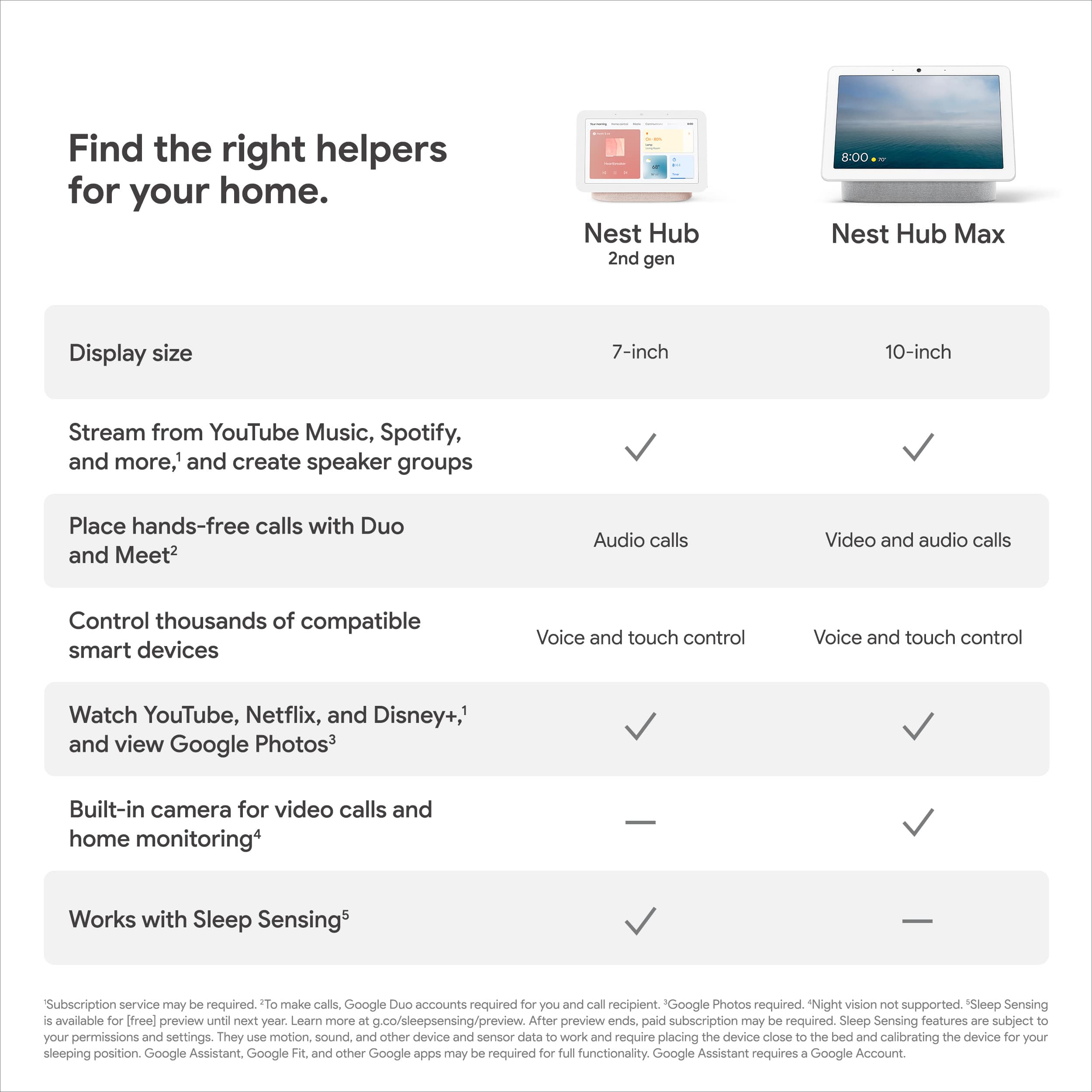
The Nest Hub (2nd gen) is the updated version of the Nest Hub. And like its previous version, it has no Nest Cam built-in, though we added some features. It offers everything it already has with the original hub with added features like an improved speaker with 50% more bass than the original, a faster and more responsive Assistant, Soli technology built-in to enable features like Quick Gestures and Sleep Sensing.
We always listen to what our customers like you share with us, so we released the Nest Hub Max with a built-in camera which will help your busy family stay in touch and on track. Leave video messages and make video calls. Check in on home when you’re away with the built-in Nest Cam. Share reminders and to-dos. Everyone views their own calendar, commute, and more with just a glance. And enjoy Google Photos, YouTube TV, videos, and music on the 10-inch HD screen with stereo speakers. See this link for more details: https://support.google.com/googlenest/answer/9334359
If you have any concerns about using the features of your Nest displays, please reach out to us anytime here and we’ll definitely help you the best we can: https://support.google.com/googlenest/gethelp
Great buy
||Posted . Owned for 3 weeks when reviewed.This reviewer received promo considerations or sweepstakes entry for writing a review.Great product for your money, would definitely buy again
I would recommend this to a friendGoogle
||Posted . Owned for 1 month when reviewed.This reviewer received promo considerations or sweepstakes entry for writing a review.I love my google. I’m very happy with the color option
I would recommend this to a friend- Cons mentioned:Responsiveness
Getting hanged multiple times
||Posted . Owned for 3 months when reviewed.This reviewer received promo considerations or sweepstakes entry for writing a review.It’s getting stop by it’s own. Not working as expected .
No, I would not recommend this to a friendBrand response from Nest Support
Posted .Hello Abhi, thanks for posting your review here on your Nest Hub(2nd gen). It's unfortunate to hear that your device is experiencing some performance issues. We'd like to know more details about your device so we can investigate and identify the cause of the issues you're experiencing and help you with troubleshooting steps that may improve the overall performance of your Nest Hub. Please contact us on our Google Help by visiting our support site here: https://support.google.com/googlenest/gethelp
Wife gift
||Posted . Owned for 3 weeks when reviewed.This reviewer received promo considerations or sweepstakes entry for writing a review.Wife enjoys it! Easy to use for the most part but sometime google can be stupid
I would recommend this to a friendGoogle
||Posted . Owned for 1 month when reviewed.This reviewer received promo considerations or sweepstakes entry for writing a review.Would buy again in the near future. Best purchase ever.
I would recommend this to a friendGood not great
||Posted .This reviewer received promo considerations or sweepstakes entry for writing a review.Good product. Used as a alarm clock. Screen doesn’t get dark enough though IMO
I would recommend this to a friendgoogle hub
||Posted . Owned for 1 week when reviewed.This reviewer received promo considerations or sweepstakes entry for writing a review.well made, the OS could be more cleaner . changes to the apps can not be made.
I would recommend this to a friendIssues from beginning
||Posted . Owned for 6 months when reviewed.This reviewer received promo considerations or sweepstakes entry for writing a review.Issues with google device not staying on network even though other similar products have no issues with internet. Google continues to blame on internet providers through support forum filled. 2 thumbs down for google .
No, I would not recommend this to a friendBrand response from Nest Support
Posted .Hello there, Yaboyyrobb. We’re sorry to hear about your experience with the connectivity of your Nest Hub (2nd gen). We’ll share your feedback with the right team to work on improving our products and services, including how we handle customer concerns with care and efficiency. Meanwhile, we’d like to have another opportunity to investigate and help you with your concern. Please contact us again using this link: https://support.google.com/googlenest/gethelp