Customer Ratings & Reviews
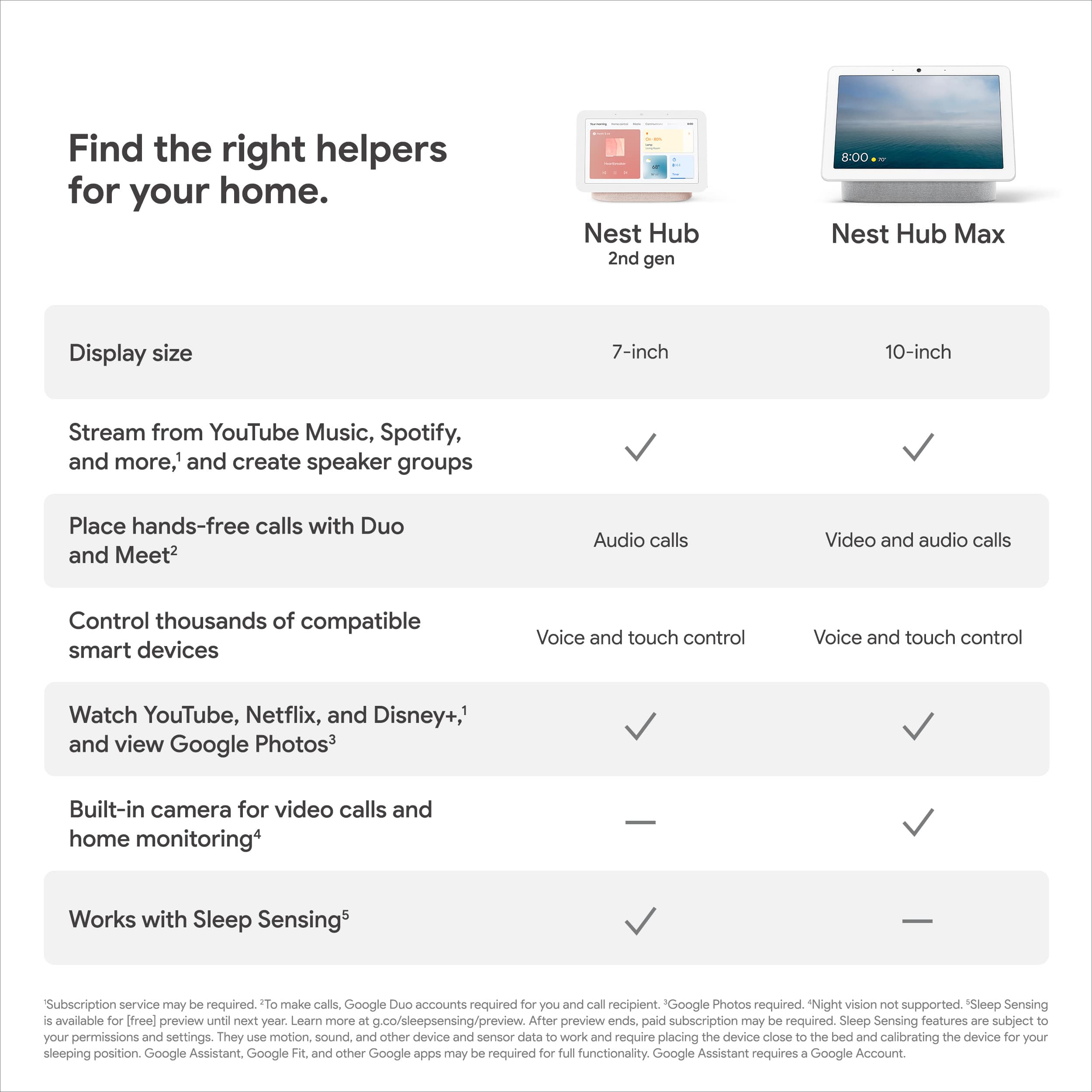






- Model:
- GA02307-US
- SKU:
- 6450821
Rating by feature
- Value
Rating 4.7 out of 5 stars
- Quality
Rating 4.7 out of 5 stars
- Ease of Use
Rating 4.6 out of 5 stars
Customers are saying
Customers appreciate the Nest Hub 2nd Gen for its ease of use, sound quality, and ideal screen size, especially for bedside use. The Google Assistant integration, reasonable price, and sleep tracking capabilities are also well-received. However, some customers have noted the absence of a camera and occasional sluggishness in responsiveness. Additionally, a few users mentioned compatibility issues with certain devices.
This summary was generated by AI based on customer reviews.
Recommended buy!
Posted .This reviewer received promo considerations or sweepstakes entry for writing a review.Amazing product definitely enhances my quality of life!
I would recommend this to a friend- Pros mentioned:Google assistant
Great Additon to My Setup
Posted .This reviewer received promo considerations or sweepstakes entry for writing a review.I already have some google home speakers int ge house, but i love this ine because it shows me info when i ask it questions and I love being able to swap out the faces.
I would recommend this to a friend Google Review
Posted .This reviewer received promo considerations or sweepstakes entry for writing a review.good product. ……………………………………………………..
I would recommend this to a friend- Pros mentioned:Screen size
Should have bought two!!!
Posted .This reviewer received promo considerations or sweepstakes entry for writing a review.This little powerhouse can do it all. I will be purchasing another for the kitchen. It is in my bedrooms now and I use it a lot more than I expected.
I would recommend this to a friend - Cons mentioned:Responsiveness
Laggy Google Junk
Posted .This reviewer received promo considerations or sweepstakes entry for writing a review.Idk how people can love this. Very slow. Very laggy, not responsive at all, overall its a cheap useless gadget. I have a few smart bulbs and outlets that currently I control with Sonos. I thought this will be an upgrade but nooo it is a huge downgrade. Gets confused how to play and where to play music. It can start playing music but cannot stop. These all works well wirh Sonos voice command but google made it. A useless display woth a cord which is slow and laggy. Returning this usless thing.
No, I would not recommend this to a friendBrand response from Nest Support
Posted .Hi, Botond! Thanks for your feedback. We're sorry to hear you're having connection issues with your Nest Hub and that it's not working as intended. This is not the type of experience we want you to have, and we're here to help. We suggest contacting our support team so we can assist you and check on your Nest Hub. We might need to perform some troubleshooting steps that may help resolve your concern. Reach out to us here anytime: https://support.google.com/googlenest/gethelp

Nice
Posted .This reviewer received promo considerations or sweepstakes entry for writing a review.It’s a very good product I really enjoyed listen music
I would recommend this to a friendWaste of money
Posted .This reviewer received promo considerations or sweepstakes entry for writing a review.I had great hopes for this device. I had been using the Google Home app on my phone and was wanting to expand my ability to control my home. I had hoped that with the presence sensing in the hub that it would open up new triggers. It does not. However, this is not the issue that brings the greatest regret. The device will not stay connected to WIFI. Period. I have reset it, moved it directly beside the router, etc. and it still will not stay connected. This makes the device an absolute waste of money, electricity, bandwidth and time. If you ask it to turn on the lights - "I'm having trouble connecting to the network" If you ask it to play YouTube - "I'm having trouble connecting to the network" Even just using it as an expensive photo frame is a letdown as it just continually has the connection error on the screen or a message to please try and set up the device again. If I had been able to return this item I would have but I missed my window of time to do so.
No, I would not recommend this to a friendBrand response from Nest Support
Posted .Hi there, MichaelS. Thanks for letting us know about your experience with the Nest Hub (2nd gen). We can imagine how much time and effort you’ve spent, and we regret the inconvenience these issues have caused you. We encourage you to contact us anytime so we can investigate whether these are caused by the device, network, or other environmental factors. You’ll find our specialists always ready to help you here: https://support.google.com/googlenest/gethelp
Incredibly frustrating
Posted .This reviewer received promo considerations or sweepstakes entry for writing a review.This thing has a mind of it's own and doesn't do anything you ask it to. You can tell it to play something and watch the screen as it registers what you are saying. It will type out everything word for word, like when I say "play artist Haken" and then start playing some random song that has absolutely nothing to do with what I asked for and could not possibly mistaken for having a similar name. Also, it likes to give a 30 second lecture after every error message. If I speak above a whisper and ask it to add something to my shopping list, instead of just saying try again it says "can only share person information if I recognize your voice, try going to assistant settings and changing your voice match settings". It didn't matter that I've checked the settings or that I've heard the stupid message a thousand times, it still says it every time. I tried speaking to it in terms that it uses, but that didn't help either. For example, I named my TV "Sony" so it would have a unique identifier for Google. I said "play music on Sony" and it said "I don't recognize Sony, try saying your device name instead". But if I say "play music on TV" it says "okay, playing music from YouTube on Sony". There are no settings to limit how much it talks, or even to make the speaking volume softer than the media volume. If you listen to music at a high volume, it is going to scream in your ear if you ask it a question later. In general I would also say that the user interface is not very intuitive. The sound quality should isn't great, the mini speakers sound way better for half the price.
No, I would not recommend this to a friendBrand response from Nest Support
Posted .Hi there, JustinM. It’s unfortunate to hear about your experience with the Nest Hub (2nd gen) and its Google Assistant. This is not the ideal experience we want to share with you and we apologize for the inconvenience these issues have caused. We recommend contacting our support team so we can guide you with troubleshooting procedures accordingly, here: https://support.google.com/googlenest/gethelp
Didn’t get item
Posted .This reviewer received promo considerations or sweepstakes entry for writing a review.Never got the item. Got lost in shipping so not sure if it was fed exs fault or Best Buy
I would recommend this to a friend- Pros mentioned:Sound quality
Piece of garbage stick with Alexa devices
Posted .This reviewer received promo considerations or sweepstakes entry for writing a review.First of all you can only connect this device to Google home if you're using a non Google pixel phone. So apparently you need an iPhone or other non Google device to connect this which Google has confirmed and is absolutely insane. If you're able to get it connected to Google home none of the third party apps or connections work on the device you just open them and then it freezes and restarts. Spend the extra money on an Alexa device you won't regret it
No, I would not recommend this to a friendBrand response from Nest Support
Posted .Hi there thecocodoge, thanks for letting us know about the 3rd party integration issue you're having with Nest Hub (2nd Gen). We apologize for any inconvenience this experience may have caused you.
Nest Hub (2nd Gen) works exclusively with the Google Home app, which generally works with both Android and iOS mobile phones and tablet devices. However, for the best experience in setting up Nest Hub and integrating 3rd party apps or devices, we recommend checking if your current setup meets the following minimum requirements:
- Latest version of the Google Home app.
- Latest version of the Google app.
- A Google Account.
- A mobile phone or tablet having Android 8.0 or later version or iOS device having 14.0 or later version.
- Works with 2.4 GHz and 5 GHz Wi-Fi networks (a WPA-2 Enterprise network won't work).
- Ensure that Bluetooth is turned on.
- An Internet connection and secure wireless network.
Freezing and restarting issues with your 3rd party apps and Nest Hub (2nd Gen) may be related to a connectivity issue or limited bandwidth of your Internet connection. Removing some of your connected devices and trying out your 3rd party apps with Nest Hub (2nd Gen) may help verify this. Once you confirm the presence of congestion or a limited bandwidth for your connection, contacting your Internet service provider will be the best course of action.
We also recommend checking if the 3rd party app or device that you are using is fully compatible with your Nest Hub (2nd Gen). You can easily verify if your app is supported by entering the name of your app using this link: https://assistant.google.com/explore
If you need further help, you can always visit our support page and reach out to our support team using this link: https://support.google.com/googlenest/gethelp
- Pros mentioned:Sound quality
Works great.
Posted .This reviewer received promo considerations or sweepstakes entry for writing a review.Works great. My daughter loves that she can play and control her music in her room.
I would recommend this to a friend Not great
Posted .This reviewer received promo considerations or sweepstakes entry for writing a review.Sound quality is bad. Always muddy even with the bass on minimum and treble on max. Always overrides Hey Google on my phone. Glad I got it half price.
No, I would not recommend this to a friendBrand response from Nest Support
Posted .Hi there, DonnieWads. Thanks for sharing your feedback on Nest Hub (2nd Gen). It's unfortunate to hear that the sound quality fell short of meeting your expectations. Your Nest Hub (2nd Gen) comes with a high quality full-range speaker that has a 1.7 in (43.5 mm) driver that lets you tweak both the treble and bass settings to your liking. It's quite easy and here's how you can change it:
- Make sure your mobile device or tablet is connected to the same Wi-Fi or linked to the same account as your Nest Hub.
- Open the Google Home app.
- Tap the device you want to adjust > and then Settings > and then Audio and then Equalizer.
- Adjust Bass and Treble level.
For additional help with any features on Nest Hub (2nd Gen), feel free to contact our support team here: https://support.google.com/googlenest/gethelp
- Pros mentioned:Ease of use
Google home
Posted .This reviewer received promo considerations or sweepstakes entry for writing a review.Works well and easy to set up, can also be used as a digital frame. Good for displaying recipes when cooking
I would recommend this to a friend - Pros mentioned:Screen size
Review
Posted .This reviewer received promo considerations or sweepstakes entry for writing a review.This item was very great! Good size for my kitchen.
I would recommend this to a friend DO NOT BUY!
Posted .This reviewer received promo considerations or sweepstakes entry for writing a review.Symptom: After a Google Home software update, Google Home Hub now stays stuck with the logo 'G' regardless when trying to do a factory reset. Google Service Specialist's response: It shouldn't do that, and you passed your 1-year warranty last September. The resolution is to go buy another one. My thoughts I've been a google fan and champion for as long as I can remember. If a software update bricks your device, I'd assume that there should be a solution for that. It's not as if the user has damaged it, but rather the company is at fault. For me to now go buy another device, with the expectation for it to fail within a year and a bit is absolutely ridiculous. When I first go the google home hub, it wasn't as useful as I first thought of it, and at least I was able to use it as a picture frame and then my son's display to play youtube videos. After the initial resolution the specialist provides, it now makes me question the level of quality of the software-hardware and support (which I never thought I would have to question). Is this something now that I have to question on all potential future purchases?
No, I would not recommend this to a friendBrand response from Nest Support
Posted .Hi Sam1, thanks for posting your feedback to let us know your experience with the Nest Hub (2nd gen), and with our customer service team. We apologize for falling short on your support needs. We’ll use your feedback to work on improving how we handle customer concerns with accuracy and efficiency. Meanwhile, we’d be happy to investigate your concern further and see how we can help improve your experience. Please share with us your recent case number here so we can have a closer look into it: https://support.google.com/googlenest/gethelp
Terrible Attempt
Posted .This reviewer received promo considerations or sweepstakes entry for writing a review.I’m not one to review giving a negative review unless something is incredibly wrong, and this device missess the mark. I purchased it under the pretense that I could control my hub app from it—which I can, barely. It has serious lag issues, is choked with bloat apps and services, and lacks ANY customizability. I just want to control my cameras and other devices, I don’t want analytics on my TV, watch netflix on it, or entertain useless pages I can’t remove or cycle through easily. Overall, this is device is a noncustomizable ipad. If you want a better tool for controling your devices, just save money and use an ipad
No, I would not recommend this to a friendBrand response from Nest Support
Posted .Hi ConnectionLost! We understand that the Google Nest Hub (2nd gen) isn't meeting your expectations for controlling your smart home. We need to perform some advanced troubleshooting steps, please contact us here: https://support.google.com/googlenest/gethelp?sjid=13240470573889395758-NC
decent for the price
Posted .This reviewer received promo considerations or sweepstakes entry for writing a review.Not the best sounding audio quality but the screen still works amazing
I would recommend this to a friendBrand response from Nest Support
Posted .Hello there, Luke. Thanks for your feedback on Nest Hub (2nd Gen). We’re glad that the screen works well, but we’re sorry to hear that your experience with the audio quality is below your expectations.
We suggest adjusting the volume of your Nest speaker that can improve its sound either by voice, by touch, or from the Google Home App. You can also change the audio settings of your speaker in the Google Home app following the steps below:
- Make sure your mobile device or tablet is connected to the same Wi-Fi or linked to the same account as your Nest speaker.
- Open the Google Home app.
- Tap the device you want to adjust, select Settings, select Audio, then select Equalizer.
- Adjust Bass and Treble level.
Please let us know by contacting us if more help is needed, here: https://support.google.com/googlenest/gethelp
Don’t buy it.
Posted .This reviewer received promo considerations or sweepstakes entry for writing a review.This was a big part of my managing my home until it stopped responding to voice commands. Done everything recommended but doesn’t work. Both of them have died. Would not buy again
No, I would not recommend this to a friendBrand response from Nest Support
Posted .Hi there, WilliamL. Thanks for your feedback. We're sorry to hear about your experience with the Nest Hub (2nd Gen). It's disappointing when a product that plays a significant role in managing your home suddenly stops responding to voice commands, especially after trying all recommended troubleshooting steps. It sounds frustrating to have encountered this issue with not just one, but both devices. We wanted to know more of your concern, we recommend reaching out to our dedicated team of specialists on the Google Help Center here: https://support.google.com/googlenest/gethelp
Nest Hub
Posted .This reviewer received promo considerations or sweepstakes entry for writing a review.This new unit is 12ft away from the the main wi-fi and mesh router. On most day's i have to re-boot the Smart Display. I also replaced the unit downstairs, its installed 2x from the mesh router downstairs. This unit reconnects without having to reboot the Hub.
No, I would not recommend this to a friendBrand response from Nest Support
Posted .Hello Cortland, thanks for sharing the details of your feedback on Nest Hub (2nd gen), and we’re sorry to hear that one of your Nest displays is performing below your expectations.
Your Nest display could be having trouble connecting to Google, and you can try these simple steps below that might help:
- Check your Wi-Fi network for possible congestion. Relieving some of your connected devices may help free up some bandwidth space.
- Ensure that it is within a line of sight from your router.
- Check for wireless interference with other Wi-Fi hotspots or appliances and devices nearby.
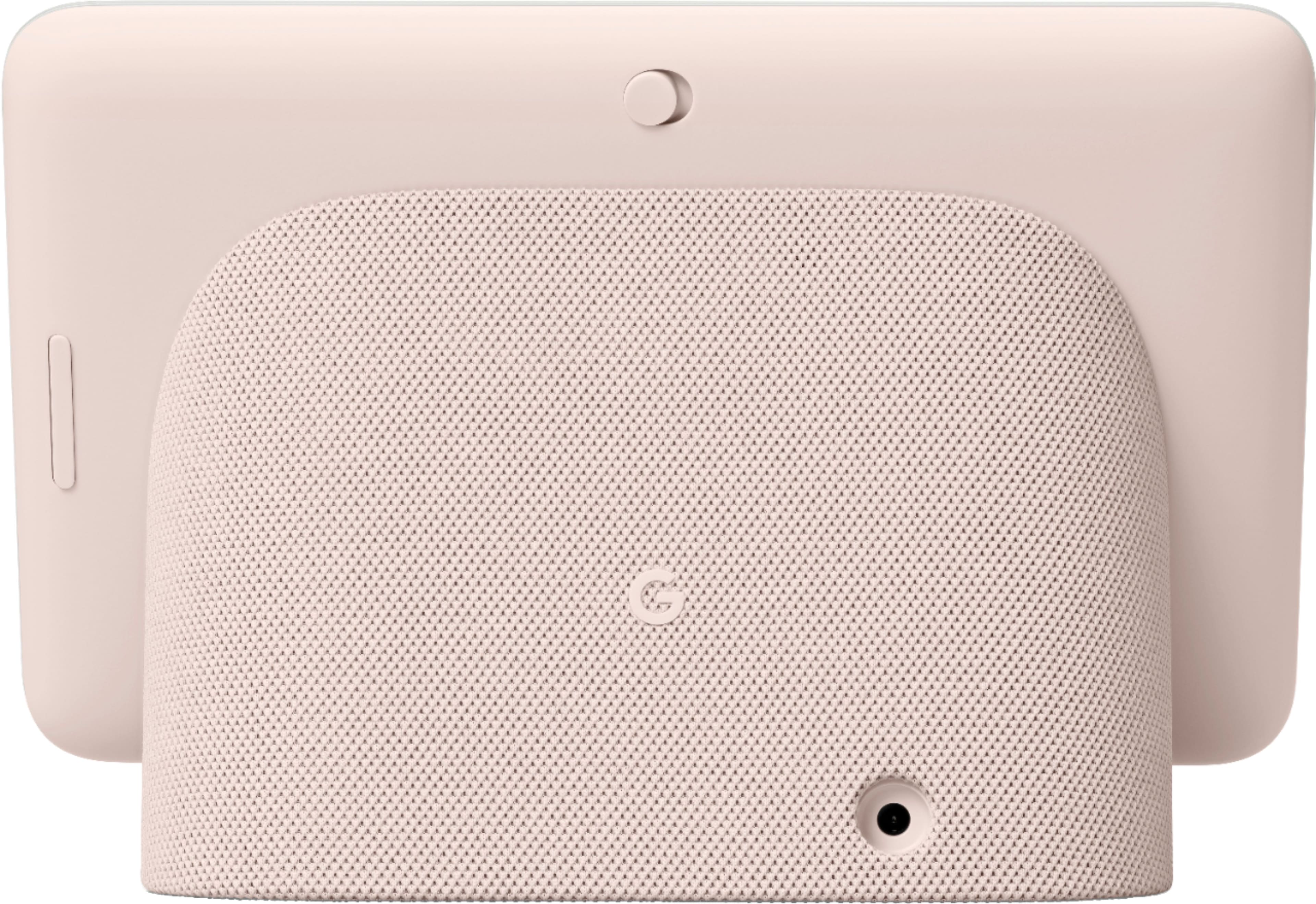
- Reset your Nest display. On the back of Nest Hub, press and hold both volume buttons together for about 10 seconds. Your Nest Hub will let you know that it's resetting.
We're always here for your support needs, please let us know if further assistance is required: https://support.google.com/googlenest/gethelp
Defective Data Eater
Posted .This reviewer received promo considerations or sweepstakes entry for writing a review.I've had it for a month and mine must defective as it is using an enormous amount of data. Near the end of last month I got a notification that I was reaching my data cap. I've never gotten that! I unplugged it for 3 days and behaved normally on my WiFi connection, and used only 3% of my data allowance. With it plugged back in for 11 days I have used 36% of my monthly data allowance. I have done research and The Hub is not supposed to do that; but Google Home App and the device itself are not very user friendly when trying to figure out why it is doing this. I have the mic, all motion and sleeping sensing features turned off so it is basically a glorified clock and still eating my data! And I'm 3 days passed the refund/return date, which is upsetting as a new unit might have been something I would be willing to try because it is a nice little machine.
No, I would not recommend this to a friendBrand response from Nest Support
Posted .Hi Mandia, thanks for reaching out. We're sorry to hear that your Nest Hub (2nd Gen) is consuming more data than usual.
If you're willing to try, resetting your Nest Hub (2nd Gen) may be a good step to see if it might be able to fix the higher data usage issue. Keep in mind that this process will erase all data and that you may need to set it up again. To reset, check on the back of Nest Hub, press and hold both volume buttons together for about 10 seconds. Your Nest Hub will let you know that it's resetting. You may then try and see if your Nest Hub (2nd Gen) will still consume more data than usual.
If resetting doesn't fix the issue, then we may need to take a closer look and see what may be causing the issue. You may speak to our support team using this link: https://support.google.com/googlenest/gethelp