Last-Minute SavingsLimited quantities.Shop now

Skip to content
Gift Ideas
Main Content

Customer Ratings & Reviews
Last Minute Deal
Your price for this item is $49.98
The comparable value price is $79.99

Customer reviews

Rating 4.8 out of 5 stars with 591 reviews

Rating Filter

Rating by feature

  • Value

    Rating 4.8 out of 5 stars

  • Quality

    Rating 4.8 out of 5 stars

  • Ease of Use

    Rating 4.9 out of 5 stars

Pros mentioned filter

Cons mentioned filter

97%would recommend to a friend

Customers are saying

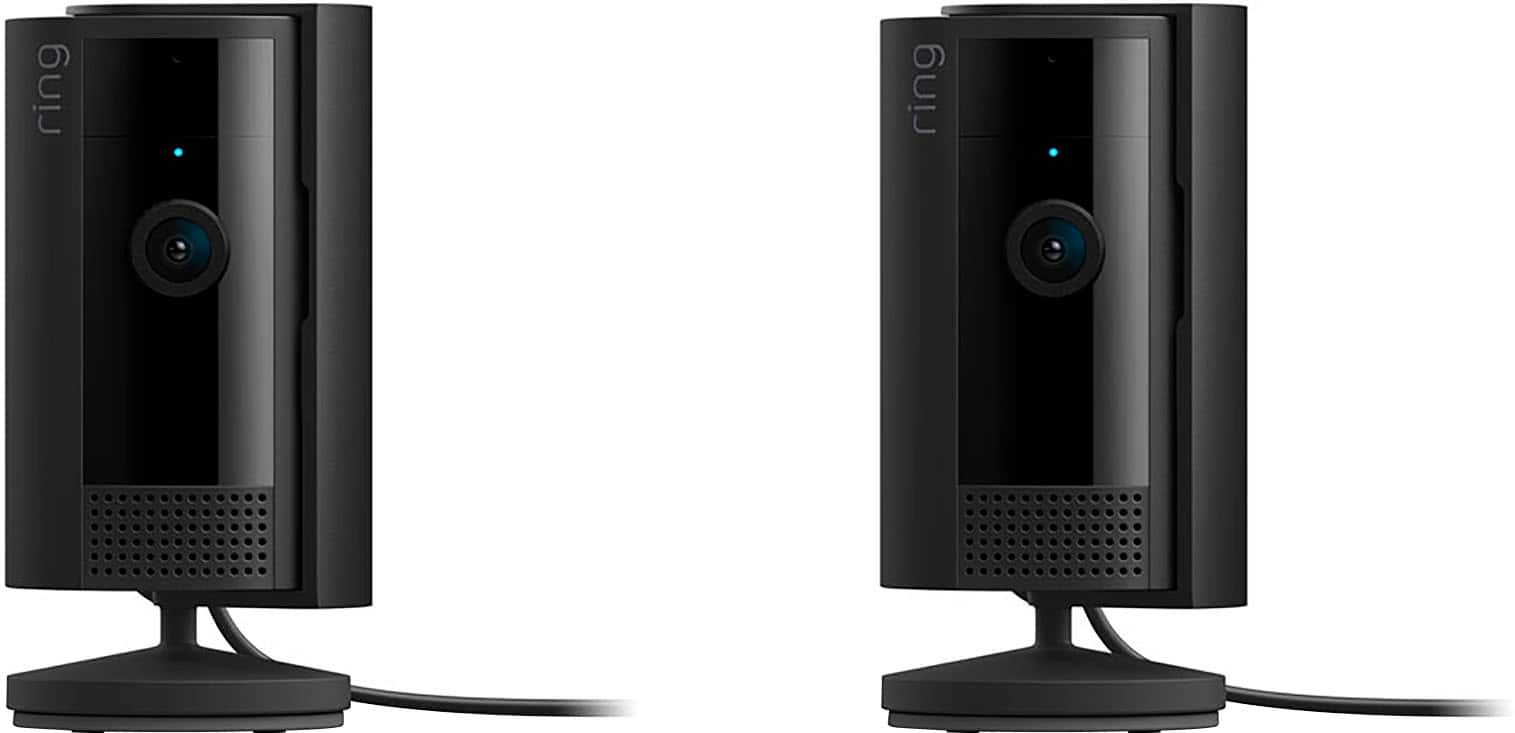
Customers commend the 2-Pack Indoor Plug-In 1080p Security Camera for its fantastic camera quality and ease of use, highlighting its simple installation and programming. The overall performance and inclusion of a privacy cover are also appreciated. Some customers have noted that the cord length could be longer and the night vision can be grainy.

This summary was generated by AI based on customer reviews.

The vast majority of our reviews come from verified purchases. Reviews from customers may include My Best Buy members, employees, and Tech Insider Network members (as tagged). Select reviewers may receive discounted products, promotional considerations or entries into drawings for honest, helpful reviews.
Page 28 Showing 541-560 of 591 reviews
  • Rated 4 out of 5 stars

    Good product

    |
    |
    Posted . Owned for 1 month when reviewed.
    This reviewer received promo considerations or sweepstakes entry for writing a review.

    Good working product, sometimes has to see a face before detecting it’s a person.

    I would recommend this to a friend
    • Brand response from Ring
      Posted .

      Hi Oaoa.

      Thank you for taking the time to share your Ring experience with us. We are happy to read that you are enjoying your new Ring Indoor Cam device! Likewise, we believe in keeping people close to what’s important. That is why we are driven to create products that help you protect what matters most at home and empower you to connect with your visitors from wherever you are. Together, we’ll make neighborhoods safer!

      Ring Community was launched to help deliver the most current news and educational information to our neighbors. This online forum is divided into four categories: Product Boards, Ring Updates, Tips + Tricks, and a Moderators’ Corner. The Product Boards are where you can begin new topics with your questions or feedback; there is also a search option that helps you find topics that were already posted by other neighbors.

      Sincerely,
      Matthew from Ring. Ring

  • Rated 5 out of 5 stars

    Ring cameras are the best.

    |
    |
    Posted . Owned for 3 weeks when reviewed.
    This reviewer received promo considerations or sweepstakes entry for writing a review.

    Excellent product. Gping to get wireless Ring cameras also.

    I would recommend this to a friend
  • Rated 5 out of 5 stars

    Simply the Best BUY!

    |
    |
    Posted . Owned for 3 weeks when reviewed.
    This reviewer received promo considerations or sweepstakes entry for writing a review.

    Excellent product and delivery. Best Buy is my go to Tech Store!

    I would recommend this to a friend
  • Rated 5 out of 5 stars

    Get them for your home.

    |
    |
    Posted . Owned for 1 week when reviewed.
    This reviewer received promo considerations or sweepstakes entry for writing a review.

    I have other ring devices, so I wanted all the same thing. Ring is a wonderful product

    I would recommend this to a friend
  • Rated 5 out of 5 stars

    Camera review

    |
    |
    Posted . Owned for 3 weeks when reviewed.
    This reviewer received promo considerations or sweepstakes entry for writing a review.

    Product was in perfect condition and works really well.

    I would recommend this to a friend
  • Rated 5 out of 5 stars

    Love it

    |
    |
    Posted . Owned for 1 week when reviewed.
    This reviewer received promo considerations or sweepstakes entry for writing a review.

    Will buy again because the best ever privacy is key

    I would recommend this to a friend
  • Rated 5 out of 5 stars

    Get some today!

    |
    |
    Posted . Owned for 2 weeks when reviewed.
    This reviewer received promo considerations or sweepstakes entry for writing a review.

    If u don't have some yet I suggest u should get on it!!!

    I would recommend this to a friend
  • Rated 5 out of 5 stars

    Cameras

    |
    |
    Posted . Owned for 3 weeks when reviewed.
    This reviewer received promo considerations or sweepstakes entry for writing a review.

    Great buy works perfectly! Was very easy to set up!

    I would recommend this to a friend
  • Rated 5 out of 5 stars

    Ring camera pack

    |
    |
    Posted . Owned for 3 weeks when reviewed.
    This reviewer received promo considerations or sweepstakes entry for writing a review.

    Great product. Highly recommended for outdoor use.

    I would recommend this to a friend
  • Rated 5 out of 5 stars

    Home security

    |
    |
    Posted . Owned for 3 weeks when reviewed.
    This reviewer received promo considerations or sweepstakes entry for writing a review.

    Excellent quality Ring always makes me feel secure

    I would recommend this to a friend
  • Rated 4 out of 5 stars

    Great camera for Indoor

    |
    |
    Posted . Owned for 3 weeks when reviewed.
    This reviewer received promo considerations or sweepstakes entry for writing a review.

    These cameras are great for indoor movement even in home or commerical area. Only issue WIFI cameras are slow and some times it cut the videos.

    I would recommend this to a friend
    • Brand response from Ring
      Posted .

      Hi Anshu.

      Thank you for taking the time to share your Ring experience with us and other consumers. We believe in keeping people close to what’s important. That is why we are driven to create products that help you protect what matters most at home and empower you to connect with your visitors from wherever you are. Together, we’ll make neighborhoods safer!

      Ring devices require high-speed internet to bring you crisp, clear video and audio. Poor network connectivity can affect the performance of your Ring device. We are happy to share some troubleshooting steps to help you diagnose and fix common video issues that you may experience with Ring doorbells and cameras.

      Ring devices with 1080p video require at least 1 Mbps upload and download speeds, though 2 Mbps is recommended for optimal performance. In addition to ensuring that you have sufficient wifi speeds, you will also want to check the signal strength of your device. A poor wifi signal can cause connectivity with your Ring device to be unreliable. Check the Device Health section of your Ring application to ensure the device’s RSSI is within an acceptable range. The recommended range for optimal performance is 0 to -60 for the RSSI.

      Ring Community was launched to help deliver the most current news and educational information to our neighbors. This online forum is divided into four categories: Product Boards, Ring Updates, Tips + Tricks, and a Moderators’ Corner. The Product Boards are where you can begin new topics with your questions or feedback; there is also a search option which helps you find topics that were already posted by other neighbors. We invite you to visit our community today!

      Thank you,
      Melissa from Ring. Ring

  • Rated 4 out of 5 stars

    Functional

    |
    |
    Posted . Owned for 1 month when reviewed.
    This reviewer received promo considerations or sweepstakes entry for writing a review.

    Shaped kind of awkward but they do the job I guess

    I would recommend this to a friend
    • Brand response from Ring
      Posted .

      Hi Jimbo.

      Thank you for taking the time to share your Ring experience with us and other consumers. We believe in keeping people close to what’s important. That is why we are driven to create products that help you protect what matters most at home and empower you to connect with your visitors from wherever you are. Together, we’ll make neighborhoods safer!

      Ring Community was launched to help deliver the most current news and educational information to our neighbors. This online forum is divided into four categories: Product Boards, Ring Updates, Tips + Tricks, and a Moderators’ Corner. The Product Boards are where you can begin new topics with your questions or feedback; there is also a search option that helps you find topics that were already posted by other neighbors.

      Sincerely,
      Matthew from Ring. Ring

  • Rated 4 out of 5 stars

    Its ok

    |
    |
    Posted . Owned for 3 weeks when reviewed.
    This reviewer received promo considerations or sweepstakes entry for writing a review.

    Doesnt always catch everything. I dont know what else to tell you

    No, I would not recommend this to a friend
    • Brand response from Ring
      Posted .

      Hi DeanH.

      Thank you for taking the time to share your Ring Indoor Cam (2nd Gen.) experience with us and other consumers. We believe in keeping people close to what’s important. That is why we are driven to create products that help you protect what matters most at home and empower you to connect with your visitors from wherever you are. Together, we’ll make neighborhoods safer!

      It sounds like the device is not performing as expected in regards to person detection. It is important to ensure that you have the proper motion settings in place for your environment. This camera uses adjustable motion detection and runs on passive infrared sensors. The system identifies visitors via a moving heat signature and sends a notification to your smart device when one is detected. You can adjust three preset motion zones and their distances under the "Motion Settings" tab on the device's page in the Ring app. Additionally, you can choose how often the camera checks for movement in those predefined zones via the "Motion Frequency" setting. If you find that your camera is missing some motions, please set the motion frequency to "Frequently."

      Accuracy in motion detection can also be improved by enabling the "Smart Alerts" feature for people only in your Ring app. To enable "Smart Alerts," please follow these steps:
      Tap the menu (≡) on the top left.
      Tap "Devices."
      Tap the device that you want to adjust.
      Tap "Motion Settings."
      Tap "Smart Alerts."
      Tap "Enable Feature."
      Tap "Continue."
      Select the notification options that you want for "Person" and "Other Motion."
      You'll see a video camera where you can select or de-select recording and a bell icon to represent alert notifications.
      After you've adjusted your settings, tap "Done."

      Ring Community was launched to help deliver the most current news and educational information to our neighbors. This online forum is divided into four categories: Product Boards, Ring Updates, Tips + Tricks, and a Moderators’ Corner. The Product Boards are where you can begin new topics with your questions or feedback; there is also a search option which helps you find topics that were already posted by other neighbors. We invite you to visit our community today!

      Thank you,
      Melissa from Ring. Ring

  • Rated 4 out of 5 stars

    Best Buy

    |
    |
    Posted . Owned for 3 weeks when reviewed.
    This reviewer received promo considerations or sweepstakes entry for writing a review.

    Awesome cameras. Best Buy for the win. Always has the best product selection

    I would recommend this to a friend
    • Brand response from Ring
      Posted .

      Hi Kevin.

      Thank you for taking the time to share your experience with us. We are pleased to read that you are enjoying your new Ring Indoor Cam (2nd Gen.) and that the features included are meeting your expectations. At Ring, we believe in keeping people close to what’s important. That is why we are driven to create products that help you protect what matters most at home and empower you to connect with your visitors from wherever you are. Together, we’ll make neighborhoods safer!

      Ring Community was launched to help deliver the most current news and educational information to our neighbors. This online forum is divided into four categories: Product Boards, Ring Updates, Tips and Tricks, and a Moderators’ Corner. The Product Boards are where you can begin new topics with your questions or feedback; there is also a search option that helps you find topics that have already been posted by other neighbors. We invite you to visit our community today.

      Thank you,
      Melissa from Ring. Ring

  • Rated 4 out of 5 stars

    Customer service

    |
    |
    Posted . Owned for 1 month when reviewed.
    This reviewer received promo considerations or sweepstakes entry for writing a review.

    They guy who sold this to us was absolutely amazing

    I would recommend this to a friend
    • Brand response from Ring
      Posted .

      Hi DeborahA.

      Thank you for taking the time to share your Ring experience with us and other consumers. We believe in keeping people close to what’s important. That is why we are driven to create products that help you protect what matters most at home and empower you to connect with your visitors from wherever you are. Together, we’ll make neighborhoods safer!

      Ring Community was launched to help deliver the most current news and educational information to our neighbors. This online forum is divided into four categories: Product Boards, Ring Updates, Tips + Tricks, and a Moderators’ Corner. The Product Boards are where you can begin new topics with your questions or feedback; there is also a search option which helps you find topics that were already posted by other neighbors. We invite you to visit our community today!

      Thank you,
      Melissa from Ring. Ring

  • Rated 3 out of 5 stars

    Ring

    |
    |
    Posted . Owned for 1 month when reviewed.
    This reviewer received promo considerations or sweepstakes entry for writing a review.

    Neighbor alerts too much , and I don’t know how to adjust

    I would recommend this to a friend
    • Brand response from Ring
      Posted .

      Hi Ringalingalldaylong.

      Thank you for taking the time to share your experience with us. We understand the importance of having your Ring Indoor Cam 2nd Gen detect motion and alert you according to your needs. The features and technology provided by the Ring Indoor Cam 2nd Gen are incredibly valuable and help provide you with peace of mind about your home security. We can definitely assist you with this today, and we are confident we can find the correct settings for your home’s environment.

      It sounds like your device is not detecting motion as expected. This camera uses adjustable motion detection and runs on passive infrared sensors. The system identifies visitors via a moving heat signature and sends a notification to your smart device when one is detected. If you do not wish to receive notifications for motion events, simply toggle off the "Motion Alerts" tab on the device's page in the Ring app. You can adjust three preset motion zones and their distances under the "Motion Settings" tab on the device's page in the Ring app. Additionally, you can choose how often the camera checks for movement in those predefined zones via the "Motion Frequency" setting. If you find that your camera is picking up too much motion, we recommend lowering the "Motion Sensitivity" under the "Motion Settings" tab. It is important to ensure that you have the proper motion settings in place for your environment. This also includes changing the "Motion Frequency" to "Regularly" or "Periodically" in the Ring app.

      Accuracy in motion detection can also be improved by enabling the "Smart Alerts" feature for people only in your Ring app. To enable "Smart Alerts", please follow these steps:
      Tap the menu (≡) on the top left.
      Tap "Devices."
      Tap the device that you want to adjust.
      Tap "Motion Settings."
      Tap "Smart Alerts."
      Tap "Enable Feature."
      Tap "Continue."
      Select the notification options that you want for "Person" and "Other Motion."
      You'll see a video camera where you can select or de-select recording and a bell icon to represent alert notifications.
      After you've adjusted your settings, tap "Done."

      For more information on your Ring Indoor Cam 2nd Gen, we invite you to reach out to our community. Ring Community is our first peer-to-peer community forum, giving our customers the ability to help one another and share their personal feedback and experiences with Ring. We look forward to hearing from you if we can be of any further assistance!

      Thank you,
      Miyuki from Ring. Ring

  • Rated 3 out of 5 stars

    Cameras

    |
    |
    Posted . Owned for 3 weeks when reviewed.
    This reviewer received promo considerations or sweepstakes entry for writing a review.

    Very small, but doesn't capture images clearly in the dark.

    No, I would not recommend this to a friend
    • Brand response from Ring
      Posted .

      Hi ReeRee.

      Thank you for taking the time to share your experience with us. We understand the importance of having your Ring Indoor Cam (2nd Gen.) record clear and concise videos in the dark. The Ring Indoor Cam (2nd Gen.) was designed with adjustable light settings to suit your needs. We are happy to provide you with more information on the Night Vision concern that you mentioned in your review.

      To ensure that the "Night Vision" feature works as intended, make sure your Indoor Cam’s infrared light is toggled on in the Ring app. The infrared light control is in your Ring app under Video Settings. Enable "Color Night Vision" in the Ring app to help improve clarity at night.

      To turn the "Color Night Vision" on or off, follow these instructions:
      Open the Ring app.
      Tap the "Menu" (☰).
      Tap "Devices."
      Select the device you want to adjust.
      Tap "Device Settings."
      Tap "Video Settings."
      Toggle "Color Night Vision" on or off.

      Ring Community was launched to help deliver the most current news and educational information to our neighbors. This online forum is divided into four categories: Product Boards, Ring Updates, Tips + Tricks, and a Moderators’ Corner. The Product Boards are where you can begin new topics with your questions or feedback; there is also a search option which helps you find topics that were already posted by other neighbors. We invite you to visit our community today!

      Thank you,
      Melissa from Ring. Ring

  • Rated 2 out of 5 stars

    Would not connect to wifi

    |
    |
    Posted . Owned for 2 months when reviewed.
    This reviewer received promo considerations or sweepstakes entry for writing a review.

    I have many ring products. I tried for two hours to get this to connect to the wifi. It just wouldn't connect. I even stood next to the wifi box but still nothing. All my other cameras inside and outside work fine but these would not so I had to return

    No, I would not recommend this to a friend
    • Brand response from Ring
      Posted .

      Hi RingReplacedClaire.

      Thank you for taking the time to share your experience with us.

      We understand the importance of a seamless setup process so that you can begin using your Ring Indoor Cam (2nd Gen) right away. The features and technology provided by the Ring Indoor Cam (2nd Gen) are incredibly valuable and help provide you with peace of mind about your home security. We would love the opportunity to work with you. We are confident that we can get your device up and running today.

      It sounds like your Ring Indoor Cam (2nd Gen) is failing to complete a setup. When setting up your Ring device, there are two connections that need to be made for a successful setup. The first is the temporary wifi network called "Ring-" that is broadcast by your device. If you're having trouble finding this network, you should restart the setup procedure. When you get to this step, look for a slowly pulsing light on your device. This means the device is broadcasting the network. Now, try the setup process again. If you don't see this light, you may have a malfunctioning unit.

      The second is your home's wifi network. If you're receiving a 'Setup did not complete' message and cannot finish setup, there may be an issue with your home's wifi network. Your Ring device may be too far from your wifi router, or there may be a possible issue related to your wifi modem or router. Try rebooting your router and attempting the setup again. If you are still unable to successfully set up your device, visit our support center or contact our support team for additional troubleshooting steps.

      Ring Community was launched to help deliver the most current news and educational information to our neighbors. This online forum is divided into four categories: Product Boards, Ring Updates, Tips + Tricks, and a Moderators’ Corner. The Product Boards are where you can begin new topics with your questions or feedback; there is also a search option that helps you find topics that have already been posted by other neighbors.

      All the best,
      Nicole from Ring. Ring

  • Rated 1 out of 5 stars

    Waste of money.

    |
    |
    Posted . Owned for 2 months when reviewed.
    This reviewer received promo considerations or sweepstakes entry for writing a review.

    It will not connect to your 5G wifi and on top of that you have to purchase a subscription to even use the camera effectively. Waste of money. I rather tape an iPad to my wall instead of this.

    No, I would not recommend this to a friend
    • Brand response from Ring
      Posted .

      Hello Jackie,

      You are correct, the Ring Indoor Cam (2nd Gen) is only compatible with 2.4GHz Wi-Fi 802.11 B/G/N networks. Here is a helpful support article with more detailed product information: https://ring.com/support/articles/et42e/Indoor-Cam-Information. If you prefer a device that connect to a 5GHz network, we would suggest you look into the all-new Ring Stick Up Cam Pro.

      At Ring, we believe it is imperative that our customers receive all pertinent information regarding additional benefits they have the option to subscribe to, such as the Ring Protect Plan. Having this information allows someone to make the best purchasing decision for their needs. We provide information to our customers about the optional Ring Protect Plan on our Ring website, here: https://ring.com/protect-plans. Your Ring app will also notify you during the free 30-day trial of our cloud plan, as well as in an email after a successful setup of a Ring device.

      Ring Community was launched to help deliver the most current news and educational information to our neighbors. This online forum is divided into four categories: Product Boards, Ring Updates, Tips + Tricks, and a Moderators’ Corner. The Product Boards are where you can begin new topics with your questions or feedback; there is also a search option that helps you find topics that have already been posted by other neighbors. We invite you to visit our site at https://community.ring.com/ today.

      Thank you,
      Alexis with Ring Ring

  • Rated 1 out of 5 stars

    Terrible

    |
    |
    Posted . Owned for 1 month when reviewed.
    This reviewer received promo considerations or sweepstakes entry for writing a review.

    They don’t work worst product — I have a lot of ring products these don’t connect

    No, I would not recommend this to a friend
    • Brand response from Ring
      Posted .

      Hello FCTC.

      Thank you for taking the time to share your experience with us.

      We understand the importance of having a consistent wifi signal for the Ring Indoor Cam. Having a solid connection ensures you do not miss any activity around your home. We are eager to provide you with a solution for the connectivity concern mentioned in your review.

      It sounds like you have some concerns regarding the connectivity of your Ring Indoor Cam. If you're experiencing problems with Live View, a poor device connection, or receiving notifications, you will want to look into your wifi network speeds and signal strength.

      Even with the best wifi router and minimal obstructions, wifi signals get weaker the further they travel. If your router is far away from your Ring products, consider moving it closer, adding a Ring Chime Pro, or upgrading to a mesh network system to extend your wifi network's coverage.

      You can check wifi signal strength—or RSSI (Received Signal Strength Indicator)—in the Ring app by following these steps:

      Open the Ring app.
      Tap the Menu (☰).
      Tap Devices and select the Ring device you'd like to check.
      Tap the Device Health tile.
      Under the Network section, look for Signal Strength.
      If the RSSI value listed is green, your device has a strong signal. If it is grey, amber, or red, it may have a moderate to weak signal.
      The larger the number after "RSSI-" the weaker the signal.
      For example, a device displaying "RSSI-36" has a stronger signal than a device showing "RSSI-64".

      Visit our support center for more information.

      Ring Community was launched to help deliver the most current news and educational information to our neighbors. This online forum is divided into four categories: Product Boards, Ring Updates, Tips + Tricks, and a Moderators’ Corner. The Product Boards are where you can begin new topics with your questions or feedback; there is also a search option that helps you find topics that have already been posted by other neighbors.

      All the best,
      Nicole from Ring. Ring