Customer Ratings & Reviews


- Model:
- B08F6GPQQ7
- SKU:
- 11470659
Rating by feature
- Value
Rating 4.7 out of 5 stars
- Quality
Rating 4.8 out of 5 stars
- Ease of Use
Rating 4.8 out of 5 stars
Fld light
Posted .This reviewer received promo considerations or sweepstakes entry for writing a review.After Christmas i can say more. For now great shipment & delivery!
I would recommend this to a friendA Sham security system
Posted .This reviewer received promo considerations or sweepstakes entry for writing a review.Do not recommend buying ring products for actual security purpose. These are more of toy gadgets which gives you a false sense of security. Since the ring site doesn’t allow leaving reviews of product on site leaving rating here.
No, I would not recommend this to a friendBrand response from Ring
Posted .Hello Rahul,
Thank you for taking a moment to leave your review on the Ring Floodlight Camera. At Ring, we believe that stronger communities are the key to safer neighborhoods. That is why we are driven to create products that help you protect what matters most at home, and empower you to connect with your visitors from wherever you are. We are saddened to read that this device did not meet your expectations, but are still here to assist you, if needed.
If you still have the Ring device in your possession, we invite you to reach out to us at https://community.ring.com/. Ring Community is our first peer-to-peer community forum, giving our customers the ability to help one another and share their personal feedback/experiences with Ring. We look forward to hearing from you, if we can be of any further assistance!
Thank you,
Jamila with Ring
Definitely not for security
Posted .This reviewer received promo considerations or sweepstakes entry for writing a review.Great for the daytime. BUT, if you need it for the night security, forget it. We have been suffering for 3 weeks with rude and nasty teenagers at midnight. NOT once did the camera pick anything up. NOT ONCE.
No, I would not recommend this to a friendBrand response from Ring
Posted .Hi DeeplyDissapointed.
Thank you for taking the time to share your experience with us. We understand how important it is to have your Ring Floodlight Cam Wired Plus capture all the correct motion events. The Ring Floodlight Cam Wired Plus was designed to capture motions based on your specifications to help keep your home secure. We are here to provide you with some information to resolve the issue you mentioned in your review.
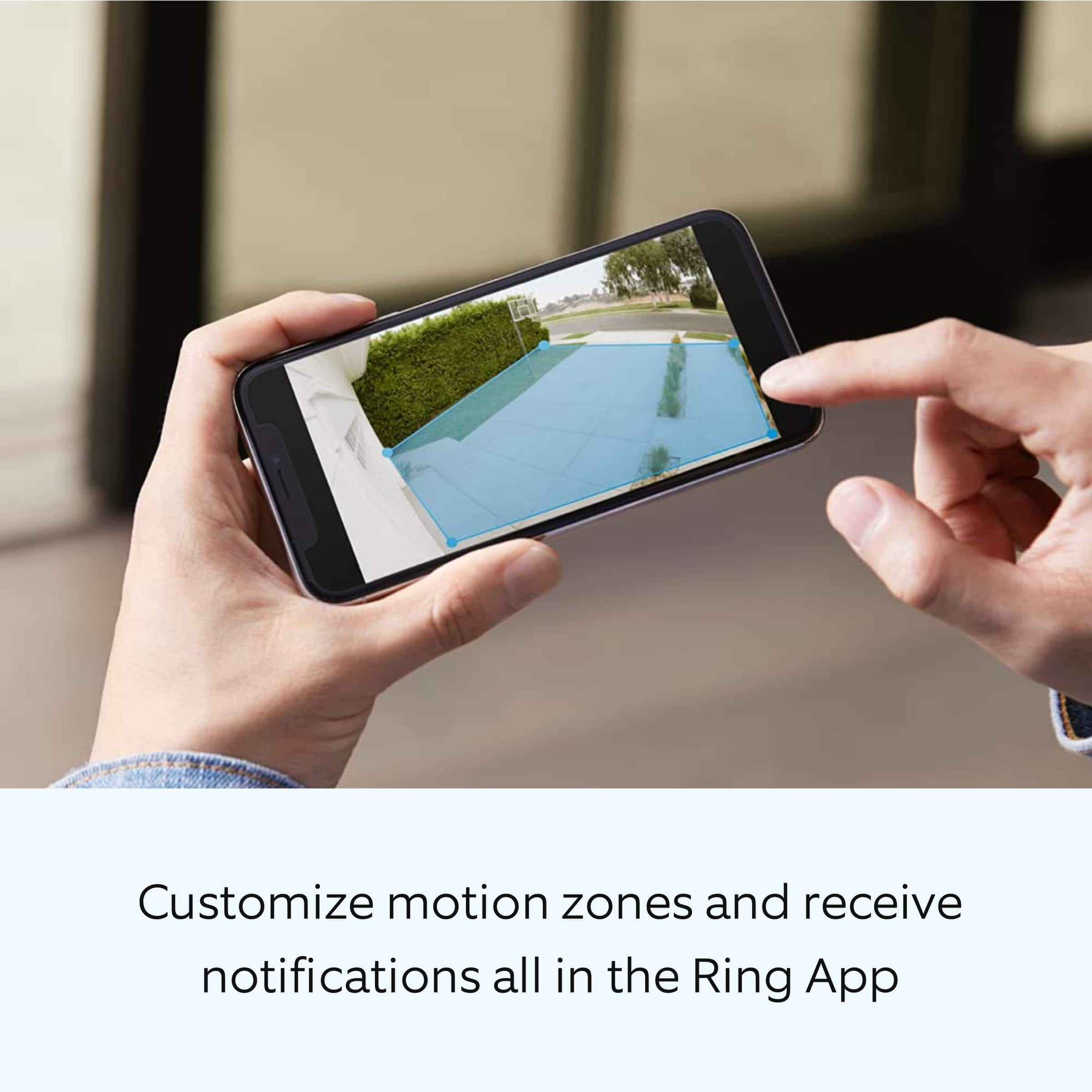
It sounds like the device is not performing as expected in regards to person detection. The Ring Floodlight Cam Wired Plus was designed with customizable motion settings. It is important to ensure that you have the proper motion settings in place for your environment. This camera uses adjustable motion detection and runs on passive infrared sensors. The system identifies visitors via a moving heat signature and sends a notification to your smart device when one is detected. You can adjust three preset motion zones and their distances under the "Motion Settings" tab on the device's page in the Ring app. Additionally, you can choose how often the camera checks for movement in those predefined zones via the "Motion Frequency" setting. If you find that your camera is missing some motions, please set the motion frequency to "Frequently."
Accuracy in motion detection can also be improved by enabling the "Smart Alerts" feature for people only in your Ring app. To enable "Smart Alerts," please follow these steps:
Tap the menu (≡) on the top left.
Tap "Devices."
Tap the device that you want to adjust.
Tap "Motion Settings."
Tap "Smart Alerts."
Tap "Enable Feature."
Tap "Continue."
Select the notification options that you want for "Person" and "Other Motion."
You'll see a video camera where you can select or de-select recording and a bell icon to represent alert notifications.
After you've adjusted your settings, tap "Done."
We also recommend that you follow these steps to remove any motion schedules that may be set for the device:
Open the Ring app.
Tap the top menu (≡).
Tap "Devices."
Select the device you'd like to apply the motion schedule to.
Tap "Motion Settings."
Go to "Advanced Settings."
Tap "Motion Schedules."
Under "Motion Schedules," select the "Motion Schedule" you'd like to edit (e.g., Schedule 1).
Tap on the schedule you've created and edit the "Name," "Timeframe," and "Days of the Week."
Delete a "Motion Schedule"
Tap on the "Motion Schedule" you've created under "Motion Schedules."
A red trash can icon with "Remove this Schedule" will appear. Tap on it and confirm that you'd like to remove the "Motion Schedule" during the time frame you selected.
If any additional information is needed regarding your Ring Floodlight Cam Wired Plus, please reach out to our community. Ring Community is our first peer-to-peer community forum, giving our customers the ability to help one another and share their feedback and experiences directly with Ring.
Thank you,
Melissa from Ring.
Junk
Posted .This reviewer received promo considerations or sweepstakes entry for writing a review.Known software flaw, the lights will not turn off at night. Don’t waste your time or money.
No, I would not recommend this to a friendBrand response from Ring
Posted .Hi TTWW.
Thank you for taking the time to share your experience with us. We understand how critical it is for your Ring Floodlight Cam Wired Plus lights to operate as intended for your needs so that you can keep an eye out for any activity around your property. The Ring Floodlight Cam Wired Plus was designed with customizable light settings to be adjusted for your environment. We can definitely assist you with this today to ensure your Ring device is performing optimally, and the proper settings are chosen within the Ring app.
It sounds like your device is not operating as intended in regards to the lights staying on at night. We recommend that you customize your Floodlight Cam's zone coverage, motion settings and light settings in the Ring app. If you already have a schedule set for the device, we recommend removing it and then testing the device overnight.
To access controls for your Floodlight Cam:
Open the Ring app.
Tap the menu (☰).
Tap Devices.
Select the Floodlight Cam that you want to adjust.
Tap the Device Schedule tile.
Tap Light Schedules.
Follow the prompts in the Ring app to customize your light schedules.
We also recommend adjusting your Motion Sensitivity and Motion Zones to suit your needs. Using your Motion Control settings, you can adjust the range and distance at which motion will turn your floodlights on. Your floodlights use passive infrared detectors (PIR) to detect motion in three 90 degree arcs around the device. You can turn these on or off independently from each other. Also, make sure that there is nothing triggering motion in the light's path.
We invite you to reach out to our Community if any additional information is needed regarding your Ring Floodlight Cam Wired Plus. The Ring Community is our first peer-to-peer community forum, giving our customers the ability to help one another by sharing their feedback and experiences with each other.
Thank you,
Melissa from Ring.