Customer Ratings & Reviews

- Model:
- B0B7QMF9T5
- SKU:
- 6532392
Rating by feature
- Value
Rating 4.6 out of 5 stars
- Quality
Rating 4.7 out of 5 stars
- Ease of Use
Rating 4.7 out of 5 stars
Customers are saying
Customers value the Spotlight Cam Plus for its impressive camera quality and ease of use. Many appreciate its overall performance and long battery life. While some users experienced issues with network connectivity, light brightness, and range, the majority are satisfied with the product's features like installation, security, motion detection, night vision, field of view, and price.
This summary was generated by AI based on customer reviews.
Great Value
||Posted . Owned for 1 month when reviewed.This reviewer received promo considerations or sweepstakes entry for writing a review.The boys from the geek squad just installed them and I can't wait to see them in action.
I would recommend this to a friendDissatisfied
||Posted . Owned for 3 weeks when reviewed.This reviewer received promo considerations or sweepstakes entry for writing a review.I’m a tad disappointed. I’ve only installed one so far and it’s not picking up the motion or distance that my neighbors can. It will sometimes pick up motion when you are right by it and that’s it. What’s the point if it’s not monitoring correctly
No, I would not recommend this to a friendBrand response from Ring
Posted .Hi MusicForTheGym.
Thank you for taking the time to share your experience with us. We understand how important it is to have your Ring Spotlight Cam Plus capture all the correct motion events. The Ring Spotlight Cam Plus was designed to capture motions based on your specifications to help keep your home secure. We are here to provide you with some information to resolve the issue you mentioned in your review.
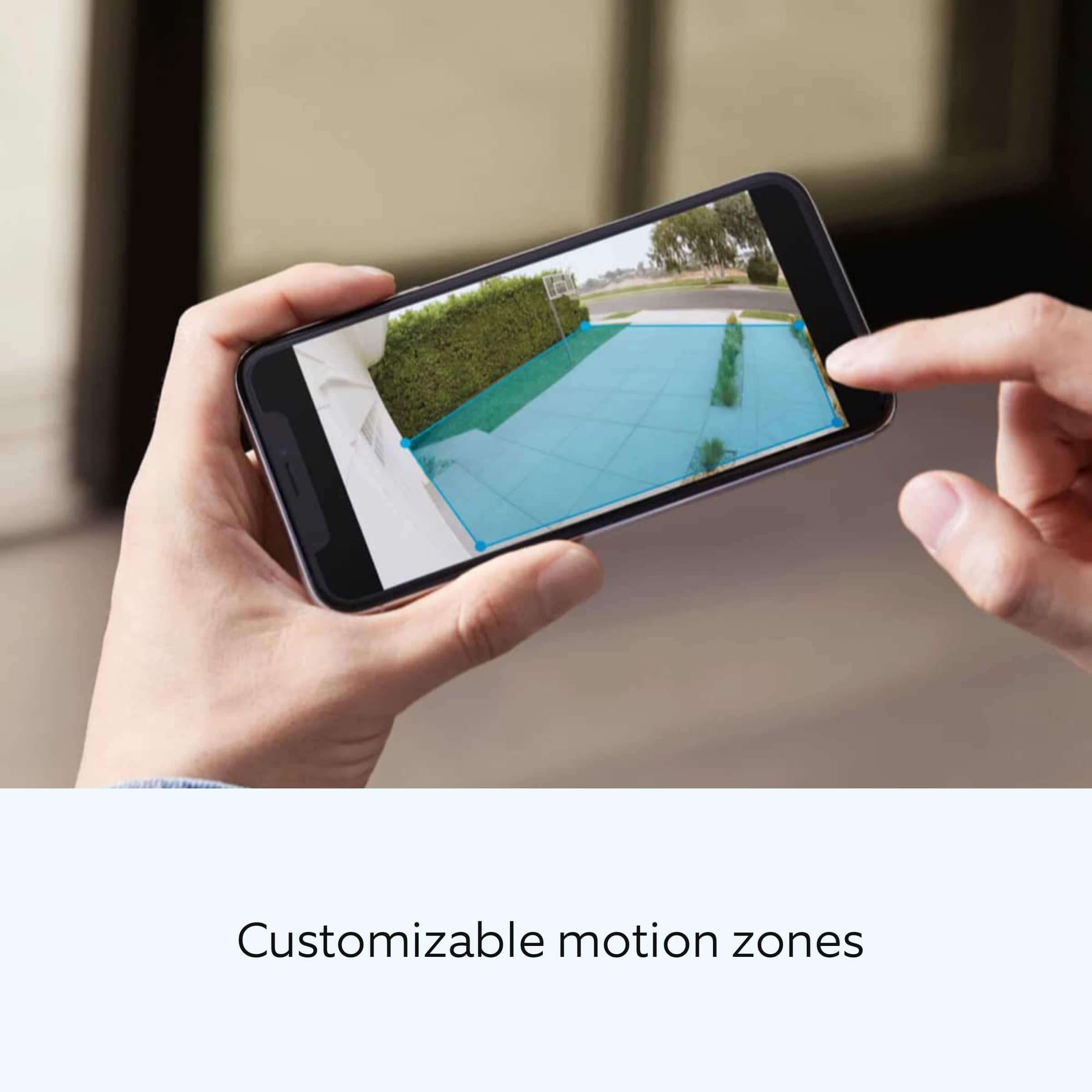
It sounds like the device is not performing as expected in regards to motion detection. It is important to ensure that you have the proper motion settings in place for your environment. This camera uses adjustable motion detection and runs on passive infrared sensors. The system identifies visitors via a moving heat signature and sends a notification to your smart device when one is detected. You can adjust three preset motion zones and their distances under the "Motion Settings" tab on the device's page in the Ring app. Additionally, you can choose how often the camera checks for movement in those predefined zones via the "Motion Frequency" setting. If you find that your camera is missing some motions, please set the motion frequency to "Frequently."
Accuracy in motion detection can also be improved by enabling the "Smart Alerts" feature for people only in your Ring app. To enable "Smart Alerts," please follow these steps:
Tap the menu (≡) on the top left.
Tap "Devices."
Tap the device that you want to adjust.
Tap "Motion Settings."
Tap "Smart Alerts."
Tap "Enable Feature."
Tap "Continue."
Select the notification options that you want for "Person" and "Other Motion."
You'll see a video camera where you can select or de-select recording and a bell icon to represent alert notifications.
After you've adjusted your settings, tap "Done."
If any additional information is needed regarding your Ring Spotlight Cam Plus, please reach out to our community. Ring Community is our first peer-to-peer community forum, giving our customers the ability to help one another and share their feedback and experiences directly with Ring. You can find it here: https://community.ring.com/.
Thank you,
Melissa from Ring.
Camera
||Posted . Owned for 1 month when reviewed.This reviewer received promo considerations or sweepstakes entry for writing a review.Bought but have not installed yet. Plan to install in the near future.
I would recommend this to a friendRing camera review
||Posted . Owned for 3 weeks when reviewed.This reviewer received promo considerations or sweepstakes entry for writing a review.This device has been working perfectly I am happy with this purchase:(
I would recommend this to a friendGood camera
||Posted . Owned for 3 weeks when reviewed.This reviewer received promo considerations or sweepstakes entry for writing a review.The cameras are good so far i just wish the battery life was longer
I would recommend this to a friendDisappointed
||Posted . Owned for 10 months when reviewed.This reviewer received promo considerations or sweepstakes entry for writing a review.Didn’t notice the big difference between these and the pro cams I have already until it was too late to return to store. First problem is the battery cover covers completely off which leaves you trying to juggle parts up a ladder when changing batteries. Second issue is the second battery is not recognized which is a problem with both cameras. My spotlight pro cameras I have never had a problem with but these are a real pain.
No, I would not recommend this to a friendBrand response from Ring
Posted .Hi Redavis.
Thank you for taking the time to share your experience with us. We understand how important it is for your Ring Spotlight Cam Plus to function consistently and reliably, so you are alerted to any wanted or unwanted activity in or around your home. The features and technology provided by the Ring Spotlight Cam Plus are incredibly valuable and help provide you with peace of mind about your home security. We are eager to address the issue you raised in your review and provide you with a resolution today.
It sounds like your Ring Spotlight Cam Plus is not performing as expected. We would love the opportunity to share with you some troubleshooting steps that you can try to get your Ring Spotlight Cam Plus functioning as intended. If your device is unresponsive, try pressing and holding the reset button for 20 seconds. Follow the steps in the Ring app to reconnect the doorbell to your network. To reconnect a Ring Spotlight Cam Plus to your wifi network: Open the Ring app. Tap the menu (≡). Tap "Devices" and select the doorbell or camera you'd like to reconnect to wifi. Tap the "Device Health" tile. Under "Network," tap "Change Network" and follow the prompts in the app. Allow some time for your device to fully reconnect to the network, then check your wifi signal strength in "Device Health" to confirm it has successfully reconnected.
If you still have the Ring device in your possession, we invite you to reach out to our community. Ring Community is our first peer-to-peer community forum, giving our customers the ability to help one another and share their personal feedback and experiences with Ring. We look forward to hearing from you. Please let us know if we can be of any further assistance!
Sincerely,
Matthew from Ring.
Surveillance
||Posted . Owned for 3 weeks when reviewed.This reviewer received promo considerations or sweepstakes entry for writing a review.The only problem is you have to charge it like every three months
I would recommend this to a friendTeresa
||Posted . Owned for 3 weeks when reviewed.This reviewer received promo considerations or sweepstakes entry for writing a review.Love that it catches everything and notifies you immediately.
I would recommend this to a friendRing spotlight camera
||Posted . Owned for 3 weeks when reviewed.This reviewer received promo considerations or sweepstakes entry for writing a review.One of the cámara do not work properly stay with the light on and waste to much battery
I would recommend this to a friendBrand response from Ring
Posted .Hi JacquelineC.
Thank you for taking the time to share your experience with us. We understand the importance of having all relevant product information prior to purchasing. The features and technology provided by the Ring Spotlight Cam Plus are incredibly valuable and help provide you with peace of mind about your home security. We can definitely provide you with more information regarding the concern mentioned in your review.
It sounds like the device is not performing as expected in regards to light setting. The Ring Spotlight Cam Plus is an outdoor security camera designed to provide you with the ability to customize your Spotlight Cam's zone coverage, motion settings and light settings in the Ring app. If the light on your Ring Spotlight Cam plus won't turn off, here are some troubleshooting steps to try:
* Try turning the light off manually within the Ring app. If it comes back on, examine the camera's view for anything that might be triggering motion detection.
* Verify that a Light Schedule isn't enabled in the app and causing the light to activate.
* Check the Device Health section of your Ring app to ensure the device’s RSSI is within an acceptable range. The recommended range for optimal performance is 0 to -60 for the RSSI.
* Reboot your Ring Spotlight Cam Plus from the Ring app by tapping "Reboot This Device" from the Device Health page.
We invite you to reach out to our community if any additional information is needed regarding your Ring Spotlight Cam Plus. The Ring Community is our first peer-to-peer community forum, giving our customers the ability to help one another by sharing their feedback and experiences with each other.
Thank you,
Miyuki from Ring.
good cam
||Posted . Owned for 1 month when reviewed.This reviewer received promo considerations or sweepstakes entry for writing a review.good cameras for security. But the pricing is bit higher.
I would recommend this to a friendGood cameras
||Posted . Owned for 1 week when reviewed.This reviewer received promo considerations or sweepstakes entry for writing a review.Cameras are good, but the battery runs out too fast.
I would recommend this to a friendbad battery
||Posted .This reviewer received promo considerations or sweepstakes entry for writing a review.one of the ring batteries don’t hold charge only last like 3 days charge that’s limiting the sensor wen people or cars pass by
I would recommend this to a friendBrand response from Ring
Posted .Hi Lui714.
Thank you for taking the time to share your experience. We understand the importance of having a solid charge on your Ring Spotlight Cam Plus so that you are able to have a longer time between charge cycles. Having longevity in a battery-powered security device is crucial when it comes to monitoring your home, especially if you are away for long periods of time. We are here to provide you with some education to resolve the battery life issue you mentioned in your review.
It sounds like the device is not performing as expected. There are some troubleshooting steps that you can take to ensure that you have your device set up for optimal battery-life performance. The more events captured by your Ring devices, the more your battery is used. Using "Live View" can also drain your battery faster. If your device is capturing an excessive number of events each day, you may need to recharge your battery sooner.
To prevent excessive activity, under "Motion Settings" for your device in the Ring app, you can:
Adjust your "Motion Sensitivity" slider to a lower sensitivity.
Redraw your "Customizable Motion Zones."
Change "Motion Frequency" to regularly or periodically.
You could also adjust the direction of your Ring device so it doesn't detect as much motion.
You can go to "Power Settings" in the Ring app to see what features may be draining your battery.
To access "Power Settings," open the Ring app:
Tap the menu (≡) on the top left of the dashboard.
Tap "Devices."
Tap the individual device (video doorbell or security camera) you want to check.
Tap "Power Settings" to check your "Battery Level" percentage and "Feature Power Usage."
Tap a feature to adjust "Snapshot Capture," "Motion Frequency," and "Video Recording Length.".
If any additional information is needed regarding your Ring Spotlight Cam Plus, please reach out to our community. Ring Community is our first peer-to-peer community forum, giving our customers the ability to help one another and share their feedback and experiences directly with Ring.
Thank you for being the best part of Ring! Have a wonderful day!
Sincerely,
Miyuki from Ring.
- Cons mentioned:Network connectivity
Ring Spotlight cam
||Posted . Owned for 1 month when reviewed.This reviewer received promo considerations or sweepstakes entry for writing a review.Horrible product. Does not maintain its Wi-Fi connection and always going off-line. Replaced both cameras and they still do the same thing.
No, I would not recommend this to a friendBrand response from Ring
Posted .Hi RICKR.
Thank you for taking the time to share your experience with us. We understand the importance of having a consistent wifi signal on the Ring Spotlight Cam Plus. Having a solid connection ensures you do not miss any activity around your home. We are here today to provide you with education to assist you in finding the best solution for your home’s environment.
It sounds like you experienced some connection issues with the device. Usually, devices falling offline repeatedly is related to poor wifi connectivity caused by signal fluctuations, channel congestion, or data loss.
To determine whether or not the problem is caused by poor upload speed, run a speed test to determine if your network can support Ring devices. In addition to ensuring that you have sufficient wifi speeds, you will also want to check the signal strength of your device. Ring devices with 1080p video require at least 1 Mbps upload and download speeds, though 2 Mbps is recommended for optimal performance.
A poor wifi signal can cause connectivity with your Ring device to be unreliable. Check the Device Health section of your Ring application to ensure the device’s RSSI is within an acceptable range. The recommended range for optimal performance is 0 to -60 for the RSSI.
If your networking equipment hasn’t been power cycled in a while, try unplugging it for 30 seconds and plugging it back in. Wireless networks utilize different channels for communication. In the United States, the 2.4 GHz band uses channels 1-11 and the 5 GHz band uses channels 36-165. In some cases, setting up your Ring device(s) can fail due to wireless interference or congestion.
We also recommend adding a Ring Chime Pro to your network. The Ring Chime Pro simply plugs into a wall outlet between your router and the Ring Stick Up Cam to assist with the wifi signal strength to the device.
If you still have the Ring Spotlight Cam Plus in your possession, we invite you to reach out to our community. Ring Community is our first peer-to-peer community forum, giving our customers the ability to help one another and share their personal feedback and experiences with Ring. We look forward to hearing from you. Please let us know if we can be of any further assistance!
Thank you,
Amilia from Ring.
Not great
||Posted .This reviewer received promo considerations or sweepstakes entry for writing a review.The cameras are ok but the battery’s went out quick and stopped working so it’s disappointing. I should of got the wire ones
No, I would not recommend this to a friendBrand response from Ring
Posted .Hi RosaTavares.
Thank you for taking the time to share your experience. We understand the importance of having a solid charge on your Ring Spotlight Cam Plus so that you are able to have a longer time between charge cycles. Having longevity in a battery-powered security device is crucial when it comes to monitoring your home, especially if you are away for long periods of time. We are here to provide you with some education to resolve the battery life issue you mentioned in your review.
It sounds like the device is not performing as expected. There are some troubleshooting steps that you can take to ensure that you have your device set up for optimal battery-life performance. The more events captured by your Ring devices, the more your battery is used. Using "Live View" can also drain your battery faster. If your device is capturing an excessive number of events each day, you may need to recharge your battery sooner.
To prevent excessive activity, under "Motion Settings" for your device in the Ring app, you can:
Adjust your "Motion Sensitivity" slider to a lower sensitivity.
Redraw your "Customizable Motion Zones."
Change "Motion Frequency" to regularly or periodically.
You could also adjust the direction of your Ring device so it doesn't detect as much motion.
You can go to "Power Settings" in the Ring app to see what features may be draining your battery.
To access "Power Settings," open the Ring app:
Tap the menu (≡) on the top left of the dashboard.
Tap "Devices."
Tap the individual device (video doorbell or security camera) you want to check.
Tap "Power Settings" to check your "Battery Level" percentage and "Feature Power Usage."
Tap a feature to adjust "Snapshot Capture," "Motion Frequency," and "Video Recording Length.".
If any additional information is needed regarding your Ring Spotlight Cam Plus, please reach out to our community. Ring Community is our first peer-to-peer community forum, giving our customers the ability to help one another and share their feedback and experiences directly with Ring.
Thank you for being the best part of Ring! Have a wonderful day!
Sincerely,
Miyuki from Ring.
- Pros mentioned:Camera quality
Best Buy or Bust
||Posted . Owned for 8 months when reviewed.This reviewer received promo considerations or sweepstakes entry for writing a review.I feel a lot safer knowing I can look all around my house. You must set up record or don’t buy it’s a game changer for safety
I would recommend this to a friendBrand response from Ring
Posted .Hello DeiM.
Thank you for taking a moment to leave your review and feedback for the Ring Spotlight Cam Plus. Here at Ring, we believe that stronger communities are the key to safer neighborhoods. That is why we are driven to create products that help you protect what matters most at home and empower you to connect with your neighbors from wherever you are. Together, we’ll make neighborhoods safer!
We are pleased to read that you are enjoying the benefits of having a Ring security device installed! Spotlight Cam Plus, Battery, Wired, Solar, or Plug-In, is an outdoor security camera that can be used to capture out-of-sight areas and blind spots. It’s equipped with Color Night Vision, customizable Motion Detection, and Motion-Activated Lights. Just mount the wireless camera and adjust the viewing angle for wide coverage throughout the day or night.
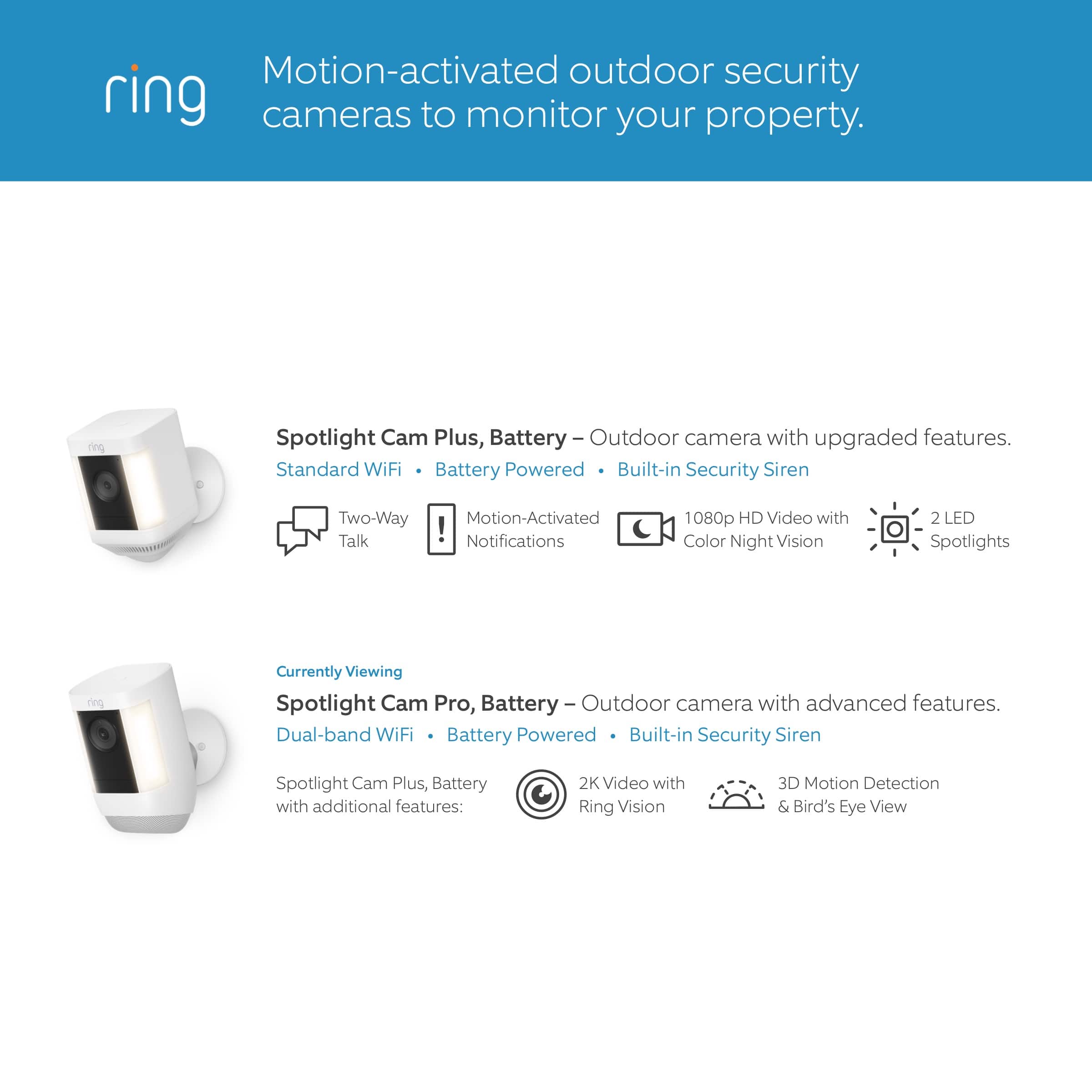
Spotlight Cam Plus has Customizable Motion Zones that are controlled in the Ring app. In addition, Spotlight Cam Plus has Two-Way Talk with noise cancellation, and other advanced features like Motion-Activated Notifications, 1080p HD Video, Color Night Vision, and a Built-in Security Siren.
Ring Community is our first peer-to-peer community forum, giving our customers the ability to help one another and share their feedback/experiences with Ring. We invite you to reach out at https://community.ring.com/ if you have any additional questions or feedback regarding your Ring Spotlight Cam Plus.
Thank you,
Melissa from Ring.
Until Better option available
||Posted . Owned for 1 month when reviewed.This reviewer received promo considerations or sweepstakes entry for writing a review.Spotty coverage and marginal customer service offered by Ring. But good option for the price.
No, I would not recommend this to a friendBrand response from Ring
Posted .Hi Katecamera.
Thank you for taking the time to share your feedback with us.
At Ring, we believe in keeping people close to what’s important. That is why we are driven to create products that help you protect what matters most at home and empower you to connect with your visitors from wherever you are. The features and technology provided by the Ring Spotlight Cam Plus are incredibly valuable and help provide you with peace of mind about your home security. We are eager to address the concerns you raised in your review.
It sounds like you have some concerns regarding the coverage your device provides. The Spotlight Cam Plus provides a 140° horizontal field of view. It has customizable motion zones that are controlled in the Ring app so that you are able to monitor the area you want to while ignoring the areas you do not. By drawing your camera motion zones to exclude high-traffic areas like public paths and roads, you can increase your Ring device's effectiveness.
To optimize your camera motion zones, make your Ring device's view as clear as possible. Motion detection can sometimes trigger "false" alerts because of moving trees, lightning, the rising or setting sun, reflections off a shiny object, headlights, shadows, and more. To reduce false alerts, adjust your motion zones, remove shiny objects, cut back tree branches that create moving shadows, or angle your device to avoid the sun.
Visit our support center for more information.
Ring Community was launched to help deliver the most current news and educational information to our neighbors. This online forum is divided into four categories: Product Boards, Ring Updates, Tips + Tricks, and a Moderators’ Corner. The Product Boards are where you can begin new topics with your questions or feedback; there is also a search option that helps you find topics that have already been posted by other neighbors.
All the best,
Nicole from Ring.
Not worth it
||Posted . Owned for 1 month when reviewed.This reviewer received promo considerations or sweepstakes entry for writing a review.I only bought this brand since I already had the ring doorbell (that I hate). These are just as bad. Notify you when no one is there but doesn’t notify you when someone IS there.. even adjusting the zones doesn’t help. Snooze motion doesn’t work it still notifies you. Just an overall headache
No, I would not recommend this to a friendBrand response from Ring
Posted .Hi Deee.
Thank you for taking the time to share your experience with us. We understand how critical it is for your Ring Spotlight Cam Plus to notify you of meaningful motion events. The features and technology provided by the Ring Spotlight Cam Plus are incredibly valuable and help provide you with peace of mind about your home security. We can definitely provide you with more information regarding the concern mentioned in your review.
It sounds like the device is not performing as intended in regards to alerts.
To enable and customize your camera "Motion Alerts" when your camera detects motion, follow these steps in the Ring app:
Open the Ring app and tap the menu (☰) in the top left corner.
Tap "Devices," then select the relevant device.
At the top of the screen, you can toggle the following on or off:
Motion Detection
Motion Alerts
Motion Warning (if your device has the feature)
Tap the "Motion Settings" tile to customize settings such as:
"Motion Sensitivity."
"Smart Alerts" (available to Ring Protect subscribers) allows you to distinguish motion so you can know whether it's a person or something else like a car.
"Advanced Settings" (example: "Advanced Motion Detection," "Motion Schedules," and "Motion Frequency.")
If any additional information is needed regarding your Ring Spotlight Cam Plus, please reach out to our community. Ring Community is our first peer-to-peer community forum, giving our customers the ability to help one another and share their feedback and experiences directly with Ring.
Sincerely,
Matthew from Ring.
- Cons mentioned:Light brightness
Ring cam
||Posted . Owned for 3 weeks when reviewed.This reviewer received promo considerations or sweepstakes entry for writing a review.Cam View during the day is ok but at night not that great, spot light not bright enough, camera did not exceed my expectations.
No, I would not recommend this to a friendBrand response from Ring
Posted .Hi Miguel.
Thank you for taking the time to share your experience with us. We understand how important it is for your Ring Spotlight Cam Plus to function consistently and reliably, so you are alerted to any wanted or unwanted activity in or around your home. The features and technology provided by the Ring Spotlight Cam Plus are incredibly valuable and help provide you with peace of mind about your home security. We are here to provide you with some information to resolve the issue you mentioned in your review.
It sounds like the device is not performing as expected. The Ring Spotlight Cam Plus is an outdoor security camera that can be used to capture out-of-sight areas and blind spots. It’s equipped with "Color Night Vision," customizable motion detection, and motion-activated lights. Just mount the wireless camera and adjust the viewing angle for wide coverage throughout the day or night.
The Spotlight Cam Pro is designed with customizable light settings to provide you with the ability to adjust the lights according to your needs. To adjust the brightness of your Ring Spotlight Cam Plus, please follow these steps:
Open the Ring app.
Tap the menu (☰).
Tap Devices.
Select the Spotlight Cam Plus that you want to adjust.
Select "Device Settings."
Select "Light Settings."
Select "Light Brightness" and adjust the slider to make the lights brighter or dimmer.
Enable "Color Night Vision" in the Ring app to help improve clarity at night.
To turn the "Color Night Vision" on or off, follow these instructions:
Open the Ring app.
Tap the "Menu" (☰).
Tap "Devices."
Select the device you want to adjust.
Tap "Device Settings."
Tap "Video Settings."
Toggle "Color Night Vision" on or off.
We invite you to reach out to our community if any additional information is needed regarding your Ring Spotlight Cam Plus. The Ring Community is our first peer-to-peer community forum, giving our customers the ability to help one another by sharing their feedback and experiences with each other.
Thank you,
Melissa from Ring.
- Pros mentioned:Camera quality
mandatory subscription
||Posted . Owned for 1 month when reviewed.This reviewer received promo considerations or sweepstakes entry for writing a review.It has good image quality, good in the application, the bad thing is that you can't record without having a mandatory subscription
No, I would not recommend this to a friendBrand response from Ring
Posted .Hi Qu1nt4n4.
Thank you for sharing your experience with us.
We understand the importance of having all relevant product information prior to purchasing. Being able to save, download, and review footage captured by your Ring Spotlight Cam Plus is a valuable feature of the Ring Protect Plan. We can definitely provide you with more information regarding the concern mentioned in your review.
It sounds like there was some confusion surrounding the optional Ring Protect Plans. The Ring Protect Plan is a subscription that gives you access to paid features for Ring devices such as video doorbells, cameras, alarm, and Car Cam. With a Ring Protect Plan, you can save, review, and share video recordings from your Ring devices to your Ring account.
Without a Ring Protect Plan, you can still view real-time video for Ring doorbells and cameras and answer doorbell notifications when they happen, but you don’t get video recordings of those events.
There are three Ring Protect Plans available for home devices, and one Ring Protect Plan available for Car Cam. Plans start at $3.99 per month. Visit our support center for more details.
Ring Community was launched to help deliver the most current news and educational information to our neighbors. This online forum is divided into four categories: Product Boards, Ring Updates, Tips + Tricks, and a Moderators’ Corner. The Product Boards are where you can begin new topics with your questions or feedback; there is also a search option that helps you find topics that have already been posted by other neighbors.
All the best,
Nicole from Ring.
Very disappointed
||Posted . Owned for 1 week when reviewed.This reviewer received promo considerations or sweepstakes entry for writing a review.Well I can’t actually give a review, the geeks were supposed to install my cameras last Saturday…. First they text saying they were running late… then I got a text giving the new time which was 5 hours past my original timeline… well that time came and went with no updates from the installers…. It’s now Friday 6 days later and still have not heard from them… poor communication.
No, I would not recommend this to a friendBrand response from Ring
Posted .Hi AnitaG.
Thank you for taking the time to share your experience with us. Your experience with Ring is our top priority, and it is important to us that when investing in our products, they meet your needs and expectations. What you describe is not the experience we want you to have, rest assured we are here to offer you some help.
In this particular case, we'd suggest you reach out to Best Buy's customer service: 1-888-237-8289 or https://www.bestbuy.com/services/triage/home. We are confident that they will be able to provide you with a resolution to this concern.
Ring Community was launched to help deliver the most current news and educational information to our neighbors. This online forum is divided into four categories: Product Boards, Ring Updates, Tips + Tricks, and a Moderators’ Corner. The Product Boards are where you can begin new topics with your questions or feedback; there is also a search option which helps you find topics that were already posted by other neighbors. We invite you to join our community today!
Thank you,
Amilia from Ring.