Customer Ratings & Reviews
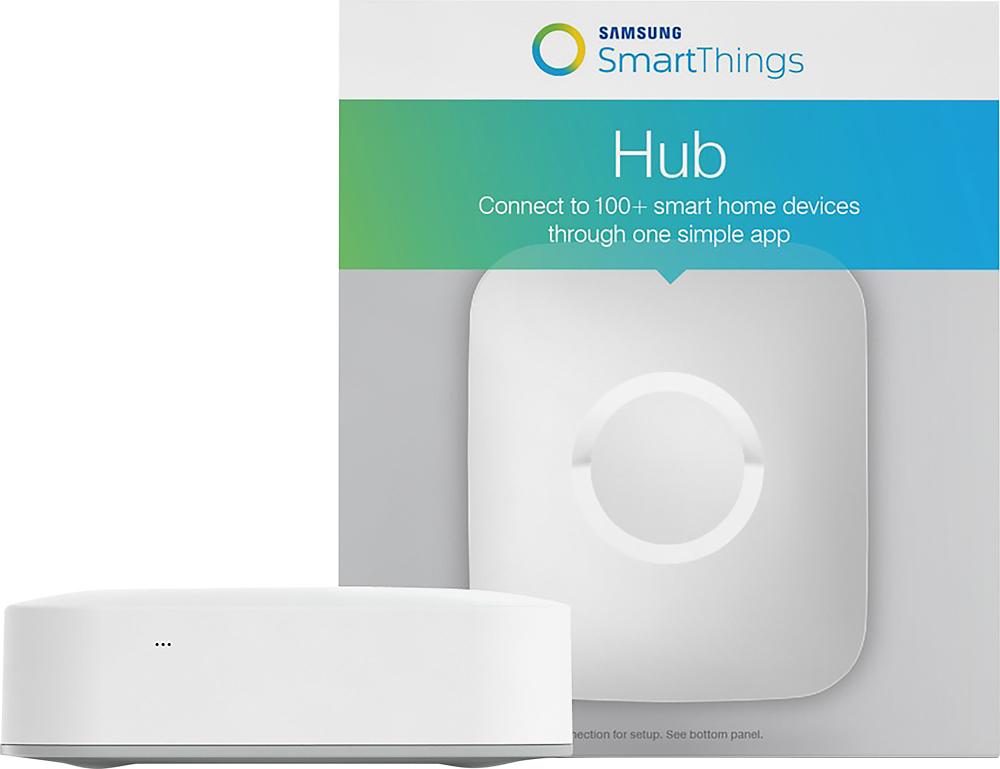


- Model:
- F-H-ETH-001
- |
- SKU:
- 4470700
Customer reviews
Rating 4.5 out of 5 stars with 1218 reviews
(1,218 customer reviews)Rating by feature
- Value4.4
Rating 4.4 out of 5 stars
- Quality4.6
Rating 4.6 out of 5 stars
- Ease of Use4.4
Rating 4.4 out of 5 stars
Customers are saying
Customers enjoy the SmartThings Hub for its ease of use, compatibility with other products, and simple setup. Some customers have experienced connectivity issues and suggest improvements to the app. The hub is praised for its home automation capabilities and reasonable price, with many appreciating its Z-Wave functionality. However, a few users have noted limitations in its range and clarity of instructions.
This summary was generated by AI based on customer reviews.
- Pros mentioned:SetupCons mentioned:Connectivity
Rated 3 out of 5 stars
Easy setup but interference with wifi is an issue
||Posted .This reviewer received promo considerations or sweepstakes entry for writing a review.I purchased the SmartThings hub to work with my zigbee-controlled light bulbs (from Sengled) and Amazon Echo. The hub is fairly easy to setup, but after that the hub drops connection with the bulbs frequently (showing "device unavailable"). After calling both Sengled and Samsung, I learned from Samsung representative that thee hub's zigbee signal has interference with Wi-Fi signal and therefore the hub must be placed far away from your Wi-Fi router (my router only broadcasts at 2.4G, not 5G). After relocating the hub, the drop connection problem never appeared again. But if you don't like a long Ethernet cable between your router and the hub, think before you buy.
No, I would not recommend this to a friend Rated 3 out of 5 stars
Worthy Addition to Hub Collection
||Posted .This reviewer received promo considerations or sweepstakes entry for writing a review.I purchased the SmartThings Hub in order to integrate control of all devices through one app & hopefully eliminate several hubs. Unfortunately, many of my devices are not recognized by the SmartThings Hub: BAS Haiku Connected Fans & Lights, Baldwin exterior locks, vintage Z-Wave switches, iDevices, just to name a few. This Hub works well & performs as claimed. You should simply be aware that there are many devices which it cannot recognize or control. It is well built & is an attractive hub. I added it to my "Hub Collection", as shown in photo & recommend it for your hub collection.
I would recommend this to a friend- Pros mentioned:Compatibility, Ease of use
Rated 3 out of 5 stars
It's got its quirks, but it works
||Posted .This reviewer received promo considerations or sweepstakes entry for writing a review.I moved from Staples Connect to Smartthings since the Staples Connect app is no longer updated and it doesn't send notifications anymore on my phone for some reason. Here are some cons I've found when comparing Staples Connect to the Smartthings hub: - Can't schedule an action to occur between specific times - Layer on rules to work concurrently so they don't work independently of each other - The on/off status of certain devices is not updated in real time or immediately sometimes That's as far as I've played around with it so far for basic functionality. For example I haven't messed around with the Smart Apps or the Home Modes yet. As for the pros: + Very simple to set up + Very simple to release and re-configure existing Z-wave devices + I like that it can work with a ton of different devices. + I get push notifications again! I've read there are some third party developed apps that can be added via SmartApps that can fulfill the rule functionality that I'm looking for, but honestly this type of basic configuration should be available from the get go.
I would recommend this to a friend - Pros mentioned:CompatibilityCons mentioned:Connectivity
Rated 3 out of 5 stars
Needs fixing
||Posted .This reviewer received promo considerations or sweepstakes entry for writing a review.The hub works well if it is connected. If your router reboots, the hub does not re-connect. The light remains blue until a physical reboot is made after which it connects to the Smartthings server. It has a lot of compatible devices but all will be useless if the hub is not connected to the server. I think this may be a simple firmware update and it will be perfect.
I would recommend this to a friend - Pros mentioned:Ease of use
Rated 3 out of 5 stars
Connects devices and provides basic automation
||Posted .This reviewer received promo considerations or sweepstakes entry for writing a review.The hub was pretty easy to setup and connect to the network. It has a key you have to enter into the app in order to set it up. After that, adding devices was pretty straightforward. It has some basic automation controls that allows it to set some actions like night, day, etc. For more advanced controls, you have to go to another app. My one dislike is that it seems to disconnect from the network once a day and reconnect a short while later
I would recommend this to a friend - Pros mentioned:Setup
Rated 3 out of 5 stars
It’s OK but not for me
||Posted .This reviewer received promo considerations or sweepstakes entry for writing a review.The setup was easy and I like the mobile app to manage it and set it up rather than a web page. I ended up returning it though because I’m pretty technical and like to do things myself and this didn’t really give me that. Instead I am now using Hije Assistant on a Rapsbeery Pi 3. I would definitely recommend this product to someone that just wants to plug it in and have it work.
I would recommend this to a friend - Pros mentioned:Ease of use
Rated 3 out of 5 stars
Surprised by features it has and is lacking
||Posted .This reviewer received promo considerations or sweepstakes entry for writing a review.I purchased the hub and 3 water detectors because it was cheaper than 3 wifi water detectors and had a longer advertised battery life. After playing around with it I soon purchased motion detectors, multi purpose sensors, proximity sensors, Zwave switches and outlets. There are a bunch of built-in apps such as elder care monitoring which gives you piece of mind for a few dollars. I also found the hub can control many of your other Smart internet enabled device like a thermostat, or Smart doorbells or cameras. I soon found I had so many devices they were hard to control using the app and a smart phone due to the small screen size so I added an Amazon Alexa to make everything voice controlled which just made everything easier. Good: Hub has both Zwave and Zigbee controllers. That is good because you have more choices of devices to control. App is easy to use for simple things. Very easy, low cost solution to do simple automation. Has a lot of integration options for other wifi devices such as thermostats. These options are sometimes hard to get to work and the Samsung support team does help you troubleshoot. What it is missing: It lacks Bluetooth!!!!! A lot of Smart Devices such as light bulbs are moving away from Zigbee and Zwave and moving to Bluetooth due to cost. It lacks Wi-Fi!!!!! The hub requires a physical cable to connect to the Internet. And they give you a 3 foot Ethernet cable and tell you the device is best when at least 6 feet from your wifi hub. Please include longer cable with product. It lacks a website where I can use a larger screen. Trying to program everything required to make this work on a Smart phone app is a pain in the ***. They really need a website or an app that can run on a full screen device. It lacks anything more substantial for automation than just if this than do that. For example I have an outside light controlled by a wall switch, an open/close sensor and a motion detector. The motion detector turns on the light as expected and will turn it off as expected. The open/close sensor turns on the light when the door opens and off when it closes. However there is no way to say turn off the light after the motion died down if and only if the light was turned on by the sensor. Or turn the light off when the door is closed if and only if the light was turned on by the door opening. If you are expecting many people for a party this gets old really quick and you find yourself frantically tryibg ti disable it manually. Or turn the light off after 11pm if and only if it was turned on by the switch.
I would recommend this to a friend - Pros mentioned:Setup
Rated 3 out of 5 stars
A necessary evil if you want home automation
||Posted .This reviewer received promo considerations or sweepstakes entry for writing a review.Once you get the hub setup, it's not too bad to deal with. This isn't the most straightforward device to setup though. First, you sign up for an account. Is fairly painless. It gets complicated if you already have a Samsung account, I highly recommend using it. Unfortunately I didn't realize I already had one. I'm not sure when I signed up for it, so now I have two. Plus, I had created an account for my parents which only added to the headache. After you have an account, you'll log into the app. If you have more than one account and logged into all of them on your device, the app will seemingly choose one at random with no easy way to say the app is trying to use the wrong account. After you get signed into the account you want to use, the app will ask for a code. The code is on one of the pamphlet in the box that is easy to overlook. I want to give you a heads up; you will want to keep that paper with the code (or some sort of copy, I took a pic to backup it to Google photos) because it will need for various reasons such as resetting the hub. Then you'll want to set a location for the hub. This part isn't too difficult. Hit menu and set your address. If you have a Philips hue hub, hopefully it will ask you to add it, because if you have to add it, the option to do so isn't easy to find. Neither is the option to add a harmony hub, but that one is going to needed to be added manually, but fairly easy to find. Now if you want to use the developer website for advanced options, that is a nightmare. It took several days and many attempts to get both the app and website logged into the same account, and even when they were, they didn't seem to sync up. This is why I reset the hub and app to know you need to keep that code for the hub handy. Now that I have the hub and website working, I hope I never have to set them up again, because it nearly drove me made, but at least it works well now.
I would recommend this to a friend - Pros mentioned:Compatibility
Rated 3 out of 5 stars
Good smart device
||Posted .This reviewer received promo considerations or sweepstakes entry for writing a review.Respond time is quick. The ability to scan and pick up most of my smart devices is great. Would have given 5 stars if it works with TP-link Kasa. Unable to pick up Samsung 6417 camera.
I would recommend this to a friend - Cons mentioned:Connectivity
Rated 3 out of 5 stars
Check TV before purchasing
||Posted .This reviewer received promo considerations or sweepstakes entry for writing a review.The problem is that some updates cause you to lose connection to your devices, my samsung ks8000 used to work with the product, but after an update it was not able to.
No, I would not recommend this to a friend Rated 3 out of 5 stars
Not a good Wink Hub replacement
||Posted .This reviewer received promo considerations or sweepstakes entry for writing a review.Not compatible with same things Wink is. I purchase this device to replace my Wink 1st generation hub and the light bulbs I was using for Wink would all have to go to. The user interface is not as good as Wink either. In the end, I took this back and bought the latest Wink hub (at twice the price). Considering the amount of money I've invested in the bulbs and devices around my house, it was far cheaper to stay with Wink than to replace it with another brand. Wink II works perfectly.
No, I would not recommend this to a friendRated 3 out of 5 stars
Overall a good upgrade from v1 but a pain to setup
||Posted .This reviewer received promo considerations or sweepstakes entry for writing a review.I have been a SmartThings user from the pre-Samsung days. I have a lot of devices and automations. Upgrading to V2 was very frustrating, and the most ridiculous process. You basically start over, but worse, since you have to properly unpair everything from the v1 hub first. In the end it works well, you just have to suffer through to get there. Literally, the dumbest upgrade process I have ever encountered. If this is your first hub, you’ll be fine.
I would recommend this to a friendRated 3 out of 5 stars
Working with Z-Wave but not Zigbee
||Posted .This reviewer received promo considerations or sweepstakes entry for writing a review.I intend to use this SmartThings Hub to replace my StaplesConnect D-Link Hub. The latter is discontinued with its previously working SunRise/SunSet trigger malfunctioned. The positive thing is SmartThings Hub Integrated SunRise/SunSet automation and it works with Z-wave devices. The negative things is that SmartThings does not support many ZigBee devices I have. Seems that I may have to replace it later.
I would recommend this to a friend- Pros mentioned:Ease of use
Rated 3 out of 5 stars
Hobby
||Posted .This reviewer received promo considerations or sweepstakes entry for writing a review.Set up is straight forward. Phone app can be better. I was able to connect Ecobee3 without any issues. I just found out though that Craftsman garage door opener is not supported anymore. If you have existing devices that you can connect to this or if you are constructing a new house, this is a good device to centralize control of smart devices and controllers. If you have an existing working non-smart devices and want to change to smart devices to have fun with it, I call it a hobby. The things that you will connect to the internet of things are not cheap. Light switches costs more than $30 each. I would still recommend this to a friend because it is a nice thing to have but gave it 3 stars since you cannot have fun having this device only. You will need to buy things to connect to it which can tend to be expensive. Though I know it is not this hub's fault that the cost of the devices to connect to this is expensive.
I would recommend this to a friend Rated 3 out of 5 stars
Do your research
||Posted .This reviewer received promo considerations or sweepstakes entry for writing a review.I purchased the SmartThings hub because I was increasing the number of Smart Devices in my home. My goal was to drive integration of my Smart Devices into one mobile app instead of having 6 different apps. I was surprised to learn that my Nest Thermostat does not natively integrate into SmartThings. After some research, I found I could integrate the Nest Thermostat into SmartThings, but I would need to get a developer account on three different systems (Nest, Samsung and Github), import code through Github, and then copy/paste some API keys. While I was able to find some good instructions on how to do this, I was quite frustrated in the experience especially when I realized that I was working within one Samsung Developer proxy server and pointing my devices to the wrong one. Some integrations were easy, like my Smart Lock over Z-Wave and my cameras were natively supported. I didn't like how SmartThings created another profile on my cameras. But I hit another snag when it came to setting up my MyQ garage door opener. Again, I had to use third-party code and I found out that the MyQ system restricts some access so SmartThings cannot tell the status of the garage door (open or close), but can only send open/close commands. Unless I want to spend more money on a third party tilt sensor. In the end, I got my smart devices to integrate, and it is nice to be able to control main functions via 1 mobile app instead of multiple different apps. But I have not been able to get rid of the other apps. In the world of Smart Thermostats, I consider Nest to be pretty mainstream. I find it frustrating that SmartThings does not offer native integration for Nest and I would not recommend the work-around for someone who is not very tech-savvy. The SmartThings Hub is probably fine if you're looking to integrate compatible switches or bulbs and integration of IFTTT sequences, but the key is definitely to do your research and make sure your devices are natively compatible.
I would recommend this to a friend- Cons mentioned:Connectivity
Rated 3 out of 5 stars
Limited connectivity
||Posted .This reviewer received promo considerations or sweepstakes entry for writing a review.Doesn't connect to sensors easily. Not much better or worse than other hubs.
No, I would not recommend this to a friend Rated 3 out of 5 stars
Just purchased
||Posted .This reviewer received promo considerations or sweepstakes entry for writing a review.Just purchased this Smart Things Hub and have not yet purchased any Smart Things accessories to use with it yet. I bought this to work with future Smart Thing security devices and appliances. I have several Samsung Tv's and refrigerator, washer and dryer. Unfortunately they were prior to Smart Things, but future one's will have the capabilities.
I would recommend this to a friendRated 3 out of 5 stars
Just good as a basic hub.
||Posted .This reviewer received promo considerations or sweepstakes entry for writing a review.I actually bought this for my yale z wave. It works OK on Yale but not the rest of my equipment which are not z wave. It can communicate with Ring, some wemo but that is all it do. You cannot even control them via the smarthing hub. Disappointing. Also having no luck installing it to my wife iphone.
No, I would not recommend this to a friend- Pros mentioned:Ease of use
Rated 3 out of 5 stars
Works well, but limited functionality
||Posted .This reviewer received promo considerations or sweepstakes entry for writing a review.This is a great first step for a home automation package. I am really just using it to control some locks to be able to remotely lock and unlock doors. First install really requires the hub to be in the same room and next to the locks (required me to uninstall a lock to get it synched into the hub) but once that was done remote locking and unlocking works well. I wish it enabled me to add users / codes to the locks although that likely requires the next rev of both the locks and hubs. However, given the price point, I guess it works well for a first home automation product.
I would recommend this to a friend - Pros mentioned:Ease of use
Rated 3 out of 5 stars
Good only for big houses
||Posted .This reviewer received promo considerations or sweepstakes entry for writing a review.How to start, I bought this item on black Friday both with an google home and a Samsung speaker, even if it was said that google home support SmartThings the speaker didn't work with google home, but lets go back to our item from thing that i understand this smart hub acts like a router between your smart devices(all must be only Samsung ) and the network, it did what it supposed to do but truth is if you live in an apartment do you really need to invest hundreds of dollars in smart devices ? my answer is "No" if you want to spend money go buy it otherwise dont
No, I would not recommend this to a friend