Customer Ratings & Reviews
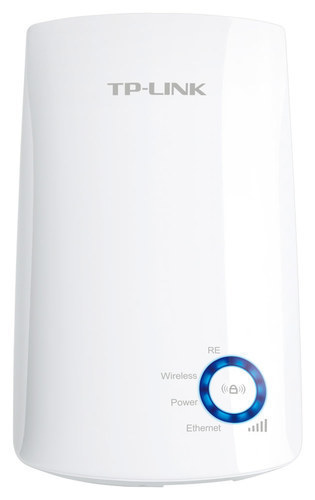
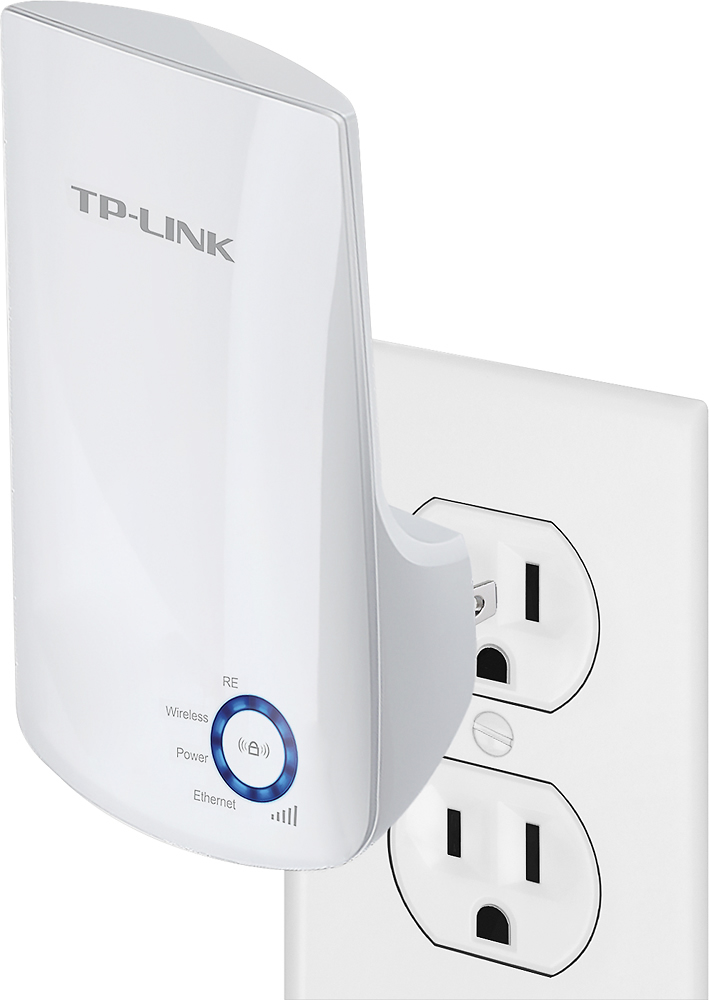
- Model:
- TL-WA850RE
- SKU:
- 2080012
Rating by feature
- Value
Rating 4.3 out of 5 stars
- Quality
Rating 4.1 out of 5 stars
- Ease of Use
Rating 4.3 out of 5 stars
Customers are saying
Customers find value in the N300 Wi-Fi Range Extender's ease of use, extended Wi-Fi range, and reasonable price. Many appreciate its strong signal and straightforward setup process, along with the added convenience of an Ethernet port. While some users experienced compatibility issues, the positive feedback on performance and ease of use outweighs these concerns. The extender is praised for improving internet access in various situations.
This summary was generated by AI based on customer reviews.
- Pros mentioned:Ease of use, Wi-fi range
Easy to use
Posted .This reviewer received promo considerations or sweepstakes entry for writing a review.Easy to use and provides wifi range where I previously had a challenge with. Customer service also very helpful.
I would recommend this to a friend - Cons mentioned:Speed
A little slow
Posted .This reviewer received promo considerations or sweepstakes entry for writing a review.This is a quick way to extend your wifi coverage. Easy to setup but not too fast.
I would recommend this to a friend - Cons mentioned:Speed
Best $20 I ever spent
Posted .This reviewer received promo considerations or sweepstakes entry for writing a review.I had been having problems with my router getting consistent coverage in my house. It's only 1450 sq ft. but unless you're in a neighboring room to the where the router is, the speed is inconsistent. Plugged it in, set it up in minutes and away to the races
I would recommend this to a friend - Pros mentioned:Wi-fi range
Nice coverage
Posted .This reviewer received promo considerations or sweepstakes entry for writing a review.I live in 3 level townhouse. I installed this on the middle floor and it covers the 10 devices I have, including some outside devices. Very satisfied.
I would recommend this to a friend Wow!!! Amazing
Posted .This reviewer received promo considerations or sweepstakes entry for writing a review.Great product from no bar to full bar!!!wow!!!!!!!
I would recommend this to a friendTerrible
Posted .This reviewer received promo considerations or sweepstakes entry for writing a review.I bought one. Seemed to work ok, so I bought one for the basement as well. They worked for about a couple months. Now, neither will get on my network. I've reset several times and tried to connect the same way I did before to no avail. This week they started blocking my game system and other devices from connecting to my network before not connecting altogether. VERY fruatrating! Do not buy these pieces of junk.
No, I would not recommend this to a friendBrand response from TPLinkSupport
Posted .Dear NoGood1,
Thank you for your review and additional feedback concerning our product. We sincerely apologize for the disappointing experience you encountered while using our product. Our support team would greatly appreciate the opportunity to follow up with you in order to properly address this concern. At your earliest convenience, please email us your contact information so we may have an available support agent reach out to you directly. Once again we apologize for the inconvenience but certainly look forward to working with you soon.
Best Regards! TP-LINK Support Team support.amazon@tp-link.com
- Pros mentioned:Ease of use
Best product
Posted .This reviewer received promo considerations or sweepstakes entry for writing a review.I bought this one a couple days ago and k already have the opportunity to use it, and I will recommend it 100% easy and quickly to use
I would recommend this to a friend - Pros mentioned:Price
Meh ?
Posted .This reviewer received promo considerations or sweepstakes entry for writing a review.Appears to be working according to spec. But, doesn't do what I needed it for. So glad it wasn't expensive
I would recommend this to a friend Do not recommend
Posted .This reviewer received promo considerations or sweepstakes entry for writing a review.Returned to store after days of dropping internet connection while streaming Netflix. Verified solid connection if unplugged repeater. TP-Link setup refers you to a URL no longer owned by TP-Ling and hacked. I was immediately attacked, but my firewall prevented any intrusion. TP-Link apparently doesn't care enough about its customers to repurchase and clean-up the URL.
No, I would not recommend this to a friendBrand response from TPLinkSupport
Posted .Dear Bluescat,
We thank you for taking the time to provide your review and sincerely apologize for any inconvenience caused by our product.
In regards to the mentioned "hacked" domain....tplinkextender.net is a local domain utilized for accessing the extender's internal management page directly from a web browser. The confusion occurs as most people insist their device must be connected to the internet as they type this domain in their browser.
Regrettably tplinkextender.com is not a registered domain and as a result, your device's browser attempts to perform a search for an internet domian, tplinkextender.net, which obviously does not doesn't exist. In order to access the extender's management page, your device must be connected to the extender via Ethernet or wireless connection, internet access is irrelevant because you are accessing a device local to you, within the confinement of your home network.
Nevertheless, we would like to apologize for your recent user experience and certainly hope you will remain interested in more of our great networking f you have any further questions or concerns in the future, please contact our 24/7 technical support team at the number and/or email provided for you below and one of our local support agents will happily answer your inquiry.
Best Regards!
TP-LINK Support Team
866) 225-8139
ussupportteam@tp-link.com
Great deal...worth it.
Posted .This reviewer received promo considerations or sweepstakes entry for writing a review.I’m actually amazed and satisfied with this product. Easy set up...took me about 10 minutes. I am now able to view my Ring camera and my surveillance camera in seconds. Nearly no lag opening up the live views. Prior I had extreme lag because my Ring camera was at my front door and the Wifi was set up in the back room. Very satisfied...the best $19.99 I’ve ever spent.
I would recommend this to a friend- Pros mentioned:Wi-fi range
Not what I had hoped for.
Posted .This reviewer received promo considerations or sweepstakes entry for writing a review.I got this wifi extender as I live in an apartment building that only has one wifi router and I don't get signal in some parts of my apartment. Since my bedroom was one of those places, it became necessary to get a stronger signal. After the initial setup, my wifi extender worked great! After that first day, I had trouble connecting to it, to the point where I reset and started over from the beginning. After this, the extender worked a bit better, but I still have trouble connecting to this at times. I would be using the internet and have to switch off/on the wifi on my devices to try to reconnect. I often have to unplug the extender and plug back in as well. Most times, I get annoyed and have to move to another and connect to my original wifi network. I've already tried moving this around to different parts of my apartment to see if it's a signal issue, but it doesn't seem to be. All in all, this does work, but it's not as convenient as I'd hoped it would be.
No, I would not recommend this to a friendBrand response from TPLinkSupport
Posted .Hello,
Thank you for your review and feedback.
Based on the symptoms described, it sounds like your wireless devices (phone, tablet, laptop, etc.) are having trouble deciding which Wi-Fi signal to choose, since the router and the extender share the same name.
In this case, we recommend using the extender's "Customize SSID" feature, which allows you to create a separate Wi-Fi name for the extender. Your wireless devices should be able to easily differentiate between the Wi-Fi signals after doing so. You can choose this option during the initial setup process of the extender.
Our Support Team is always available and happy to help. Please feel free to contact us anytime using the information below, and we'll gladly follow up with you.
Best Regards,
TP-Link Customer Support
(866) 225-8139
USSupportTeam@TP-Link.com
wifi extender
Posted .This reviewer received promo considerations or sweepstakes entry for writing a review.size is small and fits easily into wall socket. Set up took some time, and devices do not connect automatically, which is a little disappointing.
I would recommend this to a friend- Pros mentioned:Ease of use
First WiFi extender- disappointed
Posted .This reviewer received promo considerations or sweepstakes entry for writing a review.Disappointed with how poor this extended is. I gave it one star since it was easy to set up. But the purpose is to extend my WiFi and had little to no affect on my WiFi for dead spots in the house.
No, I would not recommend this to a friendBrand response from TPLinkSupport
Posted .Hi,
If you haven't noticed a significant improvement in WiFi coverage after installing the extender, we recommend relocating the unit to a position within your home where the router's WiFi signal is sufficiently strong; yet far enough from the router to effectively extend its range. Please verify the RE status LED is indicating a solid connection.
We also recommend ensuring the extender's firmware is fully up to date using the steps outlined in our FAQ here: https://www.tp-link.com/us/support/faq/1406/
If you'd like assistance with any of these steps, please send an e-mail with your contact information and a link to this review to USSupportTeam@TP-Link.com and we'll gladly have a Support Agent follow up with you directly.
Best Regards,
TP-Link Support
average for 1400 sq ft
Posted .This reviewer received promo considerations or sweepstakes entry for writing a review.We have some trouble with stable connection on smartphones when not close to extender and little interference. Multiple devices slow down network even when close to extender.
No, I would not recommend this to a friendJust what I needed
Posted .This reviewer received promo considerations or sweepstakes entry for writing a review.I was having trouble with my WiFi signal in one area of my house & this solved the problem! It was very easy to connect it!
I would recommend this to a friendWould NOT recommend
Posted .This reviewer received promo considerations or sweepstakes entry for writing a review.It was very easy to set-up, however, the signal strength is not very strong. It frequently drops the connection and sometimes can take a while to reboot. This past week, it stopped working entirely, after only using it for 4 months. I think it is better to invest in the more expensive extenders like Google Mesh/Nest that will last longer and provide better coverage.
No, I would not recommend this to a friendBrand response from TPLinkSupport
Posted .Hi,
If you haven't noticed a significant improvement in WiFi coverage after installing the extender, we recommend relocating the unit to a position within your home where the router's WiFi signal is sufficiently strong; yet far enough from the router to effectively extend its range. Please verify the RE status LED is indicating a solid connection.
We also recommend ensuring the extender's firmware is fully up to date using the steps outlined in FAQ 1406 on our official website: https://www.tp-link.com/us/support/faq/1406/
If you'd like assistance with any of these steps, please reach out to our free support team using any of the resources included with the product, or from our official website, and we'll gladly have a Support Agent follow up with you directly.
Thank you,
TP-Link Support
- Cons mentioned:Speed
Sloooww...
Posted .This reviewer received promo considerations or sweepstakes entry for writing a review.Not worth the hassle of setting up as a wifi extender after running SpeedTest, it was barely clocking a dismal 10 Mbps. Extender was setup line-of-signt from primary router, and then ran SpeedTest while on extender. When I switched to the primary router, went as high as 120 Mbps. You get what you pay for...this is going back to the store.
No, I would not recommend this to a friend Works as described
Posted .This reviewer received promo considerations or sweepstakes entry for writing a review.Easy to install following the directions. Eliminated problem reception areas.
I would recommend this to a friendBought 4 grandson & he has not gotten to work y
Posted .This reviewer received promo considerations or sweepstakes entry for writing a review.I purchased for my grandson and he has not been successful in getting it to work. His mom (has computer experience) has tried to get it to work unsuccessfully. I am not sure where the problem is. I thought you just plugged it in and it worked, but not so.
No, I would not recommend this to a friendBrand response from TPLinkSupport
Posted .Dear Judy,
Thank you for your review, we appreciate your feedback.
Our Support Team would appreciate the opportunity to follow up with you in order to properly address this concern.
At your earliest convenience, please send an e-mail including your contact details along with a copy and paste of your review to our Support Team at the address below so we may have a Support Agent follow up with you for assistance.
Your case reference number is 160624-012465.
We thank you again for your feedback and certainly hope this experience will not discourage you from checking out more of our great networking products in the future.
Best Regards,
TP-LINK Support Team
(866) 225-8139
ussupportteam@tp-link.com
Waste of money!
Posted .This reviewer received promo considerations or sweepstakes entry for writing a review.Waste of money! Tried setting up and it won’t work anywhere in my condo.
No, I would not recommend this to a friendBrand response from TPLinkSupport
Posted .Hi,
Thank you for your review. If you are experiencing difficulty connecting the extender to your router, we recommend setting up the device in the same room as your router, then relocating it after setup is complete. We also suggest re-verifying your router's Wi-Fi password during setup, or if using the WPS setup method, ensuring the WPS process is performed in the correct order. The extender's indicator LEDs will help you determine which position in your home is ideal.
We also highly recommend ensuring the extender's firmware is fully up to date using the steps outlined in FAQ 1406 on our official website: https://www.tp-link.com/us/support/faq/1406/
If you would like assistance with any of these steps, please reach out to our free support team using any of the resources included with the product, or from our official website, and we'll gladly have a Support Agent follow up with you directly.
Thank you,
TP-Link Support