


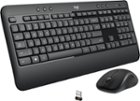

Types of computer keyboards
Whether you are choosing a new keyboard for a desktop computer or for a laptop, you will want to consider the type of keyboard that will serve you best.
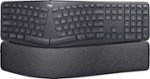
Think about uses and placement preferences when narrowing down your options. If comfort is your priority, look for an ergonomic keyboard that will provide long-term support while you are typing. When selecting an ergonomic keyboard and mouse, you will want to think about the size of your hands, which can influence what models suit you best. Sometimes, reviews offer good information about this element of fit.
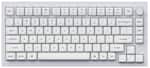
If you need truly rapid responsiveness and a decisive, clicky feel for PC gaming, look at gaming keyboards. Many of these also offer a nice splash of color with RGB lighting. If you want lots of flexibility in terms of where you can place your keyboard, a wireless keyboard will serve you best. Wireless is also a good option for a keyboard you plan on transporting. If you want the most portable keyword in terms of size, look at getting a 60% keyboard.
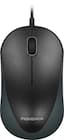
Choosing a computer mouse
When it comes to choosing computer mice, keep in mind that you won’t be using your mouse in isolation. One of the elements that can make a mouse easier or harder to use is the mouse pad on which you put it. If you have enough space, choose a larger mouse pad so that you can move more freely without having to reset your hand. Some gaming desks even have a mousepad surface to them. For comfort, you may also enjoy using a wrist pad with your mouse.
In terms of the specific computer mouse you choose, the selection process is like choosing a keyboard: consider your activities and what will best serve them. A gaming mouse prioritizes both signal response time and physical responsivity. A wireless mouse is great for its portability and flexibility. Meanwhile, you'll find ergonomic mice with an arc shape, sculpted shape or soft rubber grips can keep your hand and wrist more supported.
If you are already looking at mice and keyboards, it might also be time to consider a stylus. Or, you can always pair a drawing tablet with any computer.



![Esc F1 F2 F3 F4 F5 F6 F7 F8 F9 F10 F11 F12 PrtSc SysRq ScrLk Pause Break 1 2 3 4 5 6 7 8 9 0 - = Backspace Tab Q W E R T Y U I O P [ ] \ Caps Lock A S D F G H J K L ; ' Enter Shift Z X C V B N M , . / Shift Ctrl @ # $ % ^ & * ( ) _ + Num Lock 7 8 9 4 5 6 1 2 3 0 Insert Home Delete End Page Up Page Down Option Win Ctrl Alt Fn Backspace](https://pisces.bbystatic.com/image2/BestBuy_US/images/products/c88254ee-0d84-47b2-9f38-c97a6f47f5ef.jpg;maxHeight=100;maxWidth=150)


![esc ~ ! 1 tab caps lock shift ctrl F2 Fl # 2 3 Q W A S Z start opt L F3 $ 4 E D X alt cmd3 ) FS F4 A % 5 6 R T F G V C logi 44 HI & F9 FID FB F7 F6 * ) - - & 0 8 9 7 O P U I Y K L H J > < N M 1 B PM + = { [ : I ; ? I alt cmd D 2 4 300 3 1 F12 . * page I insert home up clear backspace 8 9 + 7 page A pg up end down home } I delete ] / 6 4 5 4 enter 2 3 enter 1 dn Pg end shift = 0 del ins etrl fn opt](https://pisces.bbystatic.com/image2/BestBuy_US/images/products/6539/6539505_sd.jpg;maxHeight=100;maxWidth=150)

![esc 1! 2@ 3# 4$ 5% 6^ 7& 8* 9( 0) - _ + del tab Q W E R T Y U I O P [ { ] } pg up caps A S D F G H J K L ; : ' enter pg dn shift Z X C V B N M , . / ? shift ins ctrl alt fn ctrl](https://pisces.bbystatic.com/image2/BestBuy_US/images/products/df61bb42-fb75-4886-b839-2ea6cc541ed7.jpg;maxHeight=427;maxWidth=640?format=webp)

![F1, esc, !, -, 1, tab, caps lock, shift, F2, @, 2, Q, A, F3, Q, #, 3, W, S, Z, F4, $4, E, D, X, F5, %, 5, R, F, C, F6, 44, A, 6, T, G, V, F7, HI &, 7, Y, H, logi, F8, FO, 4, *, (, 8, 9, U, I, J, K, M, N, FI0, 0, O, L, <, -, alt, page up, page down, end, down, delete, home, 1, P, [, ] 5, 5, 4, ., -, enter, :, 1, 3, enter, I, 2, 1, Pg up, [, ] 5, 5, 4, ., -, enter, ?, >, /, 0, del, a, 4, ins, e, ctrl, *, fn, ctrl, fn, alt, logi.](https://pisces.bbystatic.com/image2/BestBuy_US/images/products/6536/6536551_sd.jpg;maxHeight=427;maxWidth=640?format=webp)


![Sure, here is the corrected and grouped text based on the image:
**Top Row:**
- esc 1 2 F3 a 4 FS F6 PE F7 P FB F9 F10 F11 F12 prt SC eye Z Scr a paue break 1 . 2 3 E 4 $ t 5 1 6 7 & 8 9 I 0 I - ins home page up nm & / I tab Q W E R T Y U I o P [ { ] 1 enter del and page doven 7 - 8 ^ 9 42 caps A S D F G H I K L ; : 4 < 5 6 shift / I Z X V B N M > / ? shift 1 a 2 V 3 2 enter ctrl alt alt fn ctrl 0
**Keyboard Layout:**
- esc 1 2 3 4 5 6 7 8 9 0 - = del
- tab Q W E R T Y U I O P [ { ] \
- caps A S D F G H J K L ; : '
- shift Z X C V B N M , . / shift
-](https://pisces.bbystatic.com/image2/BestBuy_US/images/products/5b07d932-9ada-4324-a1b8-38e8f2ef049d.jpg;maxHeight=427;maxWidth=640?format=webp)