Elgato - Stream Deck + Studio Controller with customizable touch strip and dials - Black
Elgato - Stream Deck + Studio Controller with customizable touch strip and dials - Black
- Elgato - Wave Mic Arm Pro$159.99The price was $179.99
Related Item

Specifications
- Lighting TypeMulticolorForm FactorFull-sizeConnection TypeWired
- Key Specs
- Lighting Type: Multicolor
- Form Factor: Full-size (The size, arrangement, and physical configuration of the product.)
- Connection Type: Wired
- General
- Brand: Elgato
- Model Number: 10GBD9901
- Product Name: Stream Deck + Studio Controller with customizable touch strip and dials
- Color: Black
- Features
- Lighting Type: Multicolor
- Numeric Keypad: false
- Touchpad: true
- Keyboard Type: Keypad, Programmable
- Palm Rest: false
- Spill Resistant: false (Designed to resist some degree of accidental liquid spill. The level of spill-resistance is indicated by the product manufacturer, but the degree of protection may not be guaranteed after normal wear of the product.)
- Foldable: false
- Functions
- Form Factor: Full-size (The size, arrangement, and physical configuration of the product.)
- Number Of Keys: 8
- Adjustable Tilt Function: false
- Multimedia Keys: false
- Internet Keys: false
- Connectivity
- Connection Type: Wired
- Wired Connectivity: USB-C
- Cable Length: 3.3 feet
- Detachable Cable: true
- Compatibility
- Operating System Compatibility: Windows, Mac
- Plug and Play Operation: true
- System Requirements: Windows 10 (64-bit) or later; macOS 10.15 or later (The software that a product must have for it to be able to integrate with another product.)
- Dimensions
- Product Height: 4.33 inches (The out of box height of the item. Height is measured as the vertical distance from the bottom of the item to the top as it would be primarily used or placed.)
- Product Width: 5.51 inches (The out of box width of the item. Width is measured as the horizontal distance from one side of the item to the other as it would be primarily used or placed.)
- Product Depth: 5.4 inches (The out of box depth of the item. Depth is measured as the distance from the front of the item to the back as it would be primarily used or placed.)
- Product Weight: 16.64 ounces (The out of box weight of the item.)
- Mouse
- Mouse Included: false
- Warranty
- Warranty - Parts: 2 years
- Warranty - Labor: 2 years
- Other
- UPC: 840006645146
Iconic Stream Deck tech with LCD keys, dials, and touch strip. Fully customizable. Perfect for any workflow. Stream Deck + is your audio mixer, studio controller, production console – anything you want it to be. Trigger actions. Control mics and cameras. Adjust volume, lighting, and much more. Create limitless pages for different apps and swipe between them on the fly. Set up with ease in the Stream Deck app. Unlock Elgato Wave Link mixing software, and hit the Stream Deck Store for plugins, icon packs, thousands or royalty-free music tracks, sound effects, and more. With new plugins and updates added regularly, Stream Deck + evolves with your workflow.
- Tactile Control: LCD keys, touch strip, and dials for audio, video, lighting, and more.
- Fully Customizable: Audio mixer, studio controller, production console, etc.
- Multi Actions: Trigger multiple actions at once or sequentially.
- Visual Feedback: Know that your command has been executed and view dial information.
- Smart Profiles: Automatically switch between interface configurations for different apps.
- Powerful Plugins: Elgato Wave Link, Camera Hub, Control Center, OBS, Twitch, YouTube, Twitter, Discord, Spotify, Philips Hue, and many more
- Stream Deck Store: Download plugins, icons, thousands of royalty-free tracks, SFX, and more.
- Stream Deck App: Drag and drop setup and custom interface icons.
- Unlock Wave Link: Powerful audio mixing software with effects.
- Always Evolving: Regular updates and new plugins frequently added.
Whats Included
- Stream Deck +
- USB-C to USB-A Cable
- Quick Start Guide
Product Manuals
Q: Does the Elgato Stream Deck come with software?
A: Yes, the Elgato Stream Deck unlocks powerful audio mixing software with effects called Wave Link.
Q: How many keys does the Elgato Stream Deck Plus have?
A: The Elgato Stream Deck Plus has 8 keys.
Q: What operating systems are compatible with the Elgato Stream Deck?
A: This device is compatible with Windows 10 (64-bit) or later and macOS 10.15 or later.
Q: How is the Elgato Stream Deck connected?
A: The Elgato Stream Deck Plus connects via a USB-C cable.
Q: Can you customize the Elgato Stream Deck?
A: Yes, the Stream Deck is fully customizable. You can use it as an audio mixer, studio controller, production console, etc.
Q: Is the Elgato Stream Deck compatible with streaming platforms?
A: Yes, the Stream Deck has plugins for OBS, Twitch, YouTube, and more.
Q: Can you hook this up to a PlayStation5
A: Stream Deck + requires a Windows or macOS computer to work. It will not work if you connect it directly to your PS5.
Q: Can this be used as a audio mixer
A: With the XLR attachment yes!
Compare similar products
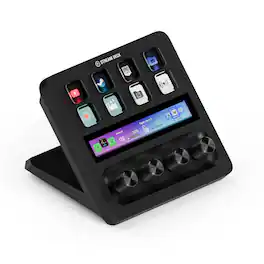
Iconic Stream Deck tech with LCD keys, dials, and touch strip. Fully customizable. Perfect for any workflow. Stream Deck + is your audio mixer, studio controller, production console – anything you want it to be. Trigger actions. Control mics and cameras. Adjust volume, lighting, and much more. Create limitless pages for different apps and swipe between them on the fly. Set up with ease in the Stream Deck app. Unlock Elgato Wave Link mixing software, and hit the Stream Deck Store for plugins, icon packs, thousands or royalty-free music tracks, sound effects, and more. With new plugins and updates added regularly, Stream Deck + evolves with your workflow.
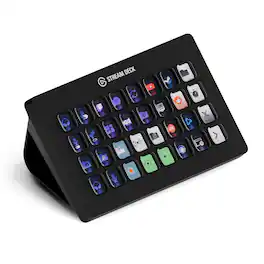
Improve the quality of online broadcasts with this Elgato Stream Deck XL advanced stream controller. The included app makes it easy to assign custom functions to the 32 touch-sensitive keys for easy access to actions and effects. This Elgato Stream Deck XL advanced stream controller is compatible with a variety of popular live streaming services.

Add the perfect lighting setup to video recording sessions with this Elgato key light. The dimmable design lets you choose the right setting for interviews or scenes, and the glare-free diffusion offers a more balanced effect. With a flat profile and metal desk mount, this Elgato key light takes up minimal space.

Stream Deck gives you 15 LCD keys to control your apps and tools. Trigger actions, launch social posts, adjust audio, play sound clips, activate lights, and much more. Get visual feedback to confirm your commands. Set Stream Deck to automatically switch key configurations as you jump between apps. It’s the ultimate workflow hack, and it’s fully customizable. Personalize your Stream Deck with custom icons, screensavers, and a growing range of interchangeable faceplates. Use the app to configure keys with ease, and hit the Stream Deck Store for app plugins, icon packs, thousands of royalty free tracks, effects, and more.
| Pros for Elgato - Stream Deck + Studio Controller with customizable touch strip and dials - Black | |||
|---|---|---|---|
| Ease of use, Customization, Quality, Knobs, Volume Control | Ease of use, Customization, Overall Performance, Back Lighting, Button Count | Ease of use, Brightness | Ease of use, Overall Performance, Customization, LCD Keys, Software |
| Cons for Elgato - Stream Deck + Studio Controller with customizable touch strip and dials - Black | |||
| There were no cons for this product— | Price | There were no cons for this product— | Price, Button Quality, Stand |
Specs

- SteelSeries - Arctis Nova Pro Wireless Multi Gaming Headset for PC, PS5, PS4, Switch - White$299.99The price was $379.99


Reviews
Customers are saying
Customers often highlight the Stream Deck + Studio Controller's ease of use, solid build quality, and high-quality knobs. The customization options are also praised, along with its effective volume control and user-friendly software. Additionally, the accessible touch strip is a valued feature.
Customer Images
The vast majority of our reviews come from verified purchases. Reviews from customers may include My Best Buy members, employees, and Tech Insider Network members (as tagged). Select reviewers may receive discounted products, promotional considerations or entries into drawings for honest, helpful reviews.
- Rated 5 out of 5 stars
Its great
Elgato Stream Deck Review: A Must-Have for Streamers and Power Users The Elgato Stream Deck has become a staple in the world of content creation and productivity, and for good reason. Whether you're a streamer, video editor, or someone who just wants to streamline their workflow, the Stream Deck offers a powerful combination of customization, responsiveness, and polish. Pros: 1. Intuitive Setup & Software The Stream Deck's companion software is user-friendly and powerful. Drag-and-drop functionality allows you to assign commands, hotkeys, media controls, and more with ease. Profiles can be created for different apps or tasks, making the device incredibly versatile. 2. Customizable LCD Keys Each key is an individual LCD screen, fully customizable with icons and labels. Elgato provides a key creation tool, or you can upload your own graphics. This makes it easy to visually organize your commands. 3. Workflow Game-Changer For streamers using OBS, Twitch, YouTube, or Discord, integration is seamless. You can switch scenes, trigger sound effects, launch apps, and even control lights (via Philips Hue or Elgato's own products) with a single button press. 4. Not Just for Streamers While built with streamers in mind, it's also a fantastic productivity tool. Many users customize it for video editing (Premiere Pro, DaVinci Resolve), music production (Ableton, Logic), or even daily productivity (macros, shortcuts, automation). 5. Build Quality The device feels solid and professional. Buttons are tactile and responsive. It comes with an adjustable stand for comfortable viewing angles.
Anonymous Posted
- Rated 5 out of 5 stars
The ultimate control center for my setup!
As a long-time user of Elgato products, I can confidently say the Stream Deck + has taken my workflow to the next level. What sets this apart are the 4 tactile dials; they are incredibly precise for controlling volume, lighting, or even zooming during editing. The combination of the 8 LCD keys and the touch strip makes navigating through folders and profiles very fluid. The build quality feels premium and sturdy, which is exactly what I expect from my favorite brand. If you’re debating between the standard model and this one, the dials alone make it worth the extra investment. Pros: • Multi-function tactile dials are a game-changer. • Touch strip for real-time info and swiping pages. • Seamless integration with Elgato’s software. • Sleek design and very stable base. Cons: • Takes a little time to fully customize, but it’s worth the effort.
Cheo Posted
- Rated 5 out of 5 stars
Productivity powerhouse
One of the best Elgato products around! The displays are really nice & bright and the touchscreen bar at the bottom is super cool & convenient! The knobs are great, perfect for adjusting discord and Spotify sound without exiting games. Haven’t noticed any lag when hitting any of my custom button set up! Perfect for if you’re tired of adjusting sounds from multiple sources while game and for setting up hot keys for productivity!
Goose Posted