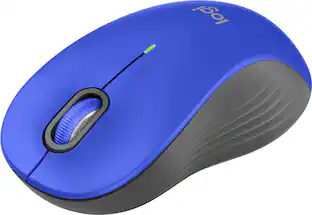
Logitech - M325s Wireless Optical Compact Ambidextrous Mouse - Wireless - Blue
Color
Blue
Key Accessories:
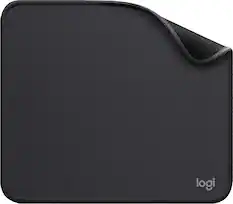
- Logitech - Mouse Pad Studio Series with Spill-Resistant Surface (Medium) - Graphite$9.99
More Buying Options from Best Buy and Marketplace sellers

Specifications
- Lighting TypeNoneMaximum Sensitivity1000 dots per inchNumber of Buttons (Total)5Connection TypeWireless
- Key Specs
- Lighting Type: None
- Maximum Sensitivity: 1000 dots per inch (Mouse sensitivity is measured in dots per inch (DPI). The higher the DPI, the more sensitive the mouse is and may be more useful for high-density pixel screens. Lower DPI typically means more precision and accuracy in mouse movement.)
- Number of Buttons (Total): 5
- Connection Type: Wireless
- General
- Brand: Logitech
- Model Number: 910-007526
- Product Name: M325s Wireless Optical Compact Ambidextrous Mouse
- Color: Blue
- System Requirements: Available USB Port , Windows® 10, 11 or later , macOS 10.5 or later , ChromeOS , Certified Works With Chromebook™ ? , Linux® kernel 2.6+ or later , Internet access required to download optional customization app Logi Options+. (The software that a product must have for it to be able to integrate with another product.)
- Features
- Mouse Type: Compact
- Lighting Type: None
- Performance
- Mouse Operation: Button(s), Scroll wheel, Tilt wheel
- Mouse Grip Style: Standard (In comparison to many palm and claw grips, ergonomic grip mice are designed for a specific handedness and put the hand and wrist in a position to promote comfort. Customizable grips feature buttons/keys that can be configured to perform specific actions and may also have customizable calibration and sensitivity settings.)
- Handedness: Ambidextrous
- Tracking Method: Optical (There are several types of computer mice, optical and laser being among the most common. Optical mice detect less detail and provide more precise and accurate movement. Laser mice detect more detail and can be used on a wider variety of surfaces, but are more sensitive to small movements.)
- Maximum Sensitivity: 1000 dots per inch (Mouse sensitivity is measured in dots per inch (DPI). The higher the DPI, the more sensitive the mouse is and may be more useful for high-density pixel screens. Lower DPI typically means more precision and accuracy in mouse movement.)
- Minimum Sensitivity: 1000 dots per inch (Mouse sensitivity is measured in dots per inch (DPI). The higher the DPI, the more sensitive the mouse is. Lower DPI typically means more precision and accuracy in mouse movement, but higher DPI may be useful for high-density pixel screens.)
- Number of Buttons (Total): 5
- Number of Thumb Buttons: 0
- Number of Programmable Buttons: 5
- Adjustable Weight: false
- Connectivity
- Connection Type: Wireless
- Wireless Connectivity: Radio Frequency (RF) (The manner in which a device sends data to another device over a short distance without the use of wires or cables.)
- Maximum Wireless Range: 33 feet
- Operating System Compatibility: Windows, Mac, Chrome, Linux
- Plug and Play Operation: true
- Power
- Mouse Power Source: Battery-powered
- On/Off Switch: true
- Rechargeable Battery (Mouse): false
- Battery Size: AA (The battery size required for operation.)
- Number of Batteries Required: 1
- Batteries Included: true (Indicates whether the product comes with the required batteries for its operation.)
- Included
- Mouse Pad Included: false
- Dimensions
- Product Height: 1.54 inches (The out of box height of the item. Height is measured as the vertical distance from the bottom of the item to the top as it would be primarily used or placed.)
- Product Length: 3.73 inches (The out of box length of the item. Length is measured as the longest dimension of the item.)
- Product Width: 2.24 inches (The out of box width of the item. Width is measured as the horizontal distance from one side of the item to the other as it would be primarily used or placed.)
- Product Weight: 93 grams (The out of box weight of the item.)
- Warranty
- Warranty - Parts: 3-Year
- Warranty - Labor: None
- Other
- UPC: 097855202871
The Logitech M325s offers a great blend of comfort and control, with micro-precise scrolling designed for web use. Its contoured shape and textured grips keep your hand comfortable, even during long sessions. With up to 18 months of battery life, it's a reliable, hassle-free companion for everyday productivity.
- Small but mighty wireless mouse: M325S is comfy, compact, and wireless—great on the go. Ambidextrous design with customizable buttons via Logi Options+ app.¹
- Smooth scrolling and customizable scroll wheel: Scroll with speed and precision using the tilt wheel—customizable for horizontal scroll, navigation, and more via Logi Options+ app.¹
- Up to 18 months battery life: Built to the high standards of a global leader, the M325S is durable and lasts up to 18 months with power-saving tech. ²
- Compatibility: M325S is compatible with most OS, including Windows, macOS, Linux, and certified Works with Chromebook. Simply plug in the USB receiver for a strong 10m connection.³ ⁴
Whats Included
- Mouse
- USB receiver
- 1 AA battery (pre-installed)
- User documentation
Disclaimers
- ¹ Customization of the buttons via Logi Options+ is not possible on Linux.
- ² Battery life may vary based on user and computing conditions.
- ³ This product has been certified to meet Google's compatibility standards. Google is not responsible for the operation of this product or its compliance with safety requirements. Chromebook and the "Works With Chromebook" badge are trademarks of Google LLC.
- ⁴ Wireless range varies with environment and setup.
- ⁵ Excludes plastic in printed wiring assembly, receiver, and packaging.
Q: Is this mouse compatible with macOS?
A: Yes, this mouse is compatible with macOS 10.5 or later.
Q: What kind of wireless technology does the mouse use?
A: The mouse uses Radio Frequency (RF) for wireless connectivity.
Q: Does this mouse require batteries to operate?
A: Yes, this mouse is battery-powered.
Q: Does this mouse use plug and play operation?
A: Yes, this mouse features plug and play operation.
Q: Is this mouse suitable for both left and right-handed users?
A: Yes, this mouse has an ambidextrous design.
Q: What is the maximum wireless range of this mouse?
A: The maximum wireless range of this mouse is 33 feet.
Q: Does this mouse have plug and play capability?
A: Yes, this mouse has plug and play operation.
Q: Can I use this mouse with a Chromebook?
A: Yes, this mouse is certified to work with Chromebook.
Compare similar products
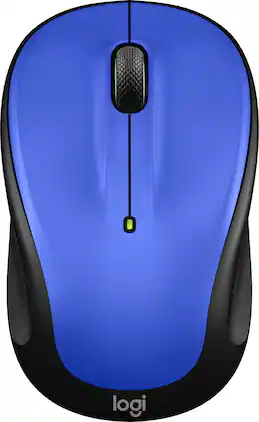
The Logitech M325s offers a great blend of comfort and control, with micro-precise scrolling designed for web use. Its contoured shape and textured grips keep your hand comfortable, even during long sessions. With up to 18 months of battery life, it's a reliable, hassle-free companion for everyday productivity.

Eliminate the most common computer mouse issue—the cord. With the Best Buy Essentials Wireless Mouse with USB Receiver, you can navigate the web with speed and accuracy. Compatible with both Windows and Mac computers, simply insert the included nano receiver into one of your computer’s USB ports to wirelessly connect the mouse. It has just 3 buttons and an ambidextrous design for simple control. Optical technology detects when the mouse moves to deliver an accurate 1600 DPI response. We also included a AA battery, so you won’t have to worry about keeping the mouse powered until the LED indicator starts to blink. Let us improve your computer navigation by going wireless with this Best Buy-backed mouse.

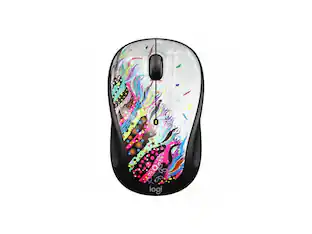
The Design Collection Limited Edition mice mood-boosting designs bring a vibrant new look to your desk setup. Choose between different fun styles. It’s small, comfortable, super responsive, and completely wireless. Get total freedom with 10 m of wireless range, and work worry-free for 12 months on a single pre-installed battery. With smooth, line by line scrolling and precise cursor control for easier navigation at home or at work. The compact design perfectly fit users with smaller hands and kids—making it a great option for homeschooling.

The Logitech MX Master 4 brings immersive control and precision you can feel with haptic feedback. Experience haptic feedback on specific actions, shortcuts, notifications like switching desktops, slider adjustments and more. Customize vibration intensity in Logi Options+. With Actions Ring shortcuts and MX Master 4, save up to 33% of your time by accessing tools and filters at your cursor, reducing repetitive movements by up to 63%. Experience uninterrupted performance with 2X more powerful connectivity, powered by an advanced radio chip, optimized antenna placement, and a new USB-C dongle.
| Pros for Logitech - M325s Wireless Optical Compact Ambidextrous Mouse - Wireless - Blue | |||
|---|---|---|---|
| Overall Performance, Size | Overall Performance, Size, Ease of use, Price, Wireless | There were no pros for this product— | Overall Performance, Ergonomics, Button Functionality, Haptic Feedback, Battery Life |
| Cons for Logitech - M325s Wireless Optical Compact Ambidextrous Mouse - Wireless - Blue | |||
| There were no cons for this product— | Click Sound, Grip | There were no cons for this product— | Weight, Size |
Specs





Reviews
Rating 4.8 out of 5 stars with 7003 reviews
- Overall Performance (5)
- Size (3)
Customer Images
The vast majority of our reviews come from verified purchases. Reviews from customers may include My Best Buy members, employees, and Tech Insider Network members (as tagged). Select reviewers may receive discounted products, promotional considerations or entries into drawings for honest, helpful reviews.
Customers often buy these together
Computer Keyboards
![Esc F1 F2 F3 F4 F5 F6 F7 F8 F9 F10 F11 F12 Print Screen Scroll Lock Pause Break 1 2 3 4 5 6 7 8 9 0 - + = Backspace Insert Home H Page Up A Num Look 1 I Tab Q W E R T Y U I o P { [ } ] I I Delete End IN Page Down 7 Home 8 9 Pg Up Caps A Lock A S D F G H J K L ; : DE g Enter 4 5 6 Shift Z X C V N M < > ? I Shift 1 End 2 3 Pp Dn Enter Ctrl Alt Alt Ctrl 0 Ins Del](https://pisces.bbystatic.com/image2/BestBuy_US/images/products/a588d446-5678-40ae-86b8-1f15e0026e66.jpg;maxHeight=232;maxWidth=233?format=webp)
Logitech - K120 Full-size Wired Membrane Keyboard for PC with Spill-Resistant Design - Black
$9.99The price was $12.99

![logi esc 1 F1 2 F2 3 F3 F4 F5 F6 F7 F8 x F9 NI F10 x F11 F12 ins del ~ ! 1 2 # 3 $ 4 % 5 ^ 6 & 7 8 ( 9 ) 0 e - + = backspace tab Q W E R T Y U I O P { [ } ] I / caps lock A S D F G H J - K L : ; " enter shift Z X C V B N M < > ? / shift ctrl fn L start opt H alt cmd alt cmd ctrl opt](https://pisces.bbystatic.com/image2/BestBuy_US/images/products/6478/6478163_sd.jpg;maxHeight=232;maxWidth=233?format=webp)

![The text on the image reads:
888 DD DI DD 4 DSC i F2 F3 4 FS T6 ET 1. 1N IN F.. 11 1.. 114 1n F1 F12 118 in9 - a ee 1 8F 2 3 $ 4 % 5 A 6 & 7 . 8 I 9 I 0 ee I + = delete fn home page up clear - / + tab Q W E R T Y U I 0 P { [ ] ] | I delete end page down 7 8 9 ee caps lock A S D F G H J K L : I - return 4 5 6 + shift Z X C V N M < F > ? / shift a 1 2 3 control option 2 command 3 command option control Y - 0 enter
After grouping and correcting the text, it reads:
888 DD DI DD 4 DSC i F2 F3 4 FS T6 ET 1. 1N IN F.. 11 1.. 114 1n F1 F12 118 in9 - a ee 1 8F 2 3 $ 4 % 5 A 6 & 7 . 8 I 9 I 0 ee I + = delete fn home page up clear - / + tab Q W E R T Y U I 0 P { [ ] ] | I delete end page down 7 8 9 ee caps lock A S D F G H J K L : I - return 4 5 6 + shift Z X C V N M < F > ? / shift a 1 2 3 control option 2 command 3 command option control Y - 0 enter](https://pisces.bbystatic.com/image2/BestBuy_US/images/products/f4059d3a-0c2a-46ef-bcfd-4e11b9b26d5d.jpg;maxHeight=232;maxWidth=233?format=webp)
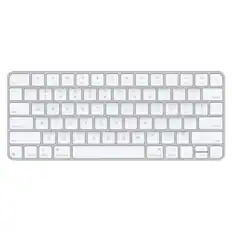
![esc ! - 1 tab caps lock shift ctrl F2 F3 # 2 3 Q W E R T Y U I O P A S D F G H J K L Z X C V B N M start opt alt cmd logi 44 HI . F10 F8 F7 F6 * ( ) - - & 0 8 9 7 O P U I Y K L H J > < N M B F + = { [ : I : ? I alt cmd 2 30 3 1 FQ page insert home up backspace page 1 delete end down ) ] / I I & shift ctrl fn opt 6 / + / clear 8 9 + 7 & P9 up home 5 6 4 a 4 2 3 enter 1 dn pg end = 0 del ins](https://pisces.bbystatic.com/image2/BestBuy_US/images/products/6539/6539508_sd.jpg;maxHeight=232;maxWidth=233?format=webp)


More to consider
 Top Deal$33.99The price was $39.99
 Top Deal$33.99The price was $39.99


Explore tech essentials Sponsored
- Top Deal$33.99The price was $39.99

Discover related products
 $13.99The price was $19.99
 $41.39The price was $43.69
 $30.99The price was $32.99





Keep exploring
 $35.00The price was $36.99