ASUS - ROG 100W Charger Dock for ROG Xbox Ally (HDMI 2.0, USB-A, USB-C) - Black
ASUS - ROG 100W Charger Dock for ROG Xbox Ally (HDMI 2.0, USB-A, USB-C) - Black
- ASUS - ROG Raikiri II Wireless Controller for ROG Xbox Ally, PC, Xbox Series X/S - Black$189.99
Related Item

About This Item
- Key Specs
- Brand Compatibility: ROG
- Model Compatibility: ROG Xbox Ally (RC73), ROG Ally X (RC72), ROG Ally (RC71)
- General
- Brand: ASUS
- Model Number: AC100-05 CHARGER DOCK/BK/US
- Product Name: ROG 100W Charger Dock for ROG Xbox Ally (HDMI 2.0, USB-A, USB-C)
- Color: Black
- Charger Type: Wall chargers
- Number Of Devices Charged Simultaneously: 3
- Power
- Charging Method: Wired
- Adapter Power Type: AC
- Wattage: 100 watts (Measurement of electrical power.)
- Compatibility
- Brand Compatibility: ROG
- Model Compatibility: ROG Xbox Ally (RC73), ROG Ally X (RC72), ROG Ally (RC71)
- Charging Interface(s): USB-A, USB-C (The connection for transmitting power to charge the device.)
- Adapter Plugs Included: false
- Features
- Overload Protection: true (Features intended to protect the product from damage and overheating caused by overload.)
- Foldable Wall Plug: true
- Removable Cable: true
- Certifications Listings & Approvals
- ENERGY STAR Certified: false (Devices carrying the ENERGY STAR service mark, such as computer products and peripherals, kitchen appliances, and other products, generally use 20% to 30% less energy than required by federal standards.)
- Product Safety Certifications and Standard(s): UL Listed (Lists the applicable certifications and/or standards, as stated by the manufacturer, in which the product has met the requirements for the assurance of quality and safety.)
- Dimensions
- Cable Length: 6.6 feet
- Product Height: 2.68 inches (The out of box height of the item. Height is measured as the vertical distance from the bottom of the item to the top as it would be primarily used or placed.)
- Product Length: 3.35 inches (The out of box length of the item. Length is measured as the longest dimension of the item.)
- Product Width: 1.26 inches (The out of box width of the item. Width is measured as the horizontal distance from one side of the item to the other as it would be primarily used or placed.)
- Product Weight: 0.62 pounds (The out of box weight of the item.)
- Warranty
- Warranty - Parts: 1 year
- Warranty - Labor: 1 year
- Other
- UPC: 199291112292
Use the ROG 100W gaming charger dock to connect your additional accessories with the ROG Xbox Ally through one USB Type-C port. Support display output using HDMI 2.0 for your TV or monitor. Charge or connect through 2 USB Type-A ports for your mouse, keyboard, or USB storage drive, all while charging your ROG Xbox Ally.
- Charge and Display Simultaneously: With AC output, USB-C port supports PD3.0, PD2.0, output up to 100W while displaying up to 4K/60Hz or 1080P/120Hz resolutions through the HDMI 2.0 port
- USB Type-A Peripherals: Use the 2 USB Type-A ports to connect any gaming peripheral, keyboard, or mouse or enjoy up to 480MB/S data transfer when connecting additional storage
- Universal Charger Dock: Not only compatible with ROG Xbox Ally, you also could use it with your USB-C mobile phone* , laptops and other device, which supports display function
- Full Function Cable: ROG 1.5m cable supports charging, audio, video, and display function with resolution up to 4K at 60Hz
- Rigorous Quality Testing: Fully torture-tested for toughness, durability and safety
- Charge and Display Simultaneously: With AC output, USB-C port supports PD3.0, PD2.0, output up to 100W while displaying up to 4K/60Hz or 1080P/120Hz resolutions through the HDMI 2.0 port
- USB Type-A Peripherals: Use the 2 USB Type-A ports to connect any gaming peripheral, keyboard, or mouse or enjoy up to 480MB/S data transfer when connecting additional storage
- Universal Charger Dock: Not only compatible with ROG Xbox Ally, you also could use it with your USB-C mobile phone* , laptops and other device, which supports display function
- Full Function Cable: ROG 1.5m cable supports charging, audio, video, and display function with resolution up to 4K at 60Hz
- Rigorous Quality Testing: Fully torture-tested for toughness, durability and safety
Whats Included
- 100W Gaming Charger Dock
- ROG USB-C Cable
- 100W Gaming Charger Dock
- ROG USB-C Cable
Q: Will this just mirror or extend my display or can I use just monitor screen
A: for me the screen on my xbox ally turned off and just displayed on my monitor
Q: Does this come with USB cords
A: it comes with a usb-c to usb-c cord
A: u need the charger dock plus hdmi cable it comes with the usb-c to usb-c cable
A: you need a hdmi cable to connect to tv. if you have a usb c monitor you connect the ally directly to the monitor with the usbc cable
A: Yes, this ASUS ROG 100W charging dock will support the Nintendo Switch only after a firmware update. Yes, the ROG Gaming Charger Dock (65W) supports the ROG Xboox Ally X.
A: It's available now. Hope this sends a email to let you know ^_^.
Reviews
Customer Images
The vast majority of our reviews come from verified purchases. Reviews from customers may include My Best Buy members, employees, and Tech Insider Network members (as tagged). Select reviewers may receive discounted products, promotional considerations or entries into drawings for honest, helpful reviews.

- Legion Go S 8" 120Hz Gaming Handheld - AMD Ryzen Z1 Extreme - SteamOS - 32GB with 1TB SSD - Steam$849.99The price was $899.99
- Legion Go S 8" 120Hz Gaming Handheld - AMD Ryzen Z2 Go - SteamOS - 16GB with 512GB SSD - Steam$599.99The price was $649.99
- Legion Go S 8" 120Hz Gaming Handheld - AMD Ryzen Z1 Extreme - WindowsOS - 32GB with 1TB SSD - Windows$929.99The price was $979.99
Compare similar products
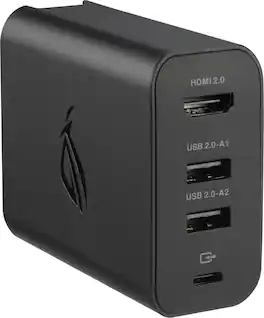
Use the ROG 100W gaming charger dock to connect your additional accessories with the ROG Xbox Ally through one USB Type-C port. Support display output using HDMI 2.0 for your TV or monitor. Charge or connect through 2 USB Type-A ports for your mouse, keyboard, or USB storage drive, all while charging your ROG Xbox Ally.

The ROG 140W USB-C GaN Charger is the ultimate charging solution for your ROG Ally with 3 USB Type-C ports and 1 USB Type-A port, making it perfect to simultaneously charge up to four devices. It efficiently fast-charges all your gear with up to 140W total power and Smart Port Balancing, all in a compact and sleek design thanks to GaN technology.
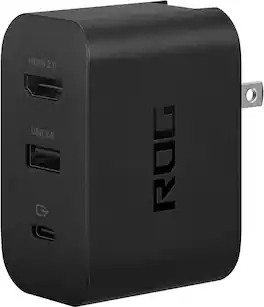
Use the ROG 65W gaming charger dock to connect your additional accessories with the ROG Ally through one USB Type-C port. Support display output using HDMI 2.0 for your TV or monitor. Charge or connect through USB Type-A for your mouse, keyboard, or USB storage drive, all while charging your ROG Ally.
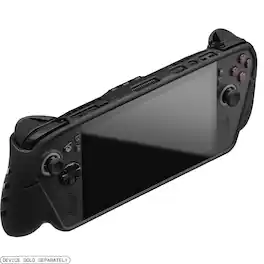
Transform your Xbox Ally X into the ultimate handheld gaming system with the dbrand Killswitch. This "Designed for Xbox" certified case combines impact-resistant thermoplastics, a slim 2.5 mm profile, and an integrated kickstand for enhanced comfort and protection. The included crushproof Travel Cover keeps your device safe on the go, while ergonomic grips and precision-cut access points ensure a seamless fit for both the Ally and Ally X.
| Pros for ASUS - ROG 100W Charger Dock for ROG Xbox Ally (HDMI 2.0, USB-A, USB-C) - Black | |||
|---|---|---|---|
| Charging Speed, Overall Performance | Charging Speed, Overall Performance, Portability, Heat Dissipation, Port Quantity | Overall Performance, Portability, Charging Speed, Connectivity, Size | Build Quality, Protection, Ergonomics, Fit, Kickstand |
| Cons for ASUS - ROG 100W Charger Dock for ROG Xbox Ally (HDMI 2.0, USB-A, USB-C) - Black | |||
| There were no cons for this product— | Size | Port Selection, Heat Dissipation, HDMI Performance, Design | Weight |