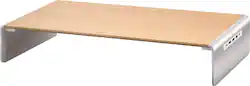
j5create - Wood Monitor Stand with Docking Station - Natural Wood Grain, Tan
- General
- Brand: j5create
- Model Number: JCT425
- Product Name: Wood Monitor Stand with Docking Station
- Color: Natural Wood Grain, Tan
- Features
- Number of Monitors Supported: 1
- Material
- Stand Material: Aluminum, Wood
- Included
- Hardware Included: true
- Warranty
- Warranty - Parts: 2 year limited
- Warranty - Labor: 2 year limited
- Other
- UPC: 847626003097
Save space on your desktop and reduce clutter all at once with this eco-friendly monitor stand. Constructed with pinewood and aluminum, it is designed to raise your monitor for a better viewing angle while also providing space underneath for a keyboard and mouse. The monitor stand comes equipped with a USB-C mini docking station with Power Delivery, providing extra connectivity for your computer. You can add up to 6 additional USB peripherals and a 4K HDMI monitor through a single USB-C port. You can also charge your computer at the same time when connected with a power source. The monitor stand is a great addition to any workstation. Whether you’re looking for more space, to raise your monitor or laptop or expand the connectivity of your USB-C-equipped device, this multi-function monitor stand will help you create the perfect workspace to maximize your productivity!
- Built-in USB-C Mini Docking Station: USB ports for additional devices and to charge devices such as phones and tablets. 4K HDMI port for an additional monitor. Power delivery up to 100W. USB-C cable included.
- Delicately trimmed aluminum-alloy: The wooden table is combined with aluminum for durability. Holds up to 88 lbs.
- Handmade solid wood: Smooth wooden table surface for high aesthetic appeal.
- Comfortable Viewing Angle: Raises your monitor up to eye level to ergonomically enhance your viewing angle. Puts less strain on your eyes and neck while improving your sitting or standing posture.
- Declutter Your Workstation: With empty space below the sturdy shelf you can stow away your keyboard and mouse for a tidier space.
- Built-in USB-C Mini Docking Station: USB ports for additional devices and to charge devices such as phones and tablets. 4K HDMI port for an additional monitor. Power delivery up to 100W. USB-C cable included.
- Delicately trimmed aluminum-alloy: The wooden table is combined with aluminum for durability. Holds up to 88 lbs.
- Handmade solid wood: Smooth wooden table surface for high aesthetic appeal.
- Comfortable Viewing Angle: Raises your monitor up to eye level to ergonomically enhance your viewing angle. Puts less strain on your eyes and neck while improving your sitting or standing posture.
- Declutter Your Workstation: With empty space below the sturdy shelf you can stow away your keyboard and mouse for a tidier space.
Whats Included
- 1 - Wood Monitor Stand
- 1 - USB-C to 6-Port USB 3.1 Hub with 4K HDMI
- 1 - USB-C 3.1 Male to Male cable
- 1 - Quick Installation Guide
- 1 - Instruction manual and tools
- 1 - Wood Monitor Stand
- 1 - USB-C to 6-Port USB 3.1 Hub with 4K HDMI
- 1 - USB-C 3.1 Male to Male cable
- 1 - Quick Installation Guide
- 1 - Instruction manual and tools
Product Manuals
A: Main body: 21.02 (W) x 3.54 (H) x 9.76 (D) in.
A: i’m having same issue - very confused what the power source is for the stand ?
A: I am going to answer this question to the best of my ability. I have not purchased this product, but I am considering it. MFi means made for iPod or iPhone. It is supposed to be a way to protect your device from being damaged by non-certified cables. Because the monitor stand and dock is made to be used with a computer, I do not think it ever is going to be MFi certified. I checked on Apple's website and it was not certified. However, if you are using an Apple cable to charge your device, I do not see what the problem should be. My guess is that the iPhone and iPad recognize that charging is occurring through a docking station, which cannot be used with an iPad or iPhone.
Q: Was this unit supposed to come with a power cable? The one I have did not? How do I connect power?
A: Here is the answer to your question. You have to use a USB-C to USB-C cable for best results and then, I bought one of those charging blocks with multiple usb but one 87w usb c adapter port on it. I plugged it into the wall outlet and connected the usb-c cable into the 87W port and on the inside of the hub slash stand, I put the other end where it says "power" on the outside end on the outside. On the inside, then you connect the "host" to the computer in any 3.0-3.1 port
Q: How many monitors will this connect?
A: Supports up to 1 HDMI monitor and requires that the computer support Thunderbolt 3 or DP alt-mode which is when the USB-C port on the PC supports video output.
Q: Does this equipment support an hdmi vga converter?
A: No, we do not recommend using converters with the JCT425 as they may not work.
Q: Does this come ready assembled or do you have to put it together yourself?
A: You will have to assemble the hub adapter into the stand via two screws.
Q: Does this work for Windows laptops ie. Dell, HP, IBM, etc.... and not just Macs?
A: Yes, this will work with laptops using the Windows operating system. Here are the device requirements for full use: Available USB Type-C™ port (USB™ 3.0 is recommended) Available DisplayPort™ Alternate Mode over USB Type-C™ connector. DisplayPort™ v1.2 required on graphics card or video source to support 4K @ 30 Hz resolution. Available USB™ power delivery over USB Type-C™ to support upstream charging