Rating 4.7 out of 5 stars with 445 reviews
4.7- Connectivity (16)
- Setup Ease (11)
- Range (4)
- Speaker Quality (3)
Customer Images
The vast majority of our reviews come from verified purchases. Reviews from customers may include My Best Buy members, employees, and Tech Insider Network members (as tagged). Select reviewers may receive discounted products, promotional considerations or entries into drawings for honest, helpful reviews.
- Rated 5 out of 5 stars
Easy Mesh Wifi
If you need simple and easy mesh wifi. This product is for you. Everything is in one app and easy to set up and easy to understand. Will recommend 10/10
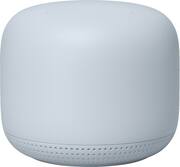
This review is from Nest Wifi - Add On Point with Google Assistant - Snow
Posted by BaneBoy
- Rated 5 out of 5 stars
small in size, big in reach
Google's range extender is a must for every household. Works well with a house that has mulitiple room. Easy to set up, virtually set up and forget. Awesome speaker. Create a mesh network with this bad boy and you'll good coverage all around the house with instant speakers everywhere.
This review is from Nest Wifi - Add On Point with Google Assistant - Snow
Posted by Jester1028
- Rated 5 out of 5 stars
Our Home is getting smarter with NEST !!
We have replaced our Alexa with Google. We converted to Nest Wifi earlier this year and have been adding point range extenders throughout the house one room at a time. We can now walk around the entire ground level and not skip a beat to any music that is playing. Our grandson has also been adding smart lighting throughout the home and we can turn on lights from any room with our Nest extenders. Will definitely be purchasing more extenders to go upstairs.
This review is from Nest Wifi - Add On Point with Google Assistant - Snow
Posted by JuJu
- Rated 5 out of 5 stars
Great range and easy setup
Worked great. Wonderful range and easy setup. Would recommend.
This review is from Nest Wifi - Add On Point with Google Assistant - Snow
Posted by Gggissac
- Rated 5 out of 5 stars
Google nest
Easy set up works great. Wouldnt hesitate to buy again Told friends about it. If you are looking to enhance your connectivity. This is an easy and affordable way to do it
This review is from Nest Wifi - Add On Point with Google Assistant - Snow
Posted by Google