- Key Specs
- Audio Only Inputs: No audio only inputs
- General
- Brand: Victrola
- Model Number: VRS-2800-ESP
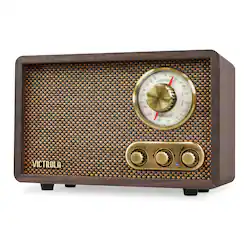
- Product Name: Retro Wood Bluetooth AM/FM Radio
- Color: Espresso
- Audio
- Speaker Size(s):
- Tuner Type(s): AM/FM
- Inputs
- Audio Only Inputs: No audio only inputs
- Features
- Remote Control Included: false
- CD-R/RW Compatible: false
- Power
- Power Source: Plug-in
- Dimensions
- Product Height: 6.3 inches (The out of box height of the item. Height is measured as the vertical distance from the bottom of the item to the top as it would be primarily used or placed.)
- Product Width: 9.5 inches (The out of box width of the item. Width is measured as the horizontal distance from one side of the item to the other as it would be primarily used or placed.)
- Product Depth: 4.9 inches (The out of box depth of the item. Depth is measured as the distance from the front of the item to the back as it would be primarily used or placed.)
- Product Weight: 2.83 pounds (The out of box weight of the item.)
- Other
- UPC: 816203018229
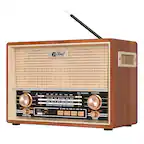
The Victrola Willow Bluetooth Radio is a timeless classic, a relic meant to inspire memories of sitting in front of the fire and listening to your favorite program. Vintage analog dials and AM/FM radio meet new-age technology like wireless Bluetooth connectivity, so you can seamlessly sync your smart device and stream your favorite music from up to 33 feet away.
- AM/FM radio: Lets you listen to your favorite stations.
- Bluetooth compatibility: Enjoy seamless wireless connectivity with your Bluetooth enabled devices, and stream music with ease.
- Bass and treble controls: Allow you to customize sound as you like.
- Built-in 3W stereo speakers: Designed for good sound reproduction.
- Retro design: With a timeless wooden design, this Victrola retro radio is perfect for any home or office.
- Connects to standard outlet: You can place the radio in any room.
Whats Included
- Victrola Retro Wood Bluetooth AM/FM Radio
Product Manuals
A: This radio looks the retro part but reception is terrible, and the frequency shifts in both AM and FM renders it useless. Super sensitive tuning knob makes it difficult to find a station and after you do the frequency shift make it impossible to listen to the station. The cabinet looks nice though. Save your money and keep looking.
Q: Is the dial back lit so you can see it in the dark?
A: No, it’s not lit
Q: Does it play without an external speaker? Does it have a built in speaker?
A: The built in speaker provides a rich sound.
Q: What are the dimensions of this radio?
A: The dimensions of this radio are; Product Height 6.3 inches Product Width 9.5 inches Product Depth 4.9 inches Product Weight 2.83 pounds
Q: Does the selector dial light up?
A: No
Q: What type of antenna does it have?
A: Built in telescopic antenna
Q: Can I connect my bluetooth earbuds to this? I want to listen through my earbuds.
A: No. This is a bluetooth speaker. It receives bluetooth signals from your phone. You would connect your earbuds to your phone directly.
Q: When you try and connect it to your phone by Bluetooth, what name does the radio come up under?
A: Hello Bianca, please see instructions below. LISTENING TO AN EXTERNAL DEVICE (BLUETOOTH) In Bluetooth Mode, this Unit can play music from external devices that are Bluetooth Compatible. CONNECTING YOUR BLUETOOTH DEVICE Turn the unit ON, then rotate the AM / FM / BT selector to select BT. Rotate the Volume Knob to adjust your desired volume level. Turn ON the Bluetooth function on your external device. Open Bluetooth settings on your external device. Note: The effective distance between your external device and this unit is 10 meters (33 ft). Wait a moment for “VRS-2800” to appear on the device list of your external device’s Bluetooth setting, then select “VRS-2800”. If your device asks for password enter “0000” then press “OK”. When the Bluetooth connection has been established successfully you will hear audible beep and the LED Indicator will remain lit. Start playback through your external device.