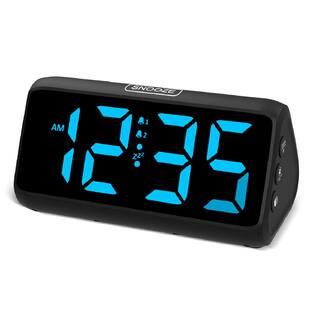
Insignia™ - Digital AM/FM Dual Alarm Clock with 4-Level Dimmer - Black
Customers are saying
Customers praise the Digital AM/FM Dual Alarm Clock with its ease of use, perfect size, and dimmer with multiple settings. Many appreciate the uniform display, readability, alarm features, and battery backup. However, some customers have expressed concerns regarding the sound quality and button layout.
Digital display
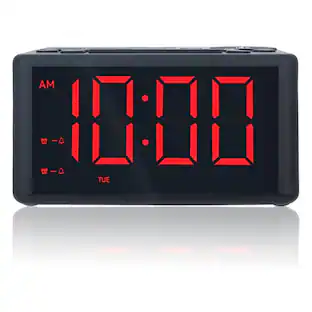
Easily check the time in the dark with the large 1.4 in. (3.56 cm) green LED display.
Integrated AM/FM radio
Wake up to your favorite radio station in the morning. The radio stores up to ten station presets for FM and AM stations (for a total of 20 presets) to easily switch between channels.
4-level dimmer
Customize the display’s backlight to your desired brightness.
Dual alarm clock function
Program up to two different alarms to ensure you get up on time.
Plug-in adapter with battery backup
Backup batteries (AAA batteries included) reliably save your alarm settings until power is restored. (Plug-in adapter needed for full functionality.)
Snooze function
Snag 10 extra minutes of rest by hitting the snooze button.
Flexible placement options
A 5.91 ft. (1.8 m) long power cord allows flexibility when plugging in the alarm clock.
- BrandInsignia™Model NumberNS-ALCL24Product NameDigital AM/FM Dual Alarm Clock with 4-Level DimmerColorBlackWarranty - Parts1 year limitedWarranty - Labor1 year limited
Reviews
Rating 4.2 out of 5 stars with 426 reviews
- Ease of Use (66)
- Overall Performance (59)
- Size (48)
- Brightness (37)
- Readability (13)
- Button Layout (6)
Customer Images
The vast majority of our reviews come from verified purchases. Reviews from customers may include My Best Buy members, employees, and Tech Insider Network members (as tagged). Select reviewers may receive discounted products, promotional considerations or entries into drawings for honest, helpful reviews.
Compare similar products

Keep your phone out of the bedroom at night by going “old school” with a traditional alarm clock. The Insignia NS-ALCL24 Digital AM/FM Dual Alarm Clock with 4-Level Dimmer has all the essentials you need. Program up to two different alarms, setting the volume and alarm sound (standard alarm or radio) for each. The green LED display is easy to read in the dark with a 4-level dimmer to customize the display’s brightness to your space. The integrated AM/FM radio can store up to 20 presets for easy listening as you get ready for the day. Your simple solution for getting up on time is just a click away.
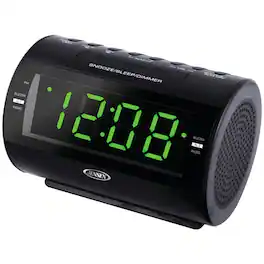
Wake up on time with the Jensen AM/FM Dual-Alarm Clock Radio. Fall asleep to nature sounds, wake up to the radio or snooze the alarm and get a few extra minutes of sleep in the morning. This versatile alarm clock is easy to see with its 1.2 in. green LED display.
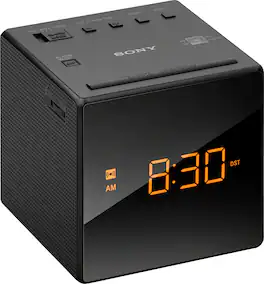
Stylish AM/FM Clock-radio with automatic time setting, brightness control, and gradual alarm

The MX-CR160 is a versatile Bluetooth clock radio featuring a USB charging function for added convenience. It comes equipped with an FM PLL radio that allows you to save up to 20 preset stations. The 0.9-inch amber LED display is complemented by a dimmer function with two brightness settings, ensuring optimal visibility. The clock radio supports a dual alarm function, letting you choose between radio or buzzer alarms, and includes a 90-minute sleep function. It also offers a snooze and sleep timer feature for a tailored wake-up experience. For additional reliability, the clock backup function operates using two AAA batteries (not included). The MX-CR160 provides a 3.5mm auxiliary input jack and delivers 1.2W x 2 output power with 10% total harmonic distortion. It is powered by an AC/DC adapter compatible with 100-240V 50/60Hz and 5V 1.8A. The USB charging function supports iPhones and smartphones with a 5V/1A output. The package includes an AC adapter and user manual.
| Pros for Insignia™ - Digital AM/FM Dual Alarm Clock with 4-Level Dimmer - Black | |||
|---|---|---|---|
| Size, Ease of Use, Overall Performance, Brightness, Readability | There were no pros for this product— | Size, Sound Quality, Ease of use, Alarm, Display | There were no pros for this product— |
| Cons for Insignia™ - Digital AM/FM Dual Alarm Clock with 4-Level Dimmer - Black | |||
| Button Layout | There were no cons for this product— | Radio Reception, Timekeeping | There were no cons for this product— |
Specs
How can I turn on the radio alarm feature?
Answered by InsigniaCustomerSupportHi there! To turn on the radio alarm feature on your Insignia™ Digital AM/FM Dual Alarm Clock, follow these steps: 1 Under Clock mode, press and hold (Alarm 1). The hour digits blink. 2 Press TUNE – or TUNE + repeatedly to set the correct hour, then press (Alarm 1) to save the setting. The minute digits blink. 3 Press TUNE – or TUNE + repeatedly to set the correct minute, then press (Alarm 1) to save the setting. 4 Press TUNE – or TUNE + to select the alarm ring type (”bu” for a buzzer sound or “rad” for the radio), then press (Alarm 1) to save the setting. 5 Press TUNE – or TUNE + to set the volume, then press (Alarm 1) to save the setting. Alarm 1 turns on. Notes: • To set Alarm 2, follow these instructions, but press (Alarm 2) instead of (Alarm 1). • To turn on an alarm that you’ve previously set, press (Alarm 1) or (Alarm 2). The Alarm 1 or Alarm 2 indicator is shown on the display when the alarm is turned on. If you have any questions or need further assistance, please don't hesitate to reach out. Thank you for choosing Insignia! | Emman | Insignia Support | https://www.bestbuy.com/site/brands/best-buy-brands/pcmcat1596746025285.c?id=pcmcat1596746025285

DOES THIS CLOCK RADIO ADJUST FOR DAYLIGHT SAVINGS TIME?
Answered by InsigniaCustomerSupportThe Insignia™ Digital AM/FM Dual Alarm Clock with 4-Level Dimmer does not automatically adjust for daylight savings time. You would need to manually adjust the time when daylight savings begins or ends. If you have any questions or need further assistance, please don't hesitate to reach out. Thank you for choosing Insignia! - Emman | Insignia Support | https://www.bestbuy.com/site/brands/best-buy-brands/pcmcat1596746025285.c?id=pcmcat1596746025285
How many alarm settings are available on this alarm clock?
You can program up to two different alarms with this alarm clock.
This question and answer was generated by AI based on customer and product data.How long is the snooze time on this alarm clock?
The snooze time for this alarm clock is 10 minutes.
This question and answer was generated by AI based on customer and product data.Can I adjust the brightness of the display?
Yes, the alarm clock has a 4-level dimmer to adjust the display's brightness.
This question and answer was generated by AI based on customer and product data.

Customers often buy these together
 Clearance$9.49The price was $11.49
 $199.99The price was $269.00
 $28.99The price was $39.99






More to consider
 $90.00The price was $110.00

Your sound, your style Sponsored
 $34.99The price was $37.99
Discover related products
 $84.99The price was $94.95
 $54.99The price was $64.99
 $64.99The price was $71.49

Keep exploring
 $68.00The price was $70.00