VIDBOX - Video Conversion for PC - Windows
- Microsoft - Office 365 Personal (1 Person) (12-Month Subscription) - Activation Required - Windows, Mac OS, Apple iOS, Android [Digital]$99.99
![Microsoft - Office 365 Personal (1 Person) (12-Month Subscription) - Activation Required - Windows, Mac OS, Apple iOS, Android [Digital]](https://pisces.bbystatic.com/image2/BestBuy_US/images/products/fa90dd84-caf2-4bbe-86e9-18b037ea6563.jpg;maxHeight=160;maxWidth=166)
Related Item
![Adobe - Creative Cloud Pro (1-Year Subscription) - Mac OS, Windows [Digital]](https://pisces.bbystatic.com/image2/BestBuy_US/images/products/ad26a2d1-a0b3-4921-b872-02254ff85ba0.jpg;maxHeight=96;maxWidth=96)
About This Item
- Key Specs
- Number of Users: 1
- Number of Devices: 1
- Operating System Compatibility: Windows
- Software Format: Physical (Physical software requires a disc, cartridge, etc. be inserted into the gaming console or computer to download and/or operate the software. Digital software allows for downloading and/or playing the software on the gaming console or computer without a physical disc, cartridge, etc. Physical (Download Code Only) software is purchased in physical form with a code that allows for downloading and/or playing the software on the gaming console or computer without a physical disc, cartridge, etc.)
- General
- Brand: VIDBOX
- Model Number: HON787800F283
- Product Name: Video Conversion for PC
- Publisher: VIDBOX
- Features
- Software Subject: Photo editing
- Language(s): English
- Purchase Rights
- Number of Users: 1
- Number of Devices: 1
- Compatibility
- Operating System Compatibility: Windows
- Software Format: Physical (Physical software requires a disc, cartridge, etc. be inserted into the gaming console or computer to download and/or operate the software. Digital software allows for downloading and/or playing the software on the gaming console or computer without a physical disc, cartridge, etc. Physical (Download Code Only) software is purchased in physical form with a code that allows for downloading and/or playing the software on the gaming console or computer without a physical disc, cartridge, etc.)
- Requirements
- System Requirements: OS: Windows 8.1, Architecture: x86, x64, ARM (The software that a product must have for it to be able to integrate with another product.)
- Other
- UPC: 882960300938
Digitize VHS, camcorder, Beta and 8-millimeter tapes with VIDBOX Video Conversion Suite for PC. Connect your legacy video recorder to your computer using the included USB and RCA AV cables and share your treasured family videos with a new audience. VIDBOX Video Conversion Suite for PC includes instructions and live support to guide you through the video conversion process.
Q: What does the VIDBOX Video Conversion software package include?
A: The VIDBOX Video Conversion software package includes instructions and live support to guide you through the video conversion process.
Q: What format does the VIDBOX Video Conversion software come in?
A: The VIDBOX Video Conversion software comes in a physical format.
Q: How many users does the VIDBOX Video Conversion software support?
A: The VIDBOX Video Conversion software supports a single user.
Q: What operating systems are compatible with the VIDBOX Video Conversion software?
A: The VIDBOX Video Conversion software is compatible with the Windows operating system.
Q: Does this software come with the cables needed to connect to a computer?
A: Yes, the VIDBOX Video Conversion software comes with USB and RCA AV cables.
A: The VIDBOX capture equipment is not tested with third-party software. Some users have had success with using the equipment with third-party software, but many also face issues with it working correctly. VIDBOX can only support the operation of the capture device with the included software. Using the Video Conversion for PC software, there are multiple recording options. However, the recommended digital storage option is using the Advanced Mode, MPEG-2 File option for roughly 4 GB/hour of footage.
A: No, you will still need a working camera to play the tapes to the device included in this package. The product relies on you having a working player that can output via RCA and/or S-Video connections. The product can digitize a signal it receives, but it cannot read from the tapes directly.
Q: Is Vidbox for PC compatible with Windows 11 Pro?
A: The software has been tested to work with Windows 11. You may need to disable the Memory Integrity setting in Windows 11 if it conflicts with certain VIDBOX device drivers. More information can be found in the VIDBOX Help Center or by contacting the Customer Care team.
Reviews
Customers are saying
Customers are delighted by the ease of use, overall performance, and video quality of Video Conversion for PC. Users find the product simple to use and report that it works as advertised. The device also utilizes USB to transfer analog input to a computer. However, some customers have reported compatibility issues.
Customer Images
The vast majority of our reviews come from verified purchases. Reviews from customers may include My Best Buy members, employees, and Tech Insider Network members (as tagged). Select reviewers may receive discounted products, promotional considerations or entries into drawings for honest, helpful reviews.
Compare similar products
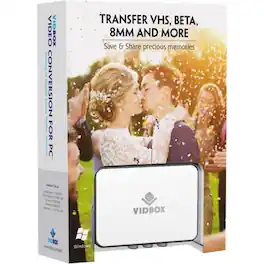
Digitize VHS, camcorder, Beta and 8-millimeter tapes with VIDBOX Video Conversion Suite for PC. Connect your legacy video recorder to your computer using the included USB and RCA AV cables and share your treasured family videos with a new audience. VIDBOX Video Conversion Suite for PC includes instructions and live support to guide you through the video conversion process.

Pack all your favorite albums into your portable music player with this Vidbox audio recorder. The USB audio capture device lets you connect your cassette player or record player, and the included RCA cables make it easy to set up your recording system. With its intuitive software, this Vidbox audio recorder lets you edit audio MP3 files into individual tracks.
![MAGIX - Video deluxe 2026 Plus - Windows [Digital]](https://pisces.bbystatic.com/image2/BestBuy_US/images/products/311aa87e-fb15-4c2f-9310-5afbf1fc6cc1.jpg;maxHeight=422;maxWidth=264?format=webp)
Video deluxe 2026 Plus makes video editing fun and easy. All important functions are right at your fingertips in the intuitive all-in-one media window—from easy-to-use editing tools and creative effects to versatile templates and smooth transitions. Use AI-powered tools to enhance image quality, automatically generate subtitles, and create realistic voiceovers and browse premium stock content for your B-roll scenes. New features: Make your subtitles pop in sync with your audio with the Highlight function and organize your footage with powerful AI media management.
![MAGIX - Video deluxe 2026 Premium - Windows [Digital]](https://pisces.bbystatic.com/image2/BestBuy_US/images/products/7ebaa978-42c0-45ea-b027-c66e37b2c2c8.jpg;maxHeight=422;maxWidth=264?format=webp)
Video deluxe 2026 Premium makes advanced video editing feel easy. Discover intuitive editing tools, the seamless all-in-one media window and the proDAD VitaScene V5 Pro effects suite with over 1,700 effects, filters and transitions for impressive cinematic results. Use AI-generated subtitles and voiceovers and browse premium stock content for your B-roll scenes. New features: Make your subtitles pop with the Highlight function, organize your footage with AI media management and access exclusive content— including customizable LUTs, music tracks and sound effects.
| Pros for VIDBOX - Video Conversion for PC - Windows | |||
|---|---|---|---|
| Ease of use, Overall Performance, Video Quality, USB | Ease of use | There were no pros for this product— | There were no pros for this product— |
| Cons for VIDBOX - Video Conversion for PC - Windows | |||
| Compatibility | There were no cons for this product— | There were no cons for this product— | There were no cons for this product— |