MAGIX - Video deluxe 2026 Premium - Windows [Digital]
Reviews coming soon
About this product
Video deluxe 2026 Premium makes advanced video editing feel easy. Discover intuitive editing tools, the seamless all-in-one media window and the proDAD VitaScene V5 Pro effects suite with over 1,700 effects, filters and transitions for impressive cinematic results. Use AI-generated subtitles and voiceovers and browse premium stock content for your B-roll scenes. New features: Make your subtitles pop with the Highlight function, organize your footage with AI media management and access exclusive content— including customizable LUTs, music tracks and sound effects.
Features
Save time sorting your media with media management powered by AI categorization
Highlight subtitles in sync with your audio for YouTube Shorts, TikToks or Reels
Export your created subtitles as transcript for perfect close captions on YouTube
proDAD VitaScene V5 Pro effects suite with over 1,700 powerful effects and filters
Smooth and seamless editing with the all-in-one media window
Accelerated export and smooth project playback with the INFUSION Engine
AI-powered tools for generating subtitles automatically and creating realistic voiceovers
AI effects for enhancing image quality and unique visual styles
Precise color correction and automatic look adjustment filters for impressive film looks
Templates for projects, editing sequences and export—also for social media
Over 2,000 effects, fades, templates, titles + integrated image stabilization
Access over 1 million royalty free video and audio assets
MultiCam editing with up to 4 cameras
Additional creative content in the in-app store
Specifications
- Operating System CompatibilityWindowsSoftware FormatDigital
Reviews
This product doesn't have any reviews yet.
Compare similar products
![MAGIX - Video deluxe 2026 Premium - Windows [Digital]](https://pisces.bbystatic.com/image2/BestBuy_US/images/products/7ebaa978-42c0-45ea-b027-c66e37b2c2c8.jpg;maxHeight=422;maxWidth=264?format=webp)
Video deluxe 2026 Premium makes advanced video editing feel easy. Discover intuitive editing tools, the seamless all-in-one media window and the proDAD VitaScene V5 Pro effects suite with over 1,700 effects, filters and transitions for impressive cinematic results. Use AI-generated subtitles and voiceovers and browse premium stock content for your B-roll scenes. New features: Make your subtitles pop with the Highlight function, organize your footage with AI media management and access exclusive content— including customizable LUTs, music tracks and sound effects.
![MAGIX - Video deluxe 2026 Plus - Windows [Digital]](https://pisces.bbystatic.com/image2/BestBuy_US/images/products/311aa87e-fb15-4c2f-9310-5afbf1fc6cc1.jpg;maxHeight=422;maxWidth=264?format=webp)
Video deluxe 2026 Plus makes video editing fun and easy. All important functions are right at your fingertips in the intuitive all-in-one media window—from easy-to-use editing tools and creative effects to versatile templates and smooth transitions. Use AI-powered tools to enhance image quality, automatically generate subtitles, and create realistic voiceovers and browse premium stock content for your B-roll scenes. New features: Make your subtitles pop in sync with your audio with the Highlight function and organize your footage with powerful AI media management.
![Corel - Pinnacle Studio Ultimate - Windows [Digital]](https://pisces.bbystatic.com/image2/BestBuy_US/images/products/6519/6519149_sd.jpg;maxHeight=422;maxWidth=264?format=webp)
Create professional-looking movies with this digital download of Pinnacle Studio Ultimate video editing software for Windows. Precise controls and cinema-grade effects let you easily fine-tune your creations, while the advanced tools enable pro-level edits to videos. This Pinnacle Studio Ultimate video editing software features smart object and motion tracking to add effects and color grades to objects.
![MAGIX - VEGAS DVD Architect - Windows [Digital]](https://pisces.bbystatic.com/image2/BestBuy_US/images/products/6015/6015300_sa.jpg;maxHeight=422;maxWidth=264?format=webp)
Create DVD and Blu-ray Discs with professional authoring functions in VEGAS DVD Architect. The intuitive drag & drop interface, compact layout and comprehensive authoring tools make producing menu-based Blu-ray and DVD projects easy. This item cannot be returned or refunded, please visit to learn more.
Specs
Customers often buy these together
Acer Nitro 15.6" LCD FHD 165Hz FreeSync IPS Portable Gaming Monitor (USB Type-C, Mini HDMI & Audio Out)
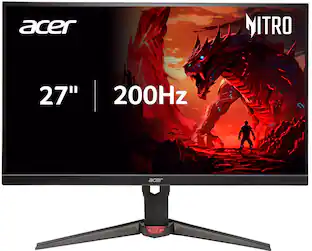
$119.99The price was $159.99Acer Nitro 27" FHD 200Hz 0.5ms FreeSync Premium IPS Gaming Monitor (1x DisplayPort, 2x HDMI)
$194.99The price was $246.56







Customers ultimately bought


Explore tech essentials Sponsored
Trend Micro Ultimate Protection Antivirus + Scam + Identity Protection (20-Device) (1-Year Subscription)
$20.99The price was $114.99






Discover related products
Acer USB C Docking Station With 2 HDMI, 9-IN-1 Docking Hub with USB A&C 3.0, SD/Micro SD, 100W Charging
$42.99The price was $47.99Acer USB C to HDMI Cable for Home Office 6.6FT (4K@60Hz), High-Speed Type C to HDMI 2.0 Braided Cord
$12.99The price was $13.99