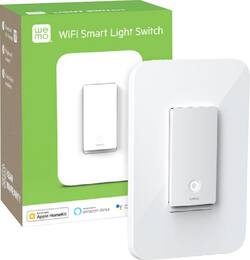
Customers express satisfaction with the light switch's ease of use, compatibility, and straightforward installation. The product is also appreciated for its quality, appealing appearance, and well-thought-out design, including its integration with HomeKit and a user-friendly app. However, some customers have reported issues with connection stability and the size of the switch.
I have multiple WeMo Light Switches, WeMo Dimmer Switches and WeMo Smart Plugs at the time of this writing and I think I have a pretty good perspective on these WeMo products. I'm glad that WeMo updated their mobile application to require their users to have an account to manage their products. Before, you just needed their products to connect to a Wi-Fi network. It is also convenient to have WeMo linked to Google Assistant. Before, updating the firmware to the WeMo switches and smart plugs was a hassle because it was not very intuitive. You attempt to update the firmware for the products, but there is no progress bar or any notification to identify how long the firmware update will take. And the firmware update would either fail midway or the app freezes. But, it seems the WeMo app has improved. Since a WeMo switch comes with only a one gang decorator/wallplate, I had to buy some 2 gang decorator/wallplate from Home Depot for two (2) WeMo switches that are together. You can name your WeMo products, create rules and schedules, and select which WeMo product(s) you would like to use and set a time when to them turn on and off. Specifically, my WeMo smart plugs tend to be occasionally unresponsive when using Google Assistant. It is inconsistent when it responds correctly, but I think it is because my WeMo Smart plugs are placed pretty far from the router. Be mindful on the distance to your router when it comes to the WeMo products. You may need to place them close to your router or add a Wi-Fi extender to your home. Sometimes, Google Assistant may turn on the incorrect WeMo light switch. To troubleshoot, I will either use the WeMo app instead or relink my WeMo account to Google Home. That way, it’ll refresh my WeMo products in Google Home. For WeMo Smart Plugs, I disconnect them from the outlet and reconnect them and wait a few moments until connection has been established. If there is a power outage or if I lose Internet connection, WeMo is pretty good at reconnecting in a few minutes. But if it does not reconnect, you will just have to hold a small button underneath the light switch with a small tool or maybe a pen to restart the WeMo light switch. If it does not reconnect, you would need to reassign or reactivate the light switch through the WeMo app. I did have one WeMo light switch that lost power randomly after 10 months of use. I thought it was bad wiring, but when I replaced it, I have not seen any issues. I will continue to monitor it, but so far so good. I would recommend buying WeMo and I will most likely buy another one in the near future.
Posted by ecscatalyst
This has been the first product that I purchased for home automation. Great product. I was worried that I wouldn’t be able to hook this up, but it was no problem. Just made sure to connect it to the neutral wire which I guess all modern homes have. I love that you don’t need a hub just WiFi. I am able to use it with Siri via Apple HomeKit. It’s for my front light. All I have to say is “Hey Siri turn on front light” and voila it comes on. Great replacement for the 25 year old switch that broke. I’m excited to start my home automation adventure.
Posted by Homekit
I absolutely love this light switch. It looks so clean and modern and works incredibly good.
Posted by MaxL
The vast majority of our reviews come from verified purchases. Reviews from customers may include My Best Buy members, employees, and Tech Insider Network members (as tagged). Select reviewers may receive discounted products, promotional considerations or entries into drawings for honest, helpful reviews.