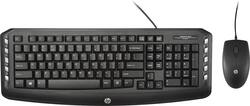
HP - C2600 Keyboard and Optical Mouse - Black
- Key Specs
- Lighting Type: None
- Form Factor: Full-size (The size, arrangement, and physical configuration of the product.)
- General
- Product Name: C2600 Keyboard and Optical Mouse
- Brand: HP
- Model Number: j2x04aa#aba
- Features
- Lighting Type: None
- Numeric Keypad: true
- Touchpad: false
- Keyboard Type: Keypad
- Palm Rest: false
- Spill Resistant: true (Designed to resist some degree of accidental liquid spill. The level of spill-resistance is indicated by the product manufacturer, but the degree of protection may not be guaranteed after normal wear of the product.)
- Foldable: false
- Functions
- Form Factor: Full-size (The size, arrangement, and physical configuration of the product.)
- Dedicated Macro Keys: false (Perform shortcuts of key sequences to carry out commands with a single key. Key sequences may include key strokes, mouse actions, and/or menu actions.)
- Adjustable Tilt Function: true
- Internet Keys: false
- Connectivity
- Number Of USB Port(s): 2 (The total number of USB ports including all generations and versions.)
- Compatibility
- Operating System Compatibility: Windows
- Plug and Play Operation: true
- Dimensions
- Product Height: 0.78 inches (The out of box height of the item. Height is measured as the vertical distance from the bottom of the item to the top as it would be primarily used or placed.)
- Product Width: 6.87 inches (The out of box width of the item. Width is measured as the horizontal distance from one side of the item to the other as it would be primarily used or placed.)
- Product Weight: 19.68 ounces (The out of box weight of the item.)
- Mouse
- Mouse Included: true
- Handedness: Right-handed
- Other
- UPC: 889894726148
Control your workstation with this HP C2600 j2x04aa#aba keyboard and mouse, which together provide tools for greater productivity, such as a number pad for quick calculations and a contoured mouse design for comfort. The optical mouse has 3 buttons and a scroll wheel for precision control.
- Full-size keyboard: Positions the keys right where you expect them to be. The built-in number pad allows quick calculations and data entry.
- 3 indicator lights: Allow quick status checks.
- Spill-resistant design: Protects the keyboard from accidents for worry-free use.
- Optical mouse: Features a scroll wheel and 3 buttons for efficient navigation. The 1200 dpi sensor works precisely on a variety of surfaces.
- 2 USB ports: Connect with a variety of systems.
- Windows 7, 8 and 10 compatible: For use with your existing computer.
Whats Included
- C2600 Keyboard and Optical Mouse
- Owner's manual
Q: does keyboard have volume control keys?
A: Yes, this device has volume control keys.
Q: Does this keyboard have a caps lock indicator light?
A: Does not have a Caps Lock light or a Num Lock light. Also, there is no documentation as to what the special buttons on the right and left sides do. Some are intuitive, some are not, but the idea someone would put out a keyboard with no Caps or Num lock indicators is Ridiculous. Also, in place of the Windows key on the right, there is a key that sort of acts like a right click on a mouse. Not sure if that's really a good idea. Keyboard is also cheaply made.
A: if you have 2 usb's
Q: Does this keyboard use a USB cord to connect to the computer (HP Compaq) (Windows 7) ?
A: Yes, the keyboard connects to the computer with a USB. The mouse connects to the computer by a separate USB.
Q: Is this compatible to the old cord with the round plug on the back?
A: Doesn't have a round plug - it plugs into your USB port instead. That's true for the keyboard and mouse.
A: Its plug and play with any usb port as it works off the built in drivers usually.
Q: got the right side figured out - what are the buttons on the left?
A: The five buttons from the top are Opens the Windows second Start menu (can also get there with Windows key + "X") I have no idea. Sometimes in your browser it kills the tab you're on and goes to the Home page. Have no idea why this key is there. As with the rest of the keyboard, there is no documentation. Cut Copy Paste. If you already know Cntrl +X, Cntrl + V and Cntrl +C, these buttons don't really do anything for you and may actually be slower than the regular way. Except as a cheap emergency backup, I do not recommend this keyboard as the construction is cheap some of the design choices made make make it difficult to use.
Q: looking for a wired keyboards with addition usb ports to plug in a wired mouse.
A: No extra usb port on the keyboard. You'll need two available usb ports on your desktop or laptop - one for the keyboard and one for the mouse.