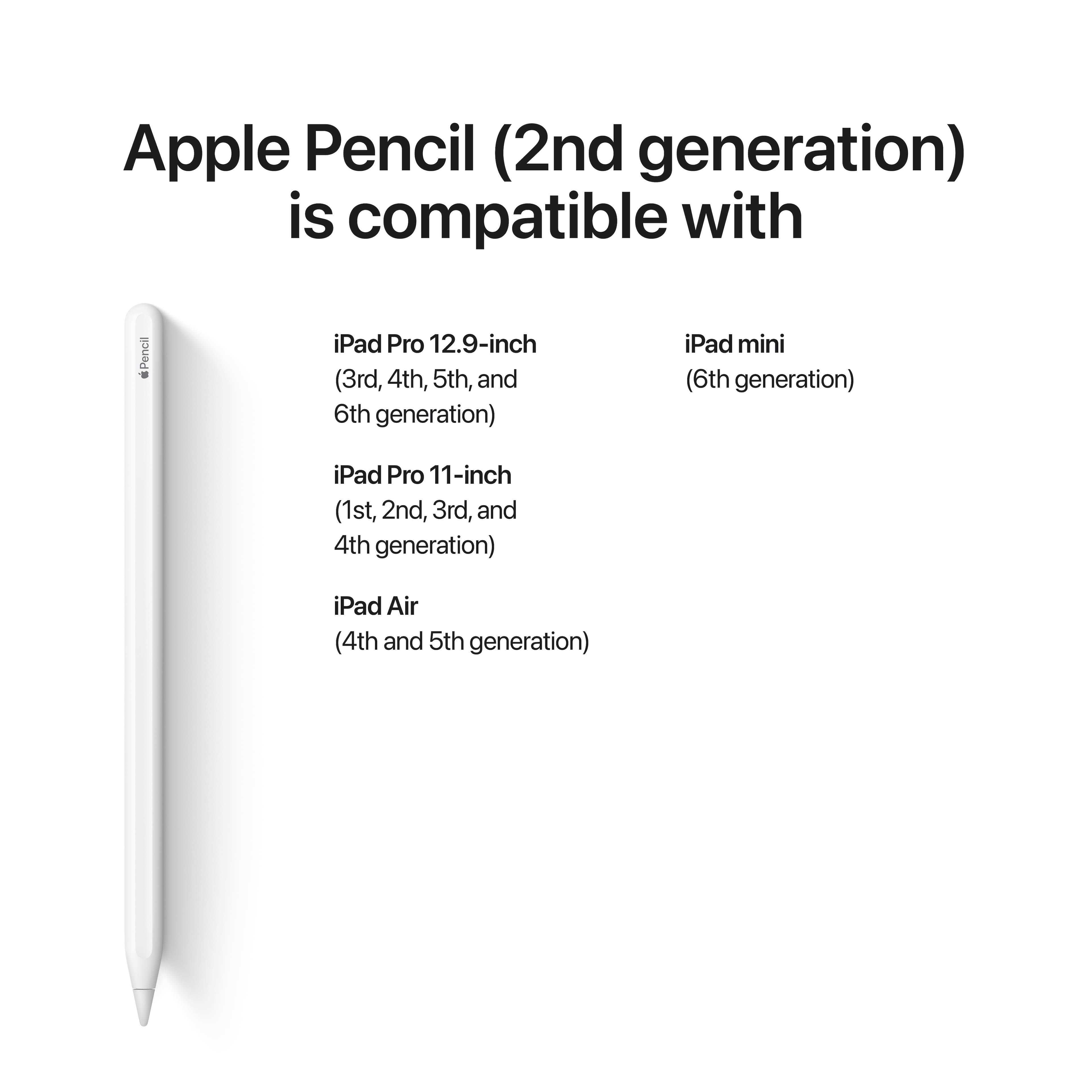
A:AnswerMagnetic. It attaches magnetically to the side of the iPad Pro 11” and iPad Pro 12.9” models. It pairs and charges while magnetically attached to the side of the iPad.
A:AnswerHi,
No, the Apple Pencil (2nd Generation) does not work for the iPad 10.9. The 2nd generation Pencil is only compatible with iPads that have a magnetic charging strip on the side, such as the iPad Pro and iPad Air. The iPad 10.9 does not have this charging strip, so it can only be used with the 1st generation Apple Pencil.
If you're looking for a stylus to use with your iPad 10.9, I recommend the 1st generation Apple Pencil. It's still a great stylus, and it's much more affordable than the 2nd generation.
I hope this helps! Let me know if you have any other questions. :D
A:AnswerHey!
The main differences between the first and second generation Apple Pencils are:
Design: The second generation Pencil has a flat edge, which makes it easier to grip and less likely to roll off surfaces. It's also slightly shorter and thinner than the first generation Pencil.
Charging: The second generation Pencil charges wirelessly by attaching to the side of your iPad. The first generation Pencil charges by plugging into the Lightning port on your iPad.
Double-tap: The second generation Pencil has a double-tap feature that allows you to switch between tools or erase without having to open the Notes app.
Hover: The second generation Pencil supports hover, which means that it can detect when it's close to the screen without actually touching it. This allows you to see a preview of your mark before you make it.
Other than that, the two Pencils are very similar. They both have the same pressure sensitivity, tilt sensitivity, and palm rejection. They also both work with the same apps.
Which Pencil is right for you depends on your needs and budget. If you're looking for the most advanced stylus available, the second generation Pencil is the way to go. But if you're on a budget, or you don't need the extra features, the first generation Pencil is still a great option.
I hope this helps! Let me know if you have any other questions. :)
A:AnswerHey there!
The only Apple Pencil that will work with your 9th generation iPad is the Apple Pencil (1st Generation). The 2nd generation Apple Pencil is not compatible with the 9th generation iPad, as it requires a magnetic charging strip on the side of the iPad, which the 9th generation iPad does not have.
Both the 1st and 2nd generation Apple Pencils are great styluses, but the 1st generation is the more affordable option. It also has a longer battery life than the 2nd generation.
If you're not sure whether you need the extra features of the 2nd generation Pencil, such as wireless charging and double-tap switching, I recommend going with the 1st generation Pencil. It's a great all-around stylus that will work perfectly with your 9th generation iPad.
I hope this helps! Let me know if you have any other questions :)
A:AnswerHey there!
Yes, the 2nd generation Apple Pencil works with the new iPad Pro 10.8 inch. It also works with the iPad Pro 12.9 inch (3rd generation and later), iPad Pro 11-inch (1st generation and later), and iPad mini (6th generation).
The 2nd generation Apple Pencil is a great stylus for the iPad Pro 10.8 inch. It has a wireless charging design and a double-tap feature that allows you to switch between tools or erase without having to open the Notes app. It also has a flat edge, which makes it easier to grip and less likely to roll off surfaces.
If you're looking for a stylus to use with your new iPad Pro 10.8 inch, the 2nd generation Apple Pencil is the way to go. It's the most advanced stylus available, and it works perfectly with the iPad Pro 10.8 inch.
I hope this helps! Let me know if you have any other questions. :)
A:AnswerYes it will work with your iPad guaranteed without any issues I personally have the 5th generation 12.9” and it works great and I use procreate and have absolutely no issues at all. Hope you get the pencil and enjoy. Have a great day.
A:AnswerHey there!
Nope, the Apple Pencil (2nd Generation) is not compatible with the iPad 10th generation. The 2nd generation Pencil is only compatible with iPads that have a magnetic charging strip on the side, such as the iPad Pro and iPad Air. The iPad 10th generation does not have this charging strip, so it can only be used with the 1st generation Apple Pencil.
If you're looking for a stylus to use with your iPad 10th generation, I recommend the 1st generation Apple Pencil. It's still a great stylus, and it's much more affordable than the 2nd generation.
I hope this helps! Let me know if you have any other questions. :)
A:AnswerHey there!
Yes, the 2nd generation Apple Pencil is compatible with the new 10.9-inch colored iPads. It is also compatible with the iPad Pro 12.9-inch (3rd generation and later), iPad Pro 11-inch (1st generation and later), and iPad mini (6th generation).
The 2nd generation Apple Pencil is a great stylus for the new 10.9-inch colored iPads. It has a wireless charging design and a double-tap feature that allows you to switch between tools or erase without having to open the Notes app. It also has a flat edge, which makes it easier to grip and less likely to roll off surfaces.
If you're looking for a stylus to use with your new 10.9-inch colored iPad, the 2nd generation Apple Pencil is the way to go. It's the most advanced stylus available, and it works perfectly with the new 10.9-inch colored iPads.
I hope this helps! Let me know if you have any other questions. :)
A:AnswerHey there!
Yes, the Apple Pencil (2nd Generation) is compatible with the new iPad Pro 12.0" 6th generation. It is also compatible with the iPad Pro 12.9-inch (3rd generation and later), iPad Pro 11-inch (1st generation and later), and iPad mini (6th generation).
The 2nd generation Apple Pencil is a great stylus for the new iPad Pro 12.0" 6th generation. It has a wireless charging design and a double-tap feature that allows you to switch between tools or erase without having to open the Notes app. It also has a flat edge, which makes it easier to grip and less likely to roll off surfaces.
If you're looking for a stylus to use with your new iPad Pro 12.0" 6th generation, the 2nd generation Apple Pencil is the way to go. It's the most advanced stylus available, and it works perfectly with the new iPad Pro 12.0" 6th generation.
I hope this helps! Let me know if you have any other questions. :)
A:AnswerHey there!
Nope, the Apple Pencil (2nd Generation) does not stick onto the iPad Air 11. It only sticks onto the iPad Pro and iPad Air models that have a magnetic charging strip on the side.
However, there are a few cases and accessories available that can help you secure the Apple Pencil to your iPad Air 11. For example, the Logitech Folio Touch case has a built-in slot for the Apple Pencil, and the Apple Pencil Cap can help prevent the Apple Pencil from rolling off surfaces.
I hope this helps! Let me know if you have any other questions. :D
A:AnswerYes. Here are the models that are listed as compatible with the Apple Pencil 2nd Generation:
Apple iPad Pro 12.9" (6th Generation 2022), Apple iPad Pro 12.9" (5th Generation 2021), Apple iPad Pro 12.9" (4th Generation 2020), Apple iPad Pro 12.9" (3rd Generation 2018), Apple iPad Pro 11" (4th Generation 2022), Apple iPad Pro 11" (3rd Generation 2021), Apple iPad Pro 11" (2nd Generation 2020), Apple iPad Pro 11" (1st Generation 2018), Apple iPad Air 10.9" (5th Generation 2022), Apple iPad Air 10.9" (4th Generation 2020), Apple iPad mini (6th Generation 2021)