“We have a receiver and surround sounds system installed by the geek squad. When we use the remote to go to Netflix or any other smart tv apps we cannot hear the sound. When it’s on the regular tv the surround sound works. What did we push on accident?”
Answer This Question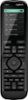
1-4 of 4 Answers
Not sure but I will say I’m new to the Harmony. If you not already done so press help Located on left of the screen next to “activities” and press help while pointed at your Tv. This should fix the problem if not contact Geek Squad.
Sorry, there was a problem. Please try again later.Make sure the ARC feature is enabled on your AV receiver, and TV. You may also want to see if they connected the HDMI cable to the HDMI/ARC input of your TV.
Sorry, there was a problem. Please try again later.Given the amount of information that you have supplied, I will have to make some assumptions about your setup. In all likelihood, Geek Squad set you up with ARC through your HDMI Cable. Because of this your Receiver should be set to the TV input when you are using an APP on your Smart TV so that your TV can send the audio from the App through the receiver. You will also need to be certain that the TV and Receiver are still set up for that audio stream. I am not certain what button you could have pushed that would change that setting. The easy way to check if it is a simple reprogramming of your remote that is needed would be to start everything up to use Netflix or another Smart TV App and manually change the input on the Receiver to TV, if you then are getting the audio for the App through your surround sound system it should just be a simple reprogram, if there is still no sound there is a possibility you have changed the audio output from the TV to the receiver to an incompatible mode. It may be worth your while to purchase BestBuy Total Tech Support for a year as they would come and square away any issues you have with any of your Tech products.
Sorry, there was a problem. Please try again later.Hi Jenny, not knowing exactly how your system is configured makes it difficult to diagnose. But I would guess that you are using your TV to stream Netflix? If so, the audio input to your receiver probably needs to be changed to match (I had the same issue). Try reprogram the remote. Open the My Harmony software and select activities. Review the settings for the Smart TV activity. You want to make sure that the receiver input is set to "TV". If it isn't, run the activity wizard for the smart TV function and set the input to "TV". Plug in your remote to the computer and update it. Hope this solves your problem.
Sorry, there was a problem. Please try again later.
