“I know it will accept sd card, where does it install?”
Answer This Question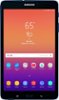
1-2 of 2 Answers
There's a small tray on the left side. Works like the sim tray on your phone. Use the included tool to pop it open, insert SD card and put the tray back in.
Sorry, there was a problem. Please try again later.Great question. Page 1 of the User Manual has a full layout of the Tab A, that shows where the MicroSD card slot is located. If you don't have a copy of the manual, you can download one using this link (https://bit.ly/2HmS5vQ). Thank you for choosing Samsung. ^Ash
Sorry, there was a problem. Please try again later.

