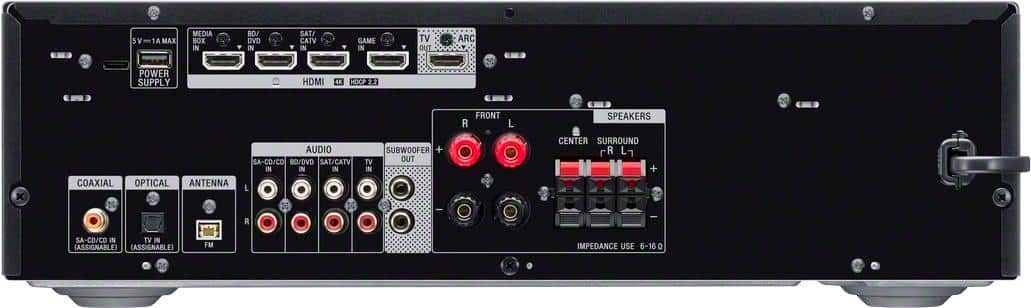
A:AnswerYes. You should have either an rca option (red and white) or 3.5 mm headphone jack option. Both of those can be used with adapters if needed depending on the types of connections you have on your CD player and your personal preferences. You might even have the option of an optical connection depending on how 'fancy' your older CD player is. Some adapter options if needed: https://www.bestbuy.com/site/insignia-6-3-5-mm-to-stereo-audio-rca-cable-black/6406732.p?skuId=6406732
https://www.bestbuy.com/site/best-buy-essentials-female-3-5-mm-to-male-1-4-audio-adapter-black/6458779.p?skuId=6458779
A:AnswerFind somebody on an online marketplace that has a blown reciever unit, and buy the system for the speakers, as long as they're 6ohm or better. Otherwise buy Polk Audio speakers, they're low on cost but big on sound.
A:Answerfirst make sure you have a true UHD cable and regular HDMI want enhance the signal. Check for picture that should tell you if your are running best available in top right corner of tv when powered on it will either say hd or uhd. Receiver if you are running true UHD it will auto enhance when you power it on its sets itself by signal of strength at least mine did
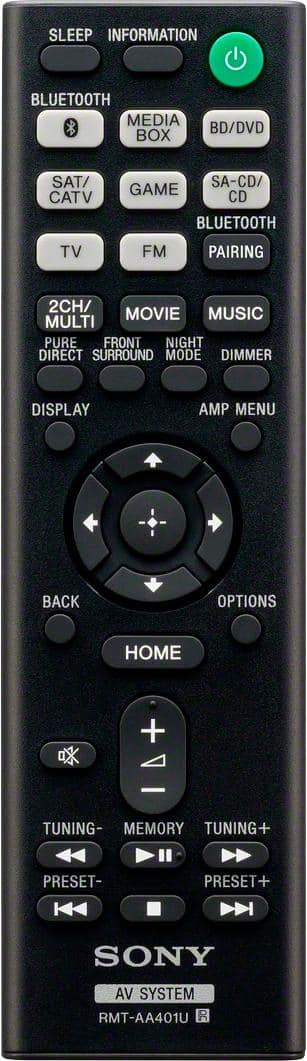
A:Answerthis is my breakdown,
if going to use surround sound works better at little higher volume.
if listening to music or tv, movie if want to hear equally in every room use multi-channel if you are in the room use enhanced under music it to me is better for multi-level sounds but only uses front and rear speakers so only comes out 2 channels
A:AnswerHello Kerry,
We're sorry to hear that. Power reset the unit, simply unplug the unit and wait 1-2 minutes then plug the device back in and power on. Also, double check if the headphones are properly connected. When connecting headphones to the receiver, [Headphone(2ch)] is selected as a sound field automatically.
Regards,
David
A:AnswerHi Phil,
Yes, you can hook up two subwoofers to this AV receiver. Select the correct speaker pattern to make it work. See page 38 for reference.
https://www.sony.com/electronics/support/res/manuals/4726/55cd375e0f9e7103f2b6baa747ed9072/47269061M.pdf
Regards,
David
A:AnswerHi Maggie,
Thank you for reaching out Sony. We're sorry to hear the issue that you are encountering with the receiver. If “PROTECT” appears on the display panel, the receiver will automatically turn off after a few seconds. Please check the following steps on this link to troubleshoot the issue: https://helpguide.sony.net/ha/strdh59/v1/en/contents/TP0001553199.html
Should you need further assistance, please email us at [email protected] with the following details so we can better assist you.
Name:
BestBuy Username:
Model Number:
Issue:
Telephone Number:
Regards,
Kris
A:AnswerHello Sparky
Thank you for the interest! We recommend connecting wired speakers with a nominal impedance of 6 ohms to 16 ohms. We also recommend using speaker wires that are anywhere between 12 to 16 gauge. These are most commonly used for connecting speakers to an amplifier or an Audio/Video (A/V) receiver
Regards,
David
A:AnswerHi Bobb,
No problem at all! Just connect it using HDMI cable (ARC connection) and you're good to go!
NOTE: We recommend connecting wired speakers with a nominal impedance of 6 ohms to 16 ohms.
Regards,
David
A:AnswerHi Lastat,
Thank you for reaching out to us with your concern.
We are so sorry about what happened and for the inconvenience. This is definitely not the experience we wanted you to have with our product.
For surround sound issues, please try following the steps provided on the links below and see if it resolves the problem:
No sound from the center or surround speakers - https://www.sony.com/electronics/support/audio-components-receivers-amplifiers/str-dh590/articles/00024519
How to troubleshoot low sound or no audio from the rear surround sound speakers - https://www.sony.com/electronics/support/audio-components-receivers-amplifiers/str-dh590/articles/00024901
If this does not help, please email us at [email protected] with the following details so we can better assist you.
Name:
BestBuy Username:
Model Number:
Issue:
Telephone Number:
We are looking forward to your message!
Sincerely,
Romeo
Sony Social Support
A:AnswerHi Tmac,
If you have two subwoofers, you can connect them to both SUBWOOFER OUT jacks. Some speakers or the subwoofer may not output sound, depending on the sound field setting. So we recommend using correct sound field and speaker pattern to output sound on both subwoofers.
Regards,
David