Customer Ratings & Reviews
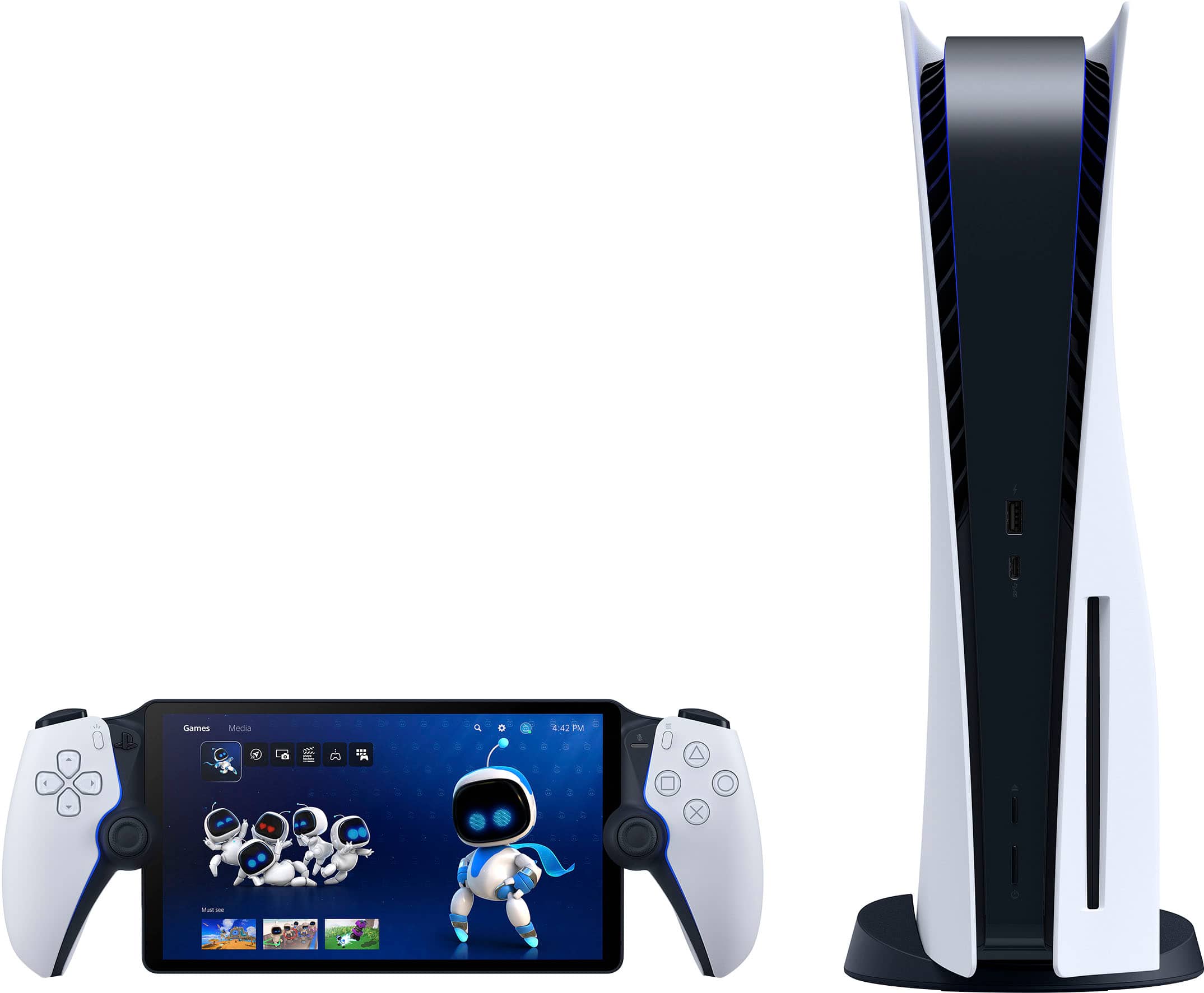
- Model:
- 1000041319
- |
- SKU:
- 10287157
Customer reviews
Rating 4.5 out of 5 stars with 7140 reviews
(7,140 customer reviews)Rating by feature
- Value4.5
Rating 4.5 out of 5 stars
- Quality4.7
Rating 4.7 out of 5 stars
- Ease of Use4.6
Rating 4.6 out of 5 stars
Customers are saying
Customers are positive about the device's overall performance, highlighting its top-notch picture quality and excellent screen clarity. Users also frequently praise the product's portability, solid battery life, and comfortable design. However, customers are negative about the connectivity features, noting that they could be improved. Additionally, some users have expressed concerns regarding occasional input lag during use.
This summary was generated by AI based on customer reviews.
- Pros mentioned:Overall performance
Rated 4 out of 5 stars
Great start gen 2 needs some additions
||Posted . Owned for less than 1 week when reviewed.This reviewer received promo considerations or sweepstakes entry for writing a review.It works great for what it is, if you want to play your PS5 while someone is using the tv or you want to play while in bed this thing is great. Mine works great with my mesh network. After trying this away from home i can tell you this thing is solid. I played connected to spectrum internet and my PS5 connected to ATT Fiber and I did not notice any lag whatsover. Keep in mind if your wifi hardware is crap then you may get a lot of stutter that some reviewers mention. I did not try this with multiplayer games just single player games and it works great. I wish it had bluetooth though but for the price i think its a great accessory.
This review is from Sony Interactive Entertainment - PlayStation Portal Remote Player - White
I would recommend this to a friend - Pros mentioned:Overall performance, Portability
Rated 5 out of 5 stars
Great for travel
||Posted . Owned for 1 week when reviewed.This reviewer received promo considerations or sweepstakes entry for writing a review.PS5 on the go. Great for travel as long as wifi is available and wifi is everywhere now a days. Performs great as long as the wifi connection is strong and has good internet. Make sure you have a usbc charger and a case!
This review is from Sony Interactive Entertainment - PlayStation Portal Remote Player - White
I would recommend this to a friend Rated 4 out of 5 stars
Worth it!
||Posted . Owned for 2 weeks when reviewed.This reviewer received promo considerations or sweepstakes entry for writing a review.This product works great now that they’ve updated it to play directly from the cloud instead of needing your PlayStation 5. What I don’t like is that you need a premium subscription to do so though. But other than that, it’s worth it.
This review is from Sony Interactive Entertainment - PlayStation Portal Remote Player - Midnight Black
I would recommend this to a friendRated 5 out of 5 stars
Great inexpensive streaming player
||Posted . Owned for 2 weeks when reviewed.This reviewer received promo considerations or sweepstakes entry for writing a review.When Sony upgraded the device to Stream games along as a PS5 controller, i had to try it. So far works very well. Graphics are clear and sharp. If you plan on using as a streaming platform you will need to subscribe to PS Premium to do that. But for the price i found it worth it.
This review is from Sony Interactive Entertainment - PlayStation Portal Remote Player - White
I would recommend this to a friend- Pros mentioned:Overall performanceCons mentioned:Connectivity
Rated 4 out of 5 stars
Portal Review
||Posted . Owned for 3 months when reviewed.This reviewer received promo considerations or sweepstakes entry for writing a review.The portal is great. Would rate it higher but disconnects at times from the PS5. Works very well at home or from another location. Graphics great. Enjoy the device. At times wish it would have more functions.
This review is from Sony Interactive Entertainment - PlayStation Portal Remote Player - White
I would recommend this to a friend - Pros mentioned:Portability
Rated 5 out of 5 stars
Portal
||Posted . Owned for 1 month when reviewed.This reviewer received promo considerations or sweepstakes entry for writing a review.Awesome I love it get to play all my favorite game on the go
This review is from Sony Interactive Entertainment - PlayStation Portal Remote Player - Midnight Black
I would recommend this to a friend - Pros mentioned:Overall performance
Rated 5 out of 5 stars
Very niceeeeeee
||Posted . Owned for 8 months when reviewed.This reviewer received promo considerations or sweepstakes entry for writing a review.Absolutely love it. Do not regret it at all. I didn’t think much of it at first until I got it. I was blown away.
This review is from Sony Interactive Entertainment - PlayStation Portal Remote Player - Midnight Black
I would recommend this to a friend - Pros mentioned:Overall performance
Rated 5 out of 5 stars
Awesome. No ps5. Needed
||Posted . Owned for 1 month when reviewed.This reviewer received promo considerations or sweepstakes entry for writing a review.Best purchase I’ve made in a while. I love it. Don’t hesitate to purchase this device. I’ve played so many games without needing a PS5
This review is from Sony Interactive Entertainment - PlayStation Portal Remote Player - Midnight Black
I would recommend this to a friend - Pros mentioned:Overall performance, Portability
Rated 5 out of 5 stars
wooow
||Posted .This reviewer received promo considerations or sweepstakes entry for writing a review."Portable PlayStation fun, smooth remote gameplay!"
This review is from Sony Interactive Entertainment - PlayStation Portal Remote Player - Midnight Black
I would recommend this to a friend Rated 5 out of 5 stars
Addicting
||Posted . Owned for 3 months when reviewed.This reviewer received promo considerations or sweepstakes entry for writing a review.Super fun and convenient. Been hooked since I got it. Unable to even shower, take a dump or eat in peace. Def cop. Especially before GTA 6 comes out. If you don’t have it by now then you’re joking..
This review is from Sony Interactive Entertainment - PlayStation Portal Remote Player - Midnight Black
I would recommend this to a friend- Pros mentioned:Battery life
Rated 5 out of 5 stars
A Fun, Pricey Addition to Your PS5 Setup
||Posted .This reviewer received promo considerations or sweepstakes entry for writing a review.Honestly, one of the best things (a bit over priced for what it has) to use alongside your PlayStation. It's so nice to move around the house and play like I would a handheld but having all the processing offloaded to your console - meaning long battery life too! The WiFi is a bit finicky; I can be 3-5ft away from an access point and get a warning about WiFi signal.
This review is from Sony Interactive Entertainment - PlayStation Portal Remote Player - Midnight Black
I would recommend this to a friend - Pros mentioned:Portability
Rated 5 out of 5 stars
Great
||Posted . Owned for 10 months when reviewed.This reviewer received promo considerations or sweepstakes entry for writing a review.Overall its a great gaming device for on the go. Have not had any problems with it.
This review is from Sony Interactive Entertainment - PlayStation Portal Remote Player - Midnight Black
I would recommend this to a friend - Pros mentioned:Overall performance
Rated 5 out of 5 stars
100% Recommend
||Posted . Owned for 1 month when reviewed.This reviewer received promo considerations or sweepstakes entry for writing a review.This is a great product would recommend for every day use!
This review is from Sony Interactive Entertainment - PlayStation Portal Remote Player - White
I would recommend this to a friend - Pros mentioned:Screen quality
Rated 5 out of 5 stars
Great Remote Play
||Posted . Owned for 2 months when reviewed.This reviewer received promo considerations or sweepstakes entry for writing a review.It works well on my network that has at least 30 smart home products connected to the Internet at all times. I have my PS5 plugged into Ethernet and have at&ts top internet plan which really only gets me about 170 - 200 mbps on WiFi but it still holds a connection well. The quality of it is really nice and I’ play on it for a few hours at a time while in my home office since my ps5 is in the living room.
This review is from Sony Interactive Entertainment - PlayStation Portal Remote Player - Midnight Black
I would recommend this to a friend - Pros mentioned:Overall performance
Rated 5 out of 5 stars
No need to take over family TV
||Posted . Owned for 1 month when reviewed.This reviewer received promo considerations or sweepstakes entry for writing a review.The Portal, in my opinion, is for a specific gamer. One that shares the TV with family but would like to game whenever they can. I enjoy gaming while family is watching TV, and I can go outside too. I have not taken it out of the home so I don't know how true remote gaming works on the Portal, but at home the connection is solid. I have not experienced any lag or drops in rate, it is well executed. For my specific need, need to play while TV is being used, this is perfect. I used to remote play on my laptop but that was cumbersome, now it's flawless and very enjoyable.
This review is from Sony Interactive Entertainment - PlayStation Portal Remote Player - White
I would recommend this to a friend - Pros mentioned:Screen quality
Rated 5 out of 5 stars
Great device just to sit back lay down on bed!
||Posted . Owned for 3 weeks when reviewed.This reviewer received promo considerations or sweepstakes entry for writing a review.It’s great when you have strong ping and router! Economics feels great as well! The speaker is great as well! The screen is great! Everything about it is great!
This review is from Sony Interactive Entertainment - PlayStation Portal Remote Player - White
I would recommend this to a friend Rated 5 out of 5 stars
Great game
||Posted . Owned for 3 weeks when reviewed.This reviewer received promo considerations or sweepstakes entry for writing a review.My kids won't put it down. They love the fact that you can play with the subscription and no actual console is required.
This review is from Sony Interactive Entertainment - PlayStation Portal Remote Player - White
I would recommend this to a friend- Pros mentioned:Overall performance
Rated 5 out of 5 stars
1 year later… still awesome!!
||Posted . Owned for 11 months when reviewed.This reviewer received promo considerations or sweepstakes entry for writing a review.I’ve been having my ps portal for over a year now and all I can say is that it’s worth every penny! Especially with its new update with cloud streaming. I’ve been able to recently play cloud streaming games(in its beta) while my wife plays on the ps5 with her account and haven’t had any kind of interference. Has been smooth out the box. Playing Remote play and now cloud streaming, no latency issues or lag or any disconnects. Definitely will continue using this awesome machine for years to come!
This review is from Sony Interactive Entertainment - PlayStation Portal Remote Player - White
I would recommend this to a friend - Pros mentioned:Overall performance
Rated 5 out of 5 stars
Great Little Device
||Posted . Owned for 2 weeks when reviewed.This reviewer received promo considerations or sweepstakes entry for writing a review.The PS Portal is a unique device. Its only remote streaming, so internet connection plays a big factor in how well the device works. I can understand that this is not for everyone, but there is something here to build on. I highly recommend hardwiring a ethernet cable from your router to the PS5, so that connection is stable. I havent had any issues with lag or disconnection while playing the portal. I have played a few games (GoW Ragnarok, Destroy All Humans 2, Spider-Man 2, The Order 1886, Spongebob Cosmic Shake, Robocop Rogue City and WWE 2k23) on the Portal and each have played better than expected. If you are on the fence about getting the device, just make sure your PS5 is hardwired to the router and you should be good to go.
This review is from Sony Interactive Entertainment - PlayStation Portal Remote Player - White
I would recommend this to a friend - Pros mentioned:Overall performance, Screen quality
Rated 4 out of 5 stars
Great remote player for ps5
||Posted . Owned for 1 month when reviewed.This reviewer received promo considerations or sweepstakes entry for writing a review.Works great as a ps5 remote play device. Screen is great and the controller is comfortable. The thumb stick are a bit smaller than the regular dual sense and the battery life is not great, but overall great product.
This review is from Sony Interactive Entertainment - PlayStation Portal Remote Player - White
I would recommend this to a friend