Sony Interactive Entertainment - PlayStation Portal Remote Player - Midnight Black
Color
Midnight Black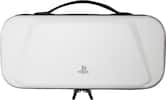 PowerA - Protection Case for PlayStation Portal Remote Player - White$27.99$34.99
More Buying Options

Specifications
- Compatible Platform(s)PlayStation 5
- Key Specs
- Compatible Platform(s): PlayStation 5
- General
- Brand: Sony Interactive Entertainment
- Model Number: 1000044180
- Product Name: PlayStation Portal Remote Player
- Color: Midnight Black
- Features
- Product Type: Controller
- Dimensions
- Product Height: 6 inches (The out of box height of the item. Height is measured as the vertical distance from the bottom of the item to the top as it would be primarily used or placed.)
- Product Width: 0 inches (The out of box width of the item. Width is measured as the horizontal distance from one side of the item to the other as it would be primarily used or placed.)
- Product Length: 14 inches (The out of box length of the item. Length is measured as the longest dimension of the item.)
- Product Weight: 2.67 pounds (The out of box weight of the item.)
- Compatibility
- Compatible Platform(s): PlayStation 5
- Warranty
- Warranty - Parts: 1 year
- Warranty - Labor: 1 year
- Other
- UPC: 711719588269
Play your PS5® console over Wi-Fi with console quality controls using PlayStation Portal™ Remote Player. Put Your PS5 in the Palm of Your Hand: PlayStation Portal™ Remote Player gives you access to the games on your PS5® console over a Wi-Fi network, letting you jump into gaming on a gorgeous 8” LCD screen capable of 1080p resolution play at 60fps, all without needing to play on a TV. Play Your Game Collection with Remote Play: PlayStation Portal™ Remote Player can play compatible games you have installed on your PS5® console, including your favorite games for PS5 and PS4. Enjoy Cloud Streaming for PS5® Games with PlayStation Plus®Premium: Stream select titles from the Game Catalog, Classics Catalog, and even select digital PS5® games in Your Library from PlayStation™Store, without needing to wait for downloads. Experience Breathtaking Immersion with DualSense® Wireless Controller Features and 3D Audio: Feel the incredible immersion of haptic feedback and adaptive triggers in supported games, and surround yourself with sound via Tempest 3D AudioTech in supported games when a compatible audio device is connected.
- Put Your PS5® in the Palm of Your Hand: PlayStation Portal™ Remote Player gives you access to the games on your PS5 over a Wi-Fi network, letting you jump right into gaming without needing to play on a TV.
- Play Your Game Collection with Remote Play: PlayStation Portal™ Remote Player can play compatible games you have installed on your PS5® console, including your favorite games for PS5 and PS4.
- Cloud Streaming from the Game Catalog and Classics Catalog: Discover an awesome library of PS5® games on the PlayStation Portal™ Remote Player with PlayStation®Plus Premium. Access hundreds of games from the Game Catalog and Classics Catalog, streamed directly to your PlayStation Portal™ Remote Player with new games added every month.
- Cloud Streaming for PS5® Games in Your Library: With PlayStation®Plus Premium, stream select digital PS5® games in Your Library from PlayStation™Store directly to your PlayStation Portal™ Remote Player, with no downloads required. Enjoy instant access to some of the latest and greatest PS5® games in the palm of your hand.
- Experience Breathtaking Immersion with DualSense® Wireless Controller Features: Feel the immersive power of haptic feedback and adaptive triggers in supported games. Responsive vibrations react to your in‑game choices and simulate environmental factors. Dynamic resistance mimics the tension of interactions with in‑game gear and objects in select PS5® games.
- Get Gaming Fast: PlayStation Portal Remote Player is a purpose-built device dedicated to delivering an incredible remote play experience. That means you can turn it on, press a button to connect to your PS5 console and get right to playing with remarkable speed.
- Put Your PS5® in the Palm of Your Hand: PlayStation Portal™ Remote Player gives you access to the games on your PS5 over a Wi-Fi network, letting you jump right into gaming without needing to play on a TV.
- Play Your Game Collection with Remote Play: PlayStation Portal™ Remote Player can play compatible games you have installed on your PS5® console, including your favorite games for PS5 and PS4.
- Cloud Streaming from the Game Catalog and Classics Catalog: Discover an awesome library of PS5® games on the PlayStation Portal™ Remote Player with PlayStation®Plus Premium. Access hundreds of games from the Game Catalog and Classics Catalog, streamed directly to your PlayStation Portal™ Remote Player with new games added every month.
- Cloud Streaming for PS5® Games in Your Library: With PlayStation®Plus Premium, stream select digital PS5® games in Your Library from PlayStation™Store directly to your PlayStation Portal™ Remote Player, with no downloads required. Enjoy instant access to some of the latest and greatest PS5® games in the palm of your hand.
- Experience Breathtaking Immersion with DualSense® Wireless Controller Features: Feel the immersive power of haptic feedback and adaptive triggers in supported games. Responsive vibrations react to your in‑game choices and simulate environmental factors. Dynamic resistance mimics the tension of interactions with in‑game gear and objects in select PS5® games.
- Get Gaming Fast: PlayStation Portal Remote Player is a purpose-built device dedicated to delivering an incredible remote play experience. That means you can turn it on, press a button to connect to your PS5 console and get right to playing with remarkable speed.
Disclaimers
- PlayStation Portal™ Remote Player can stream compatible games installed on your PS5 console. PlayStation Portal™ Remote Player requires broadband internet Wi-Fi with at least 5Mbps for use. For a better play experience, a high-speed connection of at least 15Mbps is recommended. The quality and connectivity of your play experience may vary depending on your network environment.
- Requires a PS Plus Premium Membership and only available to adult accounts. PS Plus is an ongoing subscription with a recurring subscription fee which is charged automatically (at the then current PS Store price) at the frequency you choose at purchase until cancelled. Terms apply: playstation.com/legal.
- Individual game performance will vary based on the specific game being played, and the quality of connectivity in your network environment.
- Haptic feedback and adaptive trigger features are only available when those features are supported by the game being played.
- PlayStation Portal™ Remote Player can stream compatible games installed on your PS5 console. PlayStation Portal™ Remote Player requires broadband internet Wi-Fi with at least 5Mbps for use. For a better play experience, a high-speed connection of at least 15Mbps is recommended. The quality and connectivity of your play experience may vary depending on your network environment.
- Requires a PS Plus Premium Membership and only available to adult accounts. PS Plus is an ongoing subscription with a recurring subscription fee which is charged automatically (at the then current PS Store price) at the frequency you choose at purchase until cancelled. Terms apply: playstation.com/legal.
- Individual game performance will vary based on the specific game being played, and the quality of connectivity in your network environment.
- Haptic feedback and adaptive trigger features are only available when those features are supported by the game being played.
A: when they can stop the bots from buying up the entire stock and reselling online for 2x msrp.
A: digital games just have to be installed. games requiring a disc must have disc in the console.
Q: The Portal needs to be connected to the same wifi network as the ps5?
A: To set up and connect, yes. To play, no.
A: Sony controls both sides of the connection. The device doesn’t have any competing background connections that could degrade your experience on a phone.
Q: Can I take it on the go like the switch?
A: According to PlayStation, as long as you have a strong wifi signal and have remote play activated on the PS5, you can use it anywhere.
A: No, this will only remotely stream the same screen that you would see if you were at the console, only 1 user.
A: You should be able to. The Portal does not save or process any actual game data locally, it streams from your PS5. Any saving or game data altering is being done on the PS5, not the Portal.
Q: How can i pre-order? I'm hoping to have it delivered in mid November. Thanks
A: pre order button on the product page, pay for it, you get it either pickup on release day or ships on release day.
Compare similar products
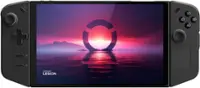
Play your PS5® console over Wi-Fi with console quality controls using PlayStation Portal™ Remote Player. Put Your PS5 in the Palm of Your Hand: PlayStation Portal™ Remote Player gives you access to the games on your PS5® console over a Wi-Fi network, letting you jump into gaming on a gorgeous 8” LCD screen capable of 1080p resolution play at 60fps, all without needing to play on a TV. Play Your Game Collection with Remote Play: PlayStation Portal™ Remote Player can play compatible games you have installed on your PS5® console, including your favorite games for PS5 and PS4. Enjoy Cloud Streaming for PS5® Games with PlayStation Plus®Premium: Stream select titles from the Game Catalog, Classics Catalog, and even select digital PS5® games in Your Library from PlayStation™Store, without needing to wait for downloads. Experience Breathtaking Immersion with DualSense® Wireless Controller Features and 3D Audio: Feel the incredible immersion of haptic feedback and adaptive triggers in supported games, and surround yourself with sound via Tempest 3D AudioTech in supported games when a compatible audio device is connected.
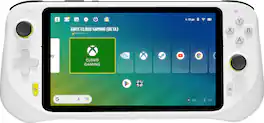
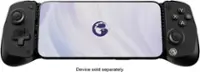
Logitech G CLOUD gaming handheld puts next-games right in your hand by putting the processing power and bookshelf of games in the cloud. This frees you to play in a ridiculous amount of locations around your home. You’ll have access to an incredible amount of games through Xbox Cloud Gaming (Beta) and NVIDIA GeForce NOW. You can even download apps from the Google Play Store for remote play, social media and more. CLOUD is also extremely lightweight with incredibly engineered controls and a 7 hour battery life. Don’t just play games, play with CLOUD Gaming Handheld in your hands and play ridiculously.

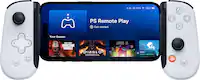
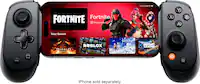
Inspired by the look and feel of the PS DualSense wireless controller, the Backbone One PlayStation Edition transforms your iPhone device into the ultimate gaming console. Snap in your iPhone and play any game or service that supports controllers, including App Store, GeForce NOW or even stream from PlayStation with PS Remote Play or PC. Our Second Generation device features two sets of magnetic adapters that allow for even better phone fit along with a reshaped D-pad which enhances responsiveness, resulting in superior feel and control across multiple genres of gameplay. The Backbone app organizes your content library and game streaming services into an integrated user experience. Uncover a new world of premium gaming in seconds.
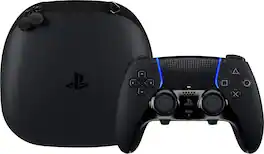
Sharpen your skills in style with the highly customizable DualSense Edge Midnight Black wireless controller. Bring the controller and its components wherever play takes you with the included Midnight Black carrying case.
| Pros for Sony Interactive Entertainment - PlayStation Portal Remote Player - Midnight Black | |||
|---|---|---|---|
| Overall Performance, Portability, Screen Quality, Battery Life, Comfort | Overall Performance, Portability, Battery Life, Screen Quality, Weight | Overall Performance, Portability, Button Responsiveness | Overall Performance, Ergonomics, Customization, Button Functionality, Feel |
| Cons for Sony Interactive Entertainment - PlayStation Portal Remote Player - Midnight Black | |||
| Connectivity, Input Lag, Frame Rate | Connectivity, Processor Speed | Connectivity, Compatibility | Connectivity, Battery Life, Stick Drift |
Specs
Reviews
Customer Images
The vast majority of our reviews come from verified purchases. Reviews from customers may include My Best Buy members, employees, and Tech Insider Network members (as tagged). Select reviewers may receive discounted products, promotional considerations or entries into drawings for honest, helpful reviews.
- Rated 5 out of 5 stars
Hot
Absolutely love the PlayStation Portal! Setup was quick and intuitive, and the remote play connection works surprisingly well—even on Wi-Fi. The 8-inch LCD screen is crisp and vibrant, and the controls feel just like a DualSense controller. Perfect for when the main TV is in use or for gaming around the house. Battery life is decent, and there's no noticeable input lag when the network is stable. Highly recommend for any PS5 owner who wants flexibility and portability!
Posted by BINGOO
- Rated 5 out of 5 stars
Outstanding Quality and Performance
The PS Portal is an excellent product that exceeded my expectations. It is made with premium materials and feels very solid and durable in the hands. The battery life is quite reasonable for its performance, lasting long enough for extended gaming sessions. As long as you have a strong and stable internet connection, the PS Portal functions smoothly and provides an impressive remote play experience. Overall, I’m very satisfied with this purchase and would definitely recommend it to any PlayStation owner looking for a high-quality way to play on the go.
Posted by MarioRmz
- Rated 5 out of 5 stars
Super portable & convenient
This is perfect for in the go gaming. If you go to a friend's house and want to play fornite with them, it's easier to bring this instead of lugging your whole PS5. It's really convenient and I don't notice any lag with decent wifi. The battery life is really good and the screen quality is great too!
Posted by Arnold