Customer Ratings & Reviews
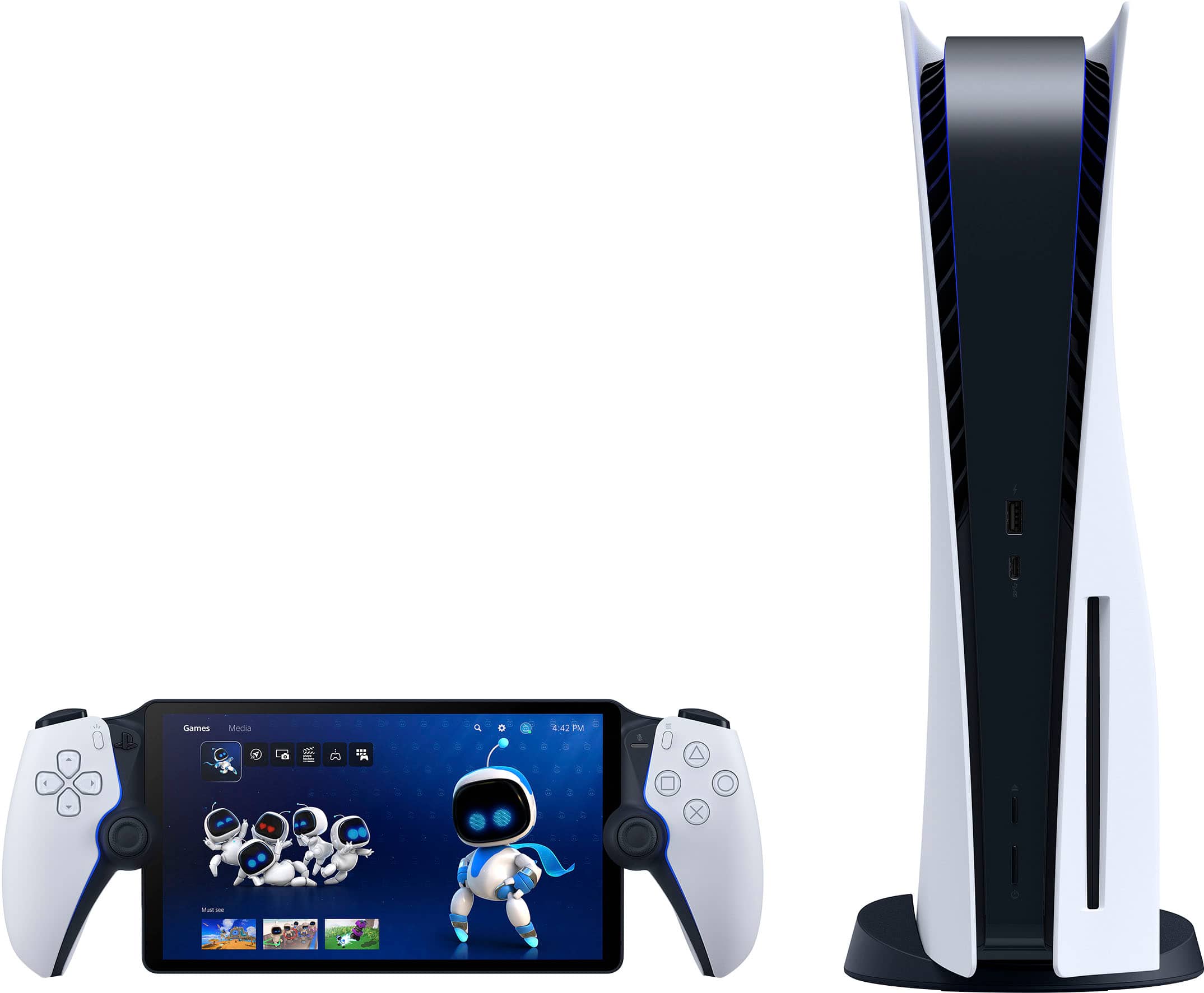
- Model:
- 1000041319
- |
- SKU:
- 11078570
Customer reviews
Rating 4.5 out of 5 stars with 7093 reviews
(7,093 customer reviews)Rating by feature
- Value4.5
Rating 4.5 out of 5 stars
- Quality4.7
Rating 4.7 out of 5 stars
- Ease of Use4.6
Rating 4.6 out of 5 stars
Customers are saying
Customers recognize the product for its excellent overall performance, with many praising its top-notch picture quality and appreciating its portability. The screen quality is also highly regarded, and users find the battery life solid and the device comfortable to hold. However, some customers have noted concerns regarding connectivity and, to a lesser extent, input lag.
This summary was generated by AI based on customer reviews.
- Pros mentioned:Battery life, Overall performance
Rated 4 out of 5 stars
Awesome
||Posted . Owned for 1 month when reviewed.This reviewer received promo considerations or sweepstakes entry for writing a review.Cool works well can recommend great picture and long battery life
This review is from Sony Interactive Entertainment - PlayStation Portal Remote Player - Midnight Black
I would recommend this to a friend - Pros mentioned:Battery life, Screen qualityCons mentioned:Connectivity
Rated 4 out of 5 stars
Overall win but…
||Posted . Owned for 3 weeks when reviewed.This reviewer received promo considerations or sweepstakes entry for writing a review.I really love this device! Screen is awesome and battery life is impressive. Only downside is not being able to connect to my AirPod pros. Spending another 200$ for proprietary headphones seems a bit much.
This review is from Sony Interactive Entertainment - PlayStation Portal Remote Player - White
I would recommend this to a friend - Pros mentioned:Overall performance
Rated 5 out of 5 stars
Great
||Posted . Owned for 2 weeks when reviewed.This reviewer received promo considerations or sweepstakes entry for writing a review.I am actually surprised. I didn’t buy this to use outside of the house. I thought it would be a waste of money since I would only use it in my house. It is really nice to play the game while in my bedroom watching tv since the ps5 is in my family room. I have used more than i thought i would. It connects without any problems and i haven't had any issues while playing madden or anything else. I would definitely recommend this.
This review is from Sony Interactive Entertainment - PlayStation Portal Remote Player - Midnight Black
I would recommend this to a friend - Pros mentioned:Battery life, Overall performanceCons mentioned:Connectivity
Rated 4 out of 5 stars
Pretty good
||Posted . Owned for 1 month when reviewed.This reviewer received promo considerations or sweepstakes entry for writing a review.Works great most of the time, even with the PS5 connected to ethernet and being in the same room as my router, I still get occasional connection issues where the image gets blurry and stutters or it it will disconnect. Battery life has been very good and the display looks great.
This review is from Sony Interactive Entertainment - PlayStation Portal Remote Player - White
I would recommend this to a friend - Pros mentioned:Screen qualityCons mentioned:Connectivity
Rated 4 out of 5 stars
Portal my travel but there will be lag.
||Posted . Owned for 6 months when reviewed.This reviewer received promo considerations or sweepstakes entry for writing a review.I knew what i was buying when i bought it, so my disappointment is really in myself. It is BEAUTIFUL and has a great screen, great controls, feels good in the hands, but just being a streaming device SUX!!! Playing your PS5 in your own house with the Portal works amazing, playing in a hotel room is sketchy at best, pick your game appropriately. Network heavy games, from the portal over a hotel network to your machine at home, etc etc, is going to lag, single player games are still going to lag but you won't miss much. If you are getting this for travel, rethink it. If you are getting this for connections between 2 homes, it should be ok.
This review is from Sony Interactive Entertainment - PlayStation Portal Remote Player - White
I would recommend this to a friend - Pros mentioned:Battery life, Overall performance
Rated 5 out of 5 stars
Next level for the price
||Posted . Owned for 2 months when reviewed.This reviewer received promo considerations or sweepstakes entry for writing a review.Love this portal . Battery life is good games run smooth . What more can u ask for ,i think sony have nailed it with thw software updates.
This review is from Sony Interactive Entertainment - PlayStation Portal Remote Player - Midnight Black
I would recommend this to a friend - Pros mentioned:Overall performance, Screen quality
Rated 5 out of 5 stars
PlayStation 5
||Posted . Owned for 4 months when reviewed.This reviewer received promo considerations or sweepstakes entry for writing a review.Purchased from Best Buy and it works great with my PS5. Screen looks amazing and controls feel premium. Streaming is smooth with good Wi-Fi. Perfect for playing without using the TV. Highly recommend buying it at Best Buy.
This review is from Sony Interactive Entertainment - PlayStation Portal Remote Player - Midnight Black
I would recommend this to a friend - Pros mentioned:Battery life, Portability
Rated 5 out of 5 stars
Ps portal
||Posted . Owned for 2 weeks when reviewed.This reviewer received promo considerations or sweepstakes entry for writing a review.Has a PS user. The PS portal is very practical and convenient. Decent battery life
This review is from Sony Interactive Entertainment - PlayStation Portal Remote Player - Midnight Black
I would recommend this to a friend - Pros mentioned:Screen qualityCons mentioned:Input lag
Rated 4 out of 5 stars
Great device with some hiccups
||Posted . Owned for 3 weeks when reviewed.This reviewer received promo considerations or sweepstakes entry for writing a review.My only qualm with this device is it should work smoothly right out of the box without having to go through tons of tweaks. The initial impression while setting up this device was really bad. Couldn't get the timezone correctly even though connected to wifi+internet. Had to manually adjust the time and date to get through. Then there were some additional tweaks needed to actually get it connected to PS5. Then comes the lag part, for which needed to bit of googling to figure all the adjustments to get rid of lags and then finally you could get to the good part. Excellent ergonomics, beautiful screen. Gameplay is enjoyable. There is still a bit of lag particularly when you need swift and precise movements. I am hoping that such things would be fixed in the future versions of the device updates. I would definitely recommend if you have PS5 and not able to get hold of the TV screen for whatever reasons.
This review is from Sony Interactive Entertainment - PlayStation Portal Remote Player - White
I would recommend this to a friend - Pros mentioned:Overall performance, Screen quality
Rated 5 out of 5 stars
Surprising how much I like this device
||Posted . Owned for 1 week when reviewed.This reviewer received promo considerations or sweepstakes entry for writing a review.I was reluctant in getting this device since you can basically do the same thing with any mobile device - but there’s something about having a dedicated unit with familiar dual sense controls/feedback that makes it worth while. I’ve been using my iPad pro paired with a dual sense for remote play and this portal is much better. I’m clearing a lot of my backlog with this thing. Games look awesome, haptic feedbak is just like the dualsense. I would love it if it was more than just a ‘remote play’ device or if you could pair any set of earbuds, but those small complaints aside, this thing rocks. There’s finally enough availability so if you’re on the fence (like I was) so go get yours!
This review is from Sony Interactive Entertainment - PlayStation Portal Remote Player - White
I would recommend this to a friend Rated 5 out of 5 stars
PlayStation Portal
||Posted . Owned for less than 1 week when reviewed.This reviewer received promo considerations or sweepstakes entry for writing a review.As a user of the Sony PlayStation Portal, I've found it to be a specialized device primarily for Remote Play with the PS5. The controller customization is somewhat limited, but the haptic feedback adjustments are useful, especially when playing more intense games. The Touchpad, integrated into the touchscreen, requires a double-tap for input, which takes some getting used to. The software is straightforward, focusing on essential settings like haptic feedback strength and brightness. Its processing power is intentionally limited, aligning with its primary purpose of Remote Play. In terms of Remote Play performance, I noticed a slight delay when playing on the same internet connection as my PS5, but it's manageable. However, using a mobile hotspot while away from home introduces a noticeable half-second input lag. Overall, while the PlayStation Portal is efficient for its intended use, it feels like it has a narrow audience, specifically catering to those heavily invested in PS5 Remote Play.
This review is from Sony Interactive Entertainment - PlayStation Portal Remote Player - White
I would recommend this to a friend- Pros mentioned:Comfort, Portability
Rated 5 out of 5 stars
Super fun on the go
||Posted .This reviewer received promo considerations or sweepstakes entry for writing a review.I like how this console feel when I play games on it especially for a PlayStation handheld console I travel due to my job and I can’t carry my PlayStation console with me this PlayStation portal helps me keep track of my games
This review is from Sony Interactive Entertainment - PlayStation Portal Remote Player - White
I would recommend this to a friend - Pros mentioned:Overall performanceCons mentioned:Input lag
Rated 5 out of 5 stars
100% Perfect. For what it is.
||Posted . Owned for 1 week when reviewed.This reviewer received promo considerations or sweepstakes entry for writing a review.This beautiful device is stunning. I'm not an online multiplayer gamer. I love playing games with a story. I love putting in a lot of hours on the games story. I have not tested it with online gaming like COD or Fortnite. But if you're trying to beat any game and have people using the tv you usually have to use. It's 100% awesome. I just got all three spider games to grind. IT LOOKS AMAZING. I've put in almost 6 hours of Spiderman Remasterd and had a millisecond of lag one time. It's not it's own system. It's made for people who can't play when their loved ones are using that tv/monitor that connects to their PS5. If you're like me and just play for fun..DO IT..If you want a system that's as fast as a PC...This device wasn't made for that. Mad love to sony for this.
This review is from Sony Interactive Entertainment - PlayStation Portal Remote Player - White
I would recommend this to a friend - Pros mentioned:Screen qualityCons mentioned:Connectivity
Rated 4 out of 5 stars
Great screen and controller, can lag if poor wifi
||Posted . Owned for 3 weeks when reviewed.This reviewer received promo considerations or sweepstakes entry for writing a review.Excellent product, connection can be spotty if using separate wifi networks, make sure both of them are at least 100 mbps, even then there might be some lag during gameplay. But the screen is amazing and the controller is literally the same as the ps5 dualsense.
This review is from Sony Interactive Entertainment - PlayStation Portal Remote Player - Midnight Black
I would recommend this to a friend - Pros mentioned:Portability, Screen quality
Rated 5 out of 5 stars
Great product!
||Posted .This reviewer received promo considerations or sweepstakes entry for writing a review.Looks and feels great. Very convenient if you want to play in bed or want/need to play while others are using the TV. Just make sure you have fast, reliable WiFi and it will feel like a portable PS5.
This review is from Sony Interactive Entertainment - PlayStation Portal Remote Player - White
I would recommend this to a friend - Pros mentioned:Overall performance, Portability
Rated 4 out of 5 stars
Pretty good product
||Posted . Owned for 9 months when reviewed.This reviewer received promo considerations or sweepstakes entry for writing a review.Honestly, it’s a great product. Don’t have a single complaint about it. I just don’t use it as much as the regular. PlayStation highly recommended if you like to play on the go.
This review is from Sony Interactive Entertainment - PlayStation Portal Remote Player - White
I would recommend this to a friend - Pros mentioned:Overall performance, Screen quality
Rated 5 out of 5 stars
Works like a champ
||Posted . Owned for 1 month when reviewed.This reviewer received promo considerations or sweepstakes entry for writing a review.Sturdy build and great performance. Took a bit to update first out of box but works like champ.
This review is from Sony Interactive Entertainment - PlayStation Portal Remote Player - Midnight Black
I would recommend this to a friend - Pros mentioned:Portability, Screen quality
Rated 5 out of 5 stars
Love my Portal
||Posted . Owned for 3 months when reviewed.This reviewer received promo considerations or sweepstakes entry for writing a review.I've greatly enjoyed my PS Portal. It's been convenient to be able to play my PS5 games around the house and not have to always be in front of the TV. My kids like to take the Portal with them to their grandparents' house, and it's worked perfectly for remote gaming there. We've used it a few times remotely with my phone's wifi hotspot, and it's hit or miss if it works. Sometimes it works perfect with the phone connection, but sometimes not at all. It depends how good your phone connection is. The screen quality is fantastic and all the buttons feel top quality. I am a little disappointed that you can't connect Bluetooth headphones to it, although the Sony Pulse Elites work great with the Portal. I can't wait to see what features get added with future software updates. I feel like the Portal is at the right price for the high quality and I would recommend it.
This review is from Sony Interactive Entertainment - PlayStation Portal Remote Player - White
I would recommend this to a friend - Pros mentioned:Overall performanceCons mentioned:Connectivity
Rated 5 out of 5 stars
Perfect For Me
||Posted . Owned for 1 week when reviewed.This reviewer received promo considerations or sweepstakes entry for writing a review.I originally preordered this from Playstation but I cancelled my preorder to wait on reviews. I was able to secure an open box - excellent Portal as I was going out of town and wanted to try it on the road. There are some things that could be improved, such as lack of Bluetooth support and lack of Internet Browser for Captive Portal APs, but for the most part this is awesome as long as you have a decent Internet connection. I would give this 4.5 stars out of 5 for this. While at my friend's house, we were both able to play online even with me remoting to my ps5 miles away. I do recommend, however, setting a static IP for your ps5 and port forward on your router as well as wiring your ps5 to your router. Games run smooth if you do this and have a decent Internet connection. While at home, this device works perfectly when the wife wants to watch Netflix and we share a TV.
This review is from Sony Interactive Entertainment - PlayStation Portal Remote Player - White
I would recommend this to a friend - Pros mentioned:Overall performanceCons mentioned:Connectivity
Rated 5 out of 5 stars
I love the portable Playstation
||Posted . Owned for 1 month when reviewed.This reviewer received promo considerations or sweepstakes entry for writing a review.I like the product because you can play your games without using the tv but you need a good internet connectionso you do not experience lags while your are playing your favorite game
This review is from Sony Interactive Entertainment - PlayStation Portal Remote Player - Midnight Black
I would recommend this to a friend