Microsoft - Surface Pen - Black - Open Box - fair
- Works like new.
- May have larger dents or scratches.
- May be missing parts, accessories, or packaging.
About This Item
About Open Box
Reviews
Customers are saying
Customers praise the Surface Pen for its ease of use, overall performance, and compatibility with devices like the Surface Go. Many appreciate its suitability for drawing, good battery life, comfortable weight and feel, and sleek design, with some specifically loving the available colors and accuracy. However, some customers find the pen to be a little pricey and have concerns about the tip durability, while others have noted issues such as lag, the absence of a clip, and weak magnet strength.
Customer Images
The vast majority of our reviews come from verified purchases. Reviews from customers may include My Best Buy members, employees, and Tech Insider Network members (as tagged). Select reviewers may receive discounted products, promotional considerations or entries into drawings for honest, helpful reviews.
Compare similar products

Streamline your creative process. Writing and drawing with Surface Pen feels natural, with precision ink on one end and a rubber eraser on the other. Sketch, shade, and paint with artistic precision—the 4,096 pressure points respond to the lightest touch. Tilt your Surface Pen to shade your sketches just like you would a graphite pencil, using the pen tip that feels right.²

Write, sketch, navigate, and recharge. Take handwritten notes and draw with the same feeling you get with pen on paper, with exceptional accuracy and a new storable design. Surface Slim Pen (2nd Edition) also delivers incredible shading and exceptional pressure sensitivity.¹
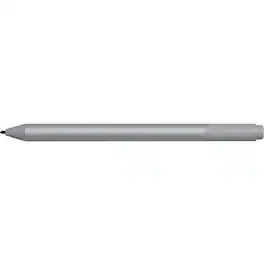
Microsoft Surface Pen Platinum - Tilt the tip to shade your drawings - Writes like pen on paper - Sketch, shade, and paint with artistic precision - Ink flows out in real time with no lag or latency - Rubber eraser rubs away your mistakes easily

The Lenovo Digital Pen 2 is a testament to innovation and user-centric design. With an enhanced grip, elastomer pen tip for precision, extended battery life, and quick-access buttons, it provides an elevated creative experience. Whether you're a professional artist, a student, or simply someone who values seamless functionality, this pen is designed to transform your digital interactions into natural and fluid expressions. Unleash your creativity, sign documents with finesse, and sketch your imagination into reality with the Lenovo Digital Pen 2.
| Pros for Microsoft - Surface Pen - Black | |||
|---|---|---|---|
| Ease of use, Overall Performance, Compatibility, Battery Life, Drawing | Ease of use, Overall Performance, Weight, Compatibility, Design | There were no pros for this product— | Overall Performance, Weight, Battery Life, Ease of Use, Connectivity |
| Cons for Microsoft - Surface Pen - Black | |||
| Price, Lag, Tip Durability, Clip, Connectivity | Price, Lag, Charger, Tip, Magnet Strength | There were no cons for this product— | Compatibility |