Customer Ratings & Reviews

- Model:
- 8WV-00001
- SKU:
- 10148499
Rating by feature
- Value
Rating 4.2 out of 5 stars
- Quality
Rating 4.6 out of 5 stars
- Ease of Use
Rating 4.6 out of 5 stars
Customers are saying
Customers are positive about the product's ease of use, overall performance, and lightweight design, with many users praising its comfortable feel and high level of accuracy. Customers are negative about the lack of an included charger and the relatively high price point compared to similar options. While most users enjoy the device, a small number of reports mention concerns regarding connectivity issues and the durability of the pen tip.
This summary was generated by AI based on customer reviews.
- Pros mentioned:Weight
Awesome Pen!
||Posted .This reviewer received promo considerations or sweepstakes entry for writing a review.The Microsoft Surface Slim Pen (2nd Edition) in Matte Black feels premium and comfortable in hand—the weight and matte finish make extended sketching or note-taking sessions easy. Its low-latency response and pressure sensitivity deliver precise strokes for drawing and handwriting, and tilt support makes shading feel natural. Pairing and the magnetic snap-to-charge with compatible Surface devices is seamless and incredibly convenient. The battery holds up well for daily use, and the matte black finish resists fingerprints. Overall, it's a fantastic accessory for Surface owners who want a responsive, well-built stylus for both creativity and productivity.
I would recommend this to a friend - Pros mentioned:Overall performance
Works great
||Posted . Owned for 3 months when reviewed.This reviewer received promo considerations or sweepstakes entry for writing a review.Works great with the surface pro. It sucks you have to pruchase separately, but it is a great pen.
I would recommend this to a friend Necessary, but way too pricey
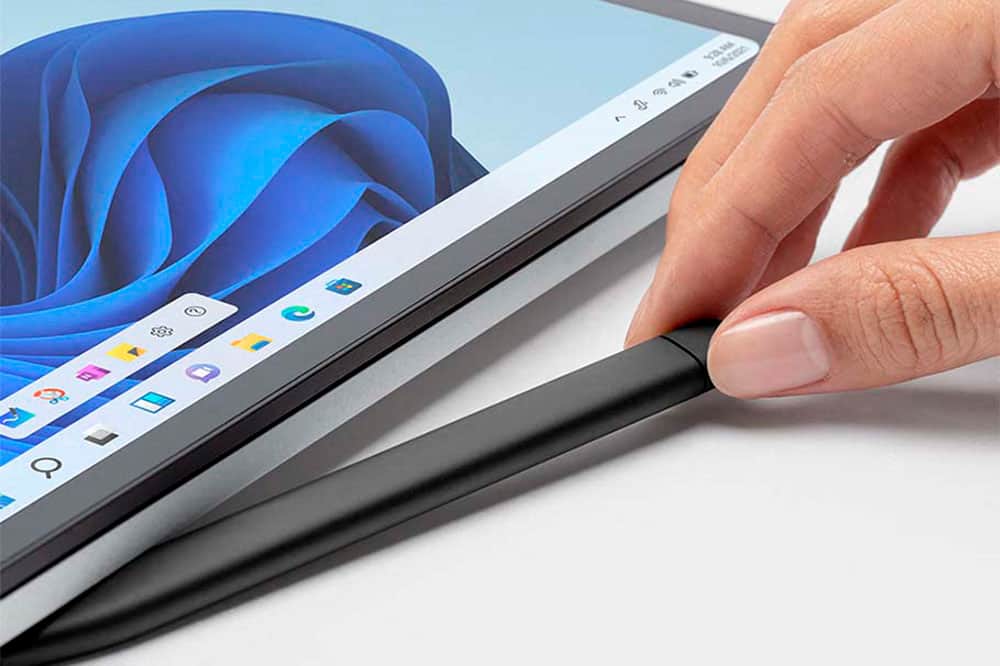
||Posted .This reviewer received promo considerations or sweepstakes entry for writing a review.if youre purchasing any surface product, the experience of most is exponentially better with the surface pen. Its not surprising since most of these products are made with the surface pen in mind. The feel, the buttons(which im not ashamed to say ive spent coutnless hours clicking for fun), the pressure sensitivity, tilt feature, I could go on. The "pencil feel" emulation with the haptic motor gives a nice feel, but isnt supported in most 3rd party writibg applications, and doesnt really feel like a pen. The way it rests and charges under my laptop studio 2 is also quite nice and handy(that magnet is also super strong! I coudlnt imagine losing it). And dont get me wrong, the surface pen 2 is a great pen that does everything it says, but its just way too pricey. Its included for some surface lines, but for the Laptop studio 2(which is what I have), why am I spending an extra $120 on top of the $2000 minimum that I spent for the computer? Especially for an product whose core selling point relies so heavily on the usage of a pen? Beyond crazy if you ask me. And a little less relevant, but my pen began to chip and "bubble" just after the warranty period ended. Maybe I got a defective batch but it is crazy for it to be this fragile with normal usage Bottom line, you should definitely factor in the price of the surface pen into your purchase of a surface device(as a good chunk of the appeal of those devices is the pen support); This pen will certainly elevate your experience with them. But it really is too expensive, and from my experience oddly fragile.
I would recommend this to a friend- Pros mentioned:Ease of use

Works great with my 2012 Surface Studio
|Posted . Owned for 1 week when reviewed.This reviewer received promo considerations or sweepstakes entry for writing a review.Tilt and all features work as intended - except that this does NOT come with the charging cradle if you do not have a newer surface device... they also dont MAKE the cradle anymore. Which is required to be able to charge the pen. Had to buy it second hand. It would have been nice if this pen supported USB-C in these modern times. If I had more time to research, I would recommend a different pencil for anyone with older Surface devices.
No, I would not recommend this to a friend - Pros mentioned:Design, Ease of use
Slim & Sleek
||Posted . Owned for 3 weeks when reviewed.This reviewer received promo considerations or sweepstakes entry for writing a review.It is slim and sleek. Worked right off the bat. Magnetic holder in the keyboard is convenient and appears to be strong in holding it in place. I was told the old Surface Book pen would not work with the Pro9, BUT IT DOES! I did not need to buy this but I am going to go ahead and keep it since I bought it as a bundle.
I would recommend this to a friend - Pros mentioned:Design
Artist review
||Posted . Owned for 3 months when reviewed.This reviewer received promo considerations or sweepstakes entry for writing a review.I have the surface studio 2 plus and I’ve been using this pen for digital art work. So the surface 2 plus comes with your standard pen so I’ll be comparing the two. The standard works great I have no complaints even with my previous Microsoft laptop I’ve used this pen for the past 3 1/2 years, however, this surface slim pen feels great in your hands, it’s sleek design makes me feel like I’m illustrating with a needle point pen! That aside I do have some major complaints. Maybe it’s just how it reacts to the surface studio 2 but the curser is 1 or 2 cm from where the tip is…may not seem like a big difference in spacing but the accuracy leads to several mistakes or over shooting where I want to draw. 2nd is the side button. I’m a little confused as to why the placement is so much higher compared to the standard pen, makes it a little awkward just to click. On the standard pen it’s right where your thumb or pointer finger is (depending on how you hold it) 3rd the magnet inside the slim pen is not near as strong compared to the standard pen. The standard has two magnets one near the tip and the other near the eraser, and the slim has the same, but because it’s shorter, I believe the magnets on the desktop of the surface studio 2 plus are just spaced too far apart which is a shame. 4th is the weight, yes some might see it as a pro to have such a light weight pen, however it feels cheap. For a pen that can be sold for $140-$100 I want it to feel like it’s worth that price. Obviously I’m not going to, but the slim pen feels like it could snap in half with little effort, my fear is that I may accidentally drop my pen and I may roll over the pen in my chair and break it, so I feel like I have to be extra careful. The design is great don’t get me wrong, but because it’s flat, it feels great in my hand but terrifying knowing it won’t roll with the wheel if I scoot back in my chair. This pen should cost no more than $50 especially cuz the surface studio 2 plus does not charge the pen and you need the additional charger!
No, I would not recommend this to a friend - Pros mentioned:Ease of use
Really good electronic pen to draw with
||Posted . Owned for 1 year when reviewed.This reviewer received promo considerations or sweepstakes entry for writing a review.It works amazing but trying to erase with it is kinda touchy one minute you’ll be erasing the next it’ll count it as drawing instead of erasing but definitely has been worth the money
I would recommend this to a friend Great item for artists, but worth the money?
||Posted . Owned for 1 month when reviewed.This reviewer received promo considerations or sweepstakes entry for writing a review.Recently purchased this a second time after breaking my first one. I'm an artist who carries it around everywhere I go. As far as the pen quality goes, there's not a better pen out there. I pair mine with the surface laptop studio, which has a built in charging storage station for the slim pen (see image). Writing is smooth but not slippery due to haptic feedback. The functioning eraser end and extra button are a fun bonus but I don't really use them often. Make sure you don't fidget with the tip like I did because the port is fragile and I broke it in about a year. Price wise it's on the more expensive end as most microsoft products go. $130 new is kind of hefty for a product that's been out for years now and is probably getting phased out soon. However, to me it was worth grabbing a replacement just because I've never come up with an alternative that draws as smoothly. Overall, I wouldn't bother purchasing if you're not an artist. But if you like drawing it's one of the best tools out there!
I would recommend this to a friend- Pros mentioned:Weight
Great pen for writing and digital art!
||Posted . Owned for 2 weeks when reviewed.This reviewer received promo considerations or sweepstakes entry for writing a review.I bought this pen to do some digital art on my Surface Pro 8. So far, it feels excellent to use - the pen is light, comfortable to hold, and the vibration motor to simulate writing feel is great to use. I've really enjoyed using this compared to styluses I've used in the past such as the S-Pen from Samsung's Galaxy Tablets. Would highly recommend if you own a surface and want to do some art or note taking.
I would recommend this to a friend - Pros mentioned:Compatibility, Design
Great pen
||Posted . Owned for 1 month when reviewed.This reviewer received promo considerations or sweepstakes entry for writing a review.I like the new design, works great even with older surface computers
I would recommend this to a friend Supreme Sleekness
||Posted . Owned for 2 weeks when reviewed.This reviewer received promo considerations or sweepstakes entry for writing a review.The Surface Slim Pen 2 Second Edition is a game-changer. Its ultra-responsive design and precise, low-latency performance make it perfect for creatives and professionals alike. The ergonomic feel and seamless integration with Surface devices elevate productivity and creativity to new heights.
I would recommend this to a friend- Pros mentioned:Overall performance
Best Surface Pen Till Date. Must Have!
||Posted . Owned for 2 months when reviewed.This reviewer received promo considerations or sweepstakes entry for writing a review.Awesome pen. Great control, smooth writing and I can really feel the flow. Amazing how improved the pressure sensitivity is. I have owned all the Surface pen models that came before and this one is the best.
I would recommend this to a friend Open Box Excellent-Review
||Posted . Owned for 3 weeks when reviewed.This reviewer received promo considerations or sweepstakes entry for writing a review.I got the 'open box Excellent' pen and I am leaving this review because I did not see enough open box reviews when I was trying to purchase. The pen came with its original packaging and manual. The pen has worked perfectly, shortcut button and side button are good. It paired well with my surface laptop studio and charges well with it. I added it to my surface account and the manufacturer's warranty is still valid just about 20 days shy of one year. Overall good buy, saved some money by getting open box.
I would recommend this to a friend- Pros mentioned:Weight
Surface Slim Pen 2
||Posted . Owned for 1 month when reviewed.This reviewer received promo considerations or sweepstakes entry for writing a review.This is a very light and useful pen for making short notes or marks on documents. It is not great for using it to take long written notes. Along with being able to store the pen in the surface pro keyboard, you can temporarily attach it to the side of the surface pro but it only has two points of contact with the computer so it is easy knocked off. I do not think that the pen is worth the price.
I would recommend this to a friend - Pros mentioned:Ease of use
Surface Pro Pen
||Posted . Owned for 4 months when reviewed.This reviewer received promo considerations or sweepstakes entry for writing a review.Sleek and easy to use! Love the shortcut and how it fits into the surface pro keyboard. Nice tip to the pencil and the color is accurate. Connects swiftly.
I would recommend this to a friend Great pen
||Posted . Owned for 5 months when reviewed.This reviewer received promo considerations or sweepstakes entry for writing a review.This pen is probably one of the best I’ve used for a tablet/laptop. The shape is a tad bit odd at first but it quickly becomes comfortable and great to draw with.
I would recommend this to a friendGreat Pen, but possibly fragile
||Posted . Owned for 2 months when reviewed.This reviewer received promo considerations or sweepstakes entry for writing a review.I bought this as a replacement for a slim pen 2 that stopped working suddenly. My old pen still turned on and connected, but any touch from the tip was not being recognized. I tried replacing the tips to bo avail. Bought a replacement pen and it paired in seconds and started working right away. The pen feels great to write and draw with and is comfortable to hold despite being flat. I love this pen but I'm not sure about the longevity considering I had to replace my original a little over a year after buying it.
I would recommend this to a friend- Pros mentioned:Ease of use
great product
||Posted . Owned for 1 month when reviewed.This reviewer received promo considerations or sweepstakes entry for writing a review.lots of cool features. you can set-up easy Short Cuts that make it easy to navigate. great sensitivity! Feels realistic when writing.
I would recommend this to a friend Stylus
||Posted . Owned for 1 month when reviewed.This reviewer received promo considerations or sweepstakes entry for writing a review.No issues, responsive long battery life and charges automatically on my Surface studio laptop. Shortcuts are configurable via Windows software to open OneNote, post it notes, sketch , etc.
I would recommend this to a friendGreat recharging pen
||Posted . Owned for 3 months when reviewed.This reviewer received promo considerations or sweepstakes entry for writing a review.Works smoothly! Got this pen because I had lost my older model, and I like how this one is slim and rechargeable!
I would recommend this to a friend