
GIGABYTE - M34WQ 34" LED WQHD FreeSync Premium IPS Gaming Monitor with HDR (HDMI, DisplayPort, USB) - Black
GIGABYTE - M34WQ 34" LED WQHD FreeSync Premium IPS Gaming Monitor with HDR (HDMI, DisplayPort, USB) - Black

Highlights
- Key Specs
- Refresh Rate: 144Hz (The number of frames per second the device can produce natively without enhancement. Higher rates help produce smooth, seamless pictures.)
- Maximum Resolution: 3440 x 1440 (Maximum resolution refers to the highest number of pixels that a screen can process and display. Higher resolution signals produce more detailed images.)
- Response Time: 1 milliseconds (The speed at which pixels can change colors is called response time. It is measured in milliseconds (ms).)
- Panel Type: IPS (Technology that affects response time and image quality.)
- Synchronization Technology: FreeSync Premium (AMD Adaptive Sync) (Generally, these technologies allow syncing between a computer/console game's frame rate and the device's refresh rate for a smoother display without tearing.)
- Screen Size: 34 inches (Size of the screen, measured diagonally from corner to corner.)
- Display Connector(s): 1 x DisplayPort 1.4, 2 x HDMI 2.0 (The number and type of connectors used to connect to an external display.)
- General
- Brand: GIGABYTE
- Model Number: M34WQ-SA
- Product Name: M34WQ 34" LED WQHD FreeSync Premium IPS Gaming Monitor with HDR (HDMI, DisplayPort, USB)
- Color: Black
- Operating System Compatibility: Windows, Apple iOS, Mac, Not Applicable
- Display
- Refresh Rate: 144Hz (The number of frames per second the device can produce natively without enhancement. Higher rates help produce smooth, seamless pictures.)
- Maximum Resolution: 3440 x 1440 (Maximum resolution refers to the highest number of pixels that a screen can process and display. Higher resolution signals produce more detailed images.)
- Contrast Ratio: 1000:1 (Measured difference between a displayed image's brightest whites and darkest blacks. The larger the first number, the more detail and color that can be displayed.)
- Response Time: 1 milliseconds (The speed at which pixels can change colors is called response time. It is measured in milliseconds (ms).)
- Display Type: LED
- Panel Type: IPS (Technology that affects response time and image quality.)
- Synchronization Technology: FreeSync Premium (AMD Adaptive Sync) (Generally, these technologies allow syncing between a computer/console game's frame rate and the device's refresh rate for a smoother display without tearing.)
- Aspect Ratio: 21:9 (The measurement of the width of a screen compared to the height of a screen, expressed as a ratio.)
- Curved Screen: false
- Brightness: 400 candela per square meter (A measure of the total light output.)
- Screen Size: 34 inches (Size of the screen, measured diagonally from corner to corner.)
- High Dynamic Range (HDR): true (An HDR-compatible 4K TV or other HDR-compatible product displays HDR video content when it's available from sources like 4K Ultra HD Blu-ray Discs and 4K streaming services.)
- High Dynamic Range Format: VESA Certified DisplayHDR 400 (There are a few HDR formats that tell the TV or other HDR-compatible product how to best utilize its capabilities to display HDR content. HDR technology can support one or multiple formats, each with various benefits to picture quality.)
- Touch Screen: false (Touch-screen devices make navigating more intuitive. Using a touch-screen display, you can do things such as tap to select, hold and drag to move items, swipe to scroll, and pinch to zoom.)
- Connectivity
- Number of DisplayPort Inputs (Total): 1
- Number of HDMI Inputs (Total): 2
- Display Connector(s): 1 x DisplayPort 1.4, 2 x HDMI 2.0 (The number and type of connectors used to connect to an external display.)
- USB Ports: 2 x USB-A 2.0, 1 x USB-C 3.2, 1 x USB-C 3.1 (The number and type of USB ports the product has.)
- Headphone Jack: true (The device features an interface that allows for the connection of headphones.)
- Compatibility
- Wall Mountable: true (The product is able to be secured to a wall. Some products are designed ready to mount, while others may require additional hardware/accessories for installation.)
- VESA Wall Mount Standard: 100mm x 100mm (VESA wall mount standards refer to the spacing of screw holes built into a TV in order to fit with standard TV wall mounts. These standards are implemented into most TVs and monitors.)
- Features
- Tiltable: true
- Adjustable Stand Height: true
- Anti-Glare: true (Product has features, such as a matte finish, that reduce the likelihood for screen glare.)
- Eye Relief Features: Low blue light, Flicker free
- Built-In Webcam: false
- Integrated Speaker(s): true
- Dimensions
- Product Height With Stand: 21.57 inches
- Product Height Without Stand: 14.48 inches
- Product Width: 7.8 inches (The out of box width of the item. Width is measured as the horizontal distance from one side of the item to the other as it would be primarily used or placed.)
- Product Weight: 29.7 pounds (The out of box weight of the item.)
- Stand Included: true
- Certifications Listings & Approvals
- ENERGY STAR Certified: false (Devices carrying the ENERGY STAR service mark, such as computer products and peripherals, kitchen appliances, and other products, generally use 20% to 30% less energy than required by federal standards.)
- EPEAT Qualified: false (The Electronic Product Environmental Assessment Tool (EPEAT) was designed to provide an environmental assessment tool for purchasers. In order to qualify for EPEAT, a product must meet all 23 required criteria.)
- Warranty
- Warranty - Parts: 3 years
- Warranty - Labor: 3 years
- Other
- UPC: 889523026878
GIGABYTE gaming monitors pack upscale performance into a streamlined package. The M34WQ provides an immersive experience through fluid gameplay and great color accuracy with 1ms response time, 144Hz refresh rate, and compatibility with graphic card software.
- Display: 34” 3440x1440 IPS Display
- Response Time: 144Hz Refresh Rate, 1ms (MPRT) Response Time
- Aspect Ratio: Immersive Ultrawide Aspect Ratio 21:9
- Vibrant Colors: Studio Grade VESA Display HDR400 and 91% DCI-P3 (117% sRGB) Color Gamut
- Built-In KVM: Control multiple devices with KVM
- Ergonomic Design: Ergonomic Design with Tilt and Height Adjustments, VESA Wall Mount Compatible 100x100mm
- Gigabyte Classic Features: GIGABYTE Classic Tactical Features with OSD Sidekick, GIGABYTE Auto-Update
- Audio: 2x 3W Speakers
- Outputs: 1x Display Port 1.4, 2x HDMI 2.0, 2x USB 3.0, 1x USB Type-C
- Display: 34” 3440x1440 IPS Display
- Response Time: 144Hz Refresh Rate, 1ms (MPRT) Response Time
- Aspect Ratio: Immersive Ultrawide Aspect Ratio 21:9
- Vibrant Colors: Studio Grade VESA Display HDR400 and 91% DCI-P3 (117% sRGB) Color Gamut
- Built-In KVM: Control multiple devices with KVM
- Ergonomic Design: Ergonomic Design with Tilt and Height Adjustments, VESA Wall Mount Compatible 100x100mm
- Gigabyte Classic Features: GIGABYTE Classic Tactical Features with OSD Sidekick, GIGABYTE Auto-Update
- Audio: 2x 3W Speakers
- Outputs: 1x Display Port 1.4, 2x HDMI 2.0, 2x USB 3.0, 1x USB Type-C
Whats Included
- ["M34WQ 34" LED WQHD FreeSync Premium IPS Gaming Monitor with HDR (HDMI, DisplayPort, USB)"]
- ["M34WQ 34" LED WQHD FreeSync Premium IPS Gaming Monitor with HDR (HDMI, DisplayPort, USB)"]
- ["M34WQ 34" LED WQHD FreeSync Premium IPS Gaming Monitor with HDR (HDMI, DisplayPort, USB)"]
- ["M34WQ 34" LED WQHD FreeSync Premium IPS Gaming Monitor with HDR (HDMI, DisplayPort, USB)"]
- ["M34WQ 34" LED WQHD FreeSync Premium IPS Gaming Monitor with HDR (HDMI, DisplayPort, USB)"]
- ["M34WQ 34" LED WQHD FreeSync Premium IPS Gaming Monitor with HDR (HDMI, DisplayPort, USB)"]
- ["M34WQ 34" LED WQHD FreeSync Premium IPS Gaming Monitor with HDR (HDMI, DisplayPort, USB)"]
- ["M34WQ 34" LED WQHD FreeSync Premium IPS Gaming Monitor with HDR (HDMI, DisplayPort, USB)"]
- ["M34WQ 34" LED WQHD FreeSync Premium IPS Gaming Monitor with HDR (HDMI, DisplayPort, USB)"]
- ["M34WQ 34" LED WQHD FreeSync Premium IPS Gaming Monitor with HDR (HDMI, DisplayPort, USB)"]
- ["M34WQ 34" LED WQHD FreeSync Premium IPS Gaming Monitor with HDR (HDMI, DisplayPort, USB)"]
- ["M34WQ 34" LED WQHD FreeSync Premium IPS Gaming Monitor with HDR (HDMI, DisplayPort, USB)"]
A: Hi Rayjd93, Yes you can have them both connected at the same time but you will need to switch the input manually between both (only 1 image can display at a time). Note that this is an ultrawide monitor and PS5 & XBOX currently dont support ultrawide resolutions, so there will be black bars on both sides of the screen. Hope this helps! - John
A: Hi MG, Yes this monitor is compatible with macbooks. Our software (OSD Sidekick) however isnt current available on Mac OSX Hope this helps. - John
A: Hi Kit, Yes you will have no problem using your monitor and laptop at their respective resolution. You can retain your 1080p 144hz on your laptop and still use the 144hz WQHD resolution on the monitor. Hope this helps! - John
Q: Can this monitor be mounted on a monitor arm vice the provided stand?
A: Yes, but the the mounting point is recessed 1/4inch. I had to buy a few different wall mounts till I found one that worked.
A: undefined
Q: can i run this monitor without a pc
A: Hi John, You don't need to use a Desktop PC. You can connect this to consoles, laptops, tablets (via USB C), and smart TV devices as well. Ideally to utilize the 21:9 ultrawide aspect ratio it will only be supported on laptops and desktop computers. Hope this helps! - John
Q: Can the USB-C port be used as just a data port (like with external data drives)?
A: Hi RBurnham, The port is only able to support video in and out. There is no data transfer capabilities at this time, but we do have a USB 3.0 Hub built into the monitor. Hope this helps! - John
Q: Is this monitor HDCP compliant?
A: It is HDCP 2.2 compliant
Compare similar products
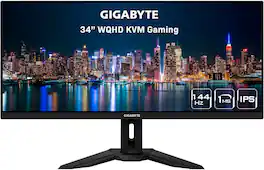
GIGABYTE gaming monitors pack upscale performance into a streamlined package. The M34WQ provides an immersive experience through fluid gameplay and great color accuracy with 1ms response time, 144Hz refresh rate, and compatibility with graphic card software.

Dominate the game with the 34” UltraGear WQHD (3340x1440) Gaming Monitor, built for speed, precision, and pure visual impact. The 21:9 UltraGear display gives you more room to play and multitask, with a virtually borderless design that keeps you locked into the action. React instantly with a blistering 240Hz refresh rate and 1ms response time—perfect for competitive gamers who live in the milliseconds. Vivid color pops with HDR10, DisplayHDR 400, and up to 95% DCI-P3 color gamut, while AMD FreeSync Premium and NVIDIA G-SYNC compatibility ensure buttery-smooth, tear-free visuals across PC and next-gen consoles. Split your screen with Picture-by-Picture mode, plug in with USB-C, HDMI (x2), DisplayPort, and USB-A (x2), and hear every detail with built-in speakers. Designed for battle and built for comfort—with a slim, adjustable stand that keeps your setup clean and dialed in.
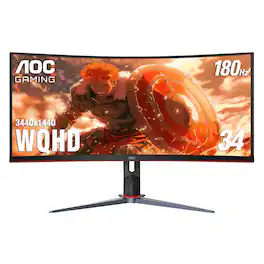
AOC CU34G2XP 34” Curved Gaming Monitor with WQHD 3440 x 1440 resolution delivers stunning visuals and world-class responsiveness, featuring FreeSync Premium tear-free immersion, VESA Certified DisplayHDR 400 mode visual enhancement, and 180Hz refresh rate and 1ms response time. The VA Wide View also allows for 178/178-degree viewing angles, and consistent image quality when viewing the monitor from all angles. In addition, this monitor comes with Low Blue Mode and Flick-Free technology to protect the user's eyes, as well as 2 HDMI, 2 DisplayPort and 4 USB 3.2 interface ports for convenient connectivity.
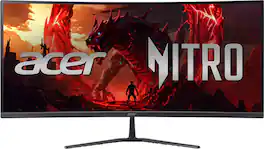
Acer's Nitro ED340CUR 34" curved panel monitor with Ultra Wide QHD resolution delivers the incredible. Through AMD FreeSync Premium technology, the game’s frame rate is determined by your graphics card, not the fixed refresh rate of the monitor, giving you a serious competitive edge. Smooth, tear-free gameplay!! Crisp, true-to-life colors come alive with the amazing 3440 x 1440 resolution, allowing you to enjoy High-Definition entertainment in the comfort of your home. The wide view angle technology lets you share what's on your screen with friends and family as colors stay true no matter what angle you're viewing from. Incredible 100,000,000:1 contrast ratio and rapid response time ensure your games, work and movies are smooth and look as epic as possible.
| Pros for GIGABYTE - M34WQ 34" LED WQHD FreeSync Premium IPS Gaming Monitor with HDR (HDMI, DisplayPort, USB) - Black | |||
|---|---|---|---|
| Screen Size, Refresh Rate, KVM Switch, Quality, Gaming | Refresh Rate, Image Quality, Design, HDR Performance, Size | Overall Performance, Screen Size, Refresh Rate, Resolution | Overall Performance, Screen Size, Refresh Rate, Resolution, Immersion |
| Cons for GIGABYTE - M34WQ 34" LED WQHD FreeSync Premium IPS Gaming Monitor with HDR (HDMI, DisplayPort, USB) - Black | |||
| Curvature, HDR, Dead Pixels, Weight | There were no cons for this product— | Speakers | There were no cons for this product— |
Specs
Reviews
Customers are saying
Customers are impressed with the monitor's screen size, KVM switch, and refresh rate, noting the amazing colors and solid display quality. The resolution and ultrawide capabilities are also appreciated for both general use and gaming. However, some customers are not fond of the curvature and feel the HDR doesn't stand out. Fortunately, there were few mentions of dead pixels.
Customer Images
The vast majority of our reviews come from verified purchases. Reviews from customers may include My Best Buy members, employees, and Tech Insider Network members (as tagged). Select reviewers may receive discounted products, promotional considerations or entries into drawings for honest, helpful reviews.
- Rated 5 out of 5 stars
Great monitor!
This monitor checks all the boxes. 144hz, built in KVM switch, gsync compatible, and great color. I was able to buy this monitor on sale and honestly at the price point its hard to beat. Buy it, you wont regret it.
Mike Posted
- Rated 5 out of 5 stars
Great Monitor!! Would buy again.
Loving this monitor. Great for work & gaming. Not all games support the Ultra Wide, but for those that do, it's amazing. Looks great. For work, it's pretty much like having two screens but i enjoy it more than 2 screens for play. Oh and that 144hz - smooth as butter. I used a wall mount because the stand is pretty massive.
nchap Posted
- Rated 5 out of 5 stars
Productivity monster
Amazing monitor that has improved my productivity at work with the vast landscape while not moving to a multi monitor setup. The refresh rate is exactly what I wanted for moving quickly around different windows through out the day. I tried this out on war zone a handful of times and was happy with the ultra wide landscape in the game.
Soflajavi Posted






